
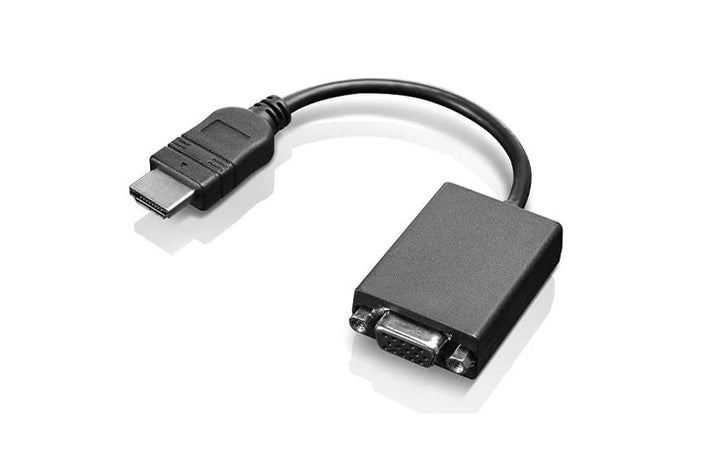

Lenovo HDMI to VGA Monitor Adapter
PRODUCT DESCRIPTION
Lenovo HDMI to VGA Monitor Adapter (0B47069) - Local Warranty
HDMI to VGA at 1080p, for Every Meeting Room That Has Not Been Refitted
The Lenovo HDMI to VGA Monitor Adapter converts an HDMI output from a laptop to a VGA input on a projector or monitor, at up to 1920 x 1080 at 60 Hz, on a 20 cm lead. Lenovo describes it as enabling interoperability of ThinkPad systems with commercial analogue projectors and displays, in extended or mirrored mode.
Read This Before Your Presentation: It Carries Picture, Not Sound
VGA is a video-only connector — it has no audio pins — and Lenovo publishes no audio output on this adapter. Plug a laptop into a projector through this and you will get a picture with no sound through the room's system. If your presentation has audio, run a separate 3.5 mm cable to the room's sound input, or plan to use the laptop's own speakers. We are stating it plainly because it is discovered at the worst possible moment otherwise.
A Three-Year Warranty, Which Is Unusually Long for a Dongle
Lenovo publishes a 3-year warranty for this adapter, longer than the 1 year on most of Lenovo's cables and hubs. For a small object that lives in a bag and gets used under pressure, that is worth something.
Available in Singapore, End of Life in the US
Lenovo's US storefront marks this part number End Of Life, while Lenovo Singapore lists it as available. That is a normal pattern for adapters serving legacy equipment, which stays in service longer in some markets than others. Ask us to confirm stock if you need several.
Lenovo HDMI to VGA Monitor Adapter Datasheet — Technical Specifications
General
| Product | Lenovo HDMI to VGA Monitor Adapter |
| Part Number | 0B47069 |
| Type | HDMI to VGA display adapter |
| Manufacturer Warranty | 3 years, customer carry-in |
| Local Warranty (Singapore) | Included with every SourceIT purchase, with GST invoice |
Lifecycle
| Status | Lenovo's US storefront marks this part number End Of Life; Lenovo Singapore lists it as available |
| Before You Order | Ask us to confirm current stock if you need more than one |
Function
| Converts | HDMI (male, from the PC) to VGA / HD-15 (female, to the display or projector) |
| Direction | One way — HDMI out to VGA in. It will not convert VGA to HDMI |
| Maximum Resolution | 1920 x 1080 at 60 Hz |
| Other Supported Resolutions | Not published by Lenovo for this part number |
| Display Modes | Extended display and mirrored mode |
| Active or Passive | Not published by Lenovo. Lenovo never characterises it either way, so neither do we |
| External Power | Not published by Lenovo. No power connector is shown and none is mentioned in any Lenovo document |
| Audio | Lenovo makes no audio claim of any kind for this adapter, and VGA has no audio pins. Plan on a separate audio path — see the note below |
Physical
| Cable Length | 20 cm |
| Dimensions | Not published by Lenovo for this part number |
| Weight | Not published by Lenovo for this part number |
| Box Contents | Not published by Lenovo for this part number |
Documentation Note
| Lenovo's Filing | Lenovo's user and warranty guide for this product is filed under option number 0B40357 rather than 0B47069. It is the correct document; the numbering is Lenovo's |
| Third-Party Lookalikes | Some resellers list an "0B47069-AX ... with audio" part. That is a third-party compatible product, not this Lenovo adapter, and Lenovo publishes no audio capability here |
Compatibility & Fit
The audio question, because it decides whether a presentation works. VGA carries video and nothing else — the connector has no audio pins at all. This adapter does not add any, and Lenovo makes no audio claim for it. So a laptop connected to a projector through this adapter will show a picture and produce no sound through the room's speakers. If your material has audio in it, the room will need a separate 3.5 mm cable from the laptop's headphone socket to its sound system. Ask us and we will supply one with the adapter.
Why anyone still buys HDMI to VGA in 2026. Because meeting rooms, lecture theatres, hotel function rooms and client sites across Singapore are still full of VGA projectors, and the person presenting rarely knows in advance which the room has. A 20 cm adapter in a laptop bag is cheap insurance. It is also, frequently, the only way to connect to older laboratory instruments, industrial displays and control panels.
If you need VGA more often than occasionally, buy a hub instead. The Powered USB-C Travel Hub and the USB-C Travel Hub Gen 2 in the ordering table both carry VGA alongside HDMI and Ethernet, from a single USB-C port. This adapter is the right buy when the laptop already has HDMI and VGA is the only thing missing.
Check which way round you need. This converts HDMI out to VGA in — a modern laptop to an old display. It does not work in reverse. If you need to get an old VGA source onto a modern HDMI screen, that is a different product and we can quote one.
Package Contents & Lenovo Accessory Ordering Information
In the box, per Lenovo PSREF:
- Lenovo publishes no box-contents list for this adapter
It is a 20 cm adapter lead with an HDMI plug on one end and a VGA socket on the other. Ask us if you need the carton contents confirmed.
Lenovo Cables, Adapters and Security Ordering Information
| 4X90S92381 | Lenovo Powered USB-C Travel Hub — HDMI 4K60, VGA, GbE, 2 x USB-A, 52 W pass-through |
| 4X91A30366 | Lenovo USB-C Travel Hub Gen 2 — HDMI, VGA, GbE, USB-A — no power pass-through |
| 4X90V55523 | Lenovo USB-C 7-in-1 Hub — HDMI, 3 x USB-A, SD and microSD, charging — no Ethernet |
| 4X90S91831 | Lenovo USB-C to Ethernet Adapter — Gigabit Ethernet from a USB-C port, PXE boot and Wake-on-LAN |
| 0B47069 (this listing) | Lenovo HDMI to VGA Monitor Adapter — HDMI to VGA at 1080p60, 20 cm — video only, no audio |
| 4X20M26276 | Lenovo 65W Standard AC Adapter USB Type-C — 65 W USB-C PD 3.0 replacement charger, UK plug |
| 40AW0065WW | Lenovo 65W USB-C AC Travel Adapter — 65 W with four interchangeable plugs and a pouch |
| 4XE1F30276 | Lenovo NanoSaver Essential Cable Lock — Keyed, 2 keys, 1.5 m x 4.5 mm — Nano slot only |
| 4XE1F30277 | Lenovo NanoSaver Combination Cable Lock — 4-dial combination, 1.8 m x 5 mm — Nano slot only |
Datasheet & Downloads
- Lenovo product page — HDMI to VGA Monitor Adapter
- Lenovo HDMI to VGA Adapter user and warranty guide (PDF)
Lenovo publishes no technical datasheet for this adapter. The guide linked above is a warranty and compliance document filed by Lenovo under option number 0B40357, and the only published specifications — the 1080p60 maximum and the 20 cm length — come from Lenovo's Singapore product page.
Frequently Asked Questions — Lenovo HDMI to VGA Monitor Adapter
Will sound come through the projector?
No. VGA is a video-only connector with no audio pins, and Lenovo publishes no audio output on this adapter. You will get a picture and no sound through the room's system. Run a separate 3.5 mm cable from the laptop to the room's audio input, or use the laptop's speakers. Ask us and we will supply an audio cable alongside.
What resolution does it support?
Up to 1920 x 1080 at 60 Hz, per Lenovo's Singapore product page. Lenovo publishes no other supported resolutions, so we list none.
Does it need external power?
Lenovo does not say, and no power connector appears on the product or in any Lenovo document. In practice it is a self-contained lead. If it matters for an unusual installation, ask us and we will confirm.
Can I use it the other way round, VGA to HDMI?
No. It converts HDMI out to VGA in — a modern laptop to an older display or projector. Getting a VGA source onto an HDMI screen is a different product; ask us and we will quote one.
Is it still available?
Lenovo's US storefront marks it End Of Life, but Lenovo Singapore lists it as available. That is normal for adapters serving legacy equipment. Ask us to confirm stock if you need several.
What warranty applies in Singapore?
Lenovo publishes 3 years with customer carry-in service for this adapter — longer than the 1 year on most of Lenovo's cables and hubs. Every unit SourceIT sells also carries local Singapore warranty support and a GST invoice.


