
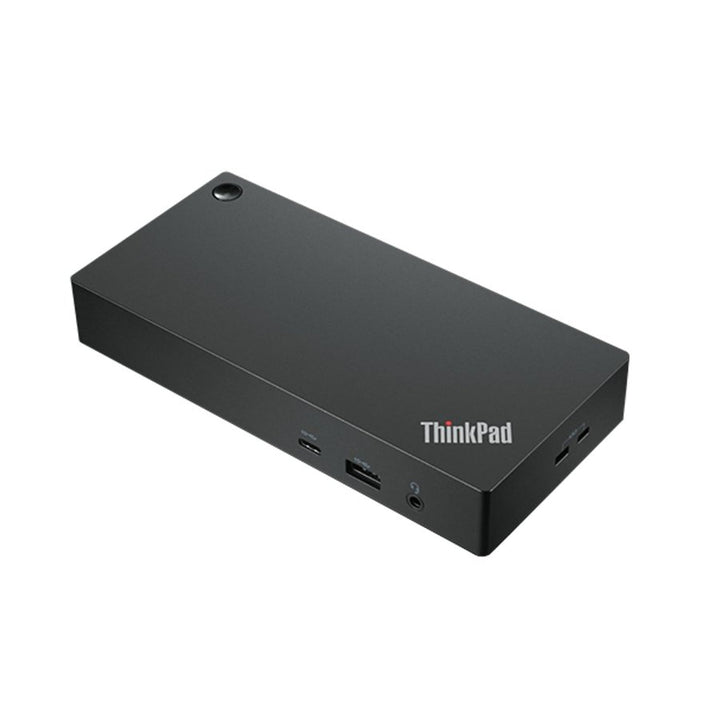


Lenovo ThinkPad Universal USB-C Dock
PRODUCT DESCRIPTION
Lenovo ThinkPad Universal USB-C Dock (40AY0090UK) - Local Warranty
Three 4K Displays, Gigabit Ethernet and a Six-Port Hub, on One USB-C Cable
The ThinkPad Universal USB-C Dock drives up to three 4K displays at 60 Hz from two DisplayPort 1.4 outputs and an HDMI 2.0, alongside gigabit Ethernet, five USB-A ports, a downstream USB-C port and a 3.5 mm combo jack. One cable to the laptop, and the desk is live.
This Is the 90 W Adapter Version, Charging at 65 W
Lenovo sells this dock as two part numbers that differ only in the power adapter supplied. This one, 40AY0090UK, ships the 90 W adapter and charges the laptop at up to 65 W. The other, 40AY0135UK, ships a 135 W adapter and charges at up to 100 W. The dock hardware is identical — same ports, same video, same dimensions, same warranty. The other listing is linked in the ordering table below.
Built for a Managed Fleet, Not Just a Desk
Lenovo publishes MAC address pass-through, Wake-on-LAN and PXE boot for this dock. A docked ThinkPad keeps a consistent network identity, and IT can wake and re-image a machine sitting closed on a desk. Those are the features that separate a corporate dock from a generic hub, and they are why this model gets specified across floors of desks.
Two Kensington Slots and a Three-Year Warranty
Both a standard Kensington and a NanoSaver lock slot are provided, so the dock can be secured whichever cable lock standard your site uses, and Lenovo publishes a 3-year CRU warranty. At 325 grams it is also small enough to sit behind a monitor rather than dominate the desk.
Lenovo ThinkPad Universal USB-C Dock Datasheet — Technical Specifications
General
| Product | Lenovo ThinkPad Universal USB-C Dock |
| Part Number | 40AY0090UK |
| Type | Universal USB-C docking station |
| Warranty | 3 years, customer-replaceable unit (CRU), per Lenovo's published datasheet |
| Local Warranty (Singapore) | Included with every SourceIT purchase, with GST invoice |
Connectivity
| Host Connection | USB-C, via a supplied 1 m USB-C cable. Lenovo states the dock works with laptops supporting industry-standard USB-C Alt Mode or Thunderbolt protocols |
| Video Outputs | 2 x DisplayPort 1.4 and 1 x HDMI 2.0 |
| Maximum Displays | Up to three displays at 4K 60 Hz. Lenovo's current datasheet says three; an earlier 2022 revision of the same document said four. We publish the current figure. Lenovo also notes the achievable resolution depends on your laptop and monitors |
| USB-A | 3 x USB-A 3.2 Gen 2 (10 Gbps), one with always-on charging; 2 x USB-A 2.0 |
| USB-C (downstream) | 1 x USB-C, 10 Gbps, 5 V / 3 A (15 W) |
| Always-On Charging Wattage | Not published by Lenovo |
| Ethernet | 1 x gigabit Ethernet (RJ45) |
| Audio Jack | 1 x 3.5 mm combo |
| MAC Address Pass-Through | Supported |
| Wake-on-LAN | Supported |
| PXE Boot | Supported |
| Security | 1 x Kensington lock slot and 1 x NanoSaver lock slot |
Physical
| Dimensions | 171 x 80 x 30 mm (6.73 x 3.15 x 1.18 in) |
| Weight | From 325 g (0.72 lb) |
| Packaged | 210 x 158 x 75 mm; 960 g |
| Colour | Black |
| Certifications | COC; CU EAC; cULus; FCC; ICES; KCC; NOM; RCM; RoHS; SABS LoA; Serbia Kvalitet; SII; TÜV Mark; VCCI |
| Operating Systems | Windows 10 and above |
Power
| AC Adapter Supplied | 90 W |
| Charging to the Laptop | Up to 65 W |
| Lenovo's Published Rule | 65 W with the 90 W adapter attached; maximum 100 W with the 135 W adapter attached |
Compatibility & Fit
Three displays, not two. Our previous version of this page claimed three, then hedged; Lenovo's current datasheet is clear that this dock supports up to three 4K displays at 60 Hz across its two DisplayPort 1.4 and one HDMI 2.0 outputs. An older 2022 revision of Lenovo's own datasheet said four, and Lenovo's docking brochure says three — we publish the current and majority figure and flag the discrepancy rather than picking the largest number. Lenovo also adds the sensible caveat that the resolution you actually get depends on your laptop's graphics and your monitors.
How to read a Lenovo dock part number. The four digits in the middle are the wattage of the AC adapter supplied in the box — 40AY0090 ships a 90 W adapter, 40AY0135 a 135 W one, 40B00300 a 300 W one. The power the dock actually delivers to your laptop is always lower, because the dock keeps some for itself and its ports. Confusing the two is the single most common mistake made when buying these, so this page states both figures separately and never lets the part number stand in for the charging figure.
Will it work with my laptop? Lenovo's own wording is that its USB-C and Thunderbolt docks "function with laptops that support industry standard USB-C Alt-Mode, DisplayLink or Thunderbolt protocols through their Type C port". In practice that means most business laptops of the last several years, Lenovo or otherwise. What Lenovo qualifies is the management features: MAC address pass-through, Wake-on-LAN, PXE boot and the mirrored power button work on most ThinkPads and, in Lenovo's words, "may not be available on certain other Lenovo laptops or non-Lenovo branded laptop systems". If those matter to your deployment — and for a managed fleet with imaging over the network they usually do — tell us the laptop models and we will check them before you order.
The management features are the reason a fleet buys this dock rather than a generic one. MAC address pass-through means a docked laptop presents the dock's MAC address to the network, so a machine keeps its network identity wherever it docks — which matters for network access control and for imaging. Wake-on-LAN and PXE boot let IT wake and re-image a machine that is sitting docked and switched off. Lenovo publishes all three as supported here.
Which of the two part numbers do you need? If your laptops are 13- and 14-inch business ultrabooks, the 90 W version charges them at 65 W and that is comfortably enough. If any of them are 15- or 16-inch machines, or ship with a 100 W-class adapter, take the 135 W version, which charges at up to 100 W. Buying the cheaper one and discovering the laptop drains during long meetings is the expensive mistake here. Tell us the laptop models and we will pick for you.
A note on a very similar product name. Lenovo also ships a ThinkPad Universal USB-C Dock v2 under part numbers beginning 40B7, in storm grey, requiring Windows 11 and above. This listing is the black 40AY dock, and the datasheet linked below is the one that governs it. If you are matching an existing fleet, check which of the two you already have — and ask us if you are not sure.
Package Contents & Lenovo Docking Ordering Information
In the box, per Lenovo PSREF:
- Dock
- 90 W power adapter
- Power cord
- USB-C cable
- Documentation
Lenovo Docking Station Ordering Information
| 40BD0065UK | Lenovo X9 Charging GaN Dock — 65 W GaN charger with HDMI 2.1, 2 x USB-C, USB-A, microSD |
| 4X11N40212 | Lenovo USB-C Slim Travel Dock — 110 g, HDMI 2.1 4K60, 4 USB ports, SD reader, no adapter |
| 40B90000WW | Lenovo USB-C Dual Display Travel Dock — 137 g, dual 4K60, gigabit Ethernet — no adapter |
| 40B90100UK | Lenovo USB-C Dual Display Travel Dock with Adapter — The same dock with a 100 W adapter included |
| 40AU0065UK | Lenovo USB-C Mini Dock — HDMI + VGA, gigabit Ethernet, 45 W, 1-year warranty |
| 40AY0090UK (this listing) | Lenovo ThinkPad Universal USB-C Dock — 3 x 4K60, GbE, 90 W adapter — charges at 65 W |
| 40AY0135UK | Lenovo ThinkPad Universal USB-C Dock (135 W Adapter) — The same dock with the 135 W adapter — charges at 100 W |
| 40AF0135UK | Lenovo ThinkPad Hybrid USB-C with USB-A Dock — Connects over USB-C or USB-A, 2 x 4K60, 90 W |
| 40B00135UK | Lenovo ThinkPad Universal Thunderbolt 4 Dock — 4 x 4K60 or 1 x 8K30, GbE, 100 W, 135 W adapter |
| 40B00300UK | Lenovo ThinkPad Thunderbolt 4 Workstation Dock — 230 W to a mobile workstation, 300 W adapter, split cable |
| 40ANY230UK | Lenovo ThinkPad Thunderbolt 3 Workstation Dock Gen 2 — Previous generation — 170 W, 230 W adapter, 4 displays |
| 40BN0135UK | Lenovo ThinkPad Universal USB-C Smart Dock, ThinkSmart Edition — Meeting-room dock — Azure Sphere managed, mounting kit, 5 m HDMI |
Datasheet & Downloads
- Lenovo ThinkPad Universal USB-C Dock datasheet (PDF)
- Lenovo ThinkPad Docking Solutions comparison brochure (PDF)
One Lenovo datasheet governs both the 90 W and 135 W versions of this dock. Take care when searching independently: Lenovo publishes a similarly-named datasheet for the ThinkPad Universal USB-C Dock v2 (part numbers beginning 40B7, storm grey), which is a different product from this one.
Frequently Asked Questions — Lenovo ThinkPad Universal USB-C Dock
How much will it charge my laptop?
Up to 65 W with this part number. Lenovo's rule for this dock is 65 W with the 90 W adapter attached and a maximum of 100 W with the 135 W adapter. The adapter wattage in the part number is not the charging figure — the dock keeps a share for its own ports.
How many monitors can it run?
Up to three at 4K 60 Hz, across two DisplayPort 1.4 outputs and one HDMI 2.0. Lenovo notes the resolution you actually achieve depends on your laptop's graphics and your monitors. Our earlier page was inconsistent about this; three is Lenovo's current published figure.
What is the difference between 40AY0090UK and 40AY0135UK?
Only the power adapter in the box, and therefore the charging figure. 40AY0090UK ships a 90 W adapter and charges at 65 W; 40AY0135UK ships a 135 W adapter and charges at up to 100 W. Ports, video outputs, dimensions, weight, certifications and warranty are identical.
Will it work with a non-Lenovo laptop?
Yes, for the basic dock functions — Lenovo says it works with laptops supporting industry-standard USB-C Alt Mode or Thunderbolt. What Lenovo qualifies is the management layer: MAC address pass-through, Wake-on-LAN, PXE boot and the mirrored power button work on most ThinkPads and, in Lenovo's own words, "may not be available on certain other Lenovo laptops or non-Lenovo branded laptop systems".
What is MAC address pass-through and do I need it?
It makes a docked laptop present the dock's network identity rather than its own. In an office with network access control, or where machines are imaged over the network, that means a laptop behaves consistently wherever it docks. If your IT team manages devices centrally, they will want it; if you are buying one dock for one desk, it will not matter to you.
What warranty applies in Singapore?
Lenovo publishes a 3-year CRU warranty for this dock. Every unit SourceIT sells also carries local Singapore warranty support and a GST invoice.


