
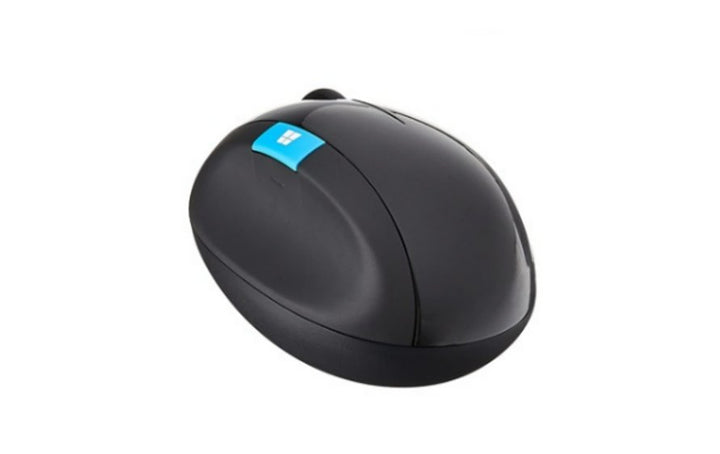


Microsoft Sculpt Ergonomic Mouse
PRODUCT DESCRIPTION
Microsoft Sculpt Ergonomic Mouse (L6V-00006) - Local Warranty
Microsoft Sculpt Ergonomic Mouse — A Ball-Shaped Mouse for All-Day Use
The Microsoft Sculpt Ergonomic Mouse (L6V-00006) is the standalone mouse from Microsoft’s Sculpt Ergonomic range. Its tall, rounded shell is designed to be held rather than gripped flat, which is the whole reason the range exists: for users who spend the working day on a pointing device and want the hand in a more upright position.
Four-Way Scrolling and a Windows Button
Microsoft publishes two features for this mouse: four-way scrolling, and a dedicated Windows button that opens the Start menu with one touch. Both remain stated on Microsoft’s surviving Australian, New Zealand and UK listings.
Runs on Two AA Batteries
Microsoft states two AA alkaline batteries, supplied in the box. Microsoft does not publish a battery-life figure for this model, and does not currently publish its connection type, wireless range, tracking technology, resolution, button count, dimensions or weight — so this page does not quote them.
Note in particular that this mouse is sold separately from the Sculpt Ergonomic Desktop set. If you want the matching split keyboard and separate number pad as well, that is the Sculpt Ergonomic Desktop under part number L5V-00027, which we list separately.
Ergonomics Programmes and Fleet Buying
For Singapore offices running workstation assessments, the Sculpt Ergonomic range is often specified by name in an occupational-health report. Because Microsoft has withdrawn its PC accessory catalogue, availability is finite — if a report has specified this model for several users, talk to us early about quantities. Supplied by SourceIT in Singapore with a GST invoice and local support. For a written quotation, current stock position or delivery lead time, contact our team.
Specification note. Microsoft has withdrawn its own-brand PC accessory catalogue. The US listing for this mouse no longer resolves; Microsoft’s Australian, New Zealand and UK listings still do, show the product as out of stock, and publish only a short specification. No current Microsoft page displays the part number L6V-00006. This page prints only what Microsoft still states and names the many fields it no longer publishes — including the connection type. Ask our team if you need a specification confirmed in writing before you order.
Microsoft Sculpt Ergonomic Mouse Datasheet — Technical Specifications
General
| Product Name | Microsoft Sculpt Ergonomic Mouse |
| Part Number (SourceIT) | L6V-00006 |
| Product Type | Ergonomic mouse, sold standalone |
| Scrolling | Four-way scrolling |
| Dedicated Key | Windows button — one-touch access to the Start menu |
| Battery | 2 × AA alkaline (included) |
| Manufacturer Warranty | Not published by Microsoft |
| Local Warranty (Singapore) | Supplied by SourceIT with local support and a GST invoice |
Operating System
| Microsoft Australia and New Zealand | Windows 11, Windows 10, Windows 8, Windows 7 and Windows RT |
| Microsoft United Kingdom | Windows 8, Windows 7 and Windows RT |
Specifications Microsoft Does Not Publish for This Product
The following are commonly asked about but are not stated on any current official Microsoft source for this part number, so SourceIT does not quote them: connection type, wireless range, tracking technology, resolution in DPI, button count, hand orientation, battery life, dimensions, weight, colour and a manufacturer warranty term. We would rather leave a field blank than print a figure we cannot substantiate.
Product Status, Availability and Warranty
Microsoft has withdrawn its own-brand PC accessory catalogue. The microsoft.com/accessories product pages for this range now redirect to Microsoft's general hardware-warranty and PC-accessories support pages, and the Microsoft Store Singapore PC-accessories collection returns no results. Microsoft has published no formal discontinuation notice for this product; the evidence is the removal of the pages themselves.
Microsoft’s United States listing for this mouse no longer resolves. Its Australian, New Zealand and United Kingdom listings still do and show the product as out of stock at Microsoft. Microsoft has published no end-of-support date.
Two conflicts exist inside Microsoft’s own pages. First, the surviving page is titled Sculpt Ergonomic Mouse for Business while its body text refers to the Microsoft Sculpt Ergonomic Mouse. Second, the Australian and New Zealand pages list Windows 11, 10, 8, 7 and RT, while the UK page lists only Windows 8, 7 and RT. Both operating-system readings appear in the specification table above.
This listing shows zero inventory in our system. Contact SourceIT for the current stock position and lead time before you raise a purchase order.
Warranty Position
Microsoft no longer publishes a warranty term for this product. Microsoft's current PC accessory warranty page states only that the accessory "comes with a 'limited hardware warranty' depending on the device" and directs the buyer to check their proof of purchase to identify the warranty period. SourceIT therefore does not quote a manufacturer term for this item. Ask our team to confirm the warranty position in writing before you order.
The local warranty named in the heading of this listing is SourceIT's own commercial term, not a figure published by Microsoft. Ask our team to confirm the term in writing with your quotation.
Compatibility, Setup and Software
The two Microsoft readings differ on whether Windows 11 and Windows 10 are supported. Microsoft Australia and New Zealand list Windows 11, 10, 8, 7 and RT; Microsoft UK lists Windows 8, 7 and RT. If you are buying for a Windows 11 fleet, ask us to confirm in writing rather than relying on either page alone.
Microsoft does not currently publish the connection type for this mouse. That is an unusual gap and it matters, because it determines whether the mouse needs a free USB port for a transceiver. Ask us to confirm against the distributor build sheet before you order in quantity.
The Sculpt Ergonomic Mouse appears in the current Microsoft Mouse and Keyboard Center supported-device list, so button and scroll customisation is supported by Microsoft’s configuration software.
Official Microsoft Sources & Downloads
- Microsoft Sculpt Ergonomic Mouse — Microsoft Australia
- Microsoft Sculpt Ergonomic Mouse — Microsoft New Zealand
- Microsoft Sculpt Ergonomic Mouse — Microsoft United Kingdom
- Microsoft PC accessory warranty — support.microsoft.com
- Devices supported by Microsoft Mouse and Keyboard Center
Microsoft’s United States listing for this mouse has been withdrawn; the regional listings above are the surviving official sources.
Frequently Asked Questions — Microsoft Sculpt Ergonomic Mouse
Is this mouse wireless?
Microsoft does not currently publish a connection type for this part number, which is why our specification table leaves it blank. Ask us and we will confirm against the distributor build sheet before you order.
Does it come with the Sculpt keyboard?
No. This listing is the mouse alone. The matching split keyboard with separate number pad is the Sculpt Ergonomic Desktop, part number L5V-00027, which we list separately.
Does it work on Windows 11?
Microsoft’s Australian and New Zealand pages list Windows 11; its UK page does not. The two official sources disagree, so ask us to confirm in writing if Windows 11 support is essential.
What batteries does it take?
Two AA alkaline batteries, supplied in the box. Microsoft does not publish a battery-life figure for this model.
Is it right-handed only?
Microsoft does not publish a hand orientation for this part number, so we do not state one.
What warranty applies?
Microsoft publishes no warranty term for this product. Its current PC accessory warranty page directs buyers to their proof of purchase. SourceIT supplies the mouse with local support and a GST invoice. The local warranty named in the heading of this listing is SourceIT's own commercial term, not a figure published by Microsoft. Ask our team to confirm the term in writing with your quotation.


