
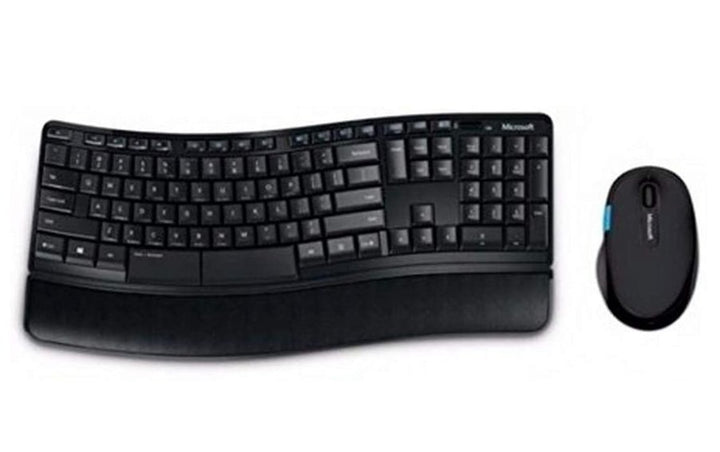


Microsoft Sculpt Comfort Desktop Wireless
PRODUCT DESCRIPTION
Microsoft Sculpt Comfort Desktop (L3V-00027) - Local Warranty
Microsoft Sculpt Comfort Desktop — Contoured Keyboard and Right-Handed Mouse
The Microsoft Sculpt Comfort Desktop (L3V-00027) is the entry point to Microsoft’s Sculpt ergonomic range: a contoured keyboard paired with a right-handed mouse, aimed at keeping the wrists in a more neutral position through a full working day. Microsoft’s own description emphasises the contoured design, the customisable features and the specifically right-handed mouse.
A Long Windows Compatibility List
Microsoft publishes support across Windows 11 Home and Pro, Windows 10, Windows 8.1, Windows 8, Windows RT and Windows 7 — an unusually long list that makes this set useful in mixed estates still running older machines alongside current ones. Microsoft states that this set is compatible with all Surface models that have a USB-A port.
Batteries Supplied for Both Halves
Microsoft states two AAA alkaline batteries for the keyboard and two AA alkaline batteries for the mouse, all included in the box. Beyond that Microsoft no longer publishes the connection type, wireless range, tracking technology, resolution, button count, dimensions, weight or colour for this set, so this page does not quote them.
Specified by Name in Ergonomic Assessments
The Sculpt range is frequently named directly in workplace ergonomic reports, which is why demand for it persists after Microsoft withdrew its accessory catalogue. If an assessment has specified this set for several users, talk to us early — remaining stock is finite and cannot be replenished from Microsoft. Supplied by SourceIT in Singapore with a GST invoice and local support. For a written quotation, current stock position or delivery lead time, contact our team.
Specification note. Microsoft has withdrawn its own-brand PC accessory catalogue. The United States page for this set no longer resolves; a routed Microsoft Store listing in another market still does, shows the product as out of stock, and publishes only a short specification. No current Microsoft page displays the part number L3V-00027. This page prints only what Microsoft still states and names every field it no longer publishes — including the connection type and the mouse tracking technology. Ask our team if you need a specification confirmed in writing before you order.
Microsoft Sculpt Comfort Desktop Datasheet — Technical Specifications
General
| Product Name | Microsoft Sculpt Comfort Desktop |
| Part Number (SourceIT) | L3V-00027 |
| Product Type | Wireless keyboard and mouse set |
| Design | Contoured keyboard with customisable features; right-handed mouse, intended to keep the wrists in a neutral position |
| Manufacturer Warranty | Not published by Microsoft |
| Local Warranty (Singapore) | Supplied by SourceIT with local support and a GST invoice |
Power
| Keyboard Battery | 2 × AAA alkaline (included) |
| Mouse Battery | 2 × AA alkaline (included) |
| Battery Life | Not published by Microsoft |
System Requirements & Compatibility
| Operating System | Windows 11 Home / Pro, Windows 10, Windows 8.1, Windows 8, Windows RT, Windows 7 |
| Hard Disk Space | 150 MB |
| Ports | A USB port is required |
| Surface | Compatible with all Surface models that have a USB-A port |
Specifications Microsoft Does Not Publish for This Product
The following are commonly asked about but are not stated on any current official Microsoft source for this part number, so SourceIT does not quote them: component names, connection type, wireless range, mouse tracking technology, resolution in DPI, button count, an AES encryption claim, whether the keyboard has a numeric keypad, whether it has a palm rest, dimensions, weight, colour, battery life and a manufacturer warranty term. We would rather leave a field blank than print a figure we cannot substantiate.
Product Status, Availability and Warranty
The microsoft.com/accessories product pages for this range now redirect to Microsoft's general hardware-warranty and PC-accessories support pages, and the Microsoft Store Singapore PC-accessories collection returns no results. Microsoft has published no formal discontinuation notice for this product; the evidence is the removal of the pages themselves.
Microsoft’s United States page for this set no longer resolves. A routed Microsoft Store listing survives in another market, showing the product as out of stock at Microsoft. Microsoft has published no end-of-support date.
This set does not appear in Microsoft’s current Mouse and Keyboard Center supported-device list. Do not assume its keys or buttons can be remapped in Microsoft’s software; confirm with us first if customisation matters to you.
Microsoft requires a USB port for this set but does not publish whether that is for a transceiver or for something else, because it no longer publishes the connection type at all. That gap is unusual and worth resolving before a bulk order.
This listing shows zero inventory in our system. Contact SourceIT for the current stock position and lead time before you raise a purchase order.
Warranty Position
Microsoft no longer publishes a warranty term for this product. Microsoft's current PC accessory warranty page states only that the accessory "comes with a 'limited hardware warranty' depending on the device" and directs the buyer to check their proof of purchase to identify the warranty period. SourceIT therefore does not quote a manufacturer term for this item. Ask our team to confirm the warranty position in writing before you order.
The local warranty named in the heading of this listing is SourceIT's own commercial term, not a figure published by Microsoft. Ask our team to confirm the term in writing with your quotation.
Compatibility, Setup and Software
Microsoft publishes Windows 11 Home and Pro, Windows 10, Windows 8.1, Windows 8, Windows RT and Windows 7, with 150 MB of free hard disk space and a USB port required.
Microsoft does not publish the connection type for this set, only that a USB port is required. Ask us to confirm against the distributor build sheet before ordering in quantity, particularly if you are deploying to machines with limited USB availability.
This set is not named in the current Microsoft Mouse and Keyboard Center supported-device list. Its individual components may be listed separately, but the set as a whole is not, so treat software customisation as unconfirmed.
The mouse is described by Microsoft as specifically right-handed. Left-handed users should look at an ambidextrous model instead.
Official Microsoft Sources & Downloads
- Microsoft Sculpt Comfort Desktop — surviving Microsoft Store listing
- Microsoft PC accessory warranty — support.microsoft.com
- Devices supported by Microsoft Mouse and Keyboard Center
- Microsoft PC accessories support hub
Microsoft’s United States page for this set has been withdrawn; the routed listing above is the surviving official source.
Frequently Asked Questions — Microsoft Sculpt Comfort Desktop
Is it wireless, and does it need a dongle?
Microsoft states that a USB port is required but no longer publishes the connection type for this set, so whether that is for a transceiver is not stated here. Ask us and we will confirm against the distributor build sheet.
Does the keyboard have a number pad?
Microsoft does not publish the keyboard layout for this set, so we do not state it.
Is the mouse suitable for a left-handed user?
No. Microsoft describes it as a specifically right-handed mouse.
What batteries does it use?
Two AAA alkaline batteries for the keyboard and two AA alkaline batteries for the mouse, all included. Microsoft publishes no battery-life figure.
Can I remap the keys in Microsoft software?
Unconfirmed. This set is not named in Microsoft’s current Mouse and Keyboard Center supported-device list, so do not plan a deployment around remapped keys without checking with us first.
Does it work with a Surface?
Microsoft states that it is compatible with all Surface models that have a USB-A port.
What warranty applies?
Microsoft publishes no warranty term for this set. Its current PC accessory warranty page directs buyers to their proof of purchase. SourceIT supplies it with local support and a GST invoice. The local warranty named in the heading of this listing is SourceIT's own commercial term, not a figure published by Microsoft. Ask our team to confirm the term in writing with your quotation.


