
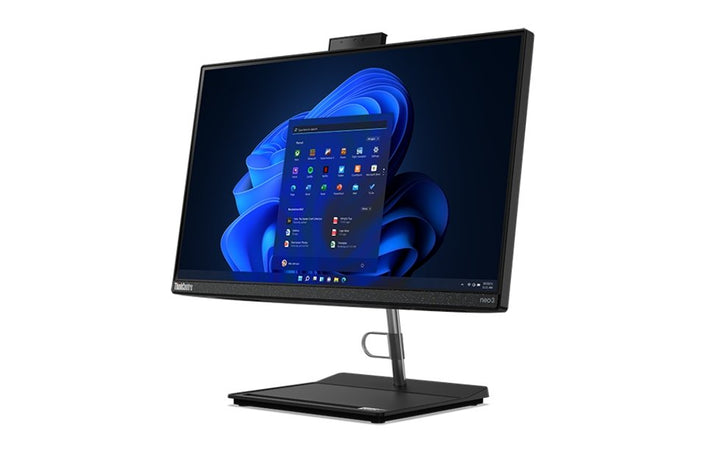


Lenovo ThinkCentre Neo M30a 23.8" Gen4 i5-13420H/8GB/512GB SSD AIO
PRODUCT DESCRIPTION
Lenovo ThinkCentre neo 30a 24 Gen 4, Core i5-13420H / 8 GB / 512 GB, 23.8-inch all-in-one (12JY002USG) - Singapore Local Warranty
A 23.8-Inch All-in-One With Harman Audio and an Infrared Camera Option
The neo 30a 24 Gen 4 puts a Core i5-13420H — 8 cores, 12 threads — behind a 23.8-inch FHD IPS panel, with stereo 3 W speakers tuned by HARMAN and a pull-up camera that can be specified with 5-megapixel infrared for Windows Hello face sign-in. For reception desks, clinics, classrooms and hot-desks it puts a complete workstation on a desk with one power cable.
What You Are Actually Getting, Not Just What the Range Offers
Lenovo publishes the processor, memory, storage, wireless card and warranty term as options for this machine type rather than as facts about any one part number. So this page carries a separate This Configuration table taken from the distributor's build sheet for 12JY002USG: Core i5-13420H, a 23.8-inch FHD IPS anti-glare non-touch panel, 8 GB DDR4-3200 SODIMM, a 512 GB M.2 NVMe Opal SSD, a 1080p RGB infrared camera with microphone, an Intel AX201 Wi-Fi 6 card, a liftable monitor stand, Windows 11 Pro and a USB keyboard and mouse. Anything neither source states is marked as not stated rather than estimated.
Three Things About This Machine You Should Know Before Ordering
None of them appeared on the old page. There is no VESA mounting. Lenovo's mounting field for this machine type reads None — this all-in-one cannot go on a monitor arm or a wall bracket, at all. Memory tops out at 16 GB, which is an unusually low ceiling for a machine with two SODIMM slots and it is the figure Lenovo publishes. And there is no HDMI input, so unlike the M-series all-in-ones this one cannot double as a monitor for another computer.
Singapore Local Warranty — and Why the Old Three-Year Heading Was Wrong
The heading used to read three years. Lenovo's book for this machine type publishes 1-year courier or carry-in and 1-year limited onsite, and no 3-year base term exists for it at all. The build sheet records no upgrade either. On an all-in-one the service level matters more than on anything else we sell, because the screen and the computer are one object — a carry-in repair takes the whole desk away.
Lenovo ThinkCentre neo 30a 24 Gen 4 Datasheet — Technical Specifications
General
| Product | Lenovo ThinkCentre neo 30a 24 Gen 4 |
| Lenovo's Official Product Name | ThinkCentre neo 30a 24 Gen 4 — our store title names a product Lenovo does not make. Lenovo's name is ThinkCentre neo 30a 24 Gen 4 — no “M”, and “24” rather than “23.8in” |
| Part Number | 12JY002USG |
| Machine Type | 12JY |
| Form Factor | AIO |
| Line | neo series — Lenovo's value business tier |
| Warranty | Not stated on the build sheet. See the warranty note below |
| Local Warranty (Singapore) | Included with every SourceIT purchase, with GST invoice |
This Configuration — From the Distributor Build Sheet for 12JY002USG
| Processor | Intel Core i5-13420H — 8 cores (4 performance and 4 efficient), 12 threads, performance cores 2.1 to 4.6 GHz, efficient cores 1.5 to 3.4 GHz, 12 MB cache. A mobile H-series part. The old page copy called this a 6-core processor; it is 8-core |
| Display | 23.8-inch FHD 1920 x 1080 IPS, anti-glare, non-touch. Lenovo publishes one panel option for this machine type: 250 nits, 1000:1, 72% NTSC, 60 Hz, 14 ms, borderless. There is no touchscreen option at all |
| Camera | 1080p RGB infrared camera with microphone, on a pull-up mechanism. Infrared means Windows Hello face sign-in is available |
| Graphics | The build sheet says Intel Iris Xe Graphics. Lenovo's book for this machine type publishes Intel UHD Graphics for both processors it offers. The two sources disagree and this page does not pick a winner — ask us to confirm if the graphics engine matters to you |
| Memory Fitted | 8 GB SODIMM DDR4-3200. The module count is not stated. Note Lenovo's ceiling for this machine type is only 16 GB |
| Storage Fitted | 512 GB M.2 2280 PCIe NVMe with Opal self-encryption |
| Optical Drive | None fitted. An internal speaker is included |
| Stand | Liftable monitor stand — per Lenovo, -5° to +16° tilt, 45° swivel each way and up to 100 mm of lift. It does not pivot |
| Mounting | None. Lenovo's mounting field for this machine type reads “None” — VESA mounting is not supported |
| Wireless | Intel Wi-Fi 6 AX201, 802.11ax 2x2, Bluetooth 5.2 |
| Operating System | Windows 11 Pro, English. No recovery media supplied |
| Keyboard and Mouse | USB keyboard and mouse included |
| Ports Noted on the Build Sheet | HDMI and gigabit Ethernet. The HDMI is output only |
| Warranty on This Build | Not stated on the build sheet. See the warranty note below |
Chassis and Platform — From Lenovo PSREF
| Processor Options | Two only, both mobile-class H-series parts: the Core i5-13420H, 8 cores (4 performance and 4 efficient), 12 threads, performance cores 2.1 to 4.6 GHz and efficient cores 1.5 to 3.4 GHz, 12 MB cache; and the Core i7-13620H, 10 cores (6 performance and 4 efficient), 16 threads, up to 4.9 GHz, 24 MB cache. Both with Intel UHD Graphics |
| Lenovo's AI PC Category | Lenovo publishes no AI PC Category field and no NPU or TOPS figure for this machine type. It is not an AI PC and not a Copilot+ PC |
| Display | One panel option only — 23.8-inch FHD 1920 x 1080 IPS, 250 nits, anti-glare, 16:9, 1000:1, 72% NTSC, 60 Hz, 178° viewing angles, 14 ms response, 16.7 million colours, borderless design. Non-touch only — Lenovo publishes no touchscreen option |
| Camera Options | HD 720p with LED indicator on a pull-up mechanism; 5.0 megapixel infrared with LED indicator, also pull-up, which is what Windows Hello face sign-in requires; or no camera |
| Audio | Stereo speakers, 3 W each, audio by HARMAN, on a Realtek ALC256 codec. Dual-microphone array optional |
| Stand and Mounting | Two stands: a monitor stand with -5° to +25° tilt and 45° swivel each way, or a liftable monitor stand with -5° to +16° tilt, 45° swivel each way and up to 100 mm of lift. Neither pivots. Lenovo's mounting field for this machine type reads "None" — VESA mounting is not supported. |
| Memory | Two DDR4 SODIMM slots, dual-channel capable, but up to 16 GB only at DDR4-3200. This is an unusually low ceiling for a two-slot machine and it is the figure Lenovo publishes |
| Storage | Up to two drives — one 2.5-inch SATA HDD up to 1 TB and one M.2 2280 SSD, PCIe NVMe at PCIe 4.0 x4, up to 1 TB. Optional slim DVD burner. No card reader |
| Expansion Slots | None. The only slots are the two M.2 positions — one for wireless, one for the SSD |
| Ports | Rear: two USB 2.0; two USB 3.2 Gen 2; one HDMI-out; gigabit RJ-45; power connector. Bottom: headphone and microphone combo jack |
| HDMI Input | Not published. This machine has HDMI output only — there is no HDMI input and no combo port that switches, so it cannot be used as a monitor for another computer. The output is HDMI 1.4, driving the built-in panel plus one external display at 1920 x 1080 at 60 Hz |
| Networking | Gigabit Ethernet on a Realtek RTL8111H. Wireless: Realtek Wi-Fi 6 RTL8852BE with Bluetooth 5.3, or Intel Wi-Fi 6 AX201 with Bluetooth 5.2 |
| Power Supply | 90 W external adapter at 89%, autosensing |
| Form Factor and Size | All-in-one, 23.8 inches. Lenovo publishes no litre figure for this form factor. With the liftable stand 541 x 220 x 380.5-480.5 mm and around 6.6 kg; with the fixed stand 541 x 207.5 x 433.8 mm and around 6.7 kg. Raven black |
| Security | Firmware TPM 2.0 integrated in the SoC — not a discrete TPM. Lenovo publishes no mechanical lock slot for this machine type |
| Operating System Options | Windows 11 Pro, Home or Home Single Language, or no preload. Lenovo publishes no Windows 10 and no Linux option for this machine type |
| Base Warranty Options | Lenovo publishes 1-year courier or carry-in service and 1-year limited onsite service. There is no 3-year base term in this book. |
| Certifications | Optional ENERGY STAR 8.0 and optional EPEAT Silver Registered. TÜV Rheinland Flicker Free, Low Blue Light and Low Noise. Lenovo publishes no EPEAT Gold, no TCO entry and no MIL-STD testing for this machine type, and does not say whether the low-blue-light solution is hardware or software |
Compatibility & Fit
A note on this product's name
Our store title reads ThinkCentre Neo M30a 23.8" Gen4. Lenovo does not make a product with that name. Two things are wrong with it. There is no “M” prefix in Lenovo's neo all-in-one naming, and the size token in Lenovo's name is “24”, not “23.8in” — 23.8 inches is the panel diagonal Lenovo prints inside the display specification, not part of the product name.
Lenovo's name is ThinkCentre neo 30a 24 Gen 4, machine type 12JY. The distributor's own build sheet on this listing agrees — it says “Neo 30a Gen 4”. We have flagged the title for correction. If you are searching Lenovo's documentation, search the name above.
It will not go on a monitor arm. At all.
This is the single most important thing on this page. Lenovo's mounting field for the neo 30a 24 Gen 4 reads “None”. There is no VESA mounting of any kind — not 100 mm, not 75 mm, not with an adapter Lenovo publishes. The machine sits on the stand it ships with and nowhere else.
That rules it out for wall-mounted kiosks, arm-mounted reception desks, cart-mounted clinical workstations and anywhere else the screen has to be carried by something other than the desk. It is the specification most often assumed rather than checked, and the one that generates returns. If you need a VESA-mountable all-in-one, Lenovo's M-series machines support VESA 100 mm — ask us and we will point you at the right one.
The stand this unit ships with is the better of the two Lenovo offers: it tilts -5° to +16°, swivels 45° each way and lifts up to 100 mm. It does not pivot to portrait.
It is not a monitor for another computer
Some Lenovo all-in-ones publish an HDMI input and can be used as a display for a laptop or a second machine. This one cannot. Lenovo publishes one HDMI-out and no input, and no combo port that switches. The HDMI output is version 1.4 and drives the built-in panel plus one external display at 1920 x 1080 at 60 Hz.
The 16 GB memory ceiling
Lenovo publishes two DDR4 SODIMM slots but a 16 GB maximum for this machine type. That is an unusual combination — two slots would normally imply a higher ceiling — and it is what Lenovo's book states. This unit ships with 8 GB and the build sheet does not say whether that is one module or two, so whether a cheap upgrade to 16 GB is possible depends on a fact neither source publishes. Ask us and we will confirm the module configuration before you order. If you need more than 16 GB in an all-in-one, this is the wrong machine and we will say so.
Other things Lenovo publishes that are worth knowing
- Firmware TPM 2.0 integrated in the SoC, not a discrete TPM
- No mechanical lock slot is published for this machine type — there is no Kensington row in Lenovo's book. On a machine destined for a public-facing desk, check this with us before you rely on a cable lock
- No PCIe expansion of any kind; the two M.2 positions carry the wireless card and the SSD
- Audio is stereo 3 W speakers by HARMAN, which is better than the single 1 W speaker in the neo desktops
- Lenovo publishes TÜV Rheinland Flicker Free and Low Blue Light for the panel, but does not say whether the low-blue-light solution is hardware or software. On panels where it is software, it shifts the colour temperature
- Lenovo publishes no MIL-STD testing and no TCO certification for this machine type
About the warranty, precisely
The distributor build sheet for this part number states no warranty term at all. The previous version of this listing carried a three-year heading anyway. We have taken the number off rather than repeat a figure nothing on file supports — a warranty term is the one specification a customer cannot verify for themselves after delivery, so it is the last place to guess.
More importantly, Lenovo's book for this machine type publishes 1-year terms only — a courier or carry-in option and a limited onsite option. There is no 3-year base term anywhere in this book. That makes the old three-year heading not merely unsourced but very likely wrong, which is why it has gone. This is a consistent difference between Lenovo's neo tier and its M-series: the M-series books do publish a 3-year onsite base option, the neo books do not.
This matters more on an all-in-one than on a desktop. When the screen and the computer are a single object, a courier or carry-in repair means the entire workstation leaves the desk, and the person who uses it has nothing. If uptime matters, specify the 1-year limited onsite option rather than the courier tier, and ask us about the extended service Lenovo sells separately.
Every unit SourceIT sells carries local Singapore warranty support and a GST invoice, and we will confirm the exact term, service level and start date in writing before you order. If you need a specific term, say so when you ask for a quote — on this machine type it is chosen at the point of order and, on Lenovo's own note, cannot be added afterwards.
Package Contents & ThinkCentre Ordering Information
In the box, per the distributor build sheet and Lenovo PSREF:
- Lenovo ThinkCentre neo 30a 24 Gen 4 all-in-one, built to the configuration above
- Liftable monitor stand
- USB keyboard and mouse
- 90 W external power adapter
- Quick start guide and safety documentation
Lenovo does not publish a carton contents list per part number. The list above reflects the build sheet for this unit, which is the only per-SKU source there is.
Lenovo ThinkCentre Desktop Ordering Information
| 12DN000ASG | Lenovo ThinkCentre M70s Gen 4 — i5-13400 / 8GB / 512GB — 8.2L SFF, DDR4 |
| 12DN000BSG | Lenovo ThinkCentre M70s Gen 4 — i7-13700 / 16GB / 512GB — 8.2L SFF, DDR4 |
| 12DNS00Y00 | Lenovo ThinkCentre M70s Gen 4 — i7-13700 / 16GB / 1TB — 8.2L SFF, DDR4 |
| 12HS000HSG | Lenovo ThinkCentre M90s Gen 4 — i7-13700 / 16GB / 512GB — DDR5, four DIMM slots, Radeon RX 6400 option |
| 12U8005PSG | Lenovo ThinkCentre M70s Gen 5 — i5-14400 / 8GB / 512GB — 8.2L SFF, DDR5 |
| 12U8005QSG | Lenovo ThinkCentre M70s Gen 5 — i7-14700 / 16GB / 512GB — 8.2L SFF, DDR5 |
| 12U3001QSG | Lenovo ThinkCentre M70s Gen 5 — i7-14700 / 16GB / 1TB — machine type 12U3 |
| 12V8000DSG | Lenovo ThinkCentre M90s Gen 5 — i7-14700 / 16GB / 512GB — 128GB ceiling, PCIe 4.0 slots |
| 12U8CTO1WW-SC | Lenovo ThinkCentre M70s Gen 6 — Core Ultra 5 225 / 16GB / 512GB — AI PC, and the only build here with a documented 3-year onsite term |
| 12JHS01900 | Lenovo ThinkCentre neo 50s Gen 4 — i5-13400 / 16GB / 512GB — 7.4L SFF, value tier |
| 11R8004WSG | Lenovo ThinkCentre M75s Gen 2 — Ryzen 5 PRO 5650G / 8GB / 512GB — AMD, serial port, discrete Radeon options |
| 12E30011SG | Lenovo ThinkCentre M70q Gen 4 — i5-13400T / 8GB / 512GB — 1L Tiny, no PCIe slot |
| 12E30012SG | Lenovo ThinkCentre M70q Gen 4 — i7-13700T / 16GB / 512GB — 1L Tiny, no PCIe slot |
| 12EHS00600 | Lenovo ThinkCentre M90q Gen 4 — i7-13700 / 16GB / 512GB — 1L Tiny, PCIe 4.0 x8 slot |
| 12LN003GSG | Lenovo ThinkCentre neo 50q Gen 4 — i5-13420H / 8GB / 256GB — 1L Tiny, value tier |
| 12LN003FSG | Lenovo ThinkCentre neo 50q Gen 4 — i5-13420H / 16GB / 512GB — 1L Tiny, value tier |
| 11JN008NSG | Lenovo ThinkCentre M75q Gen 2 — Ryzen 5 PRO 5650GE / 8GB / 256GB — 1L Tiny, AMD |
| 12JY002USG (this listing) | Lenovo ThinkCentre neo 30a 24 Gen 4 — i5-13420H / 8GB / 512GB — 23.8-inch all-in-one, no VESA, no HDMI input |
Datasheet & Downloads
PSREF is Lenovo's own Product Specifications Reference. It publishes per machine type rather than per part number, so this SKU does not appear inside the PDF itself — the PDF is the authority on the chassis, the platform and the option lists, and the distributor build sheet is the authority on which options this unit actually carries.
Frequently Asked Questions — Lenovo ThinkCentre neo 30a 24 Gen 4
Is this really called the “neo M30a”?
No. Lenovo does not make a product with that name. Lenovo's name is ThinkCentre neo 30a 24 Gen 4, machine type 12JY — no “M” prefix, and the size token is “24”. The distributor's own build sheet on this listing says “Neo 30a Gen 4” too. We have flagged our title for correction.
Can I put it on a monitor arm or wall bracket?
No. Lenovo's mounting field for this machine type reads “None”. There is no VESA mounting of any kind. It sits on its stand and nowhere else. If you need a VESA-mountable all-in-one, ask us — Lenovo's M-series machines support VESA 100 mm.
Is it a touchscreen?
No. Lenovo publishes exactly one panel for this machine type and it is non-touch. There is no touch option at any price. Note that this listing previously suggested touch-equipped machines as replacements, which would have been a confusing comparison.
Can I use it as a screen for my laptop?
No. Lenovo publishes HDMI output only on this machine — there is no HDMI input and no combo port that switches. Some Lenovo all-in-ones do have an input; this is not one of them.
How much memory can it take?
16 GB. Lenovo publishes two DDR4 SODIMM slots but a 16 GB ceiling for this machine type, which is low for a two-slot machine and is what Lenovo's book states. This unit ships with 8 GB and the build sheet does not say whether that is one module or two — ask us and we will confirm before you order.
Does it have Windows Hello face sign-in?
Yes. The build sheet records a 1080p RGB infrared camera with a microphone, on a pull-up mechanism, and infrared is what Windows Hello face sign-in requires. Lenovo also offers a plain HD 720p camera and a no-camera option on this machine type, so check the camera line when comparing quotes.
Is the graphics Iris Xe or UHD?
Our two sources disagree. The build sheet says Intel Iris Xe; Lenovo's book publishes Intel UHD Graphics for both processors it offers on this machine type. We have not picked a winner. If the graphics engine matters to your use, ask us to confirm with the distributor first.
What warranty does it come with?
The build sheet for this part number does not state one, and Lenovo's book for this machine type publishes 1-year terms only — there is no 3-year base option at all. The previous version of this listing claimed three years; that claim has been removed. Every unit SourceIT sells carries local Singapore warranty support and a GST invoice, and we will confirm the exact term in writing before you order.


