
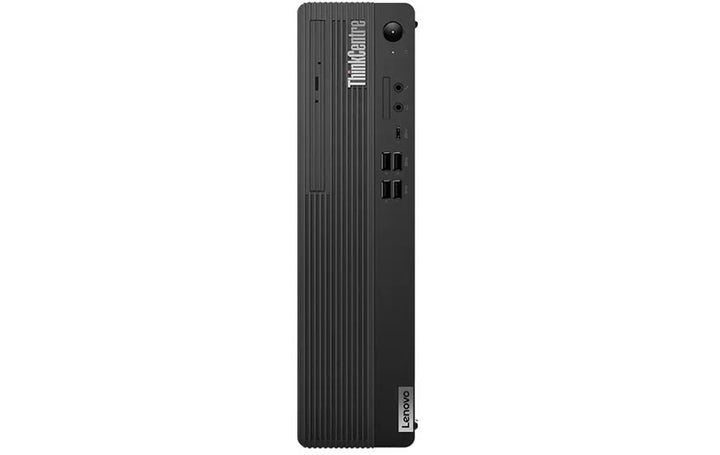


Lenovo ThinkCentre M70S G5 SFF i7-14700/16GB/1TB SSD
PRODUCT DESCRIPTION
Lenovo ThinkCentre M70s Gen 5, Core i7-14700 / 16 GB / 1 TB (12U3001QSG) - Singapore Local Warranty
A Terabyte of Opal-Encrypted NVMe, Fitted From New
This is the 1 TB build of the M70s Gen 5. The drive is an M.2 2280 PCIe 4.0 x4 Performance NVMe with Opal 2.0 — self-encrypting, so full-disk encryption runs on the drive's own controller rather than on the processor. Given that Lenovo leaves only one M.2 position free on this machine type once the wireless card is fitted, buying the capacity you need at the outset matters more here than on a machine with two SSD slots.
What You Are Actually Getting, Not Just What the Range Offers
Lenovo publishes the processor, memory, storage, wireless card and warranty term as options for this machine type rather than as facts about any one part number. So this page carries a separate This Configuration table taken from the distributor's build sheet for 12U3001QSG: Core i7-14700, 16 GB DDR5-5600 UDIMM, a 1 TB PCIe 4.0 x4 Opal 2.0 SSD, Intel UHD Graphics 770, an Intel Wi-Fi 6E AX211 card fitted, Windows 11 Pro and a USB keyboard and mouse. Anything neither source states is marked as not stated rather than estimated.
A Disagreement Between Our Own Two Build Sheets
Worth stating plainly. The build sheet for this part number describes the i7-14700 as 16 cores (8 performance and 8 efficient), 24 threads, 30 MB cache. The build sheet for the otherwise-identical 512 GB sibling describes the same processor as 20 cores (8 and 12), 28 threads, 33 MB cache. Lenovo's own book for this machine type gives the second figure. The 16-core description matches the previous generation's i7-13700, so it looks like a carried-over line rather than a different part — but we will confirm with the distributor before shipping rather than have you take our word for it.
Singapore Local Warranty, Without a Number We Cannot Support
As with the rest of this generation, the build sheet for this part number records no warranty term, so the three-year heading this listing used to carry has been removed. Lenovo does publish a 3-year limited onsite base option for the machine type, so ask us and we will quote it explicitly.
Lenovo ThinkCentre M70s Gen 5 Datasheet — Technical Specifications
General
| Product | Lenovo ThinkCentre M70s Gen 5 |
| Lenovo's Official Product Name | ThinkCentre M70s Gen 5 — Lenovo builds the M70s Gen 5 under more than one machine type. This unit is 12U3; the 512 GB sibling is 12U8. Lenovo's support database returns the same product name for both |
| Part Number | 12U3001QSG |
| Machine Type | 12U3 |
| Form Factor | SFF |
| Line | M-series — Lenovo's managed-fleet tier |
| Warranty | Not stated on the build sheet. See the warranty note below |
| Local Warranty (Singapore) | Included with every SourceIT purchase, with GST invoice |
This Configuration — From the Distributor Build Sheet for 12U3001QSG
| Processor | Intel Core i7-14700 with vPro. The build sheet for this part number states 16 cores (8 performance and 8 efficient), 24 threads, performance cores 2.1 to 5.1 GHz, efficient cores 1.5 to 4.1 GHz, 30 MB cache. Lenovo's own book for this machine type gives the i7-14700 as 20 cores, 28 threads and 33 MB cache, and the build sheet for our 512 GB sibling agrees with Lenovo. The two sources disagree and this page does not pick a winner — ask us to confirm before you order |
| Graphics | Integrated Intel UHD Graphics 770 |
| Memory Fitted | 16 GB UDIMM DDR5-5600. The module count is not stated |
| Storage Fitted | 1 TB M.2 2280 PCIe 4.0 x4 Performance NVMe with Opal 2.0 self-encryption |
| Optical Drive | None fitted. An internal speaker is included |
| Wireless | Intel Wi-Fi 6E AX211, 802.11ax 2x2, with Bluetooth and vPro support. Fitted, not optional |
| Operating System | Windows 11 Pro, English. No recovery media supplied |
| Keyboard and Mouse | USB keyboard and mouse included |
| Ports Noted on the Build Sheet | HDMI, DisplayPort and gigabit Ethernet |
| Power Supply | 260 W. Lenovo rates the 260 W unit for this machine type at 90% efficiency |
| Chassis | SFF, on the Intel Q670 chipset |
| Warranty on This Build | Not stated on the build sheet. See the warranty note below |
Chassis and Platform — From Lenovo PSREF
| Processor Options | 13th and 14th Generation Intel Core i3, i5 and i7 desktop processors, plus the Intel 300. The Core i7-14700 is 20 cores (8 performance and 12 efficient), 28 threads, performance cores 2.1 to 5.3 GHz and efficient cores 1.5 to 4.2 GHz, Max Turbo up to 5.4 GHz, 28 MB L2 and 33 MB smart cache |
| Chipset | Intel Q670 |
| Lenovo's AI PC Category | Lenovo publishes no AI PC Category field and no NPU or TOPS figure for this machine type. It is not an AI PC and not a Copilot+ PC |
| Memory | Two DDR5 UDIMM slots, dual-channel capable, up to 64 GB, at DDR5-4800, DDR5-5200 or DDR5-5600 |
| Storage | Up to three drives — one 3.5-inch HDD, one 2.5-inch HDD and one M.2 SSD. 3.5-inch HDD up to 2 TB; M.2 2280 PCIe NVMe at PCIe 4.0 x4, up to 2 TB. One M.2 slot takes the SSD, the other carries the wireless card |
| Discrete Graphics | Intel Arc A310 LP, 4 GB GDDR6, with two DisplayPort 2.0 outputs. This is the only discrete option Lenovo publishes for this machine type |
| Expansion Slots | One PCIe 3.0 x16 and one PCIe 3.0 x1, both low-profile, card length up to 155 mm and height up to 70 mm. Note these are PCIe 3.0, not 4.0 |
| Ports — Front | One USB-C at 5 Gbps with 15 W charging; four USB-A at 5 Gbps; headphone and microphone combo jack; microphone jack; optional card reader |
| Ports — Rear | Four USB-A at USB 2.0 speed; one HDMI 2.1 TMDS; one DisplayPort 1.4a; gigabit RJ-45. Optional serial and parallel via expansion |
| Networking | Gigabit Ethernet on an Intel Ethernet Connection I219-LM. Wireless options: Realtek Wi-Fi 6 RTL8852BE, Intel Wi-Fi 6 AX201, or Intel Wi-Fi 6E AX211 with vPro |
| Power Supply | Internal fixed supply — 180 W at 85%, 258 W at 90%, 260 W at 90%, or 310 W at 92%, all 100-240 V. Lenovo publishes bare efficiency percentages for ThinkCentre and no 80 PLUS tier |
| Form Factor and Size | SFF (8.2L) — 92.5 x 297.7 x 339.5 mm, around 5.3 kg |
| Security | Discrete TPM 2.0, TCG and FIPS 140-2 certified. Kensington Security Slot, 3 x 7 mm |
| Operating System Options | Windows 11 Pro, Home or Home Single Language; Windows 11 IoT Enterprise LTSC 2024; Windows 11 with downgrade rights to Windows 10 Pro 64; Ubuntu Linux; or no preload |
| Base Warranty Options | Lenovo publishes 1-year courier or carry-in service, 1-year limited onsite service, 3-year limited onsite service, or no base warranty |
| Certifications | ENERGY STAR 8.0; EPEAT Gold and EPEAT Silver Registered; TCO Certified generation 9; MIL-STD-810H military testing passed |
Compatibility & Fit
A note on this machine type
Lenovo builds the ThinkCentre M70s Gen 5 under more than one machine type. This unit's part number begins 12U3 where its 512 GB sibling begins 12U8. Lenovo's support database returns the same product name for both — M70s Gen 5 Desktop (ThinkCentre) — and PSREF publishes a single specification book covering the model, with no machine-type table inside it. So there is no official basis to state any specification difference between the two, and this page does not invent one. When you compare quotes, quote the full part number rather than the machine type alone.
What to actually think about when buying a small-form-factor desktop
The processor is rarely what decides whether an SFF machine still suits you in three years. Three other things usually do, and all three are fixed at the point of order: how many memory slots the board has and how many are already occupied, whether there is a free drive bay or M.2 slot, and what will physically fit in a low-profile card slot. The tables below give Lenovo's full option list for the machine type and the distributor's build sheet for this exact unit, side by side, so you can see which of them you are getting.
How much memory can it take, and is a slot free?
Lenovo publishes two DDR5 UDIMM slots and a 64 GB ceiling for this machine type. Whether the memory fitted to this unit occupies one slot or both is not published by Lenovo and not stated on the build sheet. It is the most-asked question about a business desktop, because it decides whether a memory upgrade is a cheap addition or a throw-away-and-replace job. Ask us and we will confirm the module configuration before you order.
M-series against neo, in three lines
Lenovo runs two ThinkCentre tiers and the differences are consistent. The M-series carries an Intel Ethernet controller with vPro support, a discrete TPM, and a 3-year limited onsite base warranty option. The neo series carries a Realtek controller, and its books publish 1-year terms only. On the Tiny machines the neo also uses a firmware TPM integrated in the SoC rather than a discrete chip. None of that shows up in a processor comparison, and all of it matters to whoever has to manage the fleet.
A note on the power supply rating
Lenovo publishes a bare efficiency percentage for every ThinkCentre power supply — 85%, 89%, 90% or 92% — and does not assign an 80 PLUS Bronze, Silver or Gold tier to them. You will see 80 PLUS claims on resellers' ThinkCentre pages. They are not Lenovo's, so they are not on ours.
About the warranty, precisely
The distributor build sheet for this part number states no warranty term at all. The previous version of this listing carried a three-year heading anyway. We have taken the number off rather than repeat a figure nothing on file supports — a warranty term is the one specification a customer cannot verify for themselves after delivery, so it is the last place to guess.
What Lenovo publishes is a range of base options for this machine type: 1-year courier or carry-in, 1-year limited onsite and a 3-year limited onsite term. A three-year machine is therefore genuinely orderable — it is simply not what this build sheet records, so we will not print it as though it were.
Every unit SourceIT sells carries local Singapore warranty support and a GST invoice, and we will confirm the exact term, service level and start date in writing before you order. If you need a specific term, say so when you ask for a quote — on this machine type it is chosen at the point of order and, on Lenovo's own note, cannot be added afterwards.
Package Contents & ThinkCentre Ordering Information
In the box, per the distributor build sheet and Lenovo PSREF:
- Lenovo ThinkCentre M70s Gen 5 desktop, built to the configuration above
- USB keyboard and mouse
- Internal speaker
- Power cable
- Quick start guide and safety documentation
Lenovo does not publish a carton contents list per part number. The list above reflects the build sheet for this unit, which is the only per-SKU source there is.
Lenovo ThinkCentre Desktop Ordering Information
| 12DN000ASG | Lenovo ThinkCentre M70s Gen 4 — i5-13400 / 8GB / 512GB — 8.2L SFF, DDR4 |
| 12DN000BSG | Lenovo ThinkCentre M70s Gen 4 — i7-13700 / 16GB / 512GB — 8.2L SFF, DDR4 |
| 12DNS00Y00 | Lenovo ThinkCentre M70s Gen 4 — i7-13700 / 16GB / 1TB — 8.2L SFF, DDR4 |
| 12HS000HSG | Lenovo ThinkCentre M90s Gen 4 — i7-13700 / 16GB / 512GB — DDR5, four DIMM slots, Radeon RX 6400 option |
| 12U8005PSG | Lenovo ThinkCentre M70s Gen 5 — i5-14400 / 8GB / 512GB — 8.2L SFF, DDR5 |
| 12U8005QSG | Lenovo ThinkCentre M70s Gen 5 — i7-14700 / 16GB / 512GB — 8.2L SFF, DDR5 |
| 12U3001QSG (this listing) | Lenovo ThinkCentre M70s Gen 5 — i7-14700 / 16GB / 1TB — machine type 12U3 |
| 12V8000DSG | Lenovo ThinkCentre M90s Gen 5 — i7-14700 / 16GB / 512GB — 128GB ceiling, PCIe 4.0 slots |
| 12U8CTO1WW-SC | Lenovo ThinkCentre M70s Gen 6 — Core Ultra 5 225 / 16GB / 512GB — AI PC, and the only build here with a documented 3-year onsite term |
| 12JHS01900 | Lenovo ThinkCentre neo 50s Gen 4 — i5-13400 / 16GB / 512GB — 7.4L SFF, value tier |
| 11R8004WSG | Lenovo ThinkCentre M75s Gen 2 — Ryzen 5 PRO 5650G / 8GB / 512GB — AMD, serial port, discrete Radeon options |
| 12E30011SG | Lenovo ThinkCentre M70q Gen 4 — i5-13400T / 8GB / 512GB — 1L Tiny, no PCIe slot |
| 12E30012SG | Lenovo ThinkCentre M70q Gen 4 — i7-13700T / 16GB / 512GB — 1L Tiny, no PCIe slot |
| 12EHS00600 | Lenovo ThinkCentre M90q Gen 4 — i7-13700 / 16GB / 512GB — 1L Tiny, PCIe 4.0 x8 slot |
| 12LN003GSG | Lenovo ThinkCentre neo 50q Gen 4 — i5-13420H / 8GB / 256GB — 1L Tiny, value tier |
| 12LN003FSG | Lenovo ThinkCentre neo 50q Gen 4 — i5-13420H / 16GB / 512GB — 1L Tiny, value tier |
| 11JN008NSG | Lenovo ThinkCentre M75q Gen 2 — Ryzen 5 PRO 5650GE / 8GB / 256GB — 1L Tiny, AMD |
| 12JY002USG | Lenovo ThinkCentre neo 30a 24 Gen 4 — i5-13420H / 8GB / 512GB — 23.8-inch all-in-one, no VESA, no HDMI input |
Datasheet & Downloads
PSREF is Lenovo's own Product Specifications Reference. It publishes per machine type rather than per part number, so this SKU does not appear inside the PDF itself — the PDF is the authority on the chassis, the platform and the option lists, and the distributor build sheet is the authority on which options this unit actually carries.
Frequently Asked Questions — Lenovo ThinkCentre M70s Gen 5
Why does the part number start 12U3 and not 12U8?
Because Lenovo builds this model under more than one machine type. Both resolve in Lenovo's own database to ThinkCentre M70s Gen 5, and PSREF publishes one specification book covering the model. There is no published specification difference between them.
Is the processor 16-core or 20-core?
Our two sources disagree and we will not guess. The build sheet for this part number says 16 cores and 24 threads; Lenovo's book for the machine type says the i7-14700 is 20 cores and 28 threads, and our 512 GB sibling's build sheet agrees with Lenovo. The 16-core figure matches the previous generation's i7-13700, so it looks like a stale line. Ask us to confirm with the distributor before ordering.
Can I add a second SSD?
Not without giving up the wireless card. One of the two M.2 slots is designated for the WLAN card. An additional 3.5-inch or 2.5-inch drive is possible.
What does Opal 2.0 actually give me?
It is a self-encrypting drive standard. The encryption runs on the SSD's own controller rather than on the processor, so BitLocker can hand the work to the hardware. For a machine that leaves the office or holds client data, it is a meaningful difference from a plain NVMe drive.
How much memory can it take?
Lenovo publishes the ceiling for the machine type in the platform table below. Whether the memory in this unit sits in one slot or two is not published by Lenovo and not stated on the build sheet — ask us and we will confirm before you order, because it decides whether an upgrade means adding a module or replacing one.
Is the power supply 80 PLUS certified?
No. Lenovo publishes a bare efficiency percentage for ThinkCentre power supplies and assigns no 80 PLUS tier to them. Any 80 PLUS Bronze or Gold claim you see on a ThinkCentre listing did not come from Lenovo.
What warranty does it come with?
The build sheet for this part number does not state one, so this page does not print a duration. Lenovo publishes 1-year courier or carry-in, 1-year limited onsite and 3-year limited onsite as base options for this machine type, so a three-year onsite machine is genuinely orderable — it is just not what this particular build records. Every unit SourceIT sells carries local Singapore warranty support and a GST invoice, and we will confirm the exact term in writing before you order.


