
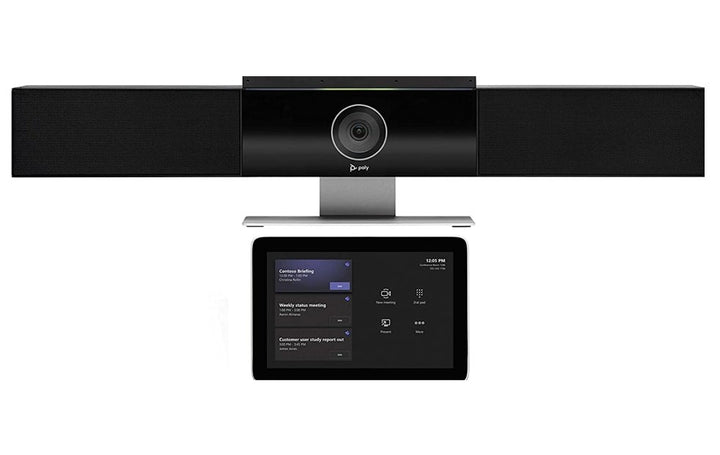
Poly Studio Small/Medium Room Kit for Teams
Email sales@sourceit.com.sg or use Request for Quotation below and our team will confirm the latest price, availability and lead time.
PRODUCT DESCRIPTION
Poly Studio Small/Medium Room Kit for Microsoft Teams — Poly Studio USB Bar with GC8 (7230-87710-102) - Local Warranty
Poly Small/Medium Room Kit for Microsoft Teams Rooms with the Studio USB Bar
The Poly Small/Medium Room Kit is a complete Microsoft Teams Rooms on Windows package for the six-to-nine seat meeting room, combining the Poly Studio USB video bar, the Poly GC8 touch controller and a certified conferencing PC. It is the step up from a huddle-room kit, adding stereo speakers and a six-element microphone array to cover a longer table.
Poly Studio USB Bar with 4K Video and DirectorAI
The Studio USB bar captures 2160p 4K UHD at 30 fps from an 8 MP sensor with a 120-degree diagonal and 110-degree horizontal field of view and 5x zoom. Poly DirectorAI provides speaker framing, people framing, group framing, presenter tracking and a DirectorAI perimeter, so the camera follows the conversation instead of showing a static wide shot.
Six-Element Beamforming Array and Stereo Speakers
Six beamforming microphone elements pick up voices to 4.6 metres (15 ft) and stereo speakers rated at 90 dB across 100 Hz to 20 kHz fill a medium room. Poly NoiseBlockAI, Acoustic Fence and Acoustic Clarity handle background noise and echo, and an optional expansion microphone input is available for longer tables — a genuine advantage over the smaller bars in the range.
Poly GC8 One-Touch Control and Table-Side Sharing
The kit includes the Poly GC8, an 8-inch WXGA touch controller connected to the conferencing PC by USB, presenting the standard Microsoft Teams Rooms console. Integrated HDMI and USB Type-A inputs mean a guest can share from a laptop at the table rather than at the display.
Ideal For
The Poly Small/Medium Room Kit is ideally suited to organisations equipping six-to-nine seat Microsoft Teams Rooms on Windows — the standard department meeting room — with a pre-matched camera, controller and compute package.
Poly Small/Medium Room Kit Datasheet — Technical Specifications
Kit Overview
| Kit name (HP) | Poly Small-Medium Room Kit with Poly Studio USB |
| Part Number | 7230-87710-102 |
| Manufacturer | Poly (HP) |
| Platform | Microsoft Teams Rooms on Windows |
| Video device | Poly Studio USB video bar |
| Controller | Poly GC8 touch controller (USB) |
| Conferencing PC | Lenovo ThinkSmart Core or Dell OptiPlex 7080 XE, per HP's setup sheet |
| Room guidance | Medium rooms, 6–9 people (HP's classification for the Studio USB bar) |
| Warranty | Local Warranty (Singapore) |
HP publishes these kits by name rather than by part number, and does not publish a seat count or room dimension for the kit as a whole — the room guidance below comes from HP's specification for the video device inside the kit.
Component: Poly Studio USB Video Bar
| Model | Poly Studio USB video bar |
| Part Number | 7200-85830-102 / 842D4AA |
| Camera | Single lens, 8 MP, 2160p 4K UHD (3840 x 2160) |
| Frame rate | 30 fps up to 4K |
| Zoom | 5x (HP does not state optical or digital) |
| Field of view | 120° DFOV / 110° HFOV |
| Framing | Poly DirectorAI — speaker framing, people framing, group framing, presenter tracking, DirectorAI perimeter |
| Speakers | Stereo speakers, 90 dB, 100 Hz – 20 kHz |
| Microphones | Six-element beamforming array; pickup up to 4.6 m (15 ft); optional expansion microphone |
| Audio processing | Poly NoiseBlockAI; Poly Acoustic Fence; Poly Acoustic Clarity |
| Ports | 1 x USB Type-C (5 Gbps); 1 x audio-in; 1 x line-in for optional microphone (no HDMI, no Ethernet, no PoE) |
| Wireless | Bluetooth 4.2; Wi-Fi 802.11a/b/g/n/ac (SISO) |
| Room size | Medium rooms, 6–9 people |
| Dimensions | 105 x 700 x 70 mm without stand; 156 x 700 x 70 mm with stand |
| Weight | 2.342 kg without stand; 2.856 kg with stand |
| Mounting | Wall mount kit and table stand included; integrated lens cover |
| Power | 100–240 VAC 50/60 Hz input; 12 VDC 5 A external supply |
| Standards | UVC 1.1/1.5 video; UAC 1.0; HID 1.11 |
| Certification | Microsoft Teams; Zoom; Google Meet |
Component: Poly GC8 Touch Controller
| Model | Poly GC8 touch controller |
| Part Number | 2200-30780-001 / 875J6AA |
| Display | 20.3 cm (8") diagonal, WXGA 1280 x 800, IPS, 16:10 |
| Viewing angle | 75° horizontal and vertical; positioning angle 60° |
| Ports | 1 x USB Type-C (5 Gbps); 1 x USB Type-A (5 Gbps); 1 x 3.5 mm audio jack; 1 x Mini HDMI |
| Power | 100–240 VAC, 12 V, 36 W or 60 W — external power supply (no PoE) |
| Dimensions (W x D x H) | 205 x 123 x 112 mm |
| Weight | 771 g (1.7 lb) |
| Colour | White |
| Operating temperature | 0 to 40 °C (32 to 104 °F) |
| Operating altitude | 3,048 m (10,000 ft) |
| Security | Kensington-style lock slot |
| Certification | Microsoft Teams certified |
| Package contents | GC8 controller; USB Type-A to micro USB cable; HDMI to mini HDMI cable |
Compatibility & Software Support
Platform
This is a kit for Microsoft Teams Rooms on Windows. The meeting experience runs on a certified conferencing PC; the Poly GC8 provides table-side control and the Poly Studio USB video bar provides the room's video and audio.
Microsoft Teams Rooms licence: HP's Poly Room Kits solution guide states “You must have a Microsoft Teams Rooms license to set up your Poly Room Kits for Microsoft Teams Rooms on Windows.” The licence is not included with the hardware and is ordered separately.
Certifications
HP states the Poly GC8 is Microsoft Teams certified. For the Poly Studio USB video bar, HP states Certified for Microsoft Teams, Certified for Zoom and Certified for Google Meet.
Operating systems and device mode
The Poly video device in this kit is a USB peripheral, so outside the Teams Rooms application it can also be used as a standard USB camera and audio device by a laptop in BYOD mode. HP publishes a BYOD solution for Poly room kits that lets a personal computer access the room peripherals — see the Poly Microsoft Teams Room Base Kit and the Poly BYOD kits for the required switching hardware.
Standards-based and third-party calling
Standards-based SIP/H.323 calling is a function of a Poly video codec such as the Poly G7500 or a Studio X-series system, not of a Teams Rooms on Windows PC kit. If SIP or H.323 registration is a requirement, specify a Poly codec-based room instead.
Management
Poly peripherals are provisioned, monitored and updated through Poly Lens. The Teams Rooms device itself is managed from the Microsoft Teams Admin Centre.
Conferencing PC: HP's setup sheets for this kit name the conferencing PC as a Lenovo ThinkSmart Core or Dell OptiPlex 7080 XE. Confirm the exact compute shipped against your quotation, as HP also builds Teams Rooms bundles around the HP Mini Conferencing PC under different part numbers.
Current HP lineup: HP Singapore's Microsoft Teams Rooms bundle page now builds rooms around the Poly Studio Base Kit G9 Plus — an HP Mini IP conferencing PC with a Poly TC10 controller — paired with the Studio V12 (approx. 15 x 10 ft), Studio V52 (approx. 20 x 15 ft), Studio V72 (approx. 28 x 15 ft) or the Studio E60 / Studio E70 cameras. Note the controller changed from GC8 to TC10 in that lineup. HP has not published an end-of-life notice for the kit on this page, but it has been superseded by that range — contact SourceIT to confirm current availability and lead time.
Package Contents & Poly Room Kit Ordering Information
Kit contents
- Poly Studio USB video bar and included cables
- Poly GC8 touch controller
- Conferencing PC (Lenovo ThinkSmart Core or Dell OptiPlex 7080 XE)
- EDID emulator (optional)
- Optional second monitor supported
Cabling
HP's setup sheet for this kit covers a 10 m USB-A to USB-C cable for the GC8, with optional 25 m and 40 m USB-A to USB-C runs, plus Ethernet, audio and power cabling. HDMI cables are not supplied and displays are not included.
About the “+487P-” suffix: some Poly room kit part numbers are quoted as a hardware SKU plus a second code beginning 487P (for example 7230-87700-102+487P-87700-112). The 487P code is a Poly+ support service attach, not an extra hardware item — the hardware content of the kit is unchanged. Ask SourceIT which support term is attached to your quotation.
Poly Room Kit Ordering Information
| Poly Studio Focus Room Kit for Microsoft Teams — Studio P15 + GC8 | 7230-87700-102 |
| Poly Studio Small Room Kit for Microsoft Teams — Studio R30 + GC8 | 7230-87600-102 |
| Poly Studio Small/Medium Room Kit for Microsoft Teams — Studio USB + GC8 (this listing) | 7230-87710-102 |
| Poly Studio Large Room Kit for Microsoft Teams — Studio E70 + GC8 | 7230-87720-102 |
| Poly Studio Small Room Kit for MS Teams — Studio R30 USB bar + GC8 | 9C913AA |
| Poly Studio Medium Room Kit for MS Teams — Studio USB video bar + GC8 | 9C981AA |
| Poly Studio Large Room Kit for MS Teams — Studio E70 smart camera + GC8 | 9R6F2AA |
Controllers Used with Poly Room Kits
| Poly Studio TC8 touch controller (PoE, 8-inch) | 2200-30760-001 / 875J0AA |
| Poly TC10 touch controller & scheduler, Black (PoE, 10.1-inch) | 875K5AA |
| Poly TC10 touch controller & scheduler, White (PoE, 10.1-inch) | 875J5AA |
| Poly GC8 touch controller (USB, 8-inch) | 2200-30780-001 / 875J6AA |
Buy the Components Separately
| Poly Studio USB video bar | Video device supplied in this kit |
| Poly GC8 touch controller | 2200-30780-001 / 875J6AA |
Datasheet & Downloads
Official HP Poly documentation for this room kit and its components:
- Poly Room Kits for Microsoft Teams Rooms on Windows Solution Guide (HP-hosted PDF)
- HP Singapore — Poly Studio USB video bar
- HP product specifications — Poly GC8 touch controller (875J6AA)
- Poly Room Kits Safety and Regulatory Notices (HP-hosted PDF)
- HP Singapore — Poly Microsoft Teams Rooms bundles
SourceIT can also supply the Poly Lens deployment guide and the current GC8 and VideoOS release notes on request.
Frequently Asked Questions — Poly Small/Medium Room Kit
How big a room does this kit cover?
HP classes the Studio USB bar as a medium-room device for six to nine people. For three to five people the Studio R30 based Small kit is the better fit; for ten or more use the Studio E70 based Large kit.
Can this kit take an expansion microphone?
Yes — the Studio USB bar is the model HP documents with a line-in for an optional expansion microphone, alongside its six-element beamforming array. That is the main audio difference against the three-element array on the Studio R30.
Do I need a room PC and a Microsoft Teams Rooms licence?
The conferencing PC is part of the kit — HP's setup sheet names the Lenovo ThinkSmart Core or Dell OptiPlex 7080 XE. A Microsoft Teams Rooms licence is required separately; HP states you must have one to set the kit up.
Is the Studio USB bar's zoom optical?
HP publishes 5x zoom without stating optical or digital, so we do not claim either. Only the Studio E70 has a zoom type published by HP, at 7.3x digital.
What mounting is included?
HP lists a wall mount kit and a table stand in the Studio USB bar's box contents, along with a remote control and USB Type-C to Type-A cable. Displays and HDMI cables are not part of the kit.
Does anything here run on PoE?
No. The Studio USB bar uses a 100–240 VAC external supply at 12 VDC 5 A and the GC8 uses an external mains supply. Neither is PoE powered.
Is this covered by warranty in Singapore?
Yes. Every Poly Small/Medium Room Kit sold by SourceIT comes with local Singapore warranty and a GST invoice.


