
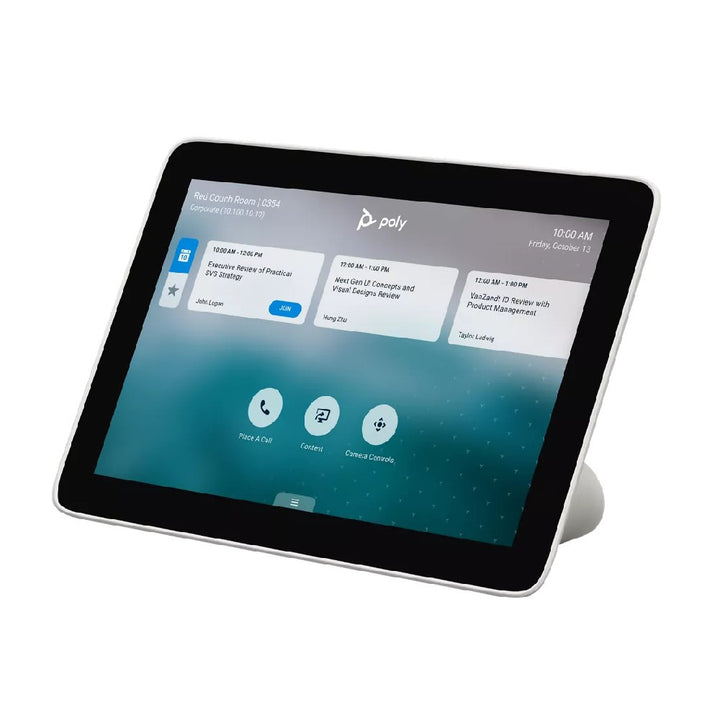


Poly Studio TC8 Video Conferencing Controller
Email sales@sourceit.com.sg or use Request for Quotation below and our team will confirm the latest price, availability and lead time.
PRODUCT DESCRIPTION
Poly Studio TC8 Touch Controller for Poly Video Systems (2200-30760-001 / 875J0AA) - Local Warranty
Poly Studio TC8 8-Inch PoE Touch Controller for Poly Room Systems
The Poly Studio TC8 is a tabletop touch controller that gives Poly Studio and G-series rooms a dedicated 8-inch WXGA touchscreen for starting meetings, sharing content and managing calls. It connects over a single Power over Ethernet cable, so the meeting table stays tidy and installation stays simple. For Singapore offices standardising on Poly room systems, the TC8 is the familiar, purpose-built control surface that makes every room work the same way.
8-Inch WXGA Multi-Touch Display
The TC8 uses an 8-inch IPS LCD panel at WXGA 1280 x 800 in a 16:10 aspect ratio, with a capacitive multi-touch sensor and a 75-degree viewing angle in all four directions. Text and meeting lists stay legible from across the table, and the 60-degree positioning angle keeps the screen comfortable to reach whether it sits in the middle of a boardroom table or at the end of a huddle bench.
Single-Cable Power over Ethernet Deployment
A single RJ-45 connection carries both power and data using IEEE 802.3af Class 3 PoE, so a TC8 needs only one cable run from a PoE switch or injector. That removes the power brick from the table, simplifies floor-box and table-grommet planning for Singapore fit-outs, and keeps meeting rooms looking clean and professional.
Pairs with Poly Studio X-Series and G-Series Room Systems
HP lists the TC8 as pairing with the Poly G7500, Poly Studio G62 and the Studio X30, X50, X52 and X70 video bars, so one controller model can serve every room size in a standardised estate. The meeting platform itself is provided by the room system, which keeps refreshes simple: change the video bar and the control experience stays the same.
Ideal For
The Poly Studio TC8 is ideally suited to organisations running Poly Studio X or G-series rooms that want a compact, PoE-powered tabletop controller with a single cable to the table — and to AV integrators standardising control across a mixed estate of small, medium and large rooms.
Poly Studio TC8 Datasheet — Technical Specifications
General
| Model | Poly Studio TC8 touch controller |
| Part Number | 2200-30760-001 / 875J0AA |
| Manufacturer | Poly (HP) |
| Type | Tabletop touch controller for Poly video systems |
| Colour | White |
| Warranty | Local Warranty (Singapore) |
Display
| Screen size | 8-inch diagonal |
| Resolution | WXGA 1280 x 800 |
| Aspect ratio | 16:10 |
| Panel | LCD, IPS, LED backlight |
| Touch | Capacitive touch sensor with multi-touch support |
| Viewing angle | 75° up / down / left / right |
| Positioning angle | 60° |
Connectivity & Power
| Ports | 1 x RJ-45 (LAN); 1 x Micro-B USB 2.0 (diagnostics only) |
| Power | Power over Ethernet (PoE), IEEE 802.3af Class 3 |
| Cabling | Single Ethernet cable carries both power and data |
| Wi-Fi / Bluetooth | Not published by HP for this model |
Design & Environment
| Dimensions | 205 x 123 x 79 mm |
| Weight | 812 g |
| Stand | Built-in stand — no external stand required |
| Security | Kensington security lock slot |
| Operating temperature | 0 to 40 °C (32 to 104 °F) |
| Non-operating temperature | -20 to 60 °C |
| Operating altitude | 0 to 10,000 ft above sea level |
Compatibility & Software Support
The Poly Studio TC8 is an IP touch controller that pairs over the network with a Poly video system. Per HP's Poly TC8 User Guide it can be paired with Poly G7500, Poly Studio G62, Poly Studio X30, Poly Studio X50, Poly Studio X52 and Poly Studio X70.
| Poly G7500 UHD 4K codec base unit | 7200-85860-102 / 83Z50AA |
| Poly Studio G62 video conferencing system | 99T09AA |
| Poly Studio X30 all-in-one video bar | 2200-85980-102 / 83Z45AA |
| Poly Studio X50 all-in-one video bar | 2200-85970-102 / 83Z44AA |
| Poly Studio X52 all-in-one video bar | 8D8K2AA |
| Poly Studio X70 all-in-one video bar | 7200-87290-102 / 83Z51AA |
The Poly TC8 data sheet states a minimum software level of 3.0 for the Poly G7500. HP does not publish minimum software versions for the other supported systems.
Platform experience: the meeting platform — Microsoft Teams Rooms on Android, Zoom Rooms, and the other providers supported by Poly VideoOS — is determined by the paired room system, not by the controller. HP does not publish a separate Microsoft Teams, Zoom or Google Meet certification for the TC8 itself.
Management: Poly devices are provisioned, monitored and updated through Poly Lens.
Important distinction: the TC8 is an IP/PoE controller for Poly room systems. It is not the USB controller used with a Windows Microsoft Teams Rooms conferencing PC — that is the Poly GC8.
Package Contents & Poly Controller Ordering Information
In the box
Poly TC8 touch controller; RJ-45 (LAN) cable; warranty card; quick start guide.
Poly Touch Controller Ordering Information
| Poly Studio TC8 touch controller (PoE, 8-inch) (this listing) | 2200-30760-001 / 875J0AA |
| Poly TC10 touch controller & scheduler, Black (PoE, 10.1-inch) | 875K5AA |
| Poly TC10 touch controller & scheduler, White (PoE, 10.1-inch) | 875J5AA |
| Poly GC8 touch controller (USB, 8-inch) | 2200-30780-001 / 875J6AA |
Compatible Poly Room Systems
| Poly G7500 UHD 4K codec base unit | 7200-85860-102 / 83Z50AA |
| Poly Studio G62 video conferencing system | 99T09AA |
| Poly Studio X30 all-in-one video bar | 2200-85980-102 / 83Z45AA |
| Poly Studio X50 all-in-one video bar | 2200-85970-102 / 83Z44AA |
| Poly Studio X52 all-in-one video bar | 8D8K2AA |
| Poly Studio X70 all-in-one video bar | 7200-87290-102 / 83Z51AA |
Datasheet & Downloads
Official HP Poly documentation for the Poly Studio TC8:
- HP product specifications — Poly TC8 (875J0AA)
- HP product features — Poly TC8
- Poly TC8 User Guide (HP-hosted PDF)
SourceIT can also supply the current Poly VideoOS release notes and deployment guides on request.
Frequently Asked Questions — Poly Studio TC8
What is the difference between the Poly TC8, TC10 and GC8?
The TC8 is an 8-inch PoE controller for Poly room systems. The TC10 is a larger 10.1-inch PoE controller that can also run standalone as a room scheduling panel. The GC8 is a USB-connected, mains-powered controller for a Windows Microsoft Teams Rooms conferencing PC and is not interchangeable with the TC8.
Which Poly systems does the TC8 work with?
HP's TC8 User Guide lists pairing with Poly G7500, Poly Studio G62, Poly Studio X30, Poly Studio X50, Poly Studio X52 and Poly Studio X70. For the G7500, Poly states a minimum software level of 3.0.
Does the TC8 need a separate power supply?
No. It draws power over the same Ethernet cable that carries data, using IEEE 802.3af Class 3 PoE, so one cable to a PoE switch or injector is all that is required at the table.
Do I need a room PC or a licence to use the TC8?
No room PC is required — the TC8 controls a Poly room system that has its own compute. Any meeting service subscription (for example Microsoft Teams Rooms or Zoom Rooms) is licensed on the room system, not on the controller.
Can one TC8 control more than one room?
The TC8 is paired to a room system to control that room. For a panel that displays availability and allows booking outside the room, the Poly TC10 adds a standalone scheduler mode.
Is a wall mount included?
HP lists the TC8 as shipping with a built-in stand and does not publish a wall-mount accessory for it. If you need a wall or glass mounted panel, the TC10 ships with a wall mount kit and table stand in the box.
Is this covered by warranty in Singapore?
Yes. Every Poly Studio TC8 sold by SourceIT comes with local Singapore warranty and a GST invoice.


