
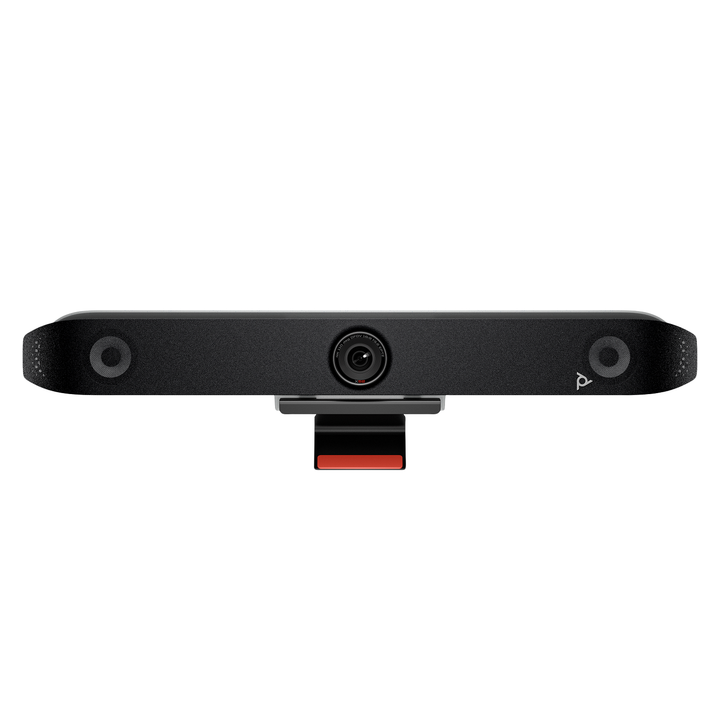


HP Poly Studio X52 4K Ultra HD Video Conferencing System
Email sales@sourceit.com.sg or use Request for Quotation below and our team will confirm the latest price, availability and lead time.
PRODUCT DESCRIPTION
HP Poly Studio X52 4K Ultra HD All-In-One Video Bar — 8D8K2AA - Local Warranty
20 MP 4K Camera Built for 6.1 m Meeting Rooms
The Poly Studio X52 is HP's current medium-room all-in-one bar. A 20 MP sensor captures 2160p 4K Ultra HD across a 110° diagonal / 95° horizontal field of view, with a camera range of 6.1 m — a deliberately tighter, higher-density framing than the wide huddle-room bars, so faces at the far end of a 20 ft room still resolve cleanly when DirectorAI zooms in on them. HP rates it for rooms of roughly 20 ft x 15 ft and it drives two displays, or three in Zoom with a supported adapter.
Wi-Fi 6 and HDMI 2.0 Throughout
The X52 carries 802.11ax Wi-Fi 6 and HDMI 2.0 on both the input and the two outputs, which matters for two practical reasons: a wireless deployment on a modern corporate WLAN behaves far better under contention, and the HDMI 2.0 path removes the ceiling that HDMI 1.4 imposes on the older Studio X50. Gigabit Ethernet, Bluetooth 5.0, two USB-A ports and a USB-C port round out the connectivity, and a line-in accepts an optional expansion microphone for longer tables.
Stereo Audio with NoiseBlockAI and Acoustic Fence
Stereo speakers rated 20 W RMS and 40 W maximum handle a medium room comfortably. Two MEMS microphones and two second-order microphones pick up to 6.09 m, with full-duplex acoustic echo cancellation, Poly NoiseBlockAI to strip out keyboard and air-con noise, and Poly Acoustic Fence to keep the corridor outside the room out of the call.
Teams and Zoom On-Device — No Room PC to Buy or Patch
HP certifies the Studio X52 for Microsoft Teams and for Zoom and lists it as compatible with Google Meet. Those room applications run on the bar itself, so there is no mini-PC to procure, licence, image or patch. Poly Video App mode reaches other cloud providers, H.323 and SIP calling up to 6 Mbps is supported, and USB Device Mode lets a visitor host from their own laptop. Security is enterprise-grade: AES 128/256-bit media encryption, H.235.6, port lockout and Active Directory support.
HP Poly Studio X52 Datasheet — Technical Specifications
Every specification below is taken from HP and Poly's own published documentation for the Studio X52 — the official product specification sheet, the HP Poly product page and the Poly datasheet. Where HP does not publish a figure we have left it out rather than estimate it.
General
| Product type | All-in-one video bar — camera, stereo speakers, microphones and video application in one device, no room PC required |
| Recommended room size | 20 ft x 15 ft (6.1 m x 4.6 m) |
| Displays supported | Two (three in Zoom with a supported adapter) |
| Management | Poly Lens cloud device management |
| Colour | White |
| Operating conditions | 0 °C to 40 °C, 15–80% relative humidity, up to 4,877 m altitude |
| Warranty | Local Warranty (Singapore) |
| Part number | 8D8K2AA |
Camera
| Capture resolution | 2160p 4K Ultra HD (3840 x 2160) |
| Sensor resolution | 20 MP |
| Frame rate | 5–60 fps; 4K at 30 fps from 2048 Kbps, 1080p at 60 fps from 1740 Kbps |
| Zoom | 5x digital zoom — no optical zoom is stated for this model |
| Field of view | 110° diagonal (DFOV), 95° horizontal (HFOV) |
| Camera range | Up to 6.1 m (20 ft) |
| Auto-framing | Poly DirectorAI — group framing, people framing, speaker framing, DirectorAI perimeter |
| Additional cameras | Secondary cameras can be added over USB and HDMI |
| Video standards | H.264 AVC, H.264 High Profile, H.265, H.239 |
| Privacy | Attachable privacy cover |
Audio
| Speakers | Stereo speakers, 20 W RMS power handling / 40 W maximum |
| Speaker sensitivity | 79 dB (1 W / 1 m) |
| Microphones | Two MEMS microphones plus two second-order microphones |
| Microphone pickup range | Up to 6.09 m (20 ft) |
| Expansion | Line-in for an optional expansion microphone |
| Audio processing | Full-duplex audio with acoustic echo cancellation, Poly NoiseBlockAI, Poly Acoustic Fence |
Connectivity
| HDMI input | 1 x HDMI 2.0 in |
| HDMI output | 2 x HDMI 2.0 out |
| USB | 2 x USB Type-A (USB 3.0, 5 Gbps); 1 x USB Type-C (5 Gbps) |
| Ethernet | 1 x RJ-45 10/100/1G; IPv4 and IPv6; H.323 and SIP up to 6 Mbps |
| Wi-Fi | 802.11a/b/g/n/ac/ax (Wi-Fi 6, MIMO) |
| Bluetooth | 5.0 |
| Audio jacks | 1 x line-in for an optional microphone |
| Wireless content sharing | Apple AirPlay, Miracast, digital whiteboarding, plus wired HDMI input |
Design & Power
| Dimensions | 769.5 mm (W) x 115.2 mm (H) x 103 mm (D) |
| Weight | 2.54 kg |
| Mounting | Display mounting clamp included; wall mount, VESA mount and table stand sold separately |
| Power | External auto-sensing supply; 37 VA at 120 V / 60 Hz and at 230 V / 50–60 Hz |
| Power consumption | 25 W heavily loaded, 8 W idle or sleep; 65 BTU/h |
| Security | Kensington lock slot; AES 128/256-bit media encryption, H.235.6, port lockout, Active Directory support |
Compatibility & Software Support
Platforms and certifications
HP states the Studio X52 is Certified for Microsoft Teams and Certified for Zoom, and lists it as compatible with Google Meet.
The bar runs native third-party room applications on the device — Zoom, Microsoft Teams, Dialpad, GoToRoom, RingCentral and StarLeaf — and Poly Video App mode reaches all cloud service providers.
Use it with a laptop or room PC
USB Device Mode is supported — connect the bar to a laptop or room PC over USB and use it as a camera, speakerphone and microphone for any application.
Standards-based calling
Standards-based H.323 and SIP calling up to 6 Mbps in Poly Video mode.
Management software
The Studio X52 is managed through Poly Lens, HP's cloud device-management service. From one console your IT team can see room device health, push firmware, apply configuration profiles and pull usage insights across every Poly device in the estate — which is the usual reason Singapore IT departments standardise on Poly rather than mixing consumer hardware across meeting rooms.
Package Contents & HP Poly Studio X Series Ordering Information
In the box
- Poly Studio X52 video bar
- AC power adapter
- Power cable
- HDMI cable
- Ethernet cable
- Display mounting clamp
- Privacy cover
Poly Studio X Series ordering information
Touch controllers and room scheduling panels
| Model / Variant | Part Number |
| Poly Studio TC8 Video Conferencing Controller | 2200-30760-001 / 875J0AA |
| Poly TC10 Touch Controller / Room Scheduler (black) | 875K5AA |
| Poly TC10 Touch Controller / Room Scheduler (white) | 875J5AA |
| Poly GC8 Touch Controller for Poly Room Kits | 2200-30780-001 / 875J6AA |
Mounts and expansion accessories for the Studio X52
| Model / Variant | Part Number |
| Poly Studio X52/V52 Wall Mount | 2215-87792-001 / 875L8AA |
| Poly Studio X52/V52 VESA Mount | 2215-88033-001 / 875L9AA |
| Poly Studio X52/V52 Table Stand | 2215-87796-001 / 875M0AA |
| Poly Studio X52/V52 Display Clamp | 875M5AA |
| Poly Table Expansion Microphone for Poly Studio X Series | 2200-87840-001 / 875M6AA |
Prices, stock and lead times for any of the above are available from the SourceIT sales team.
Datasheet & Downloads
All documents below are published by HP and Poly. Links open in a new tab.
- HP Poly Studio X52 Product Page (Singapore) — official HP Singapore product page
- HP Product Details — Poly Studio X52 with TC10 (8D8L1AA) — official HP page for the kit, including box contents
- HP Poly All-In-One Video Bar Line-Up (Singapore) — official HP Singapore comparison of X32, X52 and X72
- Poly Support (Singapore) — firmware, admin guides and release notes for Poly Video OS
Frequently Asked Questions — HP Poly Studio X52
Which room size does the Poly Studio X52 suit?
HP rates the Studio X52 for medium rooms of roughly 20 ft x 15 ft (6.1 m x 4.6 m), with a camera range of 6.1 m and microphone pickup to 6.09 m. For a huddle room the Studio X32 is the right size; for a boardroom up to 8.5 m long, the Studio X72.
Why is the X52's field of view narrower than the X32's?
Because the rooms are different shapes. The X32 covers a small room from close range and needs 120° horizontally to do it; the X52 looks down a longer room, so a 95° horizontal field of view spreads the same 20 MP sensor over a smaller angle and gives more pixels on each face at the far end. Wider is not automatically better — match the bar to the room.
Do I need a room PC, a codec or a separate licence?
No room PC and no separate gateway — Microsoft Teams and Zoom run on the bar itself. You will still need the platform licence your organisation uses (a Microsoft Teams Rooms or Zoom Rooms licence, or your own H.323/SIP infrastructure). We can quote it alongside the hardware.
How does the Studio X52 differ from the older Studio X50?
On published specifications the X52 has a 20 MP sensor, Wi-Fi 6, HDMI 2.0 on the input and both outputs, and support for three displays in Zoom with an adapter. The Studio X50 has a wider 110° horizontal field of view and a longer 7.62 m microphone pickup, so in a wide, shallow room it can still frame better. The X52 also pairs with the newer TC10 controller rather than the TC8.
Does the Studio X52 support PoE?
No — HP publishes no PoE support for the X52 bar, which ships with an external auto-sensing power adapter. The TC10 touch controller does run on PoE (IEEE 802.3at Class 0). If you need a PoE-powered bar, the Studio X32 accepts PoE++ to IEEE 802.3bt Class 6.
What mounting options are available?
A display mounting clamp is in the box. We also stock the wall mount, VESA mount, table stand and display clamp separately, plus an adapter bracket that lets an X52 reuse an existing Studio X50 wall or VESA mount.
Does the Poly Studio X52 come with a Singapore warranty and GST invoice?
Yes. Every Poly Studio X52 sold by SourceIT comes with local Singapore warranty and a GST invoice.


