
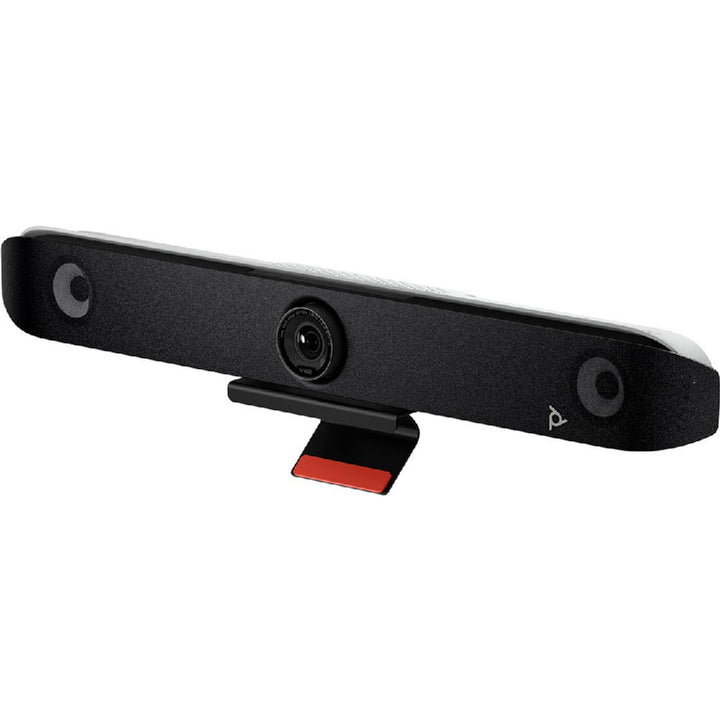


HP Poly Studio V52 USB Video Bar
Email sales@sourceit.com.sg or use Request for Quotation below and our team will confirm the latest price, availability and lead time.
PRODUCT DESCRIPTION
HP Poly Studio V52 USB Video Bar (A09D4AA) - Local Warranty
Poly Studio V52 Premium 4K USB Video Bar for Medium Meeting Rooms
The Poly Studio V52 brings Poly's premium camera and audio engineering to USB-connected rooms. A 20 MP sensor captures 2160p 4K UHD (3840 x 2160) at 30 fps across a 95° horizontal / 110° diagonal field of view, with Poly DirectorAI handling framing. HP rates it for medium rooms of 6 to 9 people. Because it runs in USB device mode, it works with whatever your host laptop or room PC runs — Microsoft Teams, Zoom, Google Meet or anything else.
Poly DirectorAI Framing with a 20 MP 4K Camera
DirectorAI delivers speaker framing, people framing, group framing and a DirectorAI perimeter, backed by 5x digital zoom on a 20 MP sensor — enough resolution to crop a tight, clean shot of whoever is talking without any moving parts. An attachable privacy cover is included for rooms where the camera must be visibly closed between meetings.
Stereo Audio with NoiseBlockAI and Acoustic Fence
Stereo speakers rated 2 x 20 W (40 W maximum) at 79 dB sensitivity fill a medium room comfortably. Four microphones — two MEMS plus two second-order — pick up voices to 6.09 m (20 ft), with Poly NoiseBlockAI, Poly Acoustic Fence, acoustic echo cancellation and automatic gain control cleaning up the room. Audio runs up to 48 kHz / 16-bit stereo over UAC 2.0.
Simple USB Deployment, Managed Centrally with Poly Lens
One USB Type-C cable to the host is the whole installation; a monitor clamp is in the box, with VESA mount, table stand and wall mount available separately. Wi-Fi 802.11a/b/g/n/ac/ax (MIMO), Bluetooth 5.0 and an RJ-45 port support provisioning and remote management through Poly Lens Cloud, with AES 128/256-bit encryption. Supplied by SourceIT with local Singapore warranty and a GST invoice.
HP Poly Studio V52 Datasheet — Technical Specifications
General
| Model | Poly Studio V52 |
| Part Number / SKU | A09D4AA |
| Product type | Premium USB video bar — USB device mode (requires a host PC, Mac or room PC) |
| Recommended room size | Medium (6–9 people) |
| Colour | White |
| Device management | Poly Lens Cloud |
| Security | AES 128-bit / 256-bit encryption |
| Manufacturer | Poly (HP) |
| Warranty | Local Warranty (Singapore) |
Camera
| Sensor | 20 MP |
| Capture resolution | 2160p, 4K UHD (3840 x 2160) |
| Frame rate | 30 fps |
| Zoom | 5x digital zoom (HP specifies no optical zoom for the V52) |
| Horizontal field of view | 95° (HFOV) |
| Diagonal field of view | 110° (DFOV) |
| Smart framing | Poly DirectorAI — speaker framing; people framing; group framing; DirectorAI perimeter |
| Privacy | Attachable privacy cover included |
Audio
| Speakers | Stereo speakers |
| Speaker output power | 2 x 20 W (40 W maximum) |
| Speaker sensitivity | 79 dB |
| Microphones | 4 total — 2 x MEMS microphones plus 2 x second-order microphones |
| Microphone pickup range | Up to 6.09 m (20 ft) |
| Audio processing | Poly NoiseBlockAI and Poly Acoustic Fence; acoustic echo cancellation; automatic gain control |
| Audio format | Up to 48 kHz / 16-bit stereo; UAC 2.0 |
| Expansion microphone | Optional expansion microphone supported |
Connectivity
| USB | 1 x USB Type-C (5 Gbps signalling rate); 2 x USB Type-A (5 Gbps signalling rate, disabled by default) |
| HDMI out | 2 x HDMI-out 2.0 — HP notes these are for provisioning support only |
| HDMI in | 1 x HDMI-in 1.4 — HP notes this input is not supported |
| Ethernet | 1 x RJ-45 |
| Wi-Fi | 802.11a/b/g/n/ac/ax (MIMO) |
| Bluetooth | Bluetooth 5.0 |
| Power over Ethernet | Not listed by HP for this model — the bar uses its external AC adapter |
Design & Power
| Dimensions (W x H x D) | 769.5 x 115.2 x 103 mm (30.3 x 4.5 x 4 in) |
| Weight | 2,540 g (2.54 kg / 5.6 lb); packaged 3,000 g |
| Colour | White |
| Power supply | External — 37 VA at 120 V 60 Hz; 37 VA at 230 V 50/60 Hz |
| Operating temperature | 0 to 40 °C (32 to 104 °F) |
| Operating humidity | 15 to 80% |
| Mounting | Monitor / display clamp included; optional VESA mount (875L9AA), table stand (875M0AA) and wall mount (875L8AA) |
Compatibility & Software Support
USB device mode — a host computer is required. HP lists the Studio V52's operating mode as USB device mode. It has no built-in compute and runs no meeting app of its own: connect it over USB Type-C to a laptop, Mac or room PC and it presents as that computer's camera, speaker and microphone. That means it works with whatever the host runs — Microsoft Teams, Zoom, Google Meet, Webex, or anything else — and it is the right choice for BYOD and hot-desk rooms.
Certifications. HP's marketing pages state Certified for Microsoft Teams and Certified for Zoom. HP's specification sheet for A09D4AA additionally lists Google Meet under certified collaboration software. Where certification is a formal procurement requirement, ask us to confirm the current HP position before you order.
Appliance alternative. If you need the room to run Microsoft Teams Rooms or Zoom Rooms natively with no PC to manage, the appliance-class Poly Studio X52 covers a comparable room size with built-in compute, and the Poly Studio X70 does the same for large rooms.
Ports, in practice. The two USB Type-A ports are disabled by default. The HDMI-out ports are for provisioning support only and the HDMI-in is not supported — drive the room display from the host PC, not from the bar.
Poly Lens management. HP supports remote management of the V52 through Poly Lens cloud-based device management, with AES 128-bit and 256-bit encryption, so IT can monitor and update deployed bars from anywhere.
Package Contents & Studio V52 Ordering Information
What’s in the Box
- Poly Studio V52 video bar
- Monitor clamp
- Privacy cover
- AC power adapter
- Power cable
- HDMI cable
- USB Type-C to USB Type-C cable
- Quick start guide
- Warranty card
- Product notice
- Safety and compliance documents
Poly Studio USB and Appliance Video Bars
| Poly Studio V52 USB Video Bar (medium rooms, USB device mode) (this listing) | A09D4AA |
| Poly Studio X52 (medium rooms, built-in compute) | 8D8K2AA |
| Poly Studio X70 (large rooms, built-in compute) | 7200-87290-102 / 83Z51AA |
Studio X52 / V52 Mounts and Accessories
| Poly Studio X52/V52 VESA Mount | 2215-88033-001 / 875L9AA |
| Poly Studio X52/V52 Table Stand | 2215-87796-001 / 875M0AA |
| Poly Studio X52/V52 Wall Mount | 2215-87792-001 / 875L8AA |
| Poly Studio X52/V52 Display Clamp | 875M5AA |
| Poly Studio X52/V52 Metal Front Panel | 977L8AA |
Datasheet & Downloads
Frequently Asked Questions — HP Poly Studio V52
Does the Studio V52 need a room PC or laptop?
Yes. HP lists the V52's operating mode as USB device mode — it has no built-in compute and no meeting app of its own. Connect it over USB Type-C to a laptop, Mac or dedicated room PC and it becomes that machine's camera, speakers and microphone. That is exactly what makes it suit BYOD and hot-desk rooms. If you want the room to run Teams Rooms or Zoom Rooms by itself with no PC, choose the Poly Studio X52 instead.
How is the Studio V52 different from the Studio X52?
They are close in size and room fit but different in architecture. The V52 is a USB bar — simpler, cheaper to deploy, dependent on a host computer, and platform-agnostic because it inherits whatever the host runs. The X52 is an appliance with built-in compute that runs Teams Rooms or Zoom Rooms natively. They share the same mounting accessories, so you can switch approach later without changing the bracket.
What size room is the V52 designed for?
HP rates the Studio V52 for medium rooms of 6 to 9 people, with a 95° horizontal / 110° diagonal field of view and microphone pickup to 6.09 m (20 ft). For larger Singapore boardrooms and training rooms, step up to the Poly Studio X70, which covers rooms up to roughly 9.1 m x 6.1 m with pickup to 7.62 m.
Does the V52 have optical zoom?
No. HP specifies 5x digital zoom on the Studio V52 — there is no optical zoom. The 20 MP sensor gives DirectorAI enough resolution to crop tight framings of speakers without a moving lens. If your room genuinely needs optical reach, the Poly Studio E60 offers 12x optical MPTZ, though it is a camera only and needs separate room audio.
Can I use the HDMI ports to drive the room display?
No — and this catches people out. HP states the two HDMI-out 2.0 ports are for provisioning support only, and that the HDMI-in 1.4 port is not supported. Content and display output come from the host PC, not from the bar. Note also that the two USB Type-A ports are disabled by default.
What mounting options and expansion accessories are available?
A monitor clamp is included in the box. SourceIT stocks the X52/V52 VESA Mount (875L9AA), the table stand (875M0AA), the wall mount (875L8AA) and the display clamp (875M5AA). HP also lists support for an optional expansion microphone where a long table needs extra pickup.
Is local Singapore warranty included?
Yes. Every Poly Studio V52 sold by SourceIT comes with local Singapore warranty and a GST invoice.


