
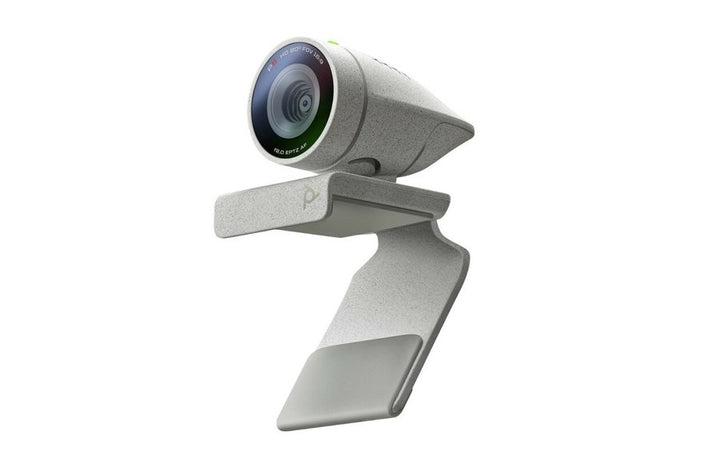


Poly Studio P5 Professional 1080p Full HD Webcam
Email sales@sourceit.com.sg or use Request for Quotation below and our team will confirm the latest price, availability and lead time.
PRODUCT DESCRIPTION
Poly Studio P5 Professional 1080p Full HD Webcam (2200-87070-001 / 76U43AA) - Local Warranty
Availability note: HP’s Singapore Poly personal video and webcams page no longer lists the Studio P series; its current Singapore USB line-up is the Studio V12, V52, V72 and R30. SourceIT continues to supply the P series while stock lasts, with local Singapore warranty.
Poly Studio P5 — Professional 1080p Full HD Webcam
The Poly Studio P5 is a professional 1080p webcam built for people who are on calls all day. A 4 MP camera delivers Full HD 1920 x 1080 at 30 fps across an 80° diagonal field of view — framed for one person at a desk rather than a whole room — with autofocus, automatic low-light compensation and true colour. It is listed by HP under Microsoft Teams and Zoom software certifications and weighs just 68 g.
Full HD Video with Autofocus and Low-Light Compensation
Office and home lighting in Singapore is rarely kind to a laptop camera. The P5 combines autofocus with automatic low-light compensation and true-colour processing so you stay sharp and correctly exposed through the working day. Digital zoom / EPTZ runs to 4x for tightening the frame, and an integrated privacy shutter physically covers the lens between calls.
A Built-In USB Port for Your Wireless Headset Adapter
The P5 carries a USB Type-A port in its own body for a Poly wireless headset adapter, so the camera and the headset dongle share one port on the computer. On a laptop with two ports, that difference is the whole argument. The camera itself connects with an integrated 1.3 m USB 2.0 Type-A cable and is bus-powered — there is no power brick.
Plug-and-Play on Windows, macOS and Chrome OS
The Studio P5 is a UVC / UAC device, so there are no drivers to install and it works with any application that supports standard USB video. A single unidirectional microphone covering 50 Hz to 16 kHz handles audio when a headset is not in use, and the adjustable monitor clamp is removable and tripod-ready. Camera settings and firmware are managed from the Poly Lens Desktop App.
Ideal For
Hybrid workers, hot desks and home offices across Singapore that need a dependable Full HD upgrade over a built-in laptop camera, and IT teams standardising a low-cost, driver-free webcam across a fleet.
Poly Studio P5 Datasheet — Technical Specifications
General
| Model | Poly Studio P5 |
| Part Number | 2200-87070-001 / 76U43AA |
| UPC | 610807900634 |
| Type | USB webcam |
| Certifications | Microsoft Teams; Zoom |
| Standards | UVC / UAC plug-and-play — no drivers required |
| Management | Poly Lens cloud service and Poly Lens Desktop App |
| Manufacturer | Poly (HP) |
| Warranty | Local Warranty (Singapore) |
Camera
| Total camera megapixels | 4 MP |
| Resolutions | 1080p Full HD (1920 x 1080) at 30 fps; 720p HD (1280 x 720) at 30 fps |
| Field of view | 80° DFOV |
| Zoom | 4x digital zoom / EPTZ, with autofocus |
| Image processing | Automatic low-light compensation; true colour |
| Privacy | Integrated manual privacy shutter |
Audio
| Microphone | Single unidirectional microphone |
| Microphone frequency response | 50 Hz – 16 kHz |
| Speaker | None — the Studio P5 is a webcam and does not include a speaker |
Connectivity
| Host connection | Wired USB 2.0 Type-A with an integrated (captive) cable, 1.3 m |
| Peripheral port | USB Type-A port built into the webcam for a wireless headset adapter |
| Bluetooth / Ethernet | Not listed by HP for this model |
Design & Power
| Dimensions | 3.7 x 3.4 x 6.2 cm |
| Weight | 0.068 kg |
| Package | 10.2 x 15.3 x 5.5 cm; 0.185 kg |
| Mounting | Adjustable / removable monitor clamp; tripod-ready |
| Power | Bus-powered over USB — no external power supply required |
Compatibility & Software Support
The Poly Studio P5 is a standards-based UVC / UAC webcam. It needs no drivers and the meeting application runs on the connected computer.
| Microsoft Teams | Listed by HP under software certifications |
| Zoom | Listed by HP under software certifications |
| Google Meet | HP does not publish a Google Meet certification for this model |
| Other applications | Any application supporting standard USB / UVC |
| Windows (datasheet) | Windows 8.1 and 10 |
| Windows (P-series user guide) | Windows 10 and 11 |
| macOS (datasheet) | macOS 10.7 or later |
| macOS (P-series user guide) | macOS 12.6 and 13.5 |
| Chrome OS | Supported per the P-series user guide |
| Headset adapter port | The built-in USB Type-A port accepts a Poly wireless headset adapter, so one USB port on the computer serves both camera and headset |
Poly Lens Support
| Poly Lens Desktop App | Yes — camera settings, framing and firmware from the connected computer |
| Poly Lens cloud service | Yes |
Poly Studio P Series at SourceIT
| Model | Part Number | Type |
| Poly Studio P5 Professional 1080p Full HD Webcam (this listing) | 2200-87070-001 / 76U43AA | USB webcam |
| Poly Studio P5 USB-A Webcam (TAA) | 76U43AA | USB webcam |
| Poly Studio P15 Video Bar | 2200-69370-102 / 842D1AA | Personal video bar |
| Poly Studio P21 Personal Meeting Display | 2200-87100-102 | All-in-one meeting display |
Package Contents & Poly Studio P Series Ordering Information
What’s in the Box
Poly Studio P5 webcam with integrated USB-A cable; removable monitor clamp; setup sheet.
Poly Studio P Series Ordering Information
| Model | Part Number | Type |
| Poly Studio P5 Professional 1080p Full HD Webcam (this listing) | 2200-87070-001 / 76U43AA | USB webcam |
| Poly Studio P5 USB-A Webcam (TAA) | 76U43AA | USB webcam |
| Poly Studio P15 Video Bar | 2200-69370-102 / 842D1AA | Personal video bar |
| Poly Studio P21 Personal Meeting Display | 2200-87100-102 | All-in-one meeting display |
Datasheet & Downloads
Frequently Asked Questions — Poly Studio P5
What is the difference between the two Poly Studio P5 listings at SourceIT?
Both listings carry HP part number 76U43AA and HP publishes an identical specification for them — 4 MP, 1080p at 30 fps, 80° DFOV and a 1.3 m captive USB-A cable. HP issues the same spec sheet under two titles, “Poly Studio P5 USB-A Webcam TAA” and “Poly Studio P5 USB-A OECSM Webcam”; the TAA and OECSM wording is a procurement-compliance designation, not a different hardware build. This listing is the standard Poly Studio P5 listing carrying both the legacy Polycom part 2200-87070-001 and HP SKU 76U43AA. The Poly Studio P5 USB-A Webcam (TAA) listing is also available here. If your tender requires TAA-compliant sourcing, tell SourceIT and we will supply against the correct designation.
Is the Poly Studio P5 a 1080p or a 4K webcam?
1080p. HP specifies Full HD 1920 x 1080 at 30 fps and 720p at 30 fps, from a 4 MP camera. If you need 4K on a desk, the Poly Studio P15 is the 4K personal video bar in the same family.
Does the Studio P5 have a speaker?
No. The P5 is a webcam with a single unidirectional microphone (50 Hz – 16 kHz) and no speaker. Pair it with a headset, or step up to the Studio P15 which includes an integrated speaker and a three-element beamforming microphone array.
What is the USB port on the webcam for?
The Studio P5 has a USB Type-A port built into its body for a Poly wireless headset adapter. That means the camera and a wireless headset share a single USB port on the computer — useful on laptops that are short of ports.
Is the zoom optical?
No. The P5 offers 4x digital zoom / EPTZ with autofocus. HP does not specify any optical zoom for this model.
Does the Studio P5 need a power supply or drivers?
Neither. It is bus-powered over its captive 1.3 m USB-A cable and is UVC / UAC plug-and-play, so it works on Windows, macOS and Chrome OS without driver installation.
Is the Poly Studio P5 still sold in Singapore?
HP’s Singapore Poly personal-video page no longer lists the P series — the current Singapore USB range is the Studio V12, V52, V72 and R30. HP has published no end-of-life announcement for the P5, and SourceIT continues to supply it with local Singapore warranty while stock lasts.
Does the Poly Studio P5 come with warranty in Singapore?
Yes. Every Poly Studio P5 sold by SourceIT comes with local Singapore warranty and a GST invoice.


