
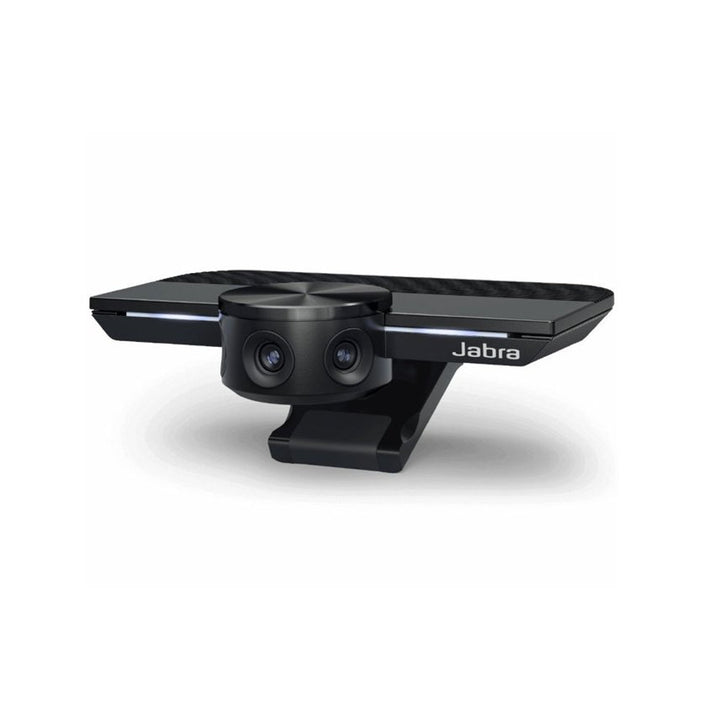


Jabra PanaCast Panoramic 4K Video Conferencing Camera
Email sales@sourceit.com.sg or use Request for Quotation below and our team will confirm the latest price, availability and lead time.
PRODUCT DESCRIPTION
Jabra PanaCast Panoramic 4K Video Conferencing Camera (8100-119) - 2 Years Local Warranty
No Longer Available. New or Similar items below:
Jabra Panacast 50 Video Bar Ultra HD 4K Conferencing Camera Black (8200-237)
Panoramic-4K Video Conferencing Camera for Huddle Rooms and Small Meeting Spaces
The Jabra PanaCast (8100-119) is a plug-and-play USB video conferencing camera built around three 13-megapixel camera units and Jabra’s patented real-time video stitching. It captures a true 180° horizontal field of view in Panoramic-4K (3840 x 1080 at 30 fps), so an entire huddle room is visible in a single, natural, distortion-free frame — no repositioning, no second camera, no participant cropped out at the edge of the table. For Singapore offices with compact huddle rooms and hot-desking meeting pods, that wide coverage is exactly what a standard webcam cannot deliver.
180° Field of View with Electronic Pan-Tilt-Zoom
Where a conventional webcam forces everyone to crowd into a narrow cone, the PanaCast covers 180° horizontally and 54° vertically. The field of view is selectable at 90°, 120°, 140° or 180° to match the room, and electronic Pan-Tilt-Zoom (ePTZ) lets you frame the shot in software without moving the camera. Brightness, contrast, saturation, sharpness and white balance are all adjustable, so the camera can be tuned once for a specific room’s lighting and left alone.
Plug-and-Play USB Deployment — No Power Supply, No Driver Install
The PanaCast connects over a single USB cable and is powered by that same USB 3.0 connection, which keeps deployment simple in rooms with no spare power outlet. All video stitching runs on the on-board PanaCast Vision Processor rather than on the host PC, so the camera behaves as a standard USB video device on Windows 7 or later, macOS X 10.9 or later, Linux Ubuntu 16.x or later and Chrome OS. Plug it in and it appears as a camera source in whatever meeting client the room already uses.
Certified for Microsoft Teams and Zoom
The Jabra PanaCast is certified for Microsoft Teams and Zoom, and is compatible with Cisco Webex, Slack and Google Meet. Firmware and settings are managed through Jabra Direct on a single machine or Jabra Xpress for fleet-wide deployment, which matters when an IT team has to keep dozens of meeting rooms on a consistent firmware baseline.
Compact, Portable Hardware Built for Small Rooms
At 102 x 67 x 20 mm and 100 g, the PanaCast sits on top of a monitor or laptop, or mounts to an optional table stand or wall mount. It is rated for 0°C to 40°C and 15–85% non-condensing humidity. Every unit sold by SourceIT ships with 2 years local Singapore warranty and a GST invoice.
Jabra PanaCast Datasheet — Technical Specifications
General
| Product Name | Jabra PanaCast Panoramic 4K Video Conferencing Camera |
| Part Number | 8100-119 |
| GTIN / UPC | 5706991028059 |
| Category | USB video conferencing camera (huddle rooms and small meeting spaces) |
| Warranty | 2 Years Local Warranty (Singapore) |
Video
| Camera Type | Panoramic-4K multi-camera video conferencing camera |
| Number of Cameras | 3 camera units with patented real-time video stitching |
| Field of View | 180° horizontal / 54° vertical |
| Selectable Field of View | 90°, 120°, 140° or 180° |
| Maximum Resolution | Panoramic-4K — 3840 x 1080 @ 30 fps |
| Other Resolutions | 1080p (1920 x 1080) @ 30 fps; 720p (1280 x 720) @ 30 fps |
| Video Stitching | Dynamic real-time stitching in the on-board PanaCast Vision Processor |
| Camera Control | Electronic Pan-Tilt-Zoom (ePTZ) |
| Image Adjustment | Brightness, Contrast, Saturation, Sharpness, White Balance |
Connectivity & Power
| Connection | USB plug-and-play via USB-C port on the camera |
| Power | Powered by the USB 3.0 cable — no separate power supply required |
| Supported Operating Systems | Windows 7 or later, macOS X 10.9 or later, Linux Ubuntu 16.x or later, Chrome OS |
Design & Environment
| Dimensions | 102 x 67 x 20 mm |
| Weight | 100 g / 3.53 oz |
| Mounting | Flexible monitor or laptop placement; optional table stand and wall mount |
| Operating Temperature | 0°C to 40°C |
| Operating Humidity | 15% to 85% (non-condensing) |
Specifications above are taken from the official Jabra PanaCast technical specification sheet (Rev C). Jabra’s tech sheet does not publish microphone or loudspeaker specifications for this camera — the PanaCast is positioned as a video device and is paired with a Jabra Speak speakerphone for room audio.
Compatibility & Software Support
Operating systems
| Windows | Windows 7 or later |
| macOS | macOS X 10.9 or later |
| Linux | Ubuntu 16.x or later |
| Chrome OS | Supported |
Platforms
| Certified for | Microsoft Teams, Zoom |
| Compatible with | Cisco Webex, Slack, Google Meet |
| Connection | Standard USB video device — works with any softclient that accepts a USB camera |
Software
| Jabra Direct | Desktop companion software for firmware updates and camera settings on an individual PC |
| Jabra Xpress | Mass deployment and firmware management across a fleet of Jabra devices |
Package Contents & PanaCast Ordering Information
What is in the box
- Jabra PanaCast camera (8100-119)
- 1 m USB-C to USB-A cable
Jabra PanaCast video range at SourceIT
| Jabra PanaCast (this product) | 8100-119 — 180° Panoramic-4K USB camera |
| Jabra PanaCast 20 | 8300-119 — personal AI-powered 4K webcam |
| Jabra PanaCast 50, Black | 8200-237 — 180° video bar with integrated audio |
| Jabra PanaCast 50, Grey | 8201-237 — 180° video bar with integrated audio |
| Jabra PanaCast 40 Video Bar | 8700-237 — UC room video bar |
PanaCast accessories at SourceIT
| Jabra PanaCast Table Stand | 14207-56 |
| Jabra PanaCast Wall Mount | 14207-57 |
| Jabra PanaCast USB Hub | 14207-69 |
| Jabra PanaCast USB Cable 1.8 m | 14202-09 |
| Jabra PanaCast USB Cable 3 m | 14202-12 |
Datasheet & Downloads
Frequently Asked Questions — Jabra PanaCast
What is the difference between the Jabra PanaCast and the PanaCast 50?
Both give a 180° field of view, but the original PanaCast (8100-119) is a video-only USB camera that needs a separate speakerphone for audio, while the PanaCast 50 (8200-237) is a full video bar with integrated speakers and microphone array. The PanaCast 50 is the current replacement for this discontinued model.
How does the PanaCast compare with the PanaCast 20?
The PanaCast 20 (8300-119) is a personal webcam for one user at a desk. The PanaCast is a room camera: three camera units stitched into a 180° panoramic view so that everyone seated around a huddle-room table is captured. Choose PanaCast 20 for individual desks, PanaCast or PanaCast 50 for shared rooms.
Does the Jabra PanaCast have a built-in speakerphone?
Jabra’s official technical specification sheet for the PanaCast publishes video specifications only and does not list loudspeaker or microphone performance. For room audio, Jabra pairs the camera with a Speak speakerphone — that is exactly what the PanaCast Meet Anywhere+ MS and Meet Anywhere+ UC bundles provide.
Does the PanaCast need a power adapter or a driver install?
No. It is powered by the USB 3.0 cable and works as a plug-and-play USB video device, so there is no battery to charge and no mains adapter to find. Video stitching runs on the camera’s own PanaCast Vision Processor rather than on the host PC.
Is it certified for Microsoft Teams and Zoom?
Yes. Jabra lists the PanaCast as certified for Microsoft Teams and Zoom, and compatible with Cisco Webex, Slack and Google Meet.
What warranty applies in Singapore?
Yes. Every Jabra PanaCast sold by SourceIT comes with 2 years local Singapore warranty and a GST invoice.


