
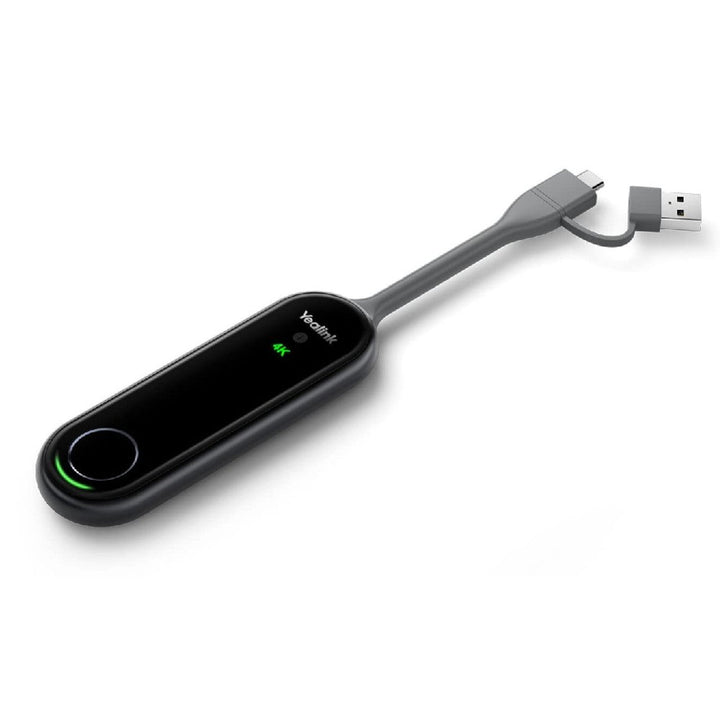


Yealink WPP30 UHD 4K Wireless Presentation Pod
PRODUCT DESCRIPTION
Yealink WPP30 UHD 4K Wireless Presentation Pod (1303112) - 2 Years Local Warranty
4K Wireless Screen Sharing for Meeting Rooms
The Yealink WPP30 is a plug-and-play wireless presentation pod that streams your laptop screen at up to 4K/30fps Ultra HD with no software installation and no drivers. Plug the pod into a full-featured USB-C port (or USB-A via the included adapter), press the START/STOP button, and your content appears on the room display — ideal for fast-moving meetings in Singapore offices where guests and staff need to present in seconds.
Wi-Fi 6 Wireless Link with Enterprise-Grade Encryption
Built on a Wi-Fi 6 module (802.11a/b/g/n/ac/ax, dual-band 2.4 GHz / 5 GHz, 2x2 MIMO), the WPP30 delivers a fast, stable and low-latency wireless link. AES encryption with WPA-PSK/WPA2-PSK security protects shared content from leakage or tampering, so confidential material stays inside the room.
Four-Screen Casting, Annotation and Reverse Control
Up to four devices can present simultaneously on the main screen for side-by-side comparison. The WPP30 supports duplicated and extended desktop sharing, annotation, whiteboard and reverse control, so with a compatible touch display you can operate the presenting laptop directly from the screen.
Wireless BYOM with Yealink Room Systems
Paired with Yealink MVC room systems, MeetingBar, MeetingEye or RoomCast, the WPP30 supports wireless BYOM (Bring Your Own Meeting): connect your own laptop to the room's existing conferencing equipment wirelessly, with no complicated configuration. Host your Teams or Zoom call from your laptop while using the room's AV — one pod, no cable clutter.
Why Buy the WPP30 from SourceIT Singapore
Every WPP30 ships with 2 years local Singapore warranty and a GST invoice, with stock and support from our Singapore office — a simple add-on that makes Yealink MeetingBar, MeetingBoard and RoomCast rooms BYOD-friendly for hybrid work.
Yealink WPP30 Datasheet — Technical Specifications
General
| Model | Yealink WPP30 Wireless Presentation Pod |
| Part Number | 1303112 |
| Product Type | 4K wireless presentation pod (plug-and-play, no software installation) |
| Warranty | 2 Years Local Warranty (Singapore) |
Video & Sharing
| Sharing Resolution | Up to 4K/30fps Ultra HD |
| Simultaneous Streams | Up to 4 devices sharing on the main screen at the same time |
| Desktop Sharing | Duplicated desktop and extended desktop modes |
| Collaboration | Annotation, whiteboard and reverse control (with compatible displays/systems) |
| BYOM | Wireless connection of your laptop to existing Yealink room equipment (Bring Your Own Meeting) |
Wireless
| Wi-Fi | Wi-Fi 6, 802.11a/b/g/n/ac/ax, 2x2 MIMO |
| Frequency Bands | 2.4 GHz / 5 GHz |
| Bluetooth | Bluetooth 5.0 |
| Security | WPA-PSK/WPA2-PSK, AES encryption |
Hardware & Physical
| Interface | 1 x full-featured USB Type-C (USB-C to USB-A adapter included) |
| Button | 1 x START/STOP button |
| LED Indicators | 4K/UHD, system status, system error |
| Input Power | 5V / 600mA |
| Power Consumption | 2.2 W (typical) |
| Dimensions | 220 x 38 x 16 mm |
| Weight | 75 g |
| Operating Conditions | -10 to 40 deg C, 0-95% humidity (non-condensing) |
Compatibility & Software Support
The WPP30 is a plug-and-play pod: no software or driver installation is required on the presenting laptop, and screen encoding runs on the pod itself. It works with Windows and macOS laptops via the full-featured USB-C port (USB-A via the included adapter).
| Yealink Room Systems | Pairs with Yealink MVC room systems, MeetingBar series, MeetingEye, MeetingBoard and RoomCast / RoomCast E2 for wireless content sharing and BYOM (feature availability varies by room system and firmware) |
| Meeting Platforms | Presents into rooms running Microsoft Teams or Zoom room systems; BYOM lets your own laptop meeting app use the room AV |
| Management | Firmware maintained via the paired Yealink room system / Yealink USB Connect ecosystem |
Note: advanced features (annotation, whiteboard, reverse control, BYOM) differ between Yealink room/video systems — check your room system's documentation for supported functions.
Package Contents & Wireless Presentation Ordering Information
- 1 x Yealink WPP30 Wireless Presentation Pod
- 1 x USB-C to USB-A adapter
| Yealink WPP30 | 1303112 — 4K/30fps Wi-Fi 6 wireless presentation pod, USB-C (this model) |
| Yealink RoomCast | 1303108 — wireless presentation system (HDMI receiver) for WPP pods, Miracast, AirPlay, Google Cast |
| Yealink RoomCast E2 | 1303214 — new-generation wireless presentation system, 4K60 HDMI output, Wi-Fi 6 |
| Yealink MShare | 1306032 — wired HDMI/USB content-sharing box for Yealink MVC rooms |
| Yealink MeetingBar A40 | Android video bar for Microsoft Teams Rooms — WPP30-compatible room system |
| Yealink MeetingBar A50 | Android video bar for Microsoft Teams Rooms — WPP30-compatible room system |
Datasheet & Downloads
Frequently Asked Questions — Yealink WPP30
What is the difference between the WPP30 and the older WPP20?
The WPP30 upgrades to Wi-Fi 6 (802.11ax) with a full-featured USB-C connector and shares at up to 4K/30fps, while the WPP20 is an earlier 1080p pod. The WPP30 also adds wireless BYOM with supported Yealink room systems.
Do I need to install software on my laptop to use the WPP30?
No. The WPP30 is plug-and-play: connect it to a full-featured USB-C port (or USB-A with the included adapter), press the button and share. Encoding is handled on the pod, so there is no driver installation and minimal CPU load on your laptop.
Which Yealink systems does the WPP30 work with?
Per Yealink, the WPP30 pairs with Yealink MVC room systems, MeetingBar (e.g. MeetingBar A40 and MeetingBar A50), MeetingEye, MeetingBoard and RoomCast / RoomCast E2. Available features vary by room system.
How many people can share at once, and can I annotate?
Up to four devices can present simultaneously on the main screen. Annotation, whiteboard and reverse control are supported with compatible Yealink systems and touch displays.
Should I choose the WPP30 or the wired Yealink MShare?
Choose the WPP30 for cable-free sharing and wireless BYOM in Yealink rooms; choose the wired Yealink MShare when you prefer a fixed HDMI cable presentation input for MVC rooms. Many rooms deploy both.
Does the WPP30 come with a local warranty in Singapore?
Yes. Every WPP30 sold by SourceIT comes with 2 years local Singapore warranty and a GST invoice.


