
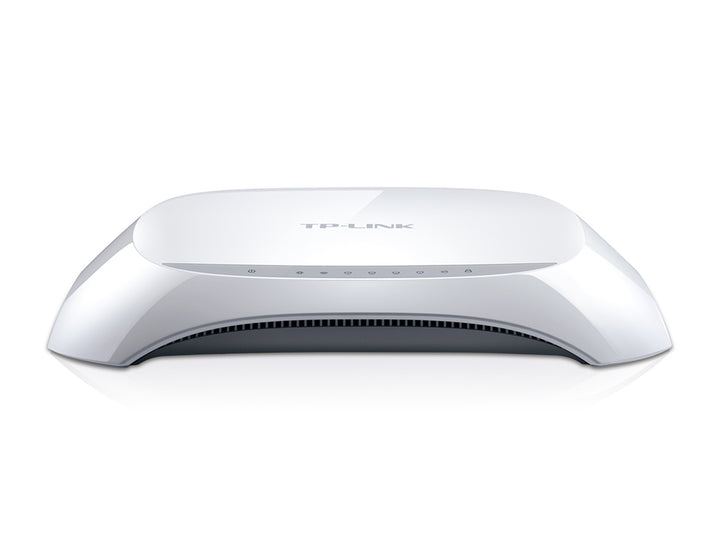


TP-Link TL-WR840N 300Mbps Wireless N Router
PRODUCT DESCRIPTION
TP-Link 300Mbps Wireless N Router (TL-WR840N) - 3 Years Local Warranty
The TL-WR840N is TP-Link's entry-level N300 wired-and-wireless router for a flat or a small office. It carries 300 Mbps of 2.4 GHz Wi-Fi 4 across two fixed antennas, one 10/100 Mbps WAN port and four 10/100 Mbps LAN ports, and it can be switched between Router, Access Point, Range Extender and WISP modes, so one box covers several common Singapore deployments.
N300 Wi-Fi Across Two Fixed Antennas
TP-Link rates the TL-WR840N at 300 Mbps on the 2.4 GHz band under IEEE 802.11n/b/g, and describes its coverage as suited to two-bedroom homes using two fixed antennas. That is a Wi-Fi 4 class radio built for browsing, email, messaging and standard-definition streaming rather than for a house full of 4K devices. For an HDB flat, a study, a shop counter or a site office where the requirement is a dependable connection rather than peak throughput, it does the job at the lowest cost in the TP-Link range.
Four Modes From One Device: Router, AP, Range Extender and WISP
The published working-mode list is Router, Access Point, Range Extender and WISP. In Router mode it terminates the broadband connection and runs NAT for the LAN. In Access Point mode it adds Wi-Fi to an existing wired network without a second DHCP server. Range Extender mode repeats an existing wireless signal into a dead zone, and WISP mode lets it take its uplink from a wireless ISP. That flexibility is what makes a low-cost unit worth keeping as a spare.
Five Fast Ethernet Ports for Wired Devices
The TL-WR840N publishes one 10/100 Mbps WAN port and four 10/100 Mbps LAN ports. The four LAN ports take a desktop, a printer, an IP camera or a set-top box directly, which keeps those devices off the wireless band and leaves more airtime for phones and tablets. Note the Fast Ethernet rating: these ports run at up to 100 Mbps, not Gigabit, so a fibre plan faster than 100 Mbps will be capped by this hardware. Ask us if you need a Gigabit model instead.
Guest Network, SPI Firewall and Parental Controls
Security is handled with an SPI firewall, access control, IP and MAC binding and an application layer gateway. Wi-Fi encryption covers WEP, WPA, WPA2 and WPA/WPA2-Enterprise, and one 2.4 GHz guest network can be published separately from the main SSID so visitors never touch the internal LAN. Parental controls cover URL filtering and time-of-day limits, letting a household put a curfew on a specific device. All of it is configured through the web interface or the TP-Link Tether app.
Setup and Day-to-Day Management
TP-Link publishes both webpage and Tether app management for this model. WAN connection types cover Dynamic IP, Static IP, PPPoE, PPTP and L2TP, which covers the common Singapore broadband handovers, and IPv4 and IPv6 are both supported. Other published software features include a DHCP server with address reservation, DDNS, QoS by device, NAT port forwarding, UPnP, DMZ and IPTV support. The unit runs on a 9 V, 0.6 A supply and measures 182 x 128 x 35 mm.
Ideal For
Singapore homes, rental units, small offices, shop counters and site offices on broadband plans up to 100 Mbps, and anyone who wants an inexpensive spare that can also be pressed into service as an access point or a range extender. Supplied by SourceIT with local Singapore warranty and a GST invoice.
TL-WR840N Datasheet — Technical Specifications
General
| Model | TL-WR840N |
| Official Product Name | 300Mbps Wireless N Router |
| Brand | TP-Link |
| Warranty | 3 Years Local Warranty (Singapore) |
Wireless
| Standards | IEEE 802.11n/b/g, 2.4 GHz (Wi-Fi 4) |
| Wi-Fi Speed | 300 Mbps (N300) |
| Wi-Fi Range | 2 Bedroom Houses — 2x Fixed Antennas |
| Working Modes | Router, Access Point, Range Extender, WISP |
| Guest Network | 1x 2.4 GHz |
| Wi-Fi Encryption | WEP, WPA, WPA2, WPA/WPA2-Enterprise |
Hardware
| Processor | Single-Core CPU |
| WAN Port | 1x 10/100 Mbps |
| LAN Ports | 4x 10/100 Mbps |
| Button | Reset Button |
| Power Supply | 9 V, 0.6 A |
| Dimensions (W x D x H) | 182 x 128 x 35 mm (7.2 x 5.0 x 1.4 in) |
Software
| Protocols | IPv4, IPv6 |
| WAN Types | Dynamic IP, Static IP, PPPoE, PPTP, L2TP |
| Network Security | SPI Firewall, Access Control, IP & MAC Binding, Application Layer Gateway |
| Management | Tether App, Webpage |
| Other Features | DHCP server with address reservation, DDNS, QoS by device, NAT port forwarding, UPnP, DMZ, IPTV, parental controls (URL filtering and time controls) |
Environment & Certification
| Certification | FCC, CE, RoHS |
| Operating Temperature | 0°C ~ 40°C (32°F ~ 104°F) |
| Storage Temperature | -40°C ~ 70°C (-40°F ~ 158°F) |
| Operating Humidity | 10% ~ 90% non-condensing |
| Storage Humidity | 5% ~ 90% non-condensing |
TP-Link does not publish a net weight or an LED row for this model, so neither is claimed here.
Compatibility & Software Support
| TP-Link Tether App | Supported — setup and management from iOS and Android |
| Web Management | Supported — browser-based configuration |
| Broadband Handover | Dynamic IP, Static IP, PPPoE, PPTP, L2TP |
| IPv6 | Supported |
| IPTV | Supported |
| Omada SDN | Not applicable — the TL-WR840N is a standalone consumer router and cannot be adopted into an Omada Controller |
Port speed is 10/100 Mbps throughout. On a broadband plan above 100 Mbps the wired ports will be the limiting factor — talk to us about a Gigabit model if that applies.
Package Contents & Ordering Information
What's in the Box
| Package Contents | Wi-Fi Router TL-WR840N, Power Adapter, RJ45 Ethernet Cable, Quick Installation Guide |
Ordering Information
| Model | TL-WR840N |
| SKU | TL-WR840N |
| Warranty | 3 Years Local Warranty (Singapore) |
Datasheet & Downloads
Frequently Asked Questions — TL-WR840N
Are the ports Gigabit?
No. TP-Link publishes one 10/100 Mbps WAN port and four 10/100 Mbps LAN ports, so wired throughput is capped at 100 Mbps. If your broadband plan is faster than that, ask us to recommend a Gigabit router instead.
How many antennas does it have?
Two fixed antennas, as published by TP-Link. They are not detachable and no antenna gain figure is published for this model.
Can it be used as an access point or a range extender?
Yes. TP-Link publishes Router, Access Point, Range Extender and WISP working modes for the TL-WR840N. The mode is selected in the web interface or the Tether app.
What warranty does SourceIT provide?
Three years local Singapore warranty, in line with TP-Link's published replacement-warranty policy. Every unit sold by SourceIT comes with a GST invoice.
Can SourceIT quote this in volume?
Yes. Send us the quantity and we will quote, with local warranty and support. Ask for the current lead time before committing to a project date.
We Also Recommend


