
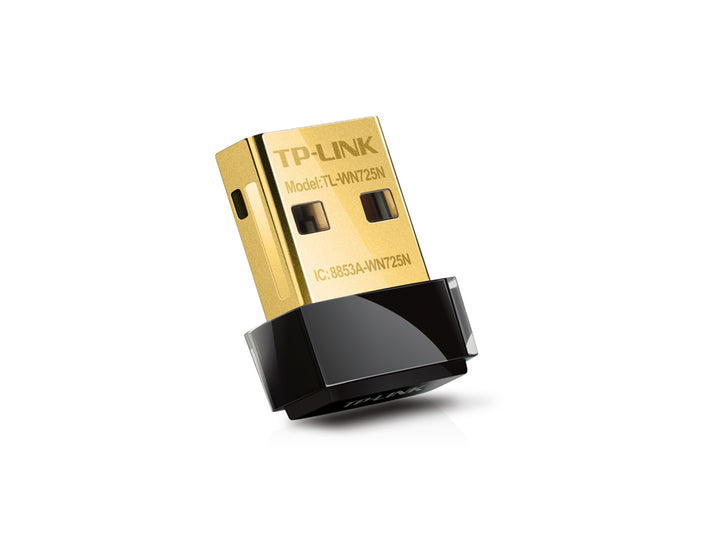


TP-Link TL-WN725N 150Mbps Wireless N Nano USB Adapter
Email sales@sourceit.com.sg or use Request for Quotation below and our team will confirm the latest price, availability and lead time.
PRODUCT DESCRIPTION
TP-Link 150Mbps Wireless N Nano USB Adapter (TL-WN725N) - 3 Years Local Warranty
The TL-WN725N is TP-Link's smallest wireless adapter: 18.6 x 15 x 7.1 mm and 2.1 g, barely larger than the USB connector itself. It adds 150 Mbps 2.4 GHz Wi-Fi to a laptop or desktop, sits flush enough to leave in permanently, and is one of the few adapters in this class to publish IEEE 802.1X support.
Nano Format — 2.1 Grams, Flush in the Port
TP-Link publishes a body of 18.6 x 15 x 7.1 mm weighing 2.1 g without packaging. That is small enough to leave in a laptop's USB port through a commute without worrying about snapping it against a bag, and small enough not to block the adjacent port on a crowded desktop. A status LED is published so the connection state is visible at a glance.
N150 on the 2.4 GHz Band
Published standards are IEEE 802.11b, 802.11g and 802.11n on 2.400-2.4835 GHz, with signal rates of up to 11 Mbps on 11b, 54 Mbps on 11g and 150 Mbps on 11n, through an internal antenna. N150 is a single-stream rate: enough for browsing, email, video calls and streaming, and appropriate to a machine used for office work rather than large file transfers. Transmission power is published at under 20 dBm.
IEEE 802.1X Support for Managed Networks
Published wireless security covers 64/128 WEP, WPA/WPA2, WPA-PSK/WPA2-PSK with TKIP and AES, and IEEE 802.1X. That last item is worth noting: 802.1X is the per-user authentication used on corporate, campus and school wireless networks, and it is not published for every adapter at this price. If your office network authenticates against a RADIUS server rather than a shared passphrase, this is the entry-level adapter that lists it.
Check the Operating System Before You Order
TP-Link's published system requirements for this model are Windows 8.1/8 (32/64-bit), Windows 7 (32/64-bit), Windows Vista (32/64-bit), Windows XP (32/64-bit), Mac OS X 10.7 to 10.10, and Linux. Windows 10 and Windows 11 are not on that published list, and neither are current macOS releases. Driver availability changes over time — check TP-Link's download page for your hardware version, linked below, or ask us before ordering for a modern machine.
Ideal For
Laptops needing a discreet spare or replacement adapter, older desktops in Singapore homes and small offices, and managed networks that require 802.1X authentication from an inexpensive adapter. Supplied by SourceIT with local Singapore warranty and a GST invoice.
TL-WN725N Datasheet — Technical Specifications
General
| Model | TL-WN725N |
| Official Product Name | 150Mbps Wireless N Nano USB Adapter |
| Brand | TP-Link |
| Warranty | 3 Years Local Warranty (Singapore) |
Hardware
| Interface | USB 2.0 |
| LED | Status |
| Dimensions | 18.6 x 15 x 7.1 mm (0.73 x 0.59 x 0.28 in) |
| Weight | 2.1 g / 0.07 oz (without packaging) |
| Antenna | Internal antenna |
Wireless
| Standards | IEEE 802.11b, IEEE 802.11g, IEEE 802.11n |
| Frequency | 2.400 - 2.4835 GHz |
| Signal Rate | 11b: up to 11 Mbps; 11g: up to 54 Mbps; 11n: up to 150 Mbps |
| Wireless Modes | Ad-Hoc / Infrastructure |
| Wireless Security | 64/128 WEP, WPA/WPA2, WPA-PSK/WPA2-PSK (TKIP/AES), IEEE 802.1X |
| Modulation | DBPSK, DQPSK, CCK, OFDM, 16-QAM, 64-QAM |
| Transmission Power | <20 dBm |
Environment & Certification
| Certification | CE, FCC, IC, RoHS |
| Operating Temperature | 0°C ~ 40°C |
| Storage Temperature | -40°C ~ 70°C |
| Operating Humidity | 10% ~ 90% non-condensing |
TP-Link publishes no antenna gain, WPS button or storage-humidity row for this model, so none is claimed here.
Compatibility & Software Support
| Windows | Windows 8.1/8 (32/64-bit), Windows 7 (32/64-bit), Windows Vista (32/64-bit), Windows XP (32/64-bit) — as published by TP-Link |
| macOS | Mac OS X 10.7 ~ 10.10 — as published by TP-Link |
| Linux | Supported |
| Host Port | USB 2.0 (works in a USB 3.0 port at USB 2.0 speeds) |
| Bands Supported | 2.4 GHz only — this adapter has no 5 GHz radio |
| Enterprise Authentication | IEEE 802.1X published — suitable for RADIUS-authenticated office and campus networks |
| Driver Source | Bundled Resource CD, or the TP-Link download page for your hardware version |
A driver installation is required; this adapter is not driverless. Windows 10, Windows 11 and current macOS releases are not on TP-Link's published system-requirements list for this model — check the download page for your hardware version, or ask us, before ordering for a modern machine.
Package Contents & Ordering Information
What's in the Box
| Package Contents | 150Mbps Wireless N Nano USB Adapter TL-WN725N, Resource CD, Quick Installation Guide |
No USB extension cable is listed in TP-Link's published package contents for this model. TP-Link still lists a Resource CD; current cartons may ship without one, and the same drivers are available from the download page linked below.
Ordering Information
| Model | TL-WN725N |
| SKU | TL-WN725N |
| Warranty | 3 Years Local Warranty (Singapore) |
Datasheet & Downloads
Frequently Asked Questions — TL-WN725N
Does it need drivers?
Yes. A driver installation is required, from the bundled Resource CD or from TP-Link's download page for your hardware version.
Will it work on Windows 11?
TP-Link's published system requirements for this model stop at Windows 8.1. Check the download page for your hardware version, or ask us, before ordering for a current machine.
How is it different from the TL-WN727N?
The TL-WN725N is the nano model: 18.6 x 15 x 7.1 mm, no USB extension cable, and it publishes IEEE 802.1X support. The TL-WN727N is a larger 69 x 21 x 9.5 mm stick with a WPS button and an extension cable in the box. Both are 150 Mbps on 2.4 GHz.
What warranty does SourceIT provide?
Three years local Singapore warranty, in line with TP-Link's published replacement-warranty policy. Every unit sold by SourceIT comes with a GST invoice.
Can SourceIT quote this in volume?
Yes. Send us the quantity and we will quote, with local warranty and support. Ask for the current lead time before committing to a rollout date.


