
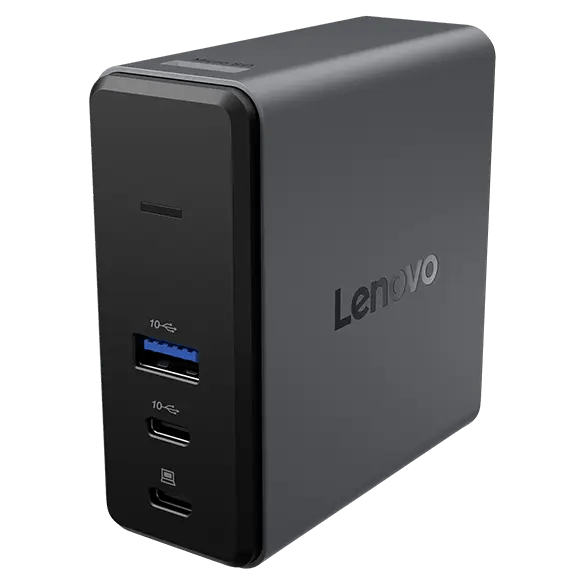


Lenovo X9 Charging GaN Dock
PRODUCT DESCRIPTION
Lenovo X9 Charging GaN Dock (40BD0065UK) - Local Warranty
A 65 W GaN Charger That Is Also a Small Dock
The Lenovo X9 Charging GaN Dock is one device doing two jobs. It is a 65 W gallium-nitride wall charger — it plugs straight into the mains, there is no separate power brick — and it carries HDMI 2.1 for a 4K display at 60 Hz, a second USB-C port, a USB-A port and a microSD card reader. For a bag that already has to carry a charger, it replaces the charger and the dongle with one 250-gram object.
60 W to the Laptop, 7.5 W and 4.5 W for Everything Else
Lenovo publishes 60 W maximum to the PC on the primary USB-C port from the dock's 65 W internal supply, with 7.5 W on the second USB-C and 4.5 W on the USB-A. So the laptop charges properly while a phone and a headset charge alongside it, from one wall socket.
250 Grams, 90% Recycled Body, Plastic-Free Packaging
It measures 33.5 x 80 x 80 mm and weighs 250 grams without the cable. Lenovo builds the body from 90% post-consumer recycled content and ships it in plastic-free FSC-certified packaging. A travel pouch, a holder and a 1.5 m mains cord are in the box alongside a 50 cm USB-C cable.
Two Things It Does Not Have
No Ethernet — Lenovo states this explicitly — and one video output only. If you need a wired network connection or two external screens on the road, the USB-C Dual Display Travel Dock in the ordering table below does both at a similar size.
Lenovo X9 Charging GaN Dock Datasheet — Technical Specifications
General
| Product | Lenovo X9 Charging GaN Dock |
| Part Number | 40BD0065UK |
| Type | Combined GaN power adapter and portable dock |
| Warranty | 3 years, customer-replaceable unit (CRU), per Lenovo's published datasheet |
| Local Warranty (Singapore) | Included with every SourceIT purchase, with GST invoice |
Power
| Type | Integrated GaN power module — the dock plugs directly into the mains; there is no separate AC adapter |
| Total Output | 65 W |
| Charging to the Laptop | 60 W maximum, on the primary USB-C port |
| Second USB-C Port | 7.5 W maximum |
| USB-A Port | 4.5 W maximum |
| Mains Cord | 1.5 m, supplied |
Connectivity
| Host Connection | USB-C, via the supplied 0.5 m detachable USB-C to USB-C cable |
| Video Output | 1 x HDMI 2.1 (TMDS) |
| Maximum Display | 4K at 60 Hz. There is one video port, so one external display |
| USB-C | 2 x USB-C Gen 2 (10 Gbps) — one rated 60 W, one rated 7.5 W |
| USB-A | 1 x USB-A 3.0, 4.5 W |
| Card Reader | TF (microSD) |
| Ethernet | None. Lenovo states "Ethernet: No" for this model |
| Audio Jack | None published by Lenovo for this model |
Physical & Environmental
| Dimensions | 33.5 x 80 x 80 mm (1.32 x 3.15 x 3.15 in) |
| Weight | From 250 g (0.55 lb), main body excluding cable |
| Recycled Content | 90% post-consumer recycled content in the body |
| Packaging | Plastic-free, FSC certified |
| Certifications | Not published by Lenovo for this model in any document we could reach |
Compatibility & Fit
Think of it as a charger first. Lenovo sells this in its Power Supply Dock category rather than alongside the USB-C docks, and that is the right way to read it. If you were going to carry a 65 W USB-C charger anyway, this one adds an HDMI output, a second USB-C port, a USB-A port and a microSD reader for very little extra bulk. If you need a dock and already have a charger, the USB-C Slim Travel Dock in the ordering table is lighter, cheaper and has more ports.
60 W is enough for most, not for all. A standard business ultrabook charges comfortably at 60 W. A 15- or 16-inch machine with a 100 W-class adapter will charge slowly, and under sustained load may hold steady or drift down rather than gain. Tell us the laptop model and we will say honestly whether 60 W is enough for how it is used.
Lenovo publishes a compatibility list. Its brochure names 24 compatible ThinkPad models. Any laptop that accepts USB-C Power Delivery and outputs DisplayPort Alt Mode will use it, but if a specific machine matters, ask us and we will check it against Lenovo's list before you order.
How to read a Lenovo dock part number. The four digits in the middle are the wattage of the AC adapter supplied in the box — 40AY0090 ships a 90 W adapter, 40AY0135 a 135 W one, 40B00300 a 300 W one. The power the dock actually delivers to your laptop is always lower, because the dock keeps some for itself and its ports. Confusing the two is the single most common mistake made when buying these, so this page states both figures separately and never lets the part number stand in for the charging figure.
Package Contents & Lenovo Docking Ordering Information
In the box, per Lenovo PSREF:
- Lenovo X9 Charging GaN Dock
- 1 x USB-C to USB-C cable (50 cm)
- 1 x AC power cord (1.5 m)
- Holder
- Travel pouch for the cable and cord
- Warranty document and quick start manual
There is no separate power adapter because the dock is the power adapter. Plug the mains cord into the dock and the dock into the wall.
Lenovo Docking Station Ordering Information
| 40BD0065UK (this listing) | Lenovo X9 Charging GaN Dock — 65 W GaN charger with HDMI 2.1, 2 x USB-C, USB-A, microSD |
| 4X11N40212 | Lenovo USB-C Slim Travel Dock — 110 g, HDMI 2.1 4K60, 4 USB ports, SD reader, no adapter |
| 40B90000WW | Lenovo USB-C Dual Display Travel Dock — 137 g, dual 4K60, gigabit Ethernet — no adapter |
| 40B90100UK | Lenovo USB-C Dual Display Travel Dock with Adapter — The same dock with a 100 W adapter included |
| 40AU0065UK | Lenovo USB-C Mini Dock — HDMI + VGA, gigabit Ethernet, 45 W, 1-year warranty |
| 40AY0090UK | Lenovo ThinkPad Universal USB-C Dock — 3 x 4K60, GbE, 90 W adapter — charges at 65 W |
| 40AY0135UK | Lenovo ThinkPad Universal USB-C Dock (135 W Adapter) — The same dock with the 135 W adapter — charges at 100 W |
| 40AF0135UK | Lenovo ThinkPad Hybrid USB-C with USB-A Dock — Connects over USB-C or USB-A, 2 x 4K60, 90 W |
| 40B00135UK | Lenovo ThinkPad Universal Thunderbolt 4 Dock — 4 x 4K60 or 1 x 8K30, GbE, 100 W, 135 W adapter |
| 40B00300UK | Lenovo ThinkPad Thunderbolt 4 Workstation Dock — 230 W to a mobile workstation, 300 W adapter, split cable |
| 40ANY230UK | Lenovo ThinkPad Thunderbolt 3 Workstation Dock Gen 2 — Previous generation — 170 W, 230 W adapter, 4 displays |
| 40BN0135UK | Lenovo ThinkPad Universal USB-C Smart Dock, ThinkSmart Edition — Meeting-room dock — Azure Sphere managed, mounting kit, 5 m HDMI |
Datasheet & Downloads
Lenovo publishes no PSREF specification sheet for its docking accessories. The document linked above is Lenovo's own datasheet or product brochure for this part number and is the source for every figure on this page.
Frequently Asked Questions — Lenovo X9 Charging GaN Dock
Is it a charger or a dock?
Both, and Lenovo's own words are that it "combines the best of both worlds — power and connectivity — all in a single, elegant device". Practically it is a 65 W GaN wall charger that also gives you HDMI 2.1 at 4K60, a second USB-C port, a USB-A port and a microSD reader. Lenovo files it under Power Supply Docks, not USB Docks.
Does it have an Ethernet port?
No. Lenovo states "Ethernet: No" explicitly. If you need a wired network connection while travelling, the USB-C Dual Display Travel Dock in the ordering table has gigabit Ethernet at a similar size and weight.
Can it run two monitors?
No — there is one HDMI output, so one external display at up to 4K 60 Hz. For two screens on the road, the USB-C Dual Display Travel Dock drives dual 4K at 60 Hz.
Will 60 W charge my laptop?
For a standard business ultrabook, yes. For a larger machine that ships with a 100 W or 135 W adapter, it will charge but slowly, and may not keep up under heavy load. Send us the model and we will tell you before you buy.
Does it come with a power brick?
No, and that is the point — the dock is the power supply. It has a GaN charging module built in and plugs into the wall with the supplied 1.5 m mains cord.
What warranty applies in Singapore?
Lenovo publishes a 3-year warranty for this product. Note that our earlier version of this page said one year, which was wrong. Every unit SourceIT sells also carries local Singapore warranty support and a GST invoice.


