
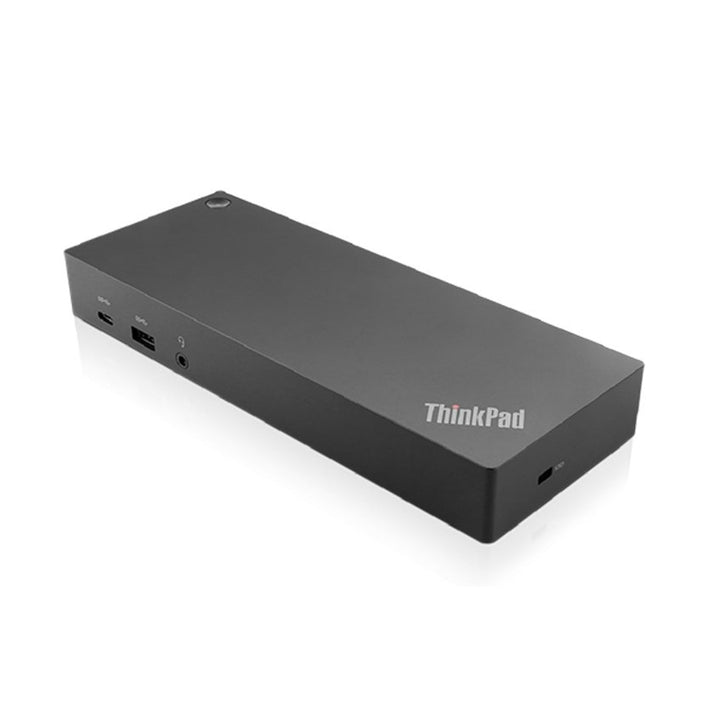


Lenovo ThinkPad Hybrid USB-C with USB-A Dock
PRODUCT DESCRIPTION
Lenovo ThinkPad Hybrid USB-C with USB-A Dock (40AF0135UK) - Local Warranty
One Dock for a Mixed Fleet — USB-C Laptops and USB-A Laptops Both
The ThinkPad Hybrid USB-C with USB-A Dock exists for offices that have not finished migrating. It connects over USB-C or, using the USB-C to USB-A adapter supplied in the box, over a plain USB-A port. Lenovo's own framing is "one dock for all laptops" — port replication for machines that predate USB-C, on the same dock the newer machines use.
Four Video Connectors, Two Displays
There are two DisplayPort 1.4 and two HDMI 2.0 connectors on the back — four physical ports — but Lenovo publishes a maximum of two displays at 4K 60 Hz. The extra connectors are there so you can use whichever cable the monitor in front of you happens to have, not so you can run four screens. Our previous listing implied otherwise.
90 W Charging, From a 135 W Adapter
Lenovo publishes 90 W maximum charging to the laptop over the USB-C connection, from the 135 W ThinkPad Slim Tip adapter in the box. Gigabit Ethernet, five USB-A ports and a downstream USB-C port complete the desk.
Lenovo Publishes an Actual Tested-Systems List
Unusually, Lenovo names the non-Lenovo machines it has tested this dock against: HP Elite 840 G10, Elite Dragonfly G4 and G3, Elite 645 G10, Pro 440 G10 and Elite 845 G10; Dell Latitude 9330, 9430, 7440, 5440 and 7330, XPS 13 Plus 9320 and XPS 13 9310; and Apple MacBook Pro 13-inch (2022 M2 and M1) and MacBook Air 13-inch (2022 M2 and M1). If you run a mixed fleet, that list is worth reading.
Lenovo ThinkPad Hybrid USB-C with USB-A Dock Datasheet — Technical Specifications
General
| Product | Lenovo ThinkPad Hybrid USB-C with USB-A Dock |
| Part Number | 40AF0135UK |
| Type | Hybrid USB-C / USB-A docking station |
| Warranty | 3 years, customer-replaceable unit (CRU), per Lenovo's published datasheet |
| Local Warranty (Singapore) | Included with every SourceIT purchase, with GST invoice |
Connectivity
| Host Connection | USB-C, via a supplied 1 m cable, plus a USB-C to USB-A dongle for laptops without a USB-C port |
| Protocols | Lenovo states the dock works with laptops supporting industry-standard USB-C Alt Mode, DisplayLink or Thunderbolt protocols through their USB-C port |
| Video Connectors | 2 x DisplayPort 1.4 and 2 x HDMI 2.0 — four physical connectors |
| Maximum Displays | Two displays at 4K 60 Hz. The four connectors give you a choice of cable, not four screens |
| USB-A | 3 x USB-A 3.2 Gen 2 (10 Gbps), one with always-on charging; 2 x USB 2.0 |
| USB-C (downstream) | 1 x USB-C, 10 Gbps, 5 V / 3 A (15 W) |
| Always-On Charging Wattage | Not published by Lenovo |
| Ethernet | 1 x gigabit Ethernet (RJ45) |
| Audio Jack | 1 x 3.5 mm combo |
| MAC Address Pass-Through | Supported |
| Wake-on-LAN | Supported |
| PXE Boot | Supported |
| Security | 1 x Kensington lock slot and 1 x NanoSaver lock slot |
Power
| AC Adapter Supplied | 135 W ThinkPad Slim Tip |
| Charging to the Laptop | 90 W maximum, over the USB-C connection |
| Charging Over the USB-A Connection | Not published by Lenovo. Lenovo qualifies its 90 W figure as being over USB-C and states nothing about the USB-A path, so we make no claim. Assume the laptop needs its own charger when connected over USB-A, and ask us if this is decisive |
Physical
| Dimensions | 210 x 80 x 30 mm (8.27 x 3.15 x 1.18 in) |
| Weight | Not published by Lenovo for this model |
| Certifications | Not published in the Lenovo datasheets we could reach for this model |
| Operating Systems | Windows 10, Windows 11, macOS 13.0, macOS 14.0, Linux Ubuntu 22.04, Chrome OS |
| Recycled Content | 30% post-consumer recycled plastic |
Compatibility & Fit
What "hybrid" means, and what Lenovo does and does not publish about it. The dock's native connection is USB-C. A USB-C to USB-A adapter is supplied so the same dock can serve a laptop that has no USB-C port at all, which Lenovo describes as delivering "port replication to non USB-C laptops". The mechanism is DisplayLink, which Lenovo names explicitly among the supported protocols — that is what carries video over a plain USB data link.
Here is the honest gap. Lenovo publishes no per-feature list of what changes on the USB-A connection. Specifically, it does not state whether the laptop charges at all over USB-A, what the video resolution or refresh limit is on that path, what the data rate is, or whether MAC address pass-through, Wake-on-LAN and PXE boot survive. The only charging figure Lenovo gives is 90 W, qualified as being over the USB-C connection. We are not going to fill those gaps with reasonable-sounding guesses on a product where the whole point is the second connection type. If you are buying this dock specifically for USB-A laptops, contact us first and we will get the behaviour confirmed by Lenovo in writing before you order.
Four connectors, two screens. Worth restating because the port count invites the wrong conclusion: two DisplayPort and two HDMI connectors, and a published maximum of two simultaneous displays. Use whichever pair matches your monitors' inputs.
How to read a Lenovo dock part number. The four digits in the middle are the wattage of the AC adapter supplied in the box — 40AY0090 ships a 90 W adapter, 40AY0135 a 135 W one, 40B00300 a 300 W one. The power the dock actually delivers to your laptop is always lower, because the dock keeps some for itself and its ports. Confusing the two is the single most common mistake made when buying these, so this page states both figures separately and never lets the part number stand in for the charging figure.
Will it work with my laptop? Lenovo's own wording is that its USB-C and Thunderbolt docks "function with laptops that support industry standard USB-C Alt-Mode, DisplayLink or Thunderbolt protocols through their Type C port". In practice that means most business laptops of the last several years, Lenovo or otherwise. What Lenovo qualifies is the management features: MAC address pass-through, Wake-on-LAN, PXE boot and the mirrored power button work on most ThinkPads and, in Lenovo's words, "may not be available on certain other Lenovo laptops or non-Lenovo branded laptop systems". If those matter to your deployment — and for a managed fleet with imaging over the network they usually do — tell us the laptop models and we will check them before you order.
The tested-systems list is genuinely useful. Lenovo names specific HP, Dell and Apple machines it has validated this dock against — something it does not do for most of its docking range. Lenovo does add that "any changes to laptop hardware or software may result in changes to functionality or compatibility", which is fair. If your fleet is mixed, send us the models and we will check them against that list.
Package Contents & Lenovo Docking Ordering Information
In the box, per Lenovo PSREF:
- Hybrid dock
- USB-C cable with USB-C to USB-A dongle
- 135 W AC adapter
- Power cord
- Poster
Lenovo Docking Station Ordering Information
| 40BD0065UK | Lenovo X9 Charging GaN Dock — 65 W GaN charger with HDMI 2.1, 2 x USB-C, USB-A, microSD |
| 4X11N40212 | Lenovo USB-C Slim Travel Dock — 110 g, HDMI 2.1 4K60, 4 USB ports, SD reader, no adapter |
| 40B90000WW | Lenovo USB-C Dual Display Travel Dock — 137 g, dual 4K60, gigabit Ethernet — no adapter |
| 40B90100UK | Lenovo USB-C Dual Display Travel Dock with Adapter — The same dock with a 100 W adapter included |
| 40AU0065UK | Lenovo USB-C Mini Dock — HDMI + VGA, gigabit Ethernet, 45 W, 1-year warranty |
| 40AY0090UK | Lenovo ThinkPad Universal USB-C Dock — 3 x 4K60, GbE, 90 W adapter — charges at 65 W |
| 40AY0135UK | Lenovo ThinkPad Universal USB-C Dock (135 W Adapter) — The same dock with the 135 W adapter — charges at 100 W |
| 40AF0135UK (this listing) | Lenovo ThinkPad Hybrid USB-C with USB-A Dock — Connects over USB-C or USB-A, 2 x 4K60, 90 W |
| 40B00135UK | Lenovo ThinkPad Universal Thunderbolt 4 Dock — 4 x 4K60 or 1 x 8K30, GbE, 100 W, 135 W adapter |
| 40B00300UK | Lenovo ThinkPad Thunderbolt 4 Workstation Dock — 230 W to a mobile workstation, 300 W adapter, split cable |
| 40ANY230UK | Lenovo ThinkPad Thunderbolt 3 Workstation Dock Gen 2 — Previous generation — 170 W, 230 W adapter, 4 displays |
| 40BN0135UK | Lenovo ThinkPad Universal USB-C Smart Dock, ThinkSmart Edition — Meeting-room dock — Azure Sphere managed, mounting kit, 5 m HDMI |
Datasheet & Downloads
- Lenovo ThinkPad Hybrid USB-C with USB-A Dock datasheet (PDF)
- Lenovo ThinkPad Docking Solutions comparison brochure (PDF)
Lenovo publishes no PSREF specification sheet for its docking accessories. The document linked above is Lenovo's own datasheet or product brochure for this part number and is the source for every figure on this page.
Frequently Asked Questions — Lenovo ThinkPad Hybrid USB-C with USB-A Dock
What does "hybrid" actually mean?
It means the dock can connect to a laptop over USB-C or, using the adapter supplied in the box, over USB-A — so one dock serves both new and older machines. Lenovo calls it "one dock for all laptops" and names DisplayLink among the supported protocols, which is what carries video over a plain USB link.
What do I lose when I connect over USB-A instead of USB-C?
Lenovo does not publish an answer, and we are not going to invent one. Lenovo's only charging figure — 90 W — is explicitly qualified as being over the USB-C connection, which strongly suggests USB-A does not charge the laptop, but Lenovo never says so. Video limits, data rate and whether the management features survive on USB-A are all unpublished. If you are buying this for USB-A machines, ask us and we will get it confirmed by Lenovo before you order.
How many monitors can it run?
Two, at 4K 60 Hz. There are four video connectors — two DisplayPort 1.4 and two HDMI 2.0 — but that is so you can use whichever cable your monitors take, not so you can run four screens. Our earlier page was ambiguous about this.
How much does it charge the laptop?
90 W maximum over the USB-C connection, from the 135 W Slim Tip adapter in the box. That covers most business laptops including many 15-inch machines.
Does it work with a MacBook or a Dell?
Lenovo publishes an actual tested list for this dock: HP Elite 840 G10, Elite Dragonfly G4 and G3, Elite 645 G10, Pro 440 G10, Elite 845 G10; Dell Latitude 9330, 9430, 7440, 5440, 7330, XPS 13 Plus 9320, XPS 13 9310; and Apple MacBook Pro 13-inch (2022 M2, M1) and MacBook Air 13-inch (2022 M2, M1). It also supports macOS 13 and 14, Ubuntu 22.04 and ChromeOS. Send us your models and we will check them.
What warranty applies in Singapore?
Lenovo publishes a 3-year warranty for this dock. Note that our earlier version of this page said one year, which was wrong. Every unit SourceIT sells also carries local Singapore warranty support and a GST invoice.


