
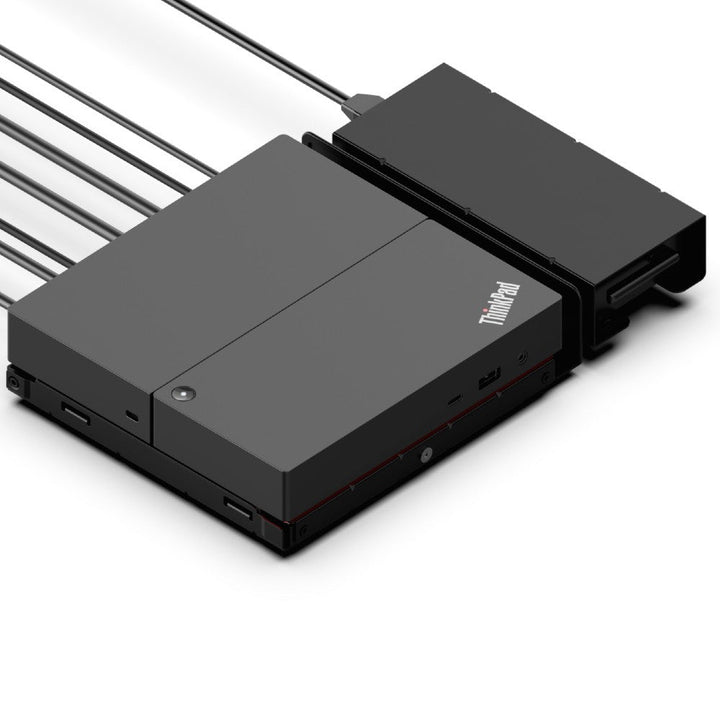


Lenovo ThinkPad Dock ThinkSmart Edition (40BN)
PRODUCT DESCRIPTION
Lenovo ThinkPad Universal USB-C Smart Dock, ThinkSmart Edition (40BN0135UK) - Local Warranty
A Dock Built for Meeting Rooms, Not Desks
Lenovo's headline for this product is "turn your laptop into a meeting room solution", and it is positioned as "a better way to build out your BYOD rooms". The ThinkSmart Edition takes Lenovo's Universal USB-C Smart Dock and adds the things a room needs and a desk does not: a mounting bracket with cable management and a power-supply holder, a 2 m USB-C host cable and a 5 m HDMI cable long enough to reach a wall-mounted display.
Managed From the Cloud, on Microsoft Azure Sphere
This is the real differentiator. The dock runs on Microsoft Azure Sphere IoT and ships with ThinkSmart Manager Basic preloaded, giving IT "cloud-based visibility into the status of BYOD rooms" and "remote visibility into room status and utilization". A standard dock tells you nothing about the room it is in; this one does.
Three Displays, Gigabit Ethernet and Six USB Ports
Three DisplayPort 1.4 outputs and one HDMI 2.0, supporting up to three displays at up to 4K. Plus gigabit Ethernet with PXE boot, Wake-on-LAN and MAC address pass-through, three USB-A 3.2 Gen 2 ports, two USB 2.0, a downstream USB-C and a stereo and microphone combo jack. Lenovo publishes it as ENERGY STAR certified.
Two Things We Are Not Going to Claim
Lenovo publishes no warranty term in this dock's datasheet, unlike the rest of its docking range — so this page shows the local warranty we provide and does not invent a manufacturer figure. And Lenovo makes no Microsoft Teams Rooms or Zoom certification claim for it; what Lenovo says is that it offers "UC interoperability" with Teams, Zoom, Webex and Google Meet. Those are different statements and we are giving you Lenovo's.
Lenovo ThinkPad Universal USB-C Smart Dock, ThinkSmart Edition Datasheet — Technical Specifications
General
| Product | Lenovo ThinkPad Universal USB-C Smart Dock, ThinkSmart Edition |
| Part Number | 40BN0135UK |
| Type | Managed USB-C docking station for meeting rooms |
| Manufacturer Warranty | Not published by Lenovo in this product's datasheet. Every other dock in this range publishes a term; this one does not. Ask us and we will get it confirmed by Lenovo before you order |
| Local Warranty (Singapore) | Included with every SourceIT purchase, with GST invoice |
Room Management
| Platform | Microsoft Azure Sphere IoT |
| Software | ThinkSmart Manager Basic, preloaded |
| What It Gives IT | Cloud-based visibility into the status of BYOD rooms, and remote visibility into room status and utilisation |
| UC Platforms | Lenovo states UC interoperability with Microsoft Teams, Zoom, Webex, Google Meet and others |
| Microsoft Teams Rooms / Zoom Certification | Not published by Lenovo. Interoperability and certification are different claims, and Lenovo makes only the first |
Connectivity
| Host Connection | USB-C DisplayPort Alt Mode, via a supplied 2 m USB-C cable |
| Host Port Compatibility | USB-C 3, USB4, Thunderbolt 3, Thunderbolt 4 |
| Video Outputs | 3 x DisplayPort 1.4 and 1 x HDMI 2.0. Lenovo notes one DisplayPort is covered when the mounting bracket is fitted |
| Maximum Displays | Up to three displays, up to 4K. Lenovo publishes no refresh rate for the three-display case in this datasheet, so we quote none |
| USB-A | 3 x USB-A 3.2 Gen 2 (10 Gbps), one with always-on charging; 2 x USB-A 2.0 |
| USB-C (downstream) | 1 x USB-C, 10 Gbps, 5 V / 3 A |
| Ethernet | 1 x RJ45, with PXE boot, Wake-on-LAN and MAC address pass-through |
| Audio Jack | 1 x stereo and microphone combo |
| Security | 1 x Kensington lock slot and 1 x NanoSaver lock slot |
Power
| AC Adapter Supplied | 135 W, with power cord |
| Charging to the Laptop | 60 W |
Physical
| Dimensions | 257.7 x 165.9 x 49.5 mm (10.15 x 6.53 x 1.95 in) — substantially larger than a desk dock |
| Weight | 1.35 kg (2.97 lb) |
| Certifications | ENERGY STAR. Lenovo publishes no fuller regulatory list in this datasheet |
| Operating Systems | Windows 10 and above |
Compatibility & Fit
Buy this for a room, not a desk. Everything that distinguishes it points the same way: a 2-metre host cable rather than a desk-length one, a 5-metre HDMI cable to reach a wall-mounted screen, a mounting bracket with cable management and a holder for the power supply, and a cloud management layer that reports on room status and utilisation. On a desk you are paying for capabilities you will never use; in a BYOD meeting room, they are the whole product.
What the management layer actually does. The dock runs on Microsoft Azure Sphere and ships with ThinkSmart Manager Basic. For an IT team responsible for a floor of huddle rooms, that means knowing which rooms are in use, which docks are online and which room has a problem — without walking the floor. A conventional dock is invisible to IT once it is installed.
Charging is 60 W, which is lower than the 135 W adapter suggests. That is normal for a dock — the adapter feeds the dock, its three display outputs and its six USB ports as well as the laptop. 60 W runs a business ultrabook. For a room where someone will plug in a large mobile workstation and expect it to charge, it is not enough, and we would rather say so.
The Teams and Zoom question, answered precisely. Lenovo does not publish a Microsoft Teams Rooms or Zoom certification for this dock. What Lenovo publishes is UC interoperability — that it works with Teams, Zoom, Webex and Google Meet. If your procurement requires a certified device, this one does not carry that certification and we will not imply that it does. Ask us and we will point you at what is certified.
On the warranty. Lenovo's datasheet for this product carries no warranty term at all, where every other dock in this range publishes one. Rather than borrow a figure from a sibling product, this page states only the local Singapore warranty and GST invoice that come with every unit we sell, and we will get Lenovo's term in writing for you before you order.
One correction. Our previous version of this page published a GTIN that is not a valid barcode — it fails its own check digit and appears to have been a placeholder. It has been removed rather than replaced with another guess.
How to read a Lenovo dock part number. The four digits in the middle are the wattage of the AC adapter supplied in the box — 40AY0090 ships a 90 W adapter, 40AY0135 a 135 W one, 40B00300 a 300 W one. The power the dock actually delivers to your laptop is always lower, because the dock keeps some for itself and its ports. Confusing the two is the single most common mistake made when buying these, so this page states both figures separately and never lets the part number stand in for the charging figure.
Will it work with my laptop? Lenovo's own wording is that its USB-C and Thunderbolt docks "function with laptops that support industry standard USB-C Alt-Mode, DisplayLink or Thunderbolt protocols through their Type C port". In practice that means most business laptops of the last several years, Lenovo or otherwise. What Lenovo qualifies is the management features: MAC address pass-through, Wake-on-LAN, PXE boot and the mirrored power button work on most ThinkPads and, in Lenovo's words, "may not be available on certain other Lenovo laptops or non-Lenovo branded laptop systems". If those matter to your deployment — and for a managed fleet with imaging over the network they usually do — tell us the laptop models and we will check them before you order.
Package Contents & Lenovo Docking Ordering Information
In the box, per Lenovo PSREF:
- ThinkPad Universal USB-C Smart Dock, ThinkSmart Edition
- 135 W power adapter and power cord
- 2 m USB-C cable
- 5 m HDMI cable
- Mounting bracket with cable management and power-supply holder
- ThinkSmart Manager Basic (preloaded)
- Warranty and setup poster
The long cables and the mounting bracket are what make this a room product rather than a desk one — a standard ThinkPad dock ships neither.
Lenovo Docking Station Ordering Information
| 40BD0065UK | Lenovo X9 Charging GaN Dock — 65 W GaN charger with HDMI 2.1, 2 x USB-C, USB-A, microSD |
| 4X11N40212 | Lenovo USB-C Slim Travel Dock — 110 g, HDMI 2.1 4K60, 4 USB ports, SD reader, no adapter |
| 40B90000WW | Lenovo USB-C Dual Display Travel Dock — 137 g, dual 4K60, gigabit Ethernet — no adapter |
| 40B90100UK | Lenovo USB-C Dual Display Travel Dock with Adapter — The same dock with a 100 W adapter included |
| 40AU0065UK | Lenovo USB-C Mini Dock — HDMI + VGA, gigabit Ethernet, 45 W, 1-year warranty |
| 40AY0090UK | Lenovo ThinkPad Universal USB-C Dock — 3 x 4K60, GbE, 90 W adapter — charges at 65 W |
| 40AY0135UK | Lenovo ThinkPad Universal USB-C Dock (135 W Adapter) — The same dock with the 135 W adapter — charges at 100 W |
| 40AF0135UK | Lenovo ThinkPad Hybrid USB-C with USB-A Dock — Connects over USB-C or USB-A, 2 x 4K60, 90 W |
| 40B00135UK | Lenovo ThinkPad Universal Thunderbolt 4 Dock — 4 x 4K60 or 1 x 8K30, GbE, 100 W, 135 W adapter |
| 40B00300UK | Lenovo ThinkPad Thunderbolt 4 Workstation Dock — 230 W to a mobile workstation, 300 W adapter, split cable |
| 40ANY230UK | Lenovo ThinkPad Thunderbolt 3 Workstation Dock Gen 2 — Previous generation — 170 W, 230 W adapter, 4 displays |
| 40BN0135UK (this listing) | Lenovo ThinkPad Universal USB-C Smart Dock, ThinkSmart Edition — Meeting-room dock — Azure Sphere managed, mounting kit, 5 m HDMI |
Datasheet & Downloads
Lenovo publishes no PSREF specification sheet for its docking accessories. The document linked above is Lenovo's own datasheet or product brochure for this part number and is the source for every figure on this page.
Frequently Asked Questions — Lenovo ThinkPad Universal USB-C Smart Dock, ThinkSmart Edition
How is this different from a normal ThinkPad dock?
Three things. It is managed — it runs on Microsoft Azure Sphere and ships with ThinkSmart Manager Basic, giving IT cloud visibility into room status and utilisation. It ships room-length cables: 2 m for the host and 5 m for HDMI, against desk-length cables on a normal dock. And it includes a mounting bracket with cable management and a power-supply holder for installing under a table or behind a display. The port and power hardware is essentially Lenovo's Universal USB-C Smart Dock.
Is it certified for Microsoft Teams Rooms or Zoom?
Lenovo publishes no such certification for this dock. What Lenovo does state is UC interoperability with Teams, Zoom, Webex, Google Meet and others — which means it works with them, not that it is certified. If a certified device is a procurement requirement, tell us and we will point you at products that carry the certification.
How much does it charge the laptop?
60 W, from the 135 W adapter. The adapter also feeds the dock's three display outputs and six USB ports, which is why the charging figure is lower than the adapter rating. 60 W runs a business ultrabook comfortably; a large mobile workstation will not keep up.
How many displays can it drive?
Up to three, at up to 4K. Note that Lenovo publishes no refresh rate for the three-display case in this datasheet, so we do not quote one. Note also Lenovo's own footnote: one of the three DisplayPort outputs is covered when the mounting bracket is fitted, so plan which ports you will use before installation.
What warranty does Lenovo give it?
Lenovo does not publish a warranty term for this product — its datasheet omits the field that every other dock in the range carries. Rather than assume it matches its siblings, we will get the answer from Lenovo in writing before you order. Every unit SourceIT sells carries local Singapore warranty support and a GST invoice regardless.
Should I use it on a desk?
You can, but you would be paying for a cloud management layer, a mounting bracket and two long cables that a desk does not need. For a desk, the ThinkPad Universal USB-C Dock or the Thunderbolt 4 Dock in the ordering table do the same job for less. This one earns its price in a meeting room.


