
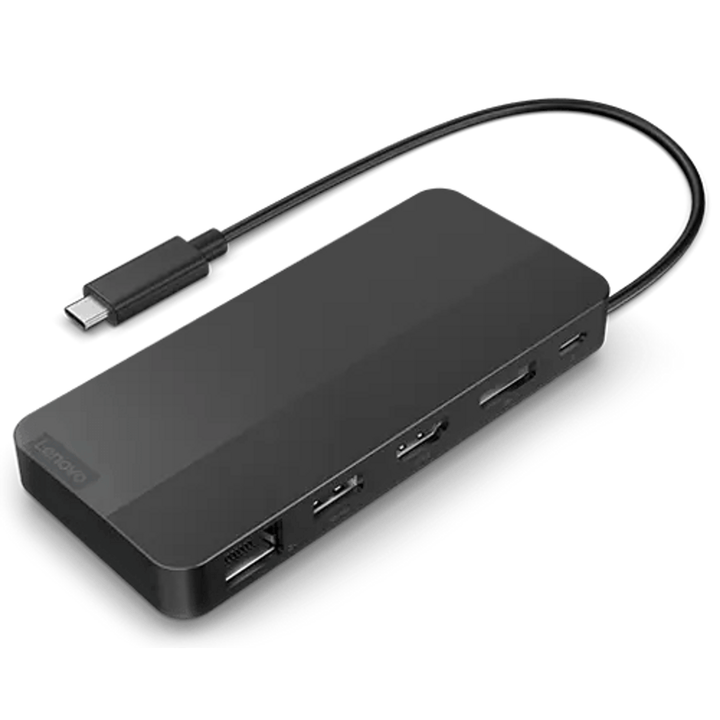


Lenovo USB-C Dual Display Travel Dock
PRODUCT DESCRIPTION
Lenovo USB-C Dual Display Travel Dock (40B90000WW) - Local Warranty
Two 4K Displays and Gigabit Ethernet, at 137 Grams
The Lenovo USB-C Dual Display Travel Dock puts HDMI 2.1 and DisplayPort 1.4 — two independent 4K displays at 60 Hz — plus gigabit Ethernet and three 10 Gbps USB ports into a 137-gram body measuring 120 x 55 x 20 mm. It is the smallest thing we sell that gives a laptop a genuine two-screen wired desk.
This Is the "no adapter" Version
Lenovo sells this dock as two part numbers. This one, 40B90000WW, is the dock on its own with no power adapter — the right choice if you already carry a USB-C charger. The other, 40B90100UK, is the identical dock supplied with a 100 W adapter. Ports, video, size, weight and warranty are the same on both; the other listing is linked in the ordering table below.
Read the Charging Ladder Carefully
Lenovo publishes charging as a function of the adapter attached: 100 W to the laptop from a 135 W or 140 W adapter; 65 W from a 100 W adapter; 45 W from a 65 W adapter; and no charging at all from anything under 45 W. Whatever charger you already own decides which rung you land on. If you want the full 100 W you need a 135 W or 140 W adapter.
Gigabit Ethernet Is the Feature That Justifies It
A wired network connection is the one thing hotel Wi-Fi and conference Wi-Fi cannot give you, and it is what separates this dock from the lighter Slim Travel Dock. Add two 4K screens and this is a full desk that lives in a jacket pocket.
Lenovo USB-C Dual Display Travel Dock Datasheet — Technical Specifications
General
| Product | Lenovo USB-C Dual Display Travel Dock |
| Part Number | 40B90000WW |
| Type | Compact USB-C travel dock |
| Warranty | 3 years, customer-replaceable unit (CRU), per Lenovo's published datasheet |
| Local Warranty (Singapore) | Included with every SourceIT purchase, with GST invoice |
Connectivity
| Host Connection | Integrated 47 cm USB-C cable |
| Video Outputs | 1 x HDMI 2.1 and 1 x DisplayPort 1.4 |
| Maximum Displays | Two displays, dual 4K at 60 Hz |
| USB-A | 1 x USB-A 3.2 Gen 2 (10 Gbps) |
| USB-C (data) | 2 x USB-C 3.2 Gen 2 (10 Gbps), one with always-on charging at 5 V / 2.4 A |
| USB-C (power) | 1 x USB-C, power only |
| Ethernet | 1 x RJ45, 10/100/1000 Mbps, plug and play |
| Audio Jack | None |
Power
| AC Adapter | None supplied. Use your own USB-C charger, or run the dock on bus power from the laptop |
| Maximum Charging to the Laptop | 100 W, with a 135 W or 140 W adapter |
| With a 100 W adapter | 65 W to the laptop |
| With a 65 W adapter | 45 W to the laptop |
| With an adapter under 45 W | No charging. Lenovo states this explicitly |
Physical & Environmental
| Dimensions | 120 x 55 x 20 mm (4.7 x 2.2 x 0.8 in) |
| Weight | From 137 g (0.3 lb), dock only |
| Cable | 47 cm, captive |
| Colour | Eclipse black |
| Certifications | CE; CB; BSMI; EAC; cULus; FCC and ICES; KCC; NOM; RCM; LoA; Ukraine DoC; TÜV Mark; VCCI |
| Recycled Content | 66% post-consumer recycled content by weight; recycled paper packaging, FSC certified |
Compatibility
| Operating Systems | Windows 10 and Windows 11 |
| Systems | Lenovo states compatibility as "select 2023 and 2024 Lenovo notebooks". It will work with other machines that support DisplayPort Alt Mode over USB-C, but Lenovo publishes no wider list — ask us to check a specific model |
Compatibility & Fit
Which of the two part numbers should you buy? If you already carry a USB-C laptop charger, buy 40B90000WW and use it — you save the cost of a second adapter and 250 grams of bag weight. If you want one object that does everything, buy 40B90100UK and get the 100 W adapter in the box. The dock itself is identical.
The charging ladder, once more, because it catches people out. A pass-through dock always delivers less than the adapter is rated for, because the dock keeps a share for its own ports and its own conversion losses. Lenovo publishes the whole ladder for this model: 135 W or 140 W adapter gives the laptop 100 W; 100 W adapter gives 65 W; 65 W adapter gives 45 W; anything under 45 W gives nothing. Match the adapter to what your laptop actually needs rather than to the dock's headline figure.
Two screens from a 137-gram device. HDMI 2.1 and DisplayPort 1.4 drive two independent displays at 4K 60 Hz. For a consultant working from client sites, or anyone who hot-desks between offices with monitors already on the desks, this is the difference between one screen and a working setup.
Gigabit Ethernet is the other reason. Wired networking is what venue Wi-Fi cannot give you, and the Slim Travel Dock in the ordering table — lighter and cheaper — does not have it. If you ever need a reliable connection for a presentation or a large upload, that port is worth the extra 27 grams.
Will it work with my laptop? Lenovo's own wording is that its USB-C and Thunderbolt docks "function with laptops that support industry standard USB-C Alt-Mode, DisplayLink or Thunderbolt protocols through their Type C port". In practice that means most business laptops of the last several years, Lenovo or otherwise. What Lenovo qualifies is the management features: MAC address pass-through, Wake-on-LAN, PXE boot and the mirrored power button work on most ThinkPads and, in Lenovo's words, "may not be available on certain other Lenovo laptops or non-Lenovo branded laptop systems". If those matter to your deployment — and for a managed fleet with imaging over the network they usually do — tell us the laptop models and we will check them before you order.
Package Contents & Lenovo Docking Ordering Information
In the box, per Lenovo PSREF:
- Lenovo Dual Display Travel Dock
- User guide
- Warranty poster
No power adapter is included with this part number. That is deliberate — it is the cheaper of the two versions. If you want the dock supplied with a 100 W adapter, order 40B90100UK instead; it is linked in the ordering table above.
Lenovo Docking Station Ordering Information
| 40BD0065UK | Lenovo X9 Charging GaN Dock — 65 W GaN charger with HDMI 2.1, 2 x USB-C, USB-A, microSD |
| 4X11N40212 | Lenovo USB-C Slim Travel Dock — 110 g, HDMI 2.1 4K60, 4 USB ports, SD reader, no adapter |
| 40B90000WW (this listing) | Lenovo USB-C Dual Display Travel Dock — 137 g, dual 4K60, gigabit Ethernet — no adapter |
| 40B90100UK | Lenovo USB-C Dual Display Travel Dock with Adapter — The same dock with a 100 W adapter included |
| 40AU0065UK | Lenovo USB-C Mini Dock — HDMI + VGA, gigabit Ethernet, 45 W, 1-year warranty |
| 40AY0090UK | Lenovo ThinkPad Universal USB-C Dock — 3 x 4K60, GbE, 90 W adapter — charges at 65 W |
| 40AY0135UK | Lenovo ThinkPad Universal USB-C Dock (135 W Adapter) — The same dock with the 135 W adapter — charges at 100 W |
| 40AF0135UK | Lenovo ThinkPad Hybrid USB-C with USB-A Dock — Connects over USB-C or USB-A, 2 x 4K60, 90 W |
| 40B00135UK | Lenovo ThinkPad Universal Thunderbolt 4 Dock — 4 x 4K60 or 1 x 8K30, GbE, 100 W, 135 W adapter |
| 40B00300UK | Lenovo ThinkPad Thunderbolt 4 Workstation Dock — 230 W to a mobile workstation, 300 W adapter, split cable |
| 40ANY230UK | Lenovo ThinkPad Thunderbolt 3 Workstation Dock Gen 2 — Previous generation — 170 W, 230 W adapter, 4 displays |
| 40BN0135UK | Lenovo ThinkPad Universal USB-C Smart Dock, ThinkSmart Edition — Meeting-room dock — Azure Sphere managed, mounting kit, 5 m HDMI |
Datasheet & Downloads
One Lenovo datasheet covers both the "with adapter" and "without adapter" part numbers of this dock. Its part-number table is where the difference between the two SKUs is stated.
Frequently Asked Questions — Lenovo USB-C Dual Display Travel Dock
What is the difference between 40B90000WW and 40B90100UK?
The power adapter, and nothing else. 40B90100UK includes a 100 W USB-C adapter; 40B90000WW does not. Lenovo's own datasheet names them "dock without adapter" and "dock with adapter". Ports, video outputs, dimensions, weight, certifications and warranty are identical.
How much will it charge my laptop?
Lenovo publishes the full ladder: 100 W from a 135 W or 140 W adapter, 65 W from a 100 W adapter, 45 W from a 65 W adapter, and nothing at all from an adapter under 45 W. Which rung you land on depends on the charger you supply.
Can it really run two 4K monitors?
Yes — dual 4K at 60 Hz over HDMI 2.1 and DisplayPort 1.4, from a 137-gram dock. Your laptop needs to support two external displays over DisplayPort Alt Mode; most business machines of the last few years do, and we can check a specific model for you.
Does it have Ethernet?
Yes — gigabit Ethernet, plug and play. That is the main functional difference from the lighter USB-C Slim Travel Dock, which has none.
Will it work with my laptop?
Lenovo publishes compatibility as "select 2023 and 2024 Lenovo notebooks" running Windows 10 or 11. In practice any laptop that supports DisplayPort Alt Mode over USB-C will drive it, but Lenovo does not publish a wider list — so if a particular machine matters, send us the model and we will check before you order.
What warranty applies in Singapore?
Lenovo publishes a 3-year CRU warranty for this dock. Every unit SourceIT sells also carries local Singapore warranty support and a GST invoice.


