
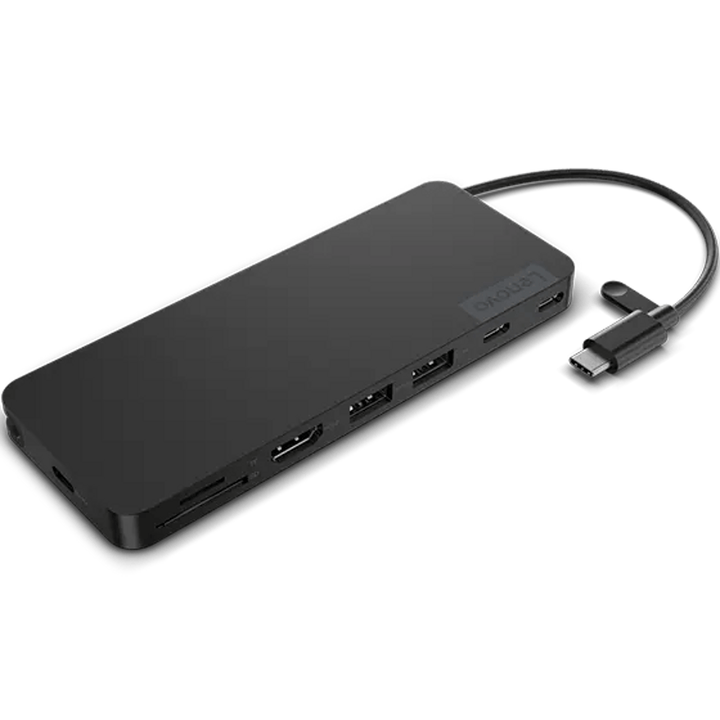


Lenovo USB-C Slim Travel Dock
PRODUCT DESCRIPTION
Lenovo USB-C Slim Travel Dock (4X11N40212) - Local Warranty
110 Grams, 10.8 mm Thick, Six Ports
The Lenovo USB-C Slim Travel Dock weighs 110 grams and is 10.8 mm thick — it goes in the laptop sleeve, not the bag. On that footprint Lenovo fits HDMI 2.1 at 4K 60 Hz, two USB-A and two USB-C ports all at 10 Gbps, an SD and microSD card reader, and a separate power-only USB-C port for pass-through charging.
Everything at 10 Gbps, Which Is Unusual at This Size
All four data ports run at USB 3.2 Gen 2, 10 Gbps. Most travel docks put one fast port among several slow ones; this one does not. An external SSD works at full speed whichever port you reach for.
65 W Pass-Through, With Your Own Charger
There is no power adapter in the box and none is needed for normal use — the dock runs on bus power from the laptop. Plug your own USB-C charger into the power-only port and it passes charge through: 65 W from a 100 W adapter, 45 W from a 65 W adapter, and no charging from anything under 45 W. Those are Lenovo's published figures and the last one is worth remembering.
What It Does Not Have
No Ethernet and no audio jack. Our previous version of this page mentioned a network port "depending on region"; that was wrong and there is no Ethernet on any version of this dock. If you need wired networking in a travel dock, the USB-C Dual Display Travel Dock in the ordering table has gigabit Ethernet.
Lenovo USB-C Slim Travel Dock Datasheet — Technical Specifications
General
| Product | Lenovo USB-C Slim Travel Dock |
| Part Number | 4X11N40212 |
| Type | Bus-powered USB-C travel dock |
| Warranty | 3 years, customer-replaceable unit (CRU), per Lenovo's published datasheet |
| Local Warranty (Singapore) | Included with every SourceIT purchase, with GST invoice |
Connectivity
| Host Connection | Integrated 12.5 cm USB-C cable |
| Video Output | 1 x HDMI 2.1 |
| Maximum Display | One display at 4K 60 Hz |
| USB-A | 2 x USB-A 3.2 Gen 2 (10 Gbps), 7.5 W |
| USB-C (data) | 2 x USB-C 3.2 Gen 2 (10 Gbps), 7.5 W |
| USB-C (power) | 1 x USB-C, power only — connect your own charger here |
| Card Reader | 1 x SD and TF (microSD) |
| Ethernet | None. There is no network port on this dock in any region |
| Audio Jack | None |
Power
| AC Adapter | None supplied. The dock is bus-powered from the laptop |
| Pass-Through Charging | 65 W maximum, using your own USB-C adapter |
| With a 100 W adapter | 65 W to the laptop |
| With a 65 W adapter | 45 W to the laptop |
| With an adapter under 45 W | No charging. Lenovo states this explicitly |
Physical & Environmental
| Dimensions | 140 x 55 x 10.8 mm (5.5 x 2.17 x 0.43 in) |
| Weight | From 110 g (0.24 lb) |
| Cable | 12.5 cm, captive |
| Certifications | COC; CU EAC; cULus; FCC; ICES; KCC; NOM; RCM; RoHS; SABS LoA; Serbia Kvalitet; SII; TÜV Mark; VCCI |
| Packaging | Recycled paper, FSC certified |
Compatibility & Fit
This is the one to buy for a bag. At 110 grams and 10.8 mm it disappears into a laptop sleeve. Six ports, all the data ones at 10 Gbps, a card reader and 4K 60 Hz video is a genuinely complete travel kit — and because there is no power brick, there is nothing extra to carry.
Understand the charging rule before you rely on it. The dock has no adapter of its own. Plug your existing USB-C charger into the power-only port and it passes charge to the laptop, but it takes a cut: a 100 W charger gives the laptop 65 W, a 65 W charger gives 45 W, and anything below 45 W charges nothing at all. If you carry a small phone charger and expect it to keep the laptop alive through the dock, it will not.
One screen, not two. There is a single HDMI output. If a hotel room or a client site needs two external displays, the USB-C Dual Display Travel Dock drives dual 4K at 60 Hz and adds gigabit Ethernet, for about 27 grams more.
Will it work with my laptop? Lenovo's own wording is that its USB-C and Thunderbolt docks "function with laptops that support industry standard USB-C Alt-Mode, DisplayLink or Thunderbolt protocols through their Type C port". In practice that means most business laptops of the last several years, Lenovo or otherwise. What Lenovo qualifies is the management features: MAC address pass-through, Wake-on-LAN, PXE boot and the mirrored power button work on most ThinkPads and, in Lenovo's words, "may not be available on certain other Lenovo laptops or non-Lenovo branded laptop systems". If those matter to your deployment — and for a managed fleet with imaging over the network they usually do — tell us the laptop models and we will check them before you order.
Package Contents & Lenovo Docking Ordering Information
In the box, per Lenovo PSREF:
- Lenovo USB-C Slim Travel Dock
- User guide
That is the entire box. No power adapter and no cables beyond the dock's own captive 12.5 cm lead — the dock draws power from the laptop, and you supply a charger only if you want pass-through charging.
Lenovo Docking Station Ordering Information
| 40BD0065UK | Lenovo X9 Charging GaN Dock — 65 W GaN charger with HDMI 2.1, 2 x USB-C, USB-A, microSD |
| 4X11N40212 (this listing) | Lenovo USB-C Slim Travel Dock — 110 g, HDMI 2.1 4K60, 4 USB ports, SD reader, no adapter |
| 40B90000WW | Lenovo USB-C Dual Display Travel Dock — 137 g, dual 4K60, gigabit Ethernet — no adapter |
| 40B90100UK | Lenovo USB-C Dual Display Travel Dock with Adapter — The same dock with a 100 W adapter included |
| 40AU0065UK | Lenovo USB-C Mini Dock — HDMI + VGA, gigabit Ethernet, 45 W, 1-year warranty |
| 40AY0090UK | Lenovo ThinkPad Universal USB-C Dock — 3 x 4K60, GbE, 90 W adapter — charges at 65 W |
| 40AY0135UK | Lenovo ThinkPad Universal USB-C Dock (135 W Adapter) — The same dock with the 135 W adapter — charges at 100 W |
| 40AF0135UK | Lenovo ThinkPad Hybrid USB-C with USB-A Dock — Connects over USB-C or USB-A, 2 x 4K60, 90 W |
| 40B00135UK | Lenovo ThinkPad Universal Thunderbolt 4 Dock — 4 x 4K60 or 1 x 8K30, GbE, 100 W, 135 W adapter |
| 40B00300UK | Lenovo ThinkPad Thunderbolt 4 Workstation Dock — 230 W to a mobile workstation, 300 W adapter, split cable |
| 40ANY230UK | Lenovo ThinkPad Thunderbolt 3 Workstation Dock Gen 2 — Previous generation — 170 W, 230 W adapter, 4 displays |
| 40BN0135UK | Lenovo ThinkPad Universal USB-C Smart Dock, ThinkSmart Edition — Meeting-room dock — Azure Sphere managed, mounting kit, 5 m HDMI |
Datasheet & Downloads
Lenovo publishes no PSREF specification sheet for its docking accessories. The document linked above is Lenovo's own datasheet or product brochure for this part number and is the source for every figure on this page.
Frequently Asked Questions — Lenovo USB-C Slim Travel Dock
Does it have an Ethernet port?
No. There is no network port on this dock in any region. Our earlier version of this page said network connectivity was available "depending on region", which was wrong. For a travel dock with gigabit Ethernet, see the USB-C Dual Display Travel Dock in the ordering table.
Does a charger come with it?
No — and for normal use you do not need one. The dock runs on power from the laptop. Add your own USB-C charger to the power-only port if you want the laptop charging while docked.
How much will it charge my laptop?
It depends entirely on the charger you plug into it. Lenovo publishes: 65 W to the laptop from a 100 W adapter, 45 W from a 65 W adapter, and no charging at all from anything under 45 W. The dock keeps a share for its own ports, which is why the output is always lower than the adapter's rating.
Can it drive two monitors?
No. One HDMI 2.1 output, one display, up to 4K at 60 Hz. The USB-C Dual Display Travel Dock is the two-screen version and is linked above.
How fast are the USB ports?
All four data ports are USB 3.2 Gen 2 at 10 Gbps — two USB-A and two USB-C. That is unusual on a dock this small; an external SSD runs at full speed on any of them.


