
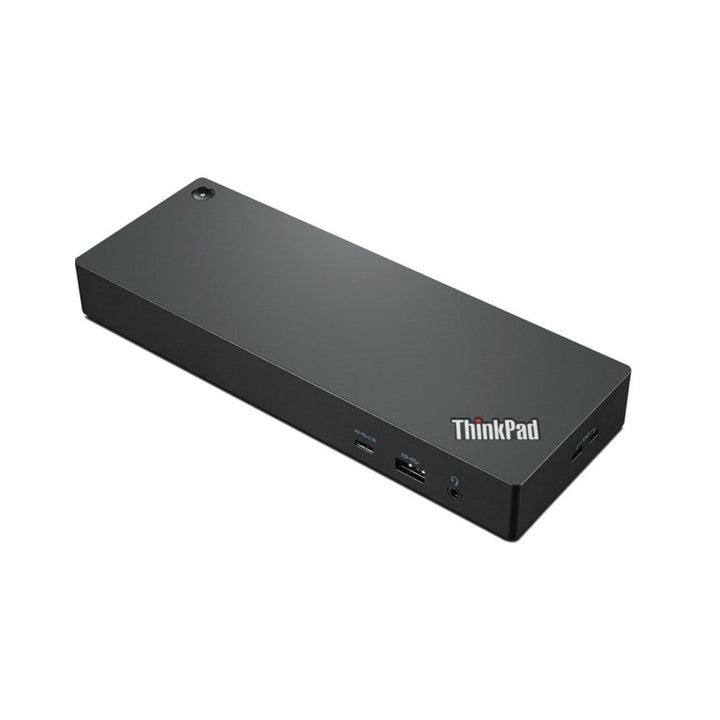


Lenovo ThinkPad Thunderbolt 4 Dock 300W
PRODUCT DESCRIPTION
Lenovo ThinkPad Thunderbolt 4 Workstation Dock (40B00300UK) - Local Warranty
230 W to a Mobile Workstation, Over One Split Cable
The ThinkPad Thunderbolt 4 Workstation Dock is built for the machines other docks cannot keep charged. Its 300 W adapter and Thunderbolt 4 split cable — Thunderbolt plus a Slim Tip power leg in one lead — deliver up to 230 W to a ThinkPad mobile workstation while carrying four 4K displays, gigabit Ethernet and six USB ports.
A Correction to This Listing
Our previous version of this page was titled "300 W" and then stated "up to 100 W power delivery" twice in the body. Both numbers were being used wrongly. Lenovo publishes a 300 W adapter supplying up to 230 W to the workstation through the split cable. Over a plain Thunderbolt 4 connection without the Slim Tip leg it delivers 100 W, the same as the standard Universal Thunderbolt 4 Dock.
Four 4K Displays or One 8K
Identical display capability to its Universal sibling: up to four 4K displays at 60 Hz, or one 8K at 30 Hz, across two DisplayPort 1.4 outputs, an HDMI 2.1 and a Thunderbolt 4 downstream port.
The 230 W Path Needs a Lenovo Slim Tip Machine
Worth being direct about: the extra power travels on the Slim Tip leg of the split cable, which is a Lenovo connector. A non-Lenovo laptop connected over Thunderbolt alone gets 100 W, not 230 W. If you are buying this dock for its charging capacity, the laptops need to be Lenovo machines with a Slim Tip power input.
Lenovo ThinkPad Thunderbolt 4 Workstation Dock Datasheet — Technical Specifications
General
| Product | Lenovo ThinkPad Thunderbolt 4 Workstation Dock |
| Part Number | 40B00300UK |
| Type | Thunderbolt 4 workstation docking station |
| Warranty | 3 years, customer-replaceable unit (CRU), per Lenovo's published datasheet |
| Local Warranty (Singapore) | Included with every SourceIT purchase, with GST invoice |
Connectivity
| Host Connection | Thunderbolt 4, via a supplied 0.7 m Thunderbolt 4 passive split cable carrying both the Thunderbolt link and a Slim Tip power leg |
| Video Outputs | 2 x DisplayPort 1.4, 1 x HDMI 2.1, and 1 x Thunderbolt 4 downstream port — four video-capable outputs |
| Maximum Displays | One 8K display at 30 Hz, or up to four 4K displays at 60 Hz |
| USB-A | 4 x USB-A 3.2 Gen 2 (10 Gbps), one with always-on charging |
| USB-C (downstream) | 1 x USB-C, 10 Gbps, 5 V / 3 A (15 W), plus the Thunderbolt 4 downstream port |
| Always-On Charging Wattage | Not published by Lenovo |
| Ethernet | 1 x gigabit Ethernet (RJ45) |
| Audio Jack | 1 x 3.5 mm combo |
| MAC Address Pass-Through | Supported |
| Wake-on-LAN | Supported |
| PXE Boot | Supported |
| Security | 2 x Kensington lock slots — one MicroSaver, one NanoSaver |
Power
| AC Adapter Supplied | 300 W Slim Tip |
| Charging to the Workstation | Up to 230 W, using the split cable's Slim Tip leg |
| Charging Over Thunderbolt 4 Alone | 100 W — the same as the standard Universal Thunderbolt 4 Dock. The 230 W figure is only available through the Slim Tip connection |
Physical
| Dimensions | 220 x 80 x 30 mm (8.66 x 3.15 x 1.18 in) |
| Weight | From 525 g. Note that Lenovo's own two datasheets print the imperial conversion differently — 1.61 lb on one and 1.16 lb on the other. 525 g is 1.16 lb; the other figure is a typo in Lenovo's document |
| Colour | Black |
| Certifications | COC; CU EAC; cULus; FCC; ICES; KCC; NOM; RCM; RoHS; SABS LoA; Serbia Kvalitet; SII; TÜV Mark; VCCI |
Compatibility
| Systems | Select ThinkPad, Lenovo and non-Lenovo systems supporting industry-standard USB-C Alt Mode or Thunderbolt protocols |
| Operating Systems | Windows 10, macOS, Linux |
Compatibility & Fit
Buy this dock for one reason: charging capacity. Electrically it is the same dock as the ThinkPad Universal Thunderbolt 4 Dock — same ports, same four-display capability, same 220 x 80 x 30 mm body, same certifications, same warranty. What it adds is a 300 W adapter and a split cable that carries a Lenovo Slim Tip power leg alongside the Thunderbolt link, delivering up to 230 W to a mobile workstation. If your machines are ThinkPad P-series, that is the difference between a workstation that stays charged under render load and one that does not.
And here is the limit of that. The 230 W travels on the Slim Tip leg, which is a Lenovo power connector. A non-Lenovo laptop, or a Lenovo laptop connected over Thunderbolt only, gets 100 W — identical to the cheaper Universal dock. So if the fleet is not Lenovo Slim Tip machines, this dock's headline advantage does not apply to you and the Universal version is the better buy.
How to read a Lenovo dock part number. The four digits in the middle are the wattage of the AC adapter supplied in the box — 40AY0090 ships a 90 W adapter, 40AY0135 a 135 W one, 40B00300 a 300 W one. The power the dock actually delivers to your laptop is always lower, because the dock keeps some for itself and its ports. Confusing the two is the single most common mistake made when buying these, so this page states both figures separately and never lets the part number stand in for the charging figure.
Will it work with my laptop? Lenovo's own wording is that its USB-C and Thunderbolt docks "function with laptops that support industry standard USB-C Alt-Mode, DisplayLink or Thunderbolt protocols through their Type C port". In practice that means most business laptops of the last several years, Lenovo or otherwise. What Lenovo qualifies is the management features: MAC address pass-through, Wake-on-LAN, PXE boot and the mirrored power button work on most ThinkPads and, in Lenovo's words, "may not be available on certain other Lenovo laptops or non-Lenovo branded laptop systems". If those matter to your deployment — and for a managed fleet with imaging over the network they usually do — tell us the laptop models and we will check them before you order.
Display capability, and the caveat that applies to any dock. Lenovo publishes four 4K displays at 60 Hz or one 8K at 30 Hz. Whether your workstation can drive four independent screens depends on its own GPU. A P-series with discrete graphics generally can; tell us the model and the layout and we will confirm it.
The management features. MAC address pass-through, Wake-on-LAN and PXE boot are all published as supported, so a docked machine keeps a consistent network identity and can be woken and re-imaged over the network.
Package Contents & Lenovo Docking Ordering Information
In the box, per Lenovo PSREF:
- Dock
- 300 W power adapter with power cord
- 0.7 m Thunderbolt 4 passive split cable
- Warranty poster
The split cable is the part that makes this dock what it is — it carries the Thunderbolt link and the Slim Tip power leg together. Keep it with the dock; a standard Thunderbolt cable will connect the dock but will cap charging at 100 W.
Lenovo Docking Station Ordering Information
| 40BD0065UK | Lenovo X9 Charging GaN Dock — 65 W GaN charger with HDMI 2.1, 2 x USB-C, USB-A, microSD |
| 4X11N40212 | Lenovo USB-C Slim Travel Dock — 110 g, HDMI 2.1 4K60, 4 USB ports, SD reader, no adapter |
| 40B90000WW | Lenovo USB-C Dual Display Travel Dock — 137 g, dual 4K60, gigabit Ethernet — no adapter |
| 40B90100UK | Lenovo USB-C Dual Display Travel Dock with Adapter — The same dock with a 100 W adapter included |
| 40AU0065UK | Lenovo USB-C Mini Dock — HDMI + VGA, gigabit Ethernet, 45 W, 1-year warranty |
| 40AY0090UK | Lenovo ThinkPad Universal USB-C Dock — 3 x 4K60, GbE, 90 W adapter — charges at 65 W |
| 40AY0135UK | Lenovo ThinkPad Universal USB-C Dock (135 W Adapter) — The same dock with the 135 W adapter — charges at 100 W |
| 40AF0135UK | Lenovo ThinkPad Hybrid USB-C with USB-A Dock — Connects over USB-C or USB-A, 2 x 4K60, 90 W |
| 40B00135UK | Lenovo ThinkPad Universal Thunderbolt 4 Dock — 4 x 4K60 or 1 x 8K30, GbE, 100 W, 135 W adapter |
| 40B00300UK (this listing) | Lenovo ThinkPad Thunderbolt 4 Workstation Dock — 230 W to a mobile workstation, 300 W adapter, split cable |
| 40ANY230UK | Lenovo ThinkPad Thunderbolt 3 Workstation Dock Gen 2 — Previous generation — 170 W, 230 W adapter, 4 displays |
| 40BN0135UK | Lenovo ThinkPad Universal USB-C Smart Dock, ThinkSmart Edition — Meeting-room dock — Azure Sphere managed, mounting kit, 5 m HDMI |
Datasheet & Downloads
- Lenovo ThinkPad Thunderbolt 4 Workstation Dock datasheet (PDF)
- Lenovo ThinkPad Thunderbolt 4 Workstation Dock brochure (PDF)
Lenovo publishes no PSREF specification sheet for its docking accessories. The document linked above is Lenovo's own datasheet or product brochure for this part number and is the source for every figure on this page.
Frequently Asked Questions — Lenovo ThinkPad Thunderbolt 4 Workstation Dock
Is it 300 W or 230 W?
Both figures are real and they mean different things. The adapter is 300 W. The charging delivered to the workstation is up to 230 W. Our earlier version of this page had a 300 W title over a 100 W body claim; neither was the charging figure. The 100 W number does apply, but only when the dock is connected over Thunderbolt 4 alone without the Slim Tip leg.
Will it charge a non-Lenovo laptop at 230 W?
No. The 230 W path uses the Slim Tip leg of the split cable, which is a Lenovo power connector. A non-Lenovo machine connects over Thunderbolt only and receives 100 W — the same as the cheaper Universal Thunderbolt 4 Dock. If your fleet is not Lenovo, buy that one instead.
How is it different from the Universal Thunderbolt 4 Dock?
Only the adapter and the cable. Same ports, same four 4K or one 8K display capability, same 220 x 80 x 30 mm body, same 525 g, same certifications, same 3-year CRU warranty. This model ships a 300 W adapter and a split cable for up to 230 W charging; the Universal ships a 135 W adapter and a plain Thunderbolt cable for up to 100 W.
How many monitors can it run?
Lenovo publishes up to four 4K displays at 60 Hz, or one 8K at 30 Hz. The practical limit is usually the workstation's own GPU. Tell us the model and the layout you want and we will check it.
What warranty applies in Singapore?
Lenovo publishes a 3-year CRU warranty. Every unit SourceIT sells also carries local Singapore warranty support and a GST invoice.


