
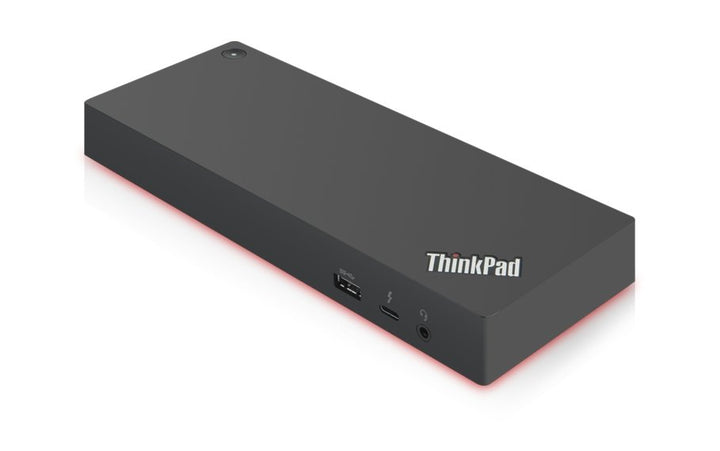


Lenovo ThinkPad Thunderbolt 3 Dock Gen 2
PRODUCT DESCRIPTION
Lenovo ThinkPad Thunderbolt 3 Workstation Dock Gen 2 (40ANY230UK) - Local Warranty
A Correction First: This Is the Workstation Dock, Not the Standard Gen 2
Our listing has been titled "ThinkPad Thunderbolt 3 Dock Gen 2". Lenovo's own support documentation and regional store pages give part number 40ANY230UK the name ThinkPad Thunderbolt 3 Workstation Dock Gen 2. The standard Thunderbolt 3 Dock Gen 2 is a different part number, 40AN0135, with a 135 W adapter. The distinction matters: this is the 230 W workstation model.
170 W to the Laptop, From a 230 W Adapter
Lenovo publishes 170 W maximum charging from the 230 W adapter, over a 0.7 m docking split cable. Our previous version of this page said "up to 135 W charging", which is a figure belonging to a different SKU. That is corrected here.
Four Displays, Five 10 Gbps USB Ports and Gigabit Ethernet
Two DisplayPort and two HDMI outputs plus a Thunderbolt 3 downstream port, driving four external displays, with five USB 3.1 Gen 2 ports at 10 Gbps (one always-on charging), gigabit Ethernet and a 3.5 mm combo jack.
This Is the Previous Generation — Read Before Standardising
Thunderbolt 3 has been superseded by Thunderbolt 4, and Lenovo's current equivalent is the ThinkPad Thunderbolt 4 Workstation Dock (40B00300UK), which charges at 230 W rather than 170 W and is linked in the ordering table. Lenovo has published no end-of-life notice for this model and its support pages and firmware remain live — but its own online store no longer serves a product page for the part number. We will not call it discontinued; we will tell you to ask us about supply before committing a fleet to it.
Lenovo ThinkPad Thunderbolt 3 Workstation Dock Gen 2 Datasheet — Technical Specifications
General
| Product | Lenovo ThinkPad Thunderbolt 3 Workstation Dock Gen 2 |
| Part Number | 40ANY230UK |
| Type | Thunderbolt 3 workstation docking station (previous generation) |
| Warranty | 3 years, customer-replaceable unit (CRU), per Lenovo's published datasheet |
| Local Warranty (Singapore) | Included with every SourceIT purchase, with GST invoice |
Connectivity
| Host Connection | Thunderbolt 3, via a 0.7 m docking split cable |
| Thunderbolt Link Specification | Lenovo publishes only "Thunderbolt 3" for this model; no bandwidth figure appears in the documents we could reach |
| Video Outputs | 2 x DisplayPort, 2 x HDMI, 1 x Thunderbolt 3 downstream. Lenovo publishes no version numbers for the DisplayPort and HDMI ports on this model |
| Maximum Displays | Four external displays. Lenovo's brochure also prints "3 x 4K at 30 Hz" alongside that four-display figure, which is internally inconsistent, and we could not corroborate a per-display resolution against a second Lenovo document. So we publish the display count and no resolution or refresh figure — ask us and we will get it confirmed before you order |
| USB Ports | 5 x USB 3.1 Gen 2 (10 Gbps), one with always-on charging. Lenovo's documents are inconsistent about the USB-C port count on this model, so we publish none |
| Always-On Charging Wattage | Not published by Lenovo |
| Ethernet | Gigabit Ethernet |
| Audio Jack | 1 x 3.5 mm stereo and microphone combo |
| MAC Address Pass-Through | Supported |
| Wake-on-LAN | Supported |
| PXE Boot | Supported |
| Security | 1 x Kensington lock slot. A NanoSaver slot is not published for this model |
Power
| AC Adapter Supplied | 230 W |
| Charging to the Laptop | 170 W maximum |
| Note | The 230 W in the part number is the adapter's rating; 170 W is what reaches the laptop. Our earlier page said 135 W, which is a figure from a different SKU |
Physical
| Dimensions | 220 x 80 x 30 mm (8.66 x 3.15 x 1.18 in) |
| Weight | From 525 g (1.16 lb) |
| Certifications | COC; CU EAC; cULus; FCC; ICES; KCC; NOM; RCM; RoHS; SABS LoA; Serbia Kvalitet; SII; TÜV Mark; VCCI |
Compatibility & Fit
The naming, first, because getting it wrong means shipping the wrong dock. Lenovo gives part number 40ANY230UK the name ThinkPad Thunderbolt 3 Workstation Dock Gen 2. The plain ThinkPad Thunderbolt 3 Dock Gen 2 is 40AN0135, a different SKU with a 135 W adapter and lower charging. Our listing title said the latter. As with the rest of Lenovo's docking range, the digits in the middle are the adapter wattage: 0135 means 135 W, Y230 means 230 W.
Where this dock stands today. Thunderbolt 3 has been superseded by Thunderbolt 4, and Lenovo's current workstation dock — the 40B00300UK in the ordering table — charges at up to 230 W against this model's 170 W, uses HDMI 2.1, and publishes a clear four-display-at-4K-60 capability that this one does not. If you are buying fresh, buy that. Buy this one to match an existing fleet, or if the price difference decides it.
On availability. Lenovo has issued no end-of-life or end-of-support announcement for this dock, and its support pages, driver and firmware downloads remain live. What we observed is that Lenovo's own online store no longer serves a product page for this part number in any region we checked. We are giving you the observation rather than a lifecycle claim Lenovo has not made. Ask us about supply before you standardise on it.
Where we have deliberately published less than the old page did. Lenovo's own brochure for this dock prints "four external displays" and "3 x 4K at 30 Hz" in the same place, which cannot both be a complete description, and we could not corroborate a per-display resolution against a second Lenovo document. Rather than pick the flattering reading, this page states the display count and no resolution figure. Lenovo also publishes no DisplayPort or HDMI version numbers for this model and is inconsistent about its USB-C port count. If any of those decide your purchase, ask us and we will get written confirmation from Lenovo before you order.
How to read a Lenovo dock part number. The four digits in the middle are the wattage of the AC adapter supplied in the box — 40AY0090 ships a 90 W adapter, 40AY0135 a 135 W one, 40B00300 a 300 W one. The power the dock actually delivers to your laptop is always lower, because the dock keeps some for itself and its ports. Confusing the two is the single most common mistake made when buying these, so this page states both figures separately and never lets the part number stand in for the charging figure.
Will it work with my laptop? Lenovo's own wording is that its USB-C and Thunderbolt docks "function with laptops that support industry standard USB-C Alt-Mode, DisplayLink or Thunderbolt protocols through their Type C port". In practice that means most business laptops of the last several years, Lenovo or otherwise. What Lenovo qualifies is the management features: MAC address pass-through, Wake-on-LAN, PXE boot and the mirrored power button work on most ThinkPads and, in Lenovo's words, "may not be available on certain other Lenovo laptops or non-Lenovo branded laptop systems". If those matter to your deployment — and for a managed fleet with imaging over the network they usually do — tell us the laptop models and we will check them before you order.
Package Contents & Lenovo Docking Ordering Information
In the box, per Lenovo PSREF:
- Dock
- 230 W power adapter
- 0.7 m Thunderbolt split cable
- Warranty and setup documentation
Lenovo Docking Station Ordering Information
| 40BD0065UK | Lenovo X9 Charging GaN Dock — 65 W GaN charger with HDMI 2.1, 2 x USB-C, USB-A, microSD |
| 4X11N40212 | Lenovo USB-C Slim Travel Dock — 110 g, HDMI 2.1 4K60, 4 USB ports, SD reader, no adapter |
| 40B90000WW | Lenovo USB-C Dual Display Travel Dock — 137 g, dual 4K60, gigabit Ethernet — no adapter |
| 40B90100UK | Lenovo USB-C Dual Display Travel Dock with Adapter — The same dock with a 100 W adapter included |
| 40AU0065UK | Lenovo USB-C Mini Dock — HDMI + VGA, gigabit Ethernet, 45 W, 1-year warranty |
| 40AY0090UK | Lenovo ThinkPad Universal USB-C Dock — 3 x 4K60, GbE, 90 W adapter — charges at 65 W |
| 40AY0135UK | Lenovo ThinkPad Universal USB-C Dock (135 W Adapter) — The same dock with the 135 W adapter — charges at 100 W |
| 40AF0135UK | Lenovo ThinkPad Hybrid USB-C with USB-A Dock — Connects over USB-C or USB-A, 2 x 4K60, 90 W |
| 40B00135UK | Lenovo ThinkPad Universal Thunderbolt 4 Dock — 4 x 4K60 or 1 x 8K30, GbE, 100 W, 135 W adapter |
| 40B00300UK | Lenovo ThinkPad Thunderbolt 4 Workstation Dock — 230 W to a mobile workstation, 300 W adapter, split cable |
| 40ANY230UK (this listing) | Lenovo ThinkPad Thunderbolt 3 Workstation Dock Gen 2 — Previous generation — 170 W, 230 W adapter, 4 displays |
| 40BN0135UK | Lenovo ThinkPad Universal USB-C Smart Dock, ThinkSmart Edition — Meeting-room dock — Azure Sphere managed, mounting kit, 5 m HDMI |
Datasheet & Downloads
- Lenovo ThinkPad Docking Solutions brochure (PDF)
- Lenovo ThinkPad Thunderbolt 3 Dock Gen 2 (40AN) brochure (PDF)
Lenovo publishes no standalone specification sheet for this dock that we could reach. The documents above are Lenovo's own docking brochures, and they are the source for the figures on this page. Where they conflict with themselves — the display resolution is the notable case — this page says so rather than choosing.
Frequently Asked Questions — Lenovo ThinkPad Thunderbolt 3 Workstation Dock Gen 2
Is this the Workstation dock or the standard one?
The Workstation dock. Lenovo's support documentation and regional store pages give part number 40ANY230UK the name "ThinkPad Thunderbolt 3 Workstation Dock Gen 2". Our listing title said "ThinkPad Thunderbolt 3 Dock Gen 2", which is a different SKU — 40AN0135, with a 135 W adapter. We are correcting the title.
How much does it charge the laptop?
170 W maximum, from the 230 W adapter. Our earlier version of this page said "up to 135W charging"; that figure belongs to the other Gen 2 dock and has been removed.
How many displays and at what resolution?
Lenovo publishes four external displays. On resolution we are deliberately silent: Lenovo's brochure prints "3 x 4K at 30 Hz" next to the four-display figure, the two cannot both be a full description, and no second Lenovo document settles it. Rather than publish a number we cannot stand behind, we will get it confirmed for you — tell us the displays you intend to run and ask.
Should I buy this or the Thunderbolt 4 Workstation Dock?
For a new purchase, the Thunderbolt 4 Workstation Dock (40B00300UK): it charges at up to 230 W rather than 170 W, uses HDMI 2.1, and publishes an unambiguous four-4K-at-60-Hz capability. Buy this Thunderbolt 3 model to match docks you already have, or if the price makes the decision.
Is it discontinued?
Lenovo has not said so, and we will not claim it. Its support pages, drivers and firmware remain published. What we can report is that Lenovo's own online store no longer serves a live product page for this part number in any region we checked. If you are planning a fleet rollout on this dock, talk to us about supply first.
What warranty applies in Singapore?
Lenovo publishes a 3-year CRU warranty for this dock family. Note that our earlier version of this page said one year, which was wrong. Every unit SourceIT sells also carries local Singapore warranty support and a GST invoice.


