
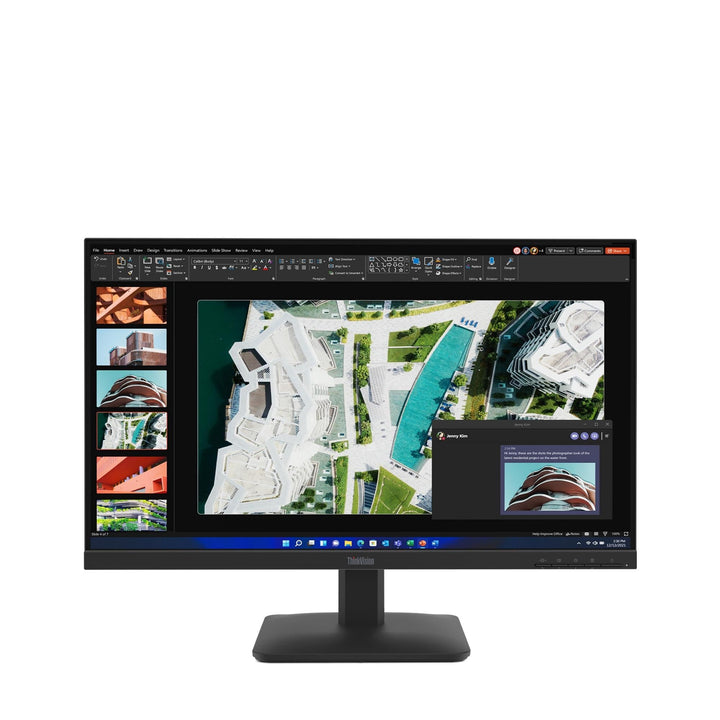


Lenovo ThinkVision S27-4e 27-inch FHD Monitor
PRODUCT DESCRIPTION
Lenovo ThinkVision S27-4e (64BEKAR1MY) - 3 Years Local Warranty
A 27-Inch IPS Panel at 300 Nits and 1500:1 — the Best Panel Figures in This Group
The ThinkVision S27-4e publishes 300 cd/m² brightness and 1500:1 contrast, both higher than the 250 nits and 1300:1 of its 21.5-inch and 23.8-inch siblings. Add 99% sRGB coverage (CIE 1931), 100 Hz and 178° viewing angles on a 3-side NearEdgeless IPS panel.
Read the Pixel Density Before You Order
This is 1920 x 1080 across 27 inches — a pixel pitch of 0.3114 mm, roughly 82 dpi. Text and interface elements are visibly larger and softer than on the 23.8-inch S24-4e (93 dpi). For anyone reading a lot of small text that is a real downside; for anyone who finds a 24-inch cramped, it is exactly the point.
Two Corrections to This Listing
This page previously stated the warranty as one year and carried an unfinished internal editing note where the warranty line should have been. Lenovo publishes a 3-year limited warranty. Both are corrected here, and every unit SourceIT sells also carries local Singapore warranty and a GST invoice.
What It Does Not Have
No USB ports. No speakers. No headphone jack. A tilt-only stand. Two inputs, HDMI 1.4 and VGA, with cable management supported. That is the honest specification of a 27-inch monitor at this price, and all four points surprise buyers who assume otherwise.
Lenovo ThinkVision S27-4e Datasheet — Technical Specifications
General
| Product | Lenovo ThinkVision S27-4e |
| Part Number | 64BEKAR1MY |
| Machine Type | 64BE |
| Type | 27-inch Full HD monitor |
| Warranty | 3-Year Limited Warranty (Lenovo, per PSREF) |
| Local Warranty (Singapore) | Included with every SourceIT purchase, with GST invoice |
Panel & Image
| Screen Size | 27" |
| Panel Type | 3-side NearEdgeless In-Plane Switching (IPS), WLED backlight. Flat panel |
| Resolution | 1920 x 1080 (Full HD), roughly 82 dpi |
| Aspect Ratio | 16:9 |
| Active Area | 597.9 x 336.3 mm; pixel pitch 0.3114 x 0.3114 mm |
| Refresh Rate | 100 Hz |
| Response Time | 4 ms GtG Extreme mode / 6 ms GtG Normal mode |
| Brightness | 300 cd/m² — higher than the 250 cd/m² of the S22-4e and S24-4e |
| Contrast Ratio | 1500:1 typical; 3,000,000:1 dynamic |
| Colour Gamut | 99% sRGB coverage ratio (CIE 1931) |
| Colour Depth | 8-bit (6-bit + FRC), 16.7 million colours |
| Viewing Angles | 178° horizontal / 178° vertical |
| Surface | Anti-glare |
Connectivity
| Video Inputs | 1 x HDMI 1.4 (supports 1920 x 1080 at 100 Hz), 1 x VGA. No DisplayPort |
| USB Hub | None. Lenovo publishes no USB ports of any kind on this model — no hub, no upstream port, no USB-C |
| USB-C | None |
| Network | None |
| Audio Out | None |
| Speakers | None |
| Cable Management | Supported |
| Security | Kensington Nano Security Slot (2.5 x 6 mm) |
Stand & Ergonomics
| Tilt | -5° to +22° |
| Height Adjustment | None. This is a fixed-height, tilt-only stand |
| Swivel | None |
| Pivot | None |
| VESA | 100 x 100 mm — use a monitor arm if you need height adjustment or rotation |
Power & Certifications
| Power Consumption | 17.3 W typical / 19.8 W maximum |
| ENERGY STAR Power-On | Not published by Lenovo for this model; TEC not published |
| Sleep / Off Mode | < 0.5 W |
| Switch-off Mode | < 0.3 W |
| Power Supply | Internal — no external power brick |
| Certifications | ENERGY STAR certified; EPEAT Gold registered; RoHS (2011/65/EU); Volatile Organic Compound certification; TÜV Rheinland Flicker Free; TÜV Rheinland Low Blue Light (hardware solution) |
| EU Energy Label | D class |
Physical
| Dimensions with Stand | 611.9 x 210.0 x 443.5 mm |
| Head Only | 611.9 x 44.4 x 366.5 mm |
| Weight | 4.1 kg (9.0 lb) with stand; 3.7 kg head only |
Compatibility & Fit
The honest case for a 27-inch Full HD monitor. Against: at roughly 82 dpi the pixels are visibly larger than on a 24-inch of the same resolution, and text edges are softer. For: everything is physically bigger with no display scaling to configure, which genuinely helps anyone who finds a 24-inch cramped or who works in large line-of-business applications at arm's length. It also costs a fraction of a 27-inch QHD.
If you want a better 27-inch rather than a bigger one, the answer is resolution, not size. A 27-inch QHD monitor at 2560 x 1440 gives 109 dpi and looks sharp at 100% scaling. The ThinkVision T27Q-40 and P27h-30 are the models; ask us and we will quote one against this so you can see the difference in price and in specification side by side.
The best panel figures in this value group. 300 cd/m² and 1500:1 are both a step above the 250 nits and 1300:1 of the smaller 4e models. If the room is bright, or the monitor faces a window, those extra nits are the specification you will actually notice.
The stand, and the cheap fix. Tilt only, -5° to +22°, fixed height. On a 27-inch panel, height matters more than on a small one — a large screen set too high is a genuine neck problem over a working day. VESA 100 x 100 mm, so an arm solves it for a modest addition. We can quote arms with the monitors.
Where the E and S series sit in Lenovo's own words. Lenovo positions the ThinkVision E series as "Comfortable Viewing for Everyday Users" and the S series as "Basic Displays for Simple Experiences", against "Enhanced Productivity" for the T series and "Best-in-Class Performance" for the P series. Lenovo publishes no expansion of what the letters stand for, so neither do we. In practice the difference that matters on a desk is the stand: most E and S models are tilt-only, while every T and P model offers 155 mm of height adjustment, swivel and pivot.
Package Contents & ThinkVision Ordering Information
In the box, per Lenovo PSREF:
- Monitor with stand
- 1 x HDMI 1.4 cable (1.8 m)
- 1 x power cable (1.8 m)
- Quick setup guide
No VGA cable is supplied despite the VGA port.
ThinkVision Value and Specialist Monitor Ordering Information
| 62F7KAR4WW | ThinkVision E20-30 — 19.5" HD+ TN, tilt-only, HDMI + VGA |
| 64CBKAR6MY | ThinkVision S22-4e — 21.5" FHD IPS, 100 Hz, 10.5 W, tilt-only |
| 64B5KAR1MY | ThinkVision S24-4e — 23.8" FHD IPS, 100 Hz, tilt-only |
| 63DEKAR3WW | ThinkVision S24i-30 — 23.8" FHD IPS, 100 Hz, audio-out, tilt-only |
| 63ABMAR3WW | ThinkVision E24-28 / E24-29 — 23.8" FHD, speakers, full ergonomic stand |
| 63EDMAR2WW | ThinkVision E24-30 — 23.8" FHD IPS, 100 Hz, 2 W speakers, ergonomic stand |
| 63DCKAR6WW | ThinkVision C24-40 — 23.8" FHD VA, 3000:1, 75 Hz, tilt-only |
| 63E0KAR4WW | ThinkVision S25e-30 — 24.5" FHD VA, 3000:1, 75 Hz, tilt-only |
| 64BEKAR1MY (this listing) | ThinkVision S27-4e — 27" FHD IPS, 100 Hz, 300 nits, tilt-only |
| 63DFKAR4WW | ThinkVision S27i-30 — 27" FHD IPS, 100 Hz, two HDMI inputs, tilt-only |
| 63F1UAR3WW | ThinkVision 27 3D — 27" glasses-free 3D, 4K in 2D, Delta E<1 |
Datasheet & Downloads
PSREF is Lenovo's own Product Specifications Reference and is the source for every figure on this page unless the table says otherwise. PSREF publishes its spec sheets per model rather than per part number, so this SKU does not appear inside the PDF itself; a per-part-number detail page also exists at psref.lenovo.com and will render in a normal browser if you need this exact configuration confirmed before ordering. Ask us and we will pull it for you.
Frequently Asked Questions — Lenovo ThinkVision S27-4e
Is the warranty one year or three?
Three. Lenovo PSREF states a 3-year limited warranty for this model. Our earlier version of this page said one year and left an unfinished internal editing note in the warranty line. Neither should have been visible to a customer, and both are corrected.
Is 27-inch Full HD sharp enough?
At roughly 82 dpi it is visibly coarser than a 23.8-inch of the same resolution (93 dpi). For spreadsheets, dashboards and line-of-business applications at arm's length it is comfortable and the extra size helps. For long-form reading or design work, a 27-inch QHD is the better investment — ask us to quote a ThinkVision T27Q-40 or P27h-30 alongside.
Does it have USB ports?
No. Lenovo publishes no USB ports of any kind on this model. If you need a monitor that also acts as a USB hub, or that docks a laptop over USB-C, the ThinkVision T-series and P-series are the ranges to look at — tell us what the desk needs and we will point you at the right one.
Does the stand adjust for height?
No. Lenovo publishes tilt only, -5° to +22°, on a fixed-height stand — there is no height adjustment, no swivel and no pivot. That is the main thing separating this monitor from the ThinkVision T-series, which offers 155 mm of lift. If getting the screen to eye level matters — and for anyone at a desk all day it should — budget for a VESA 100 x 100 mm monitor arm, which we can quote alongside.
How does it compare with the S22-4e and S24-4e?
Better panel figures: 300 cd/m² and 1500:1 against 250 nits and 1300:1 on both smaller models. Same IPS technology, same 99% sRGB, same 100 Hz, same tilt-only stand, same absence of USB and audio. The trade is pixel density — 82 dpi here against 93 dpi on the S24-4e and higher still on the S22-4e.
What warranty applies in Singapore?
Lenovo PSREF states a 3-year limited warranty as the base warranty for this model, and every unit SourceIT sells comes with local Singapore warranty support and a GST invoice.


