
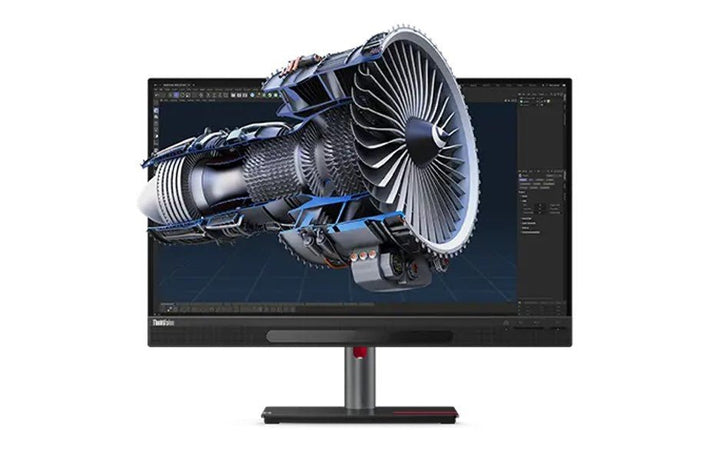


Lenovo ThinkVision 27 3D-Glasses-free, 2D/3D Compatible Display
PRODUCT DESCRIPTION
Lenovo ThinkVision 27 3D (63F1UAR3WW) - 3 Years Local Warranty
Glasses-Free 3D on a 27-Inch Professional Display, With a Switchable Lenticular Lens and Eye Tracking
The ThinkVision 27 3D shows stereoscopic 3D without glasses. Lenovo pairs a switchable lenticular lens with real-time eye tracking to send a slightly different image to each eye. Switch 3D off and it is a 4K UHD professional monitor covering 100% sRGB, 99% DCI-P3, 99% Adobe RGB, 100% BT.709 and 83% BT.2020, factory calibrated to average Delta E under 1.
Four Things to Know Before You Spend This Much
One: 3D is for one viewer — Lenovo states "number of viewers: 1". It cannot show a 3D model to a client sitting beside you. Two: horizontal resolution halves in 3D, from 3840 x 2160 to 1920 x 2160. Three: the 3D software runs on Windows 10 and 11 only — a Mac gets an excellent 4K monitor and no 3D at all. Four: 3D needs software installed and a reasonably capable PC; nothing in the box makes 3D work on its own.
Delta E Under 1 — the Most Accurate Panel We Sell
Lenovo publishes factory calibration to average Delta E under 1 across DCI-P3, Adobe RGB and sRGB, with a printed calibration report and a cleaning cloth in the box. Every other monitor in our ThinkVision range that publishes a figure at all publishes Delta E under 2. For colour-critical work this panel stands alone in our range, 3D or no 3D.
It Is Also a Full USB-C Dock
Two HDMI 2.1 inputs, DisplayPort 1.4, a USB-C port with DisplayPort 1.4 Alt Mode and up to 100 W power delivery, gigabit Ethernet, four downstream USB ports, a 3.5 mm audio-out and 5 W x 2 speakers, on a full ergonomic stand with 155 mm of lift, 45° swivel and full pivot.
Lenovo ThinkVision 27 3D Datasheet — Technical Specifications
General
| Product | Lenovo ThinkVision 27 3D |
| Part Number | 63F1UAR3WW |
| Machine Type | 63F1 |
| Type | 27-inch glasses-free 3D professional monitor |
| Warranty | 3-Year Limited Warranty (Lenovo, per PSREF) |
| Local Warranty (Singapore) | Included with every SourceIT purchase, with GST invoice |
The 3D System
| Technology | Switchable lenticular lens with real-time eye tracking. Lenovo describes it as projecting two independent images, one to each eye, so each sees the subject from a slightly different angle |
| 2D / 3D Switching | Yes — the panel works as a conventional 4K monitor with 3D switched off |
| Resolution in 2D | 3840 x 2160 (4K UHD) |
| Resolution in 3D | 1920 x 2160. Horizontal resolution halves because the lenticular lens splits pixel columns between the two eyes. This is Lenovo's published figure and it is the single most important number on this page |
| Number of Viewers | 1. Lenovo states this explicitly. The 3D effect is for the tracked viewer only |
| Optimal Viewing Angle | -20° to +20° horizontal and -20° to +20° vertical |
| Optimal Viewing Distance | 60 to 100 cm; Lenovo's recommended 3D viewing distance is 70 to 90 cm |
| Eye-Tracking Camera Specification | Not published by Lenovo. No official Lenovo document we could find states the camera count, type, sensor resolution or frame rate. PSREF says only "eye tracking support", so that is all we will claim |
| 3D Refresh Rate | Not published by Lenovo separately from the panel's 60 Hz |
3D Software — Read Before Ordering
| Required Software | 3D Explorer, obtained through Lenovo Accessories and Display Manager (ThinkColour). It installs on the connected PC; nothing 3D runs on the monitor itself |
| Components | 3D Master (3D viewing application), Design Engine, 2D-to-3D Converter, plug-ins and an SDK |
| Operating System | Windows 10 and Windows 11 only. Lenovo publishes no macOS or Linux support for the 3D software |
| Supported Applications | Lenovo names Microsoft 365, PTC Creo, Autodesk 3ds Max, Autodesk VRED, Autodesk Maya, Trimble SketchUp Pro, Blender, Lumiscaphe Patchwork 3D, Dassault Systèmes DELTAGEN, Unity, and C++ and Unreal via the SDK |
| Minimum PC Requirements | Intel Core i5-7400 at 3.00 GHz or equivalent; NVIDIA GeForce GTX 1050 or an AMD or Intel graphics equivalent; Windows 10 64-bit; 8 GB memory; 50 GB free storage |
| Subscription | Not published by Lenovo. Lenovo lists 3D Explorer as a download and states no licence term or subscription anywhere we could find — but it also never states that the software is perpetually free. We are not going to tell you there is no subscription when Lenovo has not said so. Ask us and we will get it confirmed before you order |
Panel & Image
| Screen Size | 27" |
| Panel Type | In-Plane Switching (IPS), WLED backlight |
| Aspect Ratio | 16:9 |
| Refresh Rate | 60 Hz |
| Response Time | 4 ms Extreme mode / 6 ms Normal mode |
| Brightness | 310 cd/m² |
| Contrast Ratio | 1200:1 |
| Colour Gamut | 100% sRGB, 99% DCI-P3, 100% BT.709, 99% Adobe RGB, 83% BT.2020. Lenovo publishes no CIE standard for these figures |
| Colour Depth | 8-bit — true 8-bit, not 6-bit plus frame rate control |
| Factory Calibration | Average Delta E under 1 for DCI-P3, Adobe RGB and sRGB, with a printed calibration report in the box |
| Hardware Calibration | Not published by Lenovo |
| Viewing Angles | 178° horizontal / 178° vertical |
| Surface | Anti-glare |
Connectivity
| USB-C (docking) | 1 x USB-C 3.2 Gen 1 — DisplayPort 1.4 Alt Mode and up to 100 W power delivery. Note that Lenovo's PSREF sheet and press material state 100 W while a Lenovo regional marketing page cites 96 W; we publish the PSREF figure and flag the difference |
| Video Inputs | 2 x HDMI 2.1 TMDS, 1 x DisplayPort 1.4, plus video over USB-C |
| USB Hub | 4 x USB 3.2 Gen 1 downstream, plus 1 x USB-C 3.2 Gen 1 downstream at 15 W |
| Network | 1 x RJ45 Ethernet |
| Audio Out | 1 x 3.5 mm |
| Speakers | Integrated, 5 W x 2 |
| Camera | None bundled. Lenovo publishes support for the ThinkVision MC60 monitor webcam, sold separately |
Stand & Ergonomics
| Tilt | -5° to +23.5° |
| Swivel | 45° left and right |
| Pivot | -90° to +90° |
| Height Adjustment | Up to 155 mm |
| VESA | 100 x 100 mm |
Power & Certifications
| Power Consumption | 43.8 W typical / 246 W maximum — high for a 27-inch monitor, and the cost of the 3D backlight and lens layer plus 100 W of outbound charging |
| Sleep / Off Mode | < 0.5 W |
| Switch-off Mode | < 0.3 W |
| Power Supply | Internal, AC 100–240 V, 50–60 Hz |
| Certifications | RoHS (2011/65/EU); TÜV Rheinland Eye Comfort. Lenovo publishes no ENERGY STAR and no EPEAT registration for this model, unlike the rest of our ThinkVision range — worth checking before it goes into a tender with green-procurement scoring |
| EU Energy Label | Exempt (G class) |
Physical
| Dimensions with Stand | 614.8 x 222.7 x 413 mm at lowest; 568 mm high at highest |
| Weight | 8.9 kg (19.6 lb) with stand; 6.6 kg head only |
Compatibility & Fit
We are going to spend most of this section on the reasons you might not want this monitor, because at this price a return is expensive for both of us and every one of the following is easy to discover too late.
3D is for one person. Lenovo publishes "number of viewers: 1". The eye tracking follows one head. If your use case is showing a 3D model to a client across the desk, to a class, or on a showroom table, this is the wrong product and we would rather tell you now.
3D halves the horizontal resolution. 3840 x 2160 in 2D becomes 1920 x 2160 in 3D, because the lenticular lens splits pixel columns between your two eyes. That is inherent to how glasses-free 3D works and Lenovo publishes it plainly. Anyone reading "4K 3D monitor" and expecting 4K per eye will be disappointed.
You have to sit in a fairly small box. Lenovo's optimal viewing angle is ±20° horizontally and vertically, at a recommended 3D distance of 70 to 90 cm. This is a seated-at-your-desk product. Lean well back, stand up, or move off to one side and the 3D effect degrades or drops out.
Windows only, and the PC has to be up to it. The 3D Explorer software runs on Windows 10 and 11 only — Lenovo publishes no macOS or Linux support. Minimum host requirements are a Core i5-7400-class processor, a GeForce GTX 1050-class GPU or equivalent, 8 GB of memory and 50 GB of free storage. A thin-and-light with integrated graphics will drive the 4K panel perfectly well and may struggle with the 3D.
It is not plug-and-play in 3D. The monitor does nothing three-dimensional on its own. 3D Explorer must be downloaded and installed, and most existing content needs the bundled 2D-to-3D converter or an application plug-in. Lenovo names the supported applications specifically: Microsoft 365, PTC Creo, Autodesk 3ds Max, VRED and Maya, SketchUp Pro, Blender, Patchwork 3D, DELTAGEN, Unity, and Unreal or C++ through the SDK. Arbitrary 3D files, games and streaming video are not promised to work.
Now the case for it. If you are one person, at a desk, on Windows, working in one of those applications, this monitor does something no other display we sell can do: it lets you see depth in a model without a headset, without glasses, and without leaving your normal working posture. Lenovo positions it for content creation and design, architecture and engineering, medical imaging, education and training, and industrial demonstration. And when you switch 3D off, you are left with the most accurately calibrated panel in our range — Delta E under 1 across three colour spaces, 99% Adobe RGB and 99% DCI-P3 — which on its own is a serious professional monitor.
Two procurement notes. Lenovo publishes no ENERGY STAR and no EPEAT for this model, where the rest of our ThinkVision range holds both; and its EU energy label is exempt at G class, with a 246 W maximum draw. If your tender scores environmental certification line by line, raise it with us before this model is specified.
Talk to us before you order this one. That is not a sales line. It is a single-viewer, Windows-only, software-dependent product at a serious price, and the difference between a delighted customer and a return is usually one conversation about how it will actually be used.
Package Contents & ThinkVision Ordering Information
In the box, per Lenovo PSREF:
- Monitor with stand
- 1 x DisplayPort cable (1.8 m)
- 1 x HDMI cable (1.8 m)
- 1 x USB-C to USB-A cable (1.8 m)
- 1 x USB-C to USB-C Gen 2 cable (1.5 m)
- 1 x power cable (1.8 m)
- Factory calibration report
- Cleaning cloth
- 1 x quick setup guide
The 3D software is not supplied on media — 3D Explorer is downloaded through Lenovo Accessories and Display Manager onto the connected Windows PC.
ThinkVision Value and Specialist Monitor Ordering Information
| 62F7KAR4WW | ThinkVision E20-30 — 19.5" HD+ TN, tilt-only, HDMI + VGA |
| 64CBKAR6MY | ThinkVision S22-4e — 21.5" FHD IPS, 100 Hz, 10.5 W, tilt-only |
| 64B5KAR1MY | ThinkVision S24-4e — 23.8" FHD IPS, 100 Hz, tilt-only |
| 63DEKAR3WW | ThinkVision S24i-30 — 23.8" FHD IPS, 100 Hz, audio-out, tilt-only |
| 63ABMAR3WW | ThinkVision E24-28 / E24-29 — 23.8" FHD, speakers, full ergonomic stand |
| 63EDMAR2WW | ThinkVision E24-30 — 23.8" FHD IPS, 100 Hz, 2 W speakers, ergonomic stand |
| 63DCKAR6WW | ThinkVision C24-40 — 23.8" FHD VA, 3000:1, 75 Hz, tilt-only |
| 63E0KAR4WW | ThinkVision S25e-30 — 24.5" FHD VA, 3000:1, 75 Hz, tilt-only |
| 64BEKAR1MY | ThinkVision S27-4e — 27" FHD IPS, 100 Hz, 300 nits, tilt-only |
| 63DFKAR4WW | ThinkVision S27i-30 — 27" FHD IPS, 100 Hz, two HDMI inputs, tilt-only |
| 63F1UAR3WW (this listing) | ThinkVision 27 3D — 27" glasses-free 3D, 4K in 2D, Delta E<1 |
Datasheet & Downloads
- Lenovo PSREF specification sheet — ThinkVision 27 3D (PDF)
- Lenovo ThinkVision 27 3D product datasheet (PDF)
- Lenovo ThinkVision 3D Monitor datasheet (Lenovo Tech Today, PDF)
PSREF is Lenovo's own Product Specifications Reference and is the source for every figure on this page unless the table says otherwise. PSREF publishes its spec sheets per model rather than per part number, so this SKU does not appear inside the PDF itself; a per-part-number detail page also exists at psref.lenovo.com and will render in a normal browser if you need this exact configuration confirmed before ordering. Ask us and we will pull it for you.
Frequently Asked Questions — Lenovo ThinkVision 27 3D
Can two people see the 3D at once?
No. Lenovo states "number of viewers: 1". The eye tracking follows a single head and the lenticular lens directs one image to each of that person's eyes. If you need to show 3D to a group, a client or a class, this is the wrong product and we will say so rather than sell it to you.
Is it 4K in 3D mode?
No. It is 3840 x 2160 in 2D and 1920 x 2160 in 3D. The lenticular lens splits pixel columns between your two eyes, so horizontal resolution halves. That is how glasses-free 3D works, and Lenovo publishes the figure openly. It is the number most likely to be misread from a headline specification.
Does it work with a Mac?
As a 4K monitor and USB-C dock, yes. For 3D, no. Lenovo's 3D Explorer software supports Windows 10 and Windows 11 only, and Lenovo publishes no macOS support. If your users are on Macs, you would be buying a very good 4K display and none of the 3D capability.
What do I need on the PC to use the 3D?
Lenovo publishes minimum requirements of an Intel Core i5-7400 at 3.00 GHz or equivalent, an NVIDIA GeForce GTX 1050 or equivalent AMD or Intel graphics, Windows 10 64-bit, 8 GB of memory and 50 GB of free storage. Plus the 3D Explorer software, downloaded through Lenovo Accessories and Display Manager. A thin-and-light with integrated graphics may not give a usable 3D experience.
Which applications actually work in 3D?
Lenovo names Microsoft 365, PTC Creo, Autodesk 3ds Max, Autodesk VRED, Autodesk Maya, Trimble SketchUp Pro, Blender, Lumiscaphe Patchwork 3D, Dassault Systèmes DELTAGEN, Unity, and C++ or Unreal through the SDK. A 2D-to-3D converter and plug-ins are included in the 3D Explorer package. Arbitrary 3D files, games and streaming video are not promised to work — tell us your workflow and we will check it against Lenovo's list before you order.
Is there a subscription for the 3D software?
Lenovo does not say. 3D Explorer is listed as a download and no licence term or subscription appears in any Lenovo document we could find — but Lenovo also never states that the whole stack is perpetually free. We are not going to promise you there is no subscription. Ask us and we will get it confirmed by Lenovo before you commit.
How many cameras does the eye tracking use?
Lenovo does not publish it. PSREF states only "eye tracking support" — no camera count, sensor specification or frame rate appears in the specification sheet, either datasheet, the Lenovo product pages, Lenovo Support or Lenovo's press release. What Lenovo does publish is the working envelope: ±20° horizontally and vertically, at 70 to 90 cm.
Is it ENERGY STAR or EPEAT certified?
No. Lenovo publishes neither for this model, where the rest of our ThinkVision range holds both. Its EU energy label is exempt at G class and its maximum draw is 246 W. If your procurement scores environmental certification, raise it with us early.
What warranty applies in Singapore?
Lenovo PSREF states a 3-year limited warranty as the base warranty for this model, and every unit SourceIT sells comes with local Singapore warranty support and a GST invoice.


