
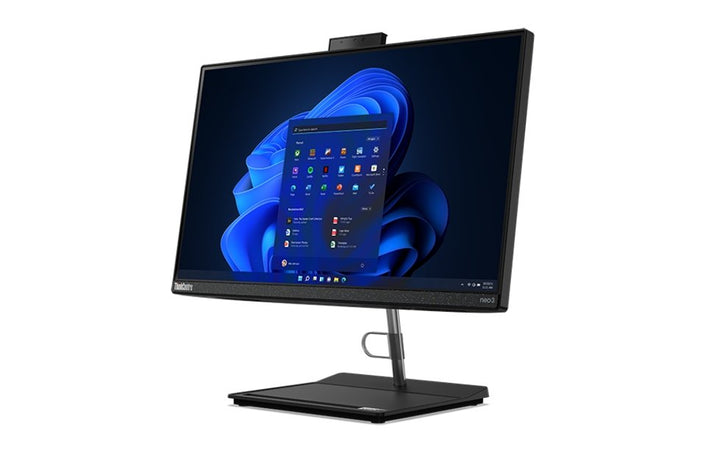


Lenovo ThinkCentre Neo M30a Gen 3 (23.8" Intel) All-In-One PC
PRODUCT DESCRIPTION
Lenovo ThinkCentre neo 30a 24 Gen 3, Core i5-1240P / 8 GB / 512 GB (12B000CDSG) - Singapore Local Warranty
First, What This Machine Is Actually Called
This listing has been carrying three different names and two different screen sizes, so it is worth settling before anything else. Lenovo's product database returns "Neo 30a 24 Gen 3 Desktop (ThinkCentre) - Type 12B0" for part number 12B000CDSG. There is no "neo M30a" and no "neo M70a" in Lenovo's range — the M is not part of any neo name — and there is no 22-inch panel for this machine type. It is a ThinkCentre neo 30a 24 Gen 3 with a 23.8-inch screen, and the distributor's build sheet agrees.
A Twelve-Core Mobile Processor in an All-in-One
The neo 30a 24 Gen 3 runs mobile-class silicon rather than desktop parts, and this build carries a Core i5-1240P: twelve cores split four performance and eight efficient, sixteen threads, with Intel Iris Xe graphics. That is a lot of parallel throughput in a thin all-in-one, and it runs cooler and quieter than a desktop chip would in the same chassis.
What You Are Actually Getting, Not Just What the Range Offers
Lenovo publishes the processor, camera, stand, wireless card and warranty term as options for this machine type rather than as facts about any one part number. So this page carries a separate This Configuration table taken from the distributor's build sheet for 12B000CDSG: a Core i5-1240P, 8 GB of DDR4-3200 SO-DIMM, a 512 GB M.2 NVMe Opal SSD, the non-touch panel, a liftable stand and Windows 11 Pro. Anything neither source states is marked as not stated rather than estimated.
Three Limits Worth Knowing Before You Order
This is the value tier and Lenovo's book is candid about what that costs. Memory tops out at 16 GB. The mounting field reads "None", so there is no VESA support. And the only HDMI port is an output, so unlike the M90a and M70a all-in-ones this one cannot be used as a screen for another computer. None of that makes it a bad desktop; it makes it a specific one.
Lenovo ThinkCentre neo 30a 24 Gen 3 Datasheet — Technical Specifications
General
| Product | Lenovo ThinkCentre neo 30a 24 Gen 3 |
| Lenovo's Official Product Name | ThinkCentre neo 30a 24 Gen 3 — see the note on naming below |
| Screen Size | 23.8-inch. No 22-inch panel exists for this machine type |
| Line | neo — Lenovo's value tier |
| Warranty | Not stated on the build sheet. Ask us and we will confirm it with Lenovo |
| Part Number | 12B000CDSG |
| Machine Type | 12B0 |
| Local Warranty (Singapore) | Included with every SourceIT purchase, with GST invoice |
This Configuration — From the Distributor Build Sheet for 12B000CDSG
| Build Sheet Header | ThinkCentre Neo 30a Gen 3: AIO |
| Processor | Intel Core i5-1240P, 12 cores (4 performance + 8 efficient) / 16 threads, performance cores 1.7 to 4.4 GHz, efficient cores 1.2 to 3.3 GHz, 12 MB — matching Lenovo's published row exactly |
| Memory | 8 GB SO-DIMM DDR4-3200. Module count not stated. Note Lenovo's ceiling for this machine type is 16 GB |
| Storage | 512 GB M.2 PCIe 2280 NVMe Opal SSD. No optical drive |
| Graphics | Integrated Intel Iris Xe Graphics |
| Display | 23.8-inch FHD 1920 x 1080 IPS anti-glare, non-touch |
| Camera | 1080p RGB IR camera and microphone. Lenovo publishes an HD 720p pull-up camera or a 5.0-megapixel IR pull-up camera for this machine type, and no 1080p option — see the note below |
| Wireless | Intel AX201 802.11ax 2x2 with Bluetooth 5.2 |
| Stand | Liftable monitor stand, internal speaker |
| Ports Stated | HDMI and LAN |
| Operating System | Windows 11 Professional, downgrade rights, 64-bit. No recovery media |
| Bundled | USB keyboard and mouse |
| Warranty on This Build | No term stated on the build sheet. See the warranty note below |
Chassis and Platform — From Lenovo PSREF
| Lenovo Product Name | ThinkCentre neo 30a 24 Gen 3. Lenovo's product database returns "Neo 30a 24 Gen 3 Desktop (ThinkCentre) - Type 12B0"; the PSREF book cover prints "ThinkCentre neo 30a 24" without the generation |
| Machine Type | 12B0 |
| Form Factor | All-in-one, 23.8-inch. No litre figure is published |
| Chipset | Lenovo publishes an "Intel SoC (System on Chip) platform" and names no discrete chipset part |
| Processor Options | Celeron 7305, Pentium Gold 8505, Core i3-1215U, i3-1220P, i5-1235U, i5-1240P, i5-12450H and i7-1260P — all mobile-class parts |
| Memory | Two DDR4 SO-DIMM slots, dual-channel capable, DDR4-3200. Up to 16 GB. Nothing is soldered |
| Storage | Up to two drives — one 2.5-inch HDD and one M.2 SSD, each to 1 TB. A second M.2 slot carries the WLAN card |
| Graphics | Integrated Intel UHD Graphics or Intel Iris Xe Graphics. No discrete graphics option is published |
| Display Panel | A single published option: 23.8-inch FHD 1920 x 1080 IPS, 250 nits, anti-glare, 16:9, 1000:1, 72% NTSC, 60 Hz, 14 ms, borderless. Non-touch only — no touch option, and no 22-inch panel exists for this machine type. The book separately carries TUV Rheinland Flicker Free and Low Blue Light |
| HDMI Input | No. The only HDMI line in the book is a rear HDMI-out. This all-in-one cannot be used as a display for another computer |
| Ports | Rear: 2 x USB 2.0, 2 x USB 3.2 Gen 2, 1 x HDMI-out, 1 x RJ-45, power connector. Bottom: 3.5 mm headphone and microphone combo. Lenovo publishes no separate front port group |
| Camera | HD 720p pull-up camera with LED indicator; or a 5.0-megapixel IR pull-up camera with LED indicator; or no camera. It is a mechanical pull-up camera — Lenovo publishes no privacy shutter for it |
| Mounting and Stand | Lenovo's mounting field reads "None" — there is no VESA support. Monitor stand with -5 to +25 degrees tilt and 45 degrees swivel left and right; or liftable monitor stand with -5 to +16 degrees tilt, 45 degrees swivel and up to 100 mm lift. No pivot is published |
| Networking | Gigabit Ethernet on a Realtek RTL8111H, 1 x RJ-45. Platform vPro is not published for this machine type |
| Wireless Options | Realtek RTL8822CE, Intel Wireless-AC 9560, Realtek Wi-Fi 6 RTL8852BE or Intel Wi-Fi 6 AX201 |
| Security | Firmware TPM 2.0 integrated in the SoC, not a discrete TPM. No FIPS or TCG wording is published |
| Power Supply | 90 W external adapter, published as "89% autosensing". Bare percentage, no 80 PLUS tier |
| Dimensions and Weight | With the liftable stand, 541 x 220 x 380.5-480.5 mm and around 6.6 kg. With the monitor stand, 541 x 207.5 x 433.8 mm and around 6.7 kg |
| Base Warranty Options (Lenovo) | 1-year courier or carry-in service or 1-year limited onsite service only. This book publishes no 3-year base term of any kind |
Compatibility & Fit
A Note on This Product's Name
Our store title calls this a "Neo M30a Gen 3" and the older copy on this page called it a "Neo M70a Gen 3" with a 22-inch screen. Both are wrong, and they are wrong in ways that matter, because the name is how you find the right specification sheet and the right drivers.
Lenovo's product database returns "Neo 30a 24 Gen 3 Desktop (ThinkCentre) - Type 12B0" for this part number. Lenovo has no "neo M" models at all — the M-series and the neo series are two different tiers, and the letter is never combined with a neo number. The 24 in the name is the screen size, and Lenovo publishes one panel for this machine type: 23.8-inch. A 22-inch neo 30a does not exist.
This page uses Lenovo's published name for the machine. If you are cross-checking against Lenovo's own documentation, search for "ThinkCentre neo 30a 24".
Warranty on This Build
The build sheet for this part number states no warranty term at all, so this page makes no duration claim in its heading. Lenovo's book for this machine type publishes only 1-year terms — 1-year courier or carry-in, and 1-year limited onsite. There is no 3-year base warranty anywhere in the neo 30a 24 book, so any three-year cover on a neo would have to be a purchased upgrade and would have to be stated as one. If you need a specific term in writing before you order, ask us and we will confirm what this exact part number carries.
No VESA, and No HDMI Input
Two things this machine type does not do, both of which the wider ThinkCentre all-in-one range does. Lenovo's mounting field for the neo 30a 24 reads "None", so there is no VESA pattern and the machine cannot go on an arm or a wall plate — it lives on its stand. And the only HDMI port Lenovo publishes is an output, so it cannot take a video feed from another computer the way the M90a Gen 3 and M70a Gen 3 can.
The stand itself is decent: the liftable version on this build tilts -5 to +16 degrees, swivels 45 degrees each way and lifts up to 100 mm. There is no pivot.
The 16 GB Ceiling
Lenovo publishes two DDR4-3200 SO-DIMM slots and a maximum of 16 GB for this machine type. That is half what the M-series all-in-ones take and a quarter of what the small form factor machines take. This build ships 8 GB, so there is one upgrade step available and then that is the end of it. If the machine needs to last five years running a browser with thirty tabs and a line-of-business app, budget for the 16 GB now.
Where the Two Tables Disagree
The camera. The build sheet says 1080p RGB IR. Lenovo publishes an HD 720p pull-up camera, a 5.0-megapixel IR pull-up camera, or no camera. There is no 1080p row in the book, so we cannot confirm the sheet's figure. If Windows Hello face sign-in is a requirement, ask us to confirm which camera this unit carries before you order.
Everything else on the sheet matches Lenovo, including the i5-1240P core split and clocks, the Iris Xe graphics, the AX201 card, the 23.8-inch non-touch panel and the liftable stand.
Package Contents & ThinkCentre Desktop Ordering Information
What Is in the Box
- ThinkCentre neo 30a 24 Gen 3 all-in-one with the liftable stand
- USB keyboard and mouse, per the build sheet
- 90 W external power adapter
- No recovery media, per the build sheet
Lenovo does not publish a box-contents list in its specification book, so the list above is the distributor's. If a keyboard, a mouse or a mounting kit matters to your rollout, confirm it with us before you order rather than assuming it ships in the carton.
ThinkCentre Desktop Ordering Information
| 11VF009HSG | Lenovo ThinkCentre M90a Gen 3 — i7-12700 / 16GB / 512GB — 23.8-inch multi-touch all-in-one with an HDMI input |
| 11VL0008SG | Lenovo ThinkCentre M70a Gen 3 — i5-12500 / 8GB / 512GB — 21.5-inch touch all-in-one with an HDMI input |
| 12B000CDSG (this listing) | Lenovo ThinkCentre neo 30a 24 Gen 3 — i5-1240P / 8GB / 512GB — 23.8-inch all-in-one, 16GB memory ceiling, no HDMI input |
| 11TT001XSG | Lenovo ThinkCentre M90s Gen 3 — i7-12700 / 16GB / 512GB — 8.2L small form factor, DDR5, four DIMM slots, two M.2 SSD slots |
| 11T8002CSG | Lenovo ThinkCentre M70s Gen 3 — 8.2L small form factor — no distributor build sheet on this listing, so the fitted configuration is unconfirmed |
| LN-M70SG3-P01-01-02-BIT | Lenovo ThinkCentre M70s Gen 3 — i5-12500 / 8GB / 256GB + 500GB — 8.2L SFF bundle, 3-year onsite stated on the build sheet |
| 11T300A6SG | Lenovo ThinkCentre M70q Gen 3 — i5-12400T / 8GB / 512GB — 1L Tiny |
| LN-M70Q-P01-01-BIT | Lenovo ThinkCentre M70q Gen 3 — i5-12400T / 8GB / 256GB + 500GB — 1L Tiny bundle, 3-year onsite stated on the build sheet |
| 11R8004WSG | Lenovo ThinkCentre M75s Gen 2 — Ryzen 5 PRO 5650G / 8GB / 512GB — 8.2L SFF on AMD, two PCIe slots |
| 11JN008NSG | Lenovo ThinkCentre M75q Gen 2 — Ryzen 5 PRO 5650GE / 8GB / 256GB — 1L Tiny on AMD, VESA kit published |
Datasheet & Downloads
Lenovo publishes its specification book per machine type, so the sheet above covers every configuration of the ThinkCentre neo 30a 24 Gen 3 and not only this part number. Use it for the chassis, the ports and the platform; use the build sheet on this page for what is actually fitted to the unit you are buying.
Frequently Asked Questions — Lenovo ThinkCentre neo 30a 24 Gen 3
Is this a 22-inch or a 23.8-inch machine?
23.8-inch. Lenovo publishes one panel for machine type 12B0 and it is 23.8-inch FHD IPS. The 22-inch figure in the old copy on this page was wrong.
Why does the title say "neo M30a"?
Because it is a store error rather than a difference in the machine. Lenovo has no "neo M" products. The correct name is ThinkCentre neo 30a 24 Gen 3.
Can I wall-mount it or put it on a monitor arm?
No. Lenovo's mounting field for this machine type reads "None" — there is no VESA support.
Can I use it as a monitor for my laptop?
No. The only HDMI port Lenovo publishes on this machine type is an output. The M90a Gen 3 and M70a Gen 3 all-in-ones do have an HDMI input; this one does not.
How much memory can it take?
16 GB, across two DDR4-3200 SO-DIMM slots. That is Lenovo's published ceiling for the machine type.
Is the screen touch?
No. Lenovo publishes one panel for this machine type and it is non-touch. The build sheet says non-touch too.
What warranty does it come with?
Lenovo publishes only 1-year terms for this machine type — 1-year courier or carry-in, or 1-year limited onsite. There is no 3-year base warranty in the neo 30a 24 book, and the build sheet for this part number states no upgrade, so this page claims no duration. Singapore local warranty support and a GST invoice come with every SourceIT purchase.


