
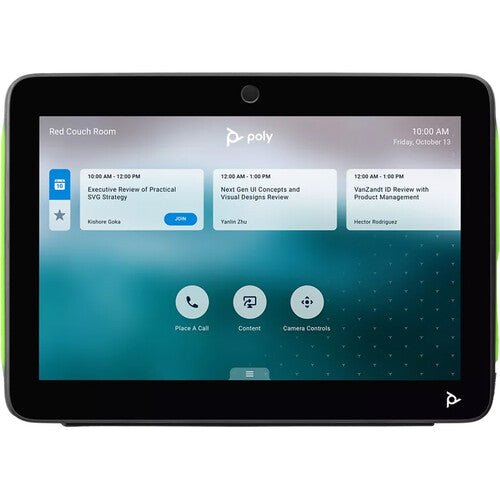


Poly TC10 Standalone 10 inch Room Scheduler Controller
PRODUCT DESCRIPTION
Poly TC10 10.1-inch Touch Controller and Room Scheduling Panel Black (875K5AA) - Local Warranty
Poly TC10 Black — 10.1-Inch PoE Touch Controller and Room Scheduler
The Poly TC10 in black is a 10.1-inch IP touch panel that works two ways: inside the room it is the touch controller for a Poly video system, and outside the room it runs standalone as a scheduling panel showing availability and allowing on-the-spot booking. Powered over a single Ethernet cable and shipping with both a wall mount kit and a table stand, it is a complete control and scheduling answer for Singapore meeting rooms.
Large 10.1-Inch WXGA IPS Touchscreen
The TC10 uses a 10.1-inch IPS panel at WXGA 1280 x 800 with 300 nits typical brightness, a 1000:1 contrast ratio and a 75-degree viewing angle horizontally and vertically. Meeting lists, dial pads and content controls stay readable across a boardroom table, and a multi-colour LED bar on each edge signals room status from a distance so staff can see whether a room is free before they walk up to it.
Controller Inside the Room, Scheduling Panel Outside
Paired to a Poly video system the TC10 runs the meeting; unpaired it runs standalone as a Zoom Rooms Scheduler or a Microsoft Teams Panel, displaying current status and upcoming bookings and letting staff reserve the space at the door. A motion and proximity sensor wakes the display as someone approaches, and an integrated air quality sensor adds workplace insight for facilities teams.
PoE Powered with Mount Kit and Table Stand Included
A single RJ-45 connection provides both data and power to IEEE 802.3at Class 0, with 802.1x supported for secure network access. The wall mount kit, table stand and mounting hardware are supplied in the box, so the same part can be table mounted in one room and wall or glass mounted outside another without ordering additional accessories.
Ideal For
The Poly TC10 in black is ideally suited to organisations running Poly Studio X or G-series rooms that want one 10.1-inch panel for both in-room control and door-side room booking, in a dark finish that suits contemporary and darker-toned office interiors.
Poly TC10 Datasheet — Technical Specifications
General
| Model | Poly TC10 touch controller and room scheduling panel |
| Part Number | 875K5AA |
| Manufacturer | Poly (HP) |
| Type | 10.1-inch IP touch controller / standalone scheduling panel |
| Colour | Black |
| Warranty | Local Warranty (Singapore) |
Display
| Screen size | 10.1-inch diagonal (25.7 cm) touchscreen |
| Resolution | WXGA 1280 x 800 |
| Aspect ratio | 16:10 |
| Panel | IPS |
| Brightness | 300 nits typical |
| Contrast ratio | 1000:1 |
| Viewing angle | 75° horizontal and vertical |
| Status indication | Multi-colour LED bar on the left and right edges showing room vacancy status |
Connectivity & Power
| Ports | 1 x RJ-45 |
| Power | Power over Ethernet (PoE), IEEE 802.3at Class 0 |
| Cabling | Single Ethernet cable for power and connectivity; a PoE injector may be used |
| Network security | 802.1x support |
| Sensors | Motion / proximity sensor to wake the display; air quality sensor |
| Controls | Physical Poly touch button to open the Poly control dock; factory-restore pinhole |
Design & Environment
| Dimensions (W x D x H) | 260 x 184 x 64 mm (10.25 x 7.25 x 2.5 in) |
| Weight | 1.27 kg (2.79 lb) |
| Mounting | Wall mount kit, table stand and mounting hardware included in the box; wall or glass mounting supported |
| Security | Kensington-style security lock slot |
| Operating temperature | 0 to 40 °C (32 to 104 °F) |
| Operating humidity | 15 to 80% |
| Non-operating humidity | 5 to 95% |
Compatibility & Software Support
The Poly TC10 pairs over the network with a Poly video system. HP's Poly TC10 Admin Guide lists pairing with Poly G7500, Poly Studio G62, Poly Studio X30, Poly Studio X50, Poly Studio X52 and Poly Studio X70.
| Poly G7500 UHD 4K codec base unit | 7200-85860-102 / 83Z50AA |
| Poly Studio G62 video conferencing system | 99T09AA |
| Poly Studio X30 all-in-one video bar | 2200-85980-102 / 83Z45AA |
| Poly Studio X50 all-in-one video bar | 2200-85970-102 / 83Z44AA |
| Poly Studio X52 all-in-one video bar | 8D8K2AA |
| Poly Studio X70 all-in-one video bar | 7200-87290-102 / 83Z51AA |
Standalone modes
The TC10 can also run on its own, without being paired to a room system:
- Zoom Rooms Controller — launch and manage Zoom meetings, join scheduled meetings, share content and dial numbers. Requires a Zoom Rooms account.
- Zoom Rooms Scheduler — display room status and upcoming meetings and reserve the room at the door. Requires a Zoom Rooms account; full scheduler functionality requires a Zoom Rooms admin account to sign in.
- Microsoft Teams Panel — display current room status and upcoming meetings and reserve the room. Requires a Microsoft Teams Rooms account, managed from the Microsoft Teams Admin Centre.
Certifications and platform support
HP states the TC10 is Certified for Zoom, and Certified for Microsoft Teams when deployed as a controller for Microsoft Teams on Android paired to a Poly video system. HP publishes no Google Meet certification for the TC10. HP additionally lists native support for third-party applications including Zoom Rooms, 8x8, BlueJeans, GoToRoom, Tencent, RingCentral and Dialpad.
Management
Poly Lens and Device Management Service for provisioning, monitoring, analytics and firmware updates.
Note: HP does not list the Poly Studio V-series USB video bars among the systems the TC10 pairs with. V-series rooms are driven by a conferencing PC — see the Poly Studio Base Kit G9 Plus, which pairs the HP Mini IP conferencing PC with a TC10.
Package Contents & Poly Controller Ordering Information
In the box
Poly TC10; wall mount kit; table stand; mounting hardware; RJ-45 cable; quick start QR code; warranty card; Poly Lens coaster.
Because the wall mount kit and table stand are included, no separate mounting accessory needs to be ordered for a standard table, wall or glass installation.
Poly Touch Controller Ordering Information
| Poly Studio TC8 touch controller (PoE, 8-inch) | 2200-30760-001 / 875J0AA |
| Poly TC10 touch controller & scheduler, Black (PoE, 10.1-inch) (this listing) | 875K5AA |
| Poly TC10 touch controller & scheduler, White (PoE, 10.1-inch) | 875J5AA |
| Poly GC8 touch controller (USB, 8-inch) | 2200-30780-001 / 875J6AA |
Compatible Poly Room Systems
| Poly G7500 UHD 4K codec base unit | 7200-85860-102 / 83Z50AA |
| Poly Studio G62 video conferencing system | 99T09AA |
| Poly Studio X30 all-in-one video bar | 2200-85980-102 / 83Z45AA |
| Poly Studio X50 all-in-one video bar | 2200-85970-102 / 83Z44AA |
| Poly Studio X52 all-in-one video bar | 8D8K2AA |
| Poly Studio X70 all-in-one video bar | 7200-87290-102 / 83Z51AA |
Datasheet & Downloads
Official HP Poly documentation for the Poly TC10:
- HP product specifications — Poly TC10 Black (875K5AA)
- HP product page — Poly TC10 touch controller (Black)
- HP spec sheet PDF — Poly TC10 (875K5AA)
- Poly TC10 Admin Guide 6.5.0 (HP-hosted PDF)
SourceIT can also supply the current Poly VideoOS release notes and Poly Lens deployment guides on request.
Frequently Asked Questions — Poly TC10
What is the difference between the black and white Poly TC10?
Only the finish. HP's specification pages for 875K5AA (black) and 875J5AA (white) are identical field for field apart from colour, so this black unit (875K5AA) and the TC10 in white are functionally the same product.
Can the TC10 be used as a room booking panel on its own?
Yes. In standalone mode it runs as a Zoom Rooms Scheduler or as a Microsoft Teams Panel, showing room status and upcoming meetings and allowing on-the-spot booking. A Zoom Rooms account or a Microsoft Teams Rooms account is required for the respective mode.
Which Poly systems can the TC10 control?
HP's TC10 Admin Guide lists Poly G7500, Poly Studio G62, Poly Studio X30, Poly Studio X50, Poly Studio X52 and Poly Studio X70. For a room built around a conferencing PC and a Studio V-series bar, see the Poly Studio Base Kit G9 Plus, which includes a TC10.
How does the TC10 compare with the TC8 and the GC8?
The Poly Studio TC8 is an 8-inch PoE controller for Poly room systems with no scheduler mode. The Poly GC8 is an 8-inch USB controller that connects to a Windows Microsoft Teams Rooms conferencing PC and uses an external mains power supply. The TC10 is the largest of the three at 10.1 inches, is PoE powered and is the only one HP publishes a standalone scheduling mode for.
Does the TC10 need a power supply or a mount kit?
No to both. It is powered over Ethernet to IEEE 802.3at Class 0 from a PoE switch or injector, and the wall mount kit, table stand and mounting hardware are supplied in the box.
Does the TC10 have a camera or microphone?
HP publishes no camera, microphone or speaker specification for the TC10. It does include a motion and proximity sensor that wakes the display, an air quality sensor and a multi-colour LED status bar so room availability is visible before you reach the door.
Is this covered by warranty in Singapore?
Yes. Every Poly TC10 sold by SourceIT comes with local Singapore warranty and a GST invoice.


