
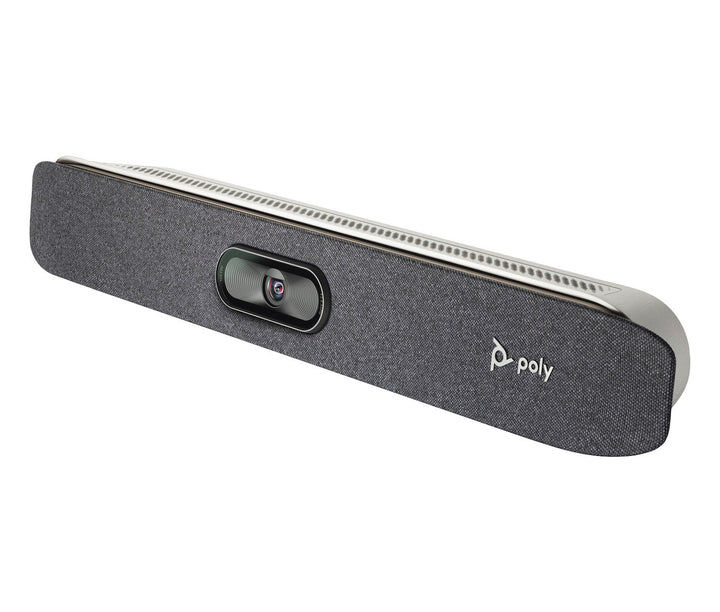


Poly Studio X30 4K Ultra HD Video Conferencing System
Email sales@sourceit.com.sg or use Request for Quotation below and our team will confirm the latest price, availability and lead time.
PRODUCT DESCRIPTION
Poly Studio X30 4K Ultra HD All-In-One Video Bar — 2200-85980-102 / 83Z45AA - Local Warranty
4K Ultra HD Video with a 121° Field of View for Huddle Rooms
The Poly Studio X30 puts the camera, speaker, microphones and the video application itself into a single 441 mm bar, so a huddle room needs nothing more than a display, a network drop and power — no room PC, no separate codec, no gateway box under the table. The camera captures 2160p 4K Ultra HD across a 121° diagonal / 110° horizontal field of view, which is wide enough to cover the whole of a typical Singapore huddle room from a single wall-mounted position. HP rates it for rooms of roughly 15 ft x 10 ft and up to six participants.
Poly DirectorAI Framing Keeps Every Face in Shot
Poly DirectorAI handles the camera work so nobody has to. It offers people framing, group framing and speaker framing, and the DirectorAI perimeter lets you tell the camera which part of the room to pay attention to — useful when the bar faces a glass partition or an open corridor. Presenter Mode keeps a standing presenter framed as they move. A 5x digital zoom lets you push in further; note that this is a digital zoom, not an optical one, and there is no motorised pan or tilt on this model.
NoiseBlockAI and Acoustic Fence for Open-Plan Offices
Four MEMS microphones in a beamforming array pick up the table out to 4.57 m. Poly NoiseBlockAI suppresses the keyboard clatter, packet rustle and air-con hum that otherwise leak into a call, while Poly Acoustic Fence draws a boundary around the room so conversations happening just outside the door stay outside the call — a practical difference in the open-plan floorplates most Singapore offices work in.
Teams, Zoom, Google Meet — or Just Your Own Laptop
HP certifies the Studio X30 for Microsoft Teams and Zoom and states it is certified to work with Google Meet, and the bar runs those applications natively on the device. Poly Video App mode reaches every other cloud provider, and standards-based H.323 and SIP calling is supported for organisations still running their own infrastructure. When a visitor needs to host from their own laptop, USB Device Mode turns the whole bar into a USB camera and speakerphone.
Poly Studio X30 Datasheet — Technical Specifications
Every specification below is taken from HP and Poly's own published documentation for the Studio X30 — the official product specification sheet, the HP Poly product page and the Poly datasheet. Where HP does not publish a figure we have left it out rather than estimate it.
General
| Product type | All-in-one video bar — camera, speaker, microphones and video application in one device, no room PC required |
| Recommended room size | 15 ft x 10 ft (4.6 m x 3.0 m); HP states up to six participants |
| Displays supported | Single display |
| Management | Poly Lens cloud device management |
| Operating conditions | 0 °C to 40 °C, 15–80% relative humidity |
| Warranty | Local Warranty (Singapore) |
| Part number | 2200-85980-102 / 83Z45AA |
Camera
| Capture resolution | 2160p 4K Ultra HD (3840 x 2160) |
| Frame rate | 5–60 fps; up to 4K resolution at 15 fps in call |
| Lens | Single lens |
| Zoom | 5x digital zoom — HP and Poly state digital zoom only; there is no optical zoom on this model |
| Field of view | 121° diagonal (DFOV), 110° horizontal (HFOV) |
| Auto-framing | Poly DirectorAI — people framing, group framing, speaker framing, DirectorAI perimeter; Presenter Mode |
| Video standards | H.264, H.265, H.239 |
| Privacy | Attachable privacy cover |
Audio
| Speaker | Single speaker, 3 W RMS / 5 W maximum |
| Speaker sensitivity | 80 dB (1 W / 1 m) |
| Microphones | Four MEMS microphones in a beamforming array |
| Microphone pickup range | Up to 4.57 m (15 ft) |
| Audio bandwidth | 22 kHz with Polycom Siren 22; down to 3.4 kHz with G.711, G.728, G.729A |
| Audio processing | Poly NoiseBlockAI, Poly Acoustic Fence |
Connectivity
| HDMI input | 1 x HDMI-in 1.4 (video) |
| HDMI output | 1 x HDMI-out 1.4 (video) |
| HDMI input resolutions | 3840 x 2160, 1920 x 1080p, 1680 x 1050, 1600 x 1200, 1280 x 1024, 1280 x 768, 1280 x 720p, 1024 x 768, 800 x 600 |
| USB | 1 x USB Type-C (5 Gbps); 1 x USB Type-A (5 Gbps) |
| Ethernet | 1 x 10/100/1G, Auto-MDIX |
| Network | IPv4 and IPv6; H.323 and/or SIP up to 6 Mbps |
| Wi-Fi | 802.11a/b/g/n/ac (MIMO) |
| Bluetooth | 5.0 |
| Wireless content sharing | Apple AirPlay, Miracast, plus wired HDMI input |
Design & Power
| Dimensions | 441.8 mm (W) x 62.5 mm (H) x 61.6 mm (D) |
| Weight | 730 g |
| Mounting | Monitor clamp included; VESA and wall mount kit, inverted mount kit and table stand sold separately |
| Power | External auto-sensing power supply; 37 VA at 120 V / 60 Hz and at 230 V / 50–60 Hz |
| Heat dissipation | 65 BTU/h |
| Control options | Poly TC8 or TC10 touch controller, Poly Bluetooth remote control, Poly Trio |
Compatibility & Software Support
Platforms and certifications
HP states the Studio X30 is Certified for Microsoft Teams, Certified for Zoom and Certified to work with Google Meet.
Poly Video App mode reaches all cloud service providers, and the bar runs native third-party room applications including Zoom, Microsoft Teams, BlueJeans, Dialpad, GoToRoom, RingCentral and StarLeaf.
Use it with a laptop or room PC
USB Device Mode is supported — connect the bar to a laptop or room PC over USB and use it as a camera, speakerphone and microphone for any application, including Webex, GoTo and in-house software.
Standards-based calling
Standards-based H.323 and SIP calling up to 6 Mbps in Poly Video mode.
Management software
The Studio X30 is managed through Poly Lens, HP's cloud device-management service. From one console your IT team can see room device health, push firmware, apply configuration profiles and pull usage insights across every Poly device in the estate — which is the usual reason Singapore IT departments standardise on Poly rather than mixing consumer hardware across meeting rooms.
Package Contents & Poly Studio X Series Ordering Information
In the box
- Poly Studio X30 video bar
- AC power adapter
- Ethernet cable
- HDMI cable
- Monitor clamp
- Privacy cover
Poly Studio X Series ordering information
Touch controllers and room scheduling panels
| Model / Variant | Part Number |
| Poly Studio TC8 Video Conferencing Controller | 2200-30760-001 / 875J0AA |
| Poly TC10 Touch Controller / Room Scheduler (black) | 875K5AA |
| Poly TC10 Touch Controller / Room Scheduler (white) | 875J5AA |
| Poly GC8 Touch Controller for Poly Room Kits | 2200-30780-001 / 875J6AA |
Mounts and expansion accessories for the Studio X30
| Model / Variant | Part Number |
| Poly Studio X30 VESA and Wall Mount | 2215-86512-001 / 875L6AA |
| Poly Studio X30 Table Stand | 2215-86513-001 / 875L5AA |
| Poly Studio X30 Inverted VESA and Wall Mount | 2215-86719-001 / 875L7AA |
Prices, stock and lead times for any of the above are available from the SourceIT sales team.
Datasheet & Downloads
All documents below are published by HP and Poly. Links open in a new tab.
- HP Poly Studio X30 Product Page — official HP product page with the full feature and certification list
- HP Product Specifications — Poly Studio X30 (83Z45AA) — official HP specification sheet
- HP Poly All-In-One Video Bar Line-Up (Singapore) — current HP Singapore comparison of the Studio X range
- Poly Support (Singapore) — firmware, admin guides and release notes for Poly Video OS
Frequently Asked Questions — Poly Studio X30
Which room size does the Poly Studio X30 suit?
HP rates the Studio X30 for huddle and small meeting rooms of roughly 15 ft x 10 ft (4.6 m x 3.0 m) and up to six participants, with microphone pickup to 4.57 m. For a room with a full-length table, step up to the Studio X52; for a boardroom, the Studio X72.
How does the Studio X30 compare with the newer Studio X32?
The Studio X32 is HP's current small-room bar and has replaced the X30 in the published line-up — HP's Singapore all-in-one comparison page now lists only the X32, X52 and X72. Against the X30 the X32 publishes a 20 MP sensor, a wider 132° diagonal field of view, stereo rather than single-driver speakers, dual HDMI 2.0 outputs, Wi-Fi 6 and PoE++ power. The X30 remains a sound choice where you are matching an existing estate or working to a tighter budget.
Do I need a room PC, a codec or a separate licence?
No room PC and no separate codec — the video application runs on the bar itself. You will still need the meeting service your organisation already uses (a Microsoft Teams Rooms licence, a Zoom Rooms licence, or your own H.323/SIP infrastructure), because the hardware certification does not include the platform subscription. We can quote the room licence alongside the hardware.
What is the difference between part numbers 83Z45AA and 842V0AA?
83Z45AA is the standard Studio X30. HP lists 842V0AA as a No Radio or Power Cord, TAA build — the same bar supplied without the wireless radio and without a power cord, for procurement programmes that require Trade Agreements Act compliance. Unless your tender specifically calls for TAA compliance, the standard part number is the one you want.
Does the Studio X30 support PoE?
No. HP publishes no PoE support for the Studio X30 — it ships with an external auto-sensing power adapter and needs a power point. If single-cable PoE deployment matters to your fit-out, the Studio X32 accepts PoE++ (IEEE 802.3bt Class 6) and is the model to specify.
Can I add a touch controller or extra microphones later?
Yes. The Studio X30 works with the Poly TC8 and Poly TC10 touch controllers, a Poly Bluetooth remote, or a Poly Trio. If you would rather have the controller from day one, we stock the bar and TC8 together as a single kit.
Does the Poly Studio X30 come with a Singapore warranty and GST invoice?
Yes. Every Poly Studio X30 sold by SourceIT comes with local Singapore warranty and a GST invoice.


