
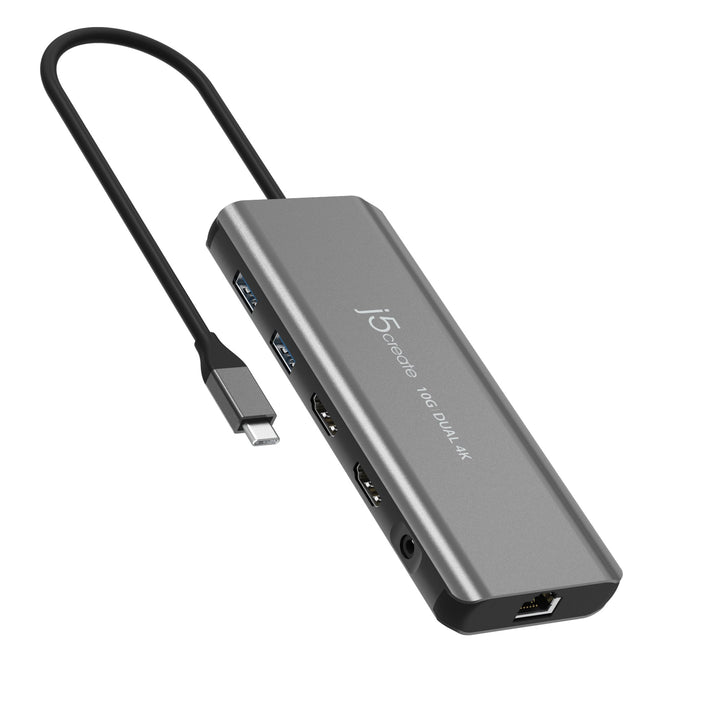


J5Create JCD398 USB-C Dual 4K HDMI 10Gbps Mini Dock
Prices in SGD, excluding 9% GST.
PRODUCT DESCRIPTION
J5Create JCD398 USB-C Dual 4K HDMI 10Gbps Mini Dock - 2 Years Local Warranty
A compact USB-C mini dock that adds display, data and charging ports to a laptop, small enough to carry between desk and meeting room.
Key Features
- Two HDMI outputs for dual extended displays on Windows and Mac, including Apple M1/M2 MacBooks
- One HDMI at 4K 60Hz (DP Alt) plus one HDMI at 4K 30Hz (USB graphics)
- Two USB-A 3.2 Gen 2 10Gbps ports
- Gigabit Ethernet and 3.5mm audio combo jack
- USB-C PD 3.0 input with up to 100W pass-through charging
Equipping a team or office? Email sales@sourceit.com.sg for volume pricing and delivery lead time.
j5create JCD398 Datasheet — Technical Specifications
General
| Local Warranty (Singapore) | 2-year limited warranty (j5create), supplied by SourceIT with a GST invoice |
| Brand | j5create |
| Model | JCD398 |
| Product Name | USB-C Dual 4K HDMI 10Gbps Mini Dock |
| EAN | 4712795088199 |
Video Output
| Video Outputs | 2 x HDMI Female (1 x 4K @ 60 Hz, 1 x 4K @ 30 Hz) |
| Displays Supported | 2 |
| Single Display (DP Alt) | 3840 x 2160 @ 60 Hz; 2560 x 1440 @ 120 Hz; 1920 x 1080 @ 144 Hz |
| Single Display (USB Graphics) | 3840 x 2160 @ 30 Hz; 2560 x 1440 @ 60 Hz; 1920 x 1080 @ 60 Hz |
| Dual Display | 3840 x 2160 @ 60 Hz via DP Alt + 3840 x 2160 @ 30 Hz via USB Graphics |
| Audio | 2.1 channel via HDMI |
Ports
| Host Connector | 1 x USB-C Male |
| Ports | 1 x HDMI 4K @ 60 Hz; 1 x HDMI 4K @ 30 Hz; 2 x USB Type-A 3.2 Gen 2 (10Gbps); 1 x 3.5mm combo audio jack; 1 x RJ45 Gigabit Ethernet; 1 x USB-C PD-in (PD 3.0, up to 100W) |
| Max Data Transfer Rate | 10 Gbps |
| Network | RJ45 Gigabit Ethernet, 10/100/1000 Mbps |
Power
| Power Source | Bus-powered or self-powered |
| Power Delivery | Accepts up to 100W USB-C PD input; up to 90W pass-through to the laptop |
| Input | 20V / 5A |
| Output | 20V / 4.5A |
| Power Consumption | ≤ 700 mA |
Compatibility
| Operating Systems | Windows 10 / 11; macOS 10.14 or later |
| Driver | Driver installation required on Windows and macOS (Windows can install automatically with network access and admin rights) |
Physical
| Dimensions (W x D x H) | 147.25 x 56.98 x 14.85 mm (5.8 x 2.24 x 0.58 in.) |
| Weight | 113.5 g (4.00 oz) |
| Cable Length | 198.12 mm (7.8 in.) |
| Colour | Space Grey |
| Enclosure | Aluminium |
| Operating Temperature | 0 to 37°C (32 to 98°F) |
| Storage Temperature | -10 to 65°C (14 to 140°F) |
| Country of Origin | Taiwan |
| Operating Humidity | < 85% non-condensing |
| Storage Humidity | < 85% non-condensing |
Compatibility & System Requirements
System Requirements
- Windows 10 / 11; macOS 10.14 or later
- Available USB-C port supporting DisplayPort Alternate Mode and USB Power Delivery 2.0/3.0 or 3.1
- Host must support DisplayPort 1.4 for 4K @ 60 Hz
- 4K-capable display required for 3840 x 2160
Compatibility
| Operating Systems | Windows 10 / 11; macOS 10.14 or later |
| Driver | Driver installation required on Windows and macOS (Windows can install automatically with network access and admin rights) |
Package Contents & j5create USB-C Mini Docks Ordering Information
In the Box
- 1 x JCD398 USB-C Dual 4K HDMI 10Gbps Mini Dock
- 1 x Quick Installation Guide (QIG)
j5create USB-C Mini Docks at SourceIT
| Model | Product |
| JCH471 | USB-C Multi-Adapter Gigabit Ethernet / USB 3.1 HUB |
| JCD353 | USB-C to 4K HDMI Multi-Port Hub |
| JCD371 | USB-C to HDMI & USB 3.1 2-Port with Power Delivery |
| JCD373 | USB-C Multi-Port Hub with Power Delivery |
| JCD373EW | USB-C Multi-Port Hub with Power Delivery |
| JCD376 | USB-C Multiport Adapter with Power Delivery |
| JCD381 | USB-C Dual HDMI Mini Dock |
| JCD383 | USB-C Multi Adapter (9 Functions in 1) |
| JCD384 | USB-C Multi Adapter (10 Functions in 1) |
| JCD392 | 4K60 Elite USB-C 10Gbps Travel Dock |
| JCD396 | USB-C Dual HDMI 4K60 Mini Dock |
| JCD397 | 4K60 Elite USB-C Triple-Monitor 10Gbps Mini Dock |
| JCD398 (this listing) | USB-C Dual 4K HDMI 10Gbps Mini Dock |
| JCH462 | Wormhole Switch Display Sharing Hub |
Datasheet & Downloads
| j5create product page | JCD398 on j5create.com |
| Quick Install Guide | Quick Install Guide (PDF) |
| Drivers | Drivers |
| Country of Origin Declaration | Country of Origin Declaration (PDF) |
Need a document sent directly? Email sales@sourceit.com.sg quoting JCD398.
Frequently Asked Questions — j5create JCD398
Does it need a driver?
Driver installation required on Windows and macOS (Windows can install automatically with network access and admin rights)
How many external displays does it support?
2. Actual output depends on your laptop's USB-C / Thunderbolt video support; see the Compatibility section.
How much charging power reaches my laptop?
Up to about 90W, based on j5create’s published output rating, when a suitable USB-C PD power adapter is connected (adapter sold separately unless listed in the box).
What warranty do I get?
2-year limited warranty from j5create, supplied locally in Singapore by SourceIT with a GST invoice.
Can SourceIT quote for bulk or corporate orders?
Yes. Email sales@sourceit.com.sg quoting JCD398 and the quantity for volume pricing and delivery lead time.