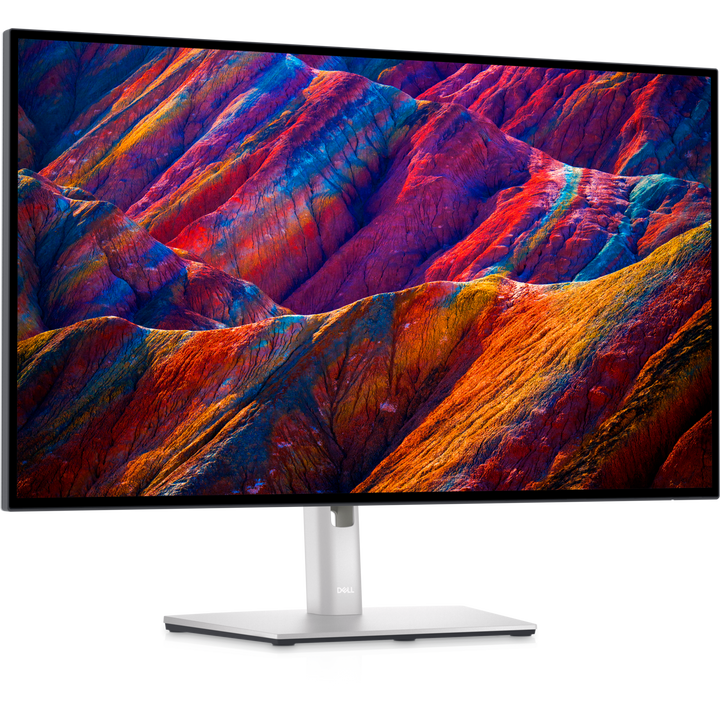


Dell UltraSharp 27 U2723QE 27" 4K IPS Black USB-C Hub Monitor
PRODUCT DESCRIPTION
Dell UltraSharp 27 4K USB-C Hub Monitor U2723QE (210-BDZI) - 3 Years Local Warranty
4K with IPS Black Technology
A 27-inch 3840 x 2160 IPS Black panel delivers 163 PPI, 2000:1 contrast, 400 cd/m² brightness and 98% DCI-P3 with factory calibration to Delta E < 2.
USB-C hub with 90 W and 1GbE
One USB-C cable carries DisplayPort 1.4 video, 10 Gbps USB data and up to 90 W of laptop charging, with a 1GbE RJ45 port and five USB-A plus one USB-C downstream ports.
Built-in KVM and full ergonomics
KVM and Auto KVM let you control two computers with one keyboard and mouse, while the stand offers 150 mm height, tilt, swivel and pivot adjustment.
Equipping a team or office? Email sales@sourceit.com.sg for volume pricing, delivery lead time and availability of current Dell successors.
Dell U2723QE Datasheet — Technical Specifications
Display
| Screen size | 27" (68.47 cm) diagonal, 16:9 |
| Panel type | IPS Black Technology, LED backlight |
| Native resolution | 4K UHD 3840 x 2160 at 60 Hz |
| Pixel pitch | 0.1554 mm |
| Pixels per inch | 163.18 PPI |
| Brightness | 400 cd/m² (typical) |
| Contrast ratio | 2000:1 (typical) |
| Colour support | 1.07 billion colours |
| Colour gamut | 100% sRGB, 100% Rec 709, 98% DCI-P3 |
| Colour accuracy | Delta E < 2 (average), factory calibrated |
| Response time | 8 ms (grey-to-grey normal); 5 ms (grey-to-grey fast) |
| Viewing angle | 178° horizontal / 178° vertical |
| Screen coating | Anti-glare, 3H hard coating |
| Bezel | 3-sided bezel-less design |
Connectivity
| HDMI | 1 x HDMI 2.0 (HDCP 2.2) |
| DisplayPort in | 1 x DisplayPort 1.4 with DSC (HDCP 2.2) |
| DisplayPort out | 1 x DisplayPort output (MST / daisy chain) |
| USB-C upstream (video + power) | 1 x USB-C upstream, DisplayPort 1.4 Alt Mode with DSC (HDCP 2.2), power delivery up to 90 W |
| USB-C upstream (data) | 1 x USB-C 3.2 Gen 2 (10 Gbps) upstream, data only |
| USB-C downstream | 1 x USB-C 3.2 Gen 2 (10 Gbps) downstream, up to 15 W |
| USB-A downstream | 4 x USB 3.2 Gen 2 (10 Gbps) downstream, plus 1 x USB 3.2 Gen 2 downstream with Battery Charging 1.2 |
| Network | 1 x RJ45 Ethernet, 1GbE |
| Audio | Audio line-out (3.5 mm mini-jack) |
| USB-C Power Delivery | Up to 90 W |
| KVM | Yes, KVM and Auto KVM |
| Built-in speakers | No |
Ergonomics
| Adjustments | Height, tilt, swivel, pivot |
| Height adjustment | 150 mm |
| Tilt | -5° / +21° |
| Swivel | -30° / +30° |
| Pivot (rotation) | -90° / +90° |
| VESA mounting | 100 x 100 mm |
| Security | Security lock slot (cable lock sold separately); anti-theft stand lock slot |
Eye Comfort
| Low blue light | Dell ComfortView Plus (always-on, built-in low blue light screen) |
Power
| Input voltage | AC 100-240 V (50/60 Hz) |
| On mode | 25.9 W |
| Maximum | 220 W |
| Standby | 0.3 W |
| Off mode | 0.2 W |
| On/off switch | Yes |
Physical
| Dimensions with stand (W x D x H) | 611.4 x 185.0 x 385.18-535.18 mm |
| Dimensions without stand (W x D x H) | 611.44 x 54.33 x 353.01 mm |
| Weight (panel only) | 4.48 kg |
| Weight (with stand and cables) | 6.64 kg |
| Shipping weight | 9.53 kg |
| Operating temperature | 0 °C to 35 °C |
| Operating humidity | 10% to 80% (non-condensing) |
Certifications
| Environmental | ENERGY STAR, EPEAT Gold (where applicable), TCO Certified Edge |
| Compliant standards | RoHS, BFR/PVC-free (excluding external cables), arsenic-free glass, mercury-free panel |
| Recycled content | 85% post-consumer recycled plastic in the design |
| Software | Dell Display Manager (incl. Easy Arrange) |
Warranty
| Local Warranty (Singapore) | Dell Singapore: 3-Year Advanced Exchange Service and Premium Panel Exchange; supplied by SourceIT with a GST invoice |
Compatibility & Software Support
PC and laptop connection
Connect via HDMI 2.0, DisplayPort 1.4 or USB-C with DisplayPort 1.4 Alt Mode (all HDCP 2.2); a DisplayPort output supports MST daisy chaining.
USB-C laptops
USB-C laptops with DisplayPort Alt Mode get 4K video, USB hub access, 1GbE Ethernet and up to 90 W charging through a single cable.
Dell Display Manager and mounting
Dell Display Manager with Easy Arrange is supported, and the panel mounts on standard 100 x 100 mm VESA arms.
Package Contents & Dell UltraSharp Monitors Ordering Information
In the Box
Monitor, stand riser, stand base, power cable, USB-C to USB-C cable (1 m), DisplayPort to DisplayPort cable (1.8 m), SuperSpeed USB Type-A to Type-C cable, factory calibration report, quick setup guide, and safety, environmental and regulatory information.
Dell UltraSharp Monitors
| Model | Key feature |
| U2421E | 24.1" WUXGA 16:10, USB-C 90 W, RJ45 |
| U2422H | 24" FHD IPS, USB hub |
| U2422HE | 24" FHD IPS, USB-C 90 W, RJ45 |
| U2424H | 24" FHD 120 Hz, USB hub |
| U2424HE | 24" FHD 120 Hz, USB-C 90 W, RJ45 |
| U2520D | 25" QHD IPS, USB-C 90 W |
| U2722D | 27" QHD IPS, USB hub |
| U2722DE | 27" QHD IPS, USB-C 90 W, RJ45 |
| U2723QE (this listing) | 27" 4K IPS Black, USB-C 90 W, RJ45 |
| U2724D | 27" QHD IPS Black 120 Hz |
| U2724DE | 27" QHD 120 Hz, Thunderbolt 4 90 W |
| U2725QE | 27" 4K 120 Hz, Thunderbolt 4 |
| U3023E | 30" WQXGA 16:10, USB-C 90 W, RJ45 |
| U3223QE | 31.5" 4K IPS Black, USB-C 90 W, RJ45 |
| U3224KB | 32" 6K, Thunderbolt 4, webcam |
| U3225QE | 32" 4K 120 Hz, Thunderbolt 4 |
| U3226Q | 32" 4K QD-OLED |
Datasheet & Downloads
| User guide | Dell U2723QE Monitor User's Guide (PDF) |
| Datasheet | Dell U2723QE product datasheet (PDF) |
| Dell Singapore | U2723QE on dell.com/en-sg |
| Manuals & drivers | U2723QE on Dell Support (Singapore) |
| Warranty | Dell Monitor Service & Warranty brochure (PDF) |
Need a PDF sent directly? Email sales@sourceit.com.sg quoting U2723QE.
Frequently Asked Questions — Dell U2723QE
What resolution and panel does the Dell U2723QE use?
It uses a 27-inch 4K 3840 x 2160 IPS Black Technology panel at 60 Hz with 2000:1 contrast.
How much power does the USB-C port provide?
The USB-C upstream port delivers up to 90 W; the downstream USB-C port supplies up to 15 W.
Does the U2723QE have a KVM switch?
Yes, Dell lists KVM and Auto KVM support, using the video USB-C and the separate data-only USB-C upstream port.
Can I daisy-chain monitors?
Yes, the DisplayPort output supports MST daisy chaining.
What warranty does it come with?
Dell Singapore: 3-Year Advanced Exchange Service and Premium Panel Exchange; supplied by SourceIT with a GST invoice.