
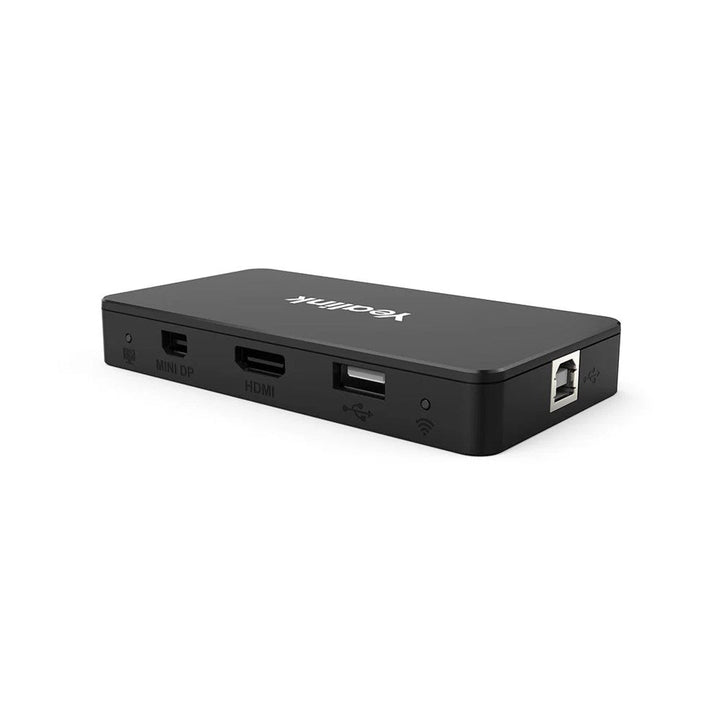

Yealink MShare
PRODUCT DESCRIPTION
Yealink MShare E2 MVC Screen Sharing Box (1306032) - 2 Years Local Warranty
Yealink MShare E2 — Wired Content Sharing for MVC Teams Rooms
The Yealink MShare E2 is the MVC screen sharing box for Yealink Microsoft Teams Rooms systems, letting presenters share a laptop screen over a simple wired HDMI or USB-C connection at up to 1080p/30fps Full HD, with audio sharing supported. It is the current, second-edition MShare — the model supplied under part number 1306032.
Flexible, Hidden-Away Deployment
Designed separately from the touch console for flexible placement, the compact MShare E2 can sit on the table or be hidden inside the conference desk for clean integration with an HDMI matrix — ideal for tidy boardroom installs in Singapore.
Simple for Presenters
Guests connect with the included HDMI or USB-C cable and share instantly into the Teams Rooms meeting; a bi-colour LED shows sharing status at a glance. At just 82 grams and 116 mm wide, it disappears into the room.
Yealink MShare E2 Datasheet — Technical Specifications
General
| Model | Yealink MShare E2 — MVC Screen Sharing Box |
| Part Number | 1306032 |
| Warranty | 2 Years Local Warranty (Singapore) |
Content Sharing
| Resolution | Up to 1080p/30fps Full HD screen sharing |
| Audio | Audio sharing supported |
| Status | Bi-colour LED indicator |
Ports
| Video Input | 1 x HDMI in, 1 x USB-C in |
| System Connection | 1 x USB Type-B |
Physical & Environment
| Dimensions | 116 x 61 x 16.8 mm |
| Weight | 0.082 kg |
| Operating Conditions | 0 to 40°C, 10-95% humidity |
Compatibility & Software Support
The MShare E2 is Yealink's wired screen sharing box for MVC Microsoft Teams Rooms systems, with a separate-from-console design that supports integration with HDMI matrices. It connects to the room's MCore/MVC system over USB and shares presenter content into the Teams meeting. Firmware and monitoring are handled with the room system through the Yealink Device Management Platform / Management Cloud Service. For wireless presentation instead of wired, see the Yealink WPP30 presentation pod.
Package Contents & Content Sharing Ordering Information
In the box: 1 x MShare E2, 1 x USB-C cable, 1 x HDMI cable, 1 x USB Type-A cable, 1 x quick start guide.
Yealink Content Sharing & Rooms at SourceIT
| Yealink MShare E2 — wired MVC screen sharing box | 1306032 (this model) |
| Yealink WPP30 4K Wireless Presentation Pod | 1303112 |
| Yealink VCH51 Pro Content Sharing & BYOD Hub | 1303106 |
| Yealink MVC S60 Native Teams Rooms System | MVC S60-C5-000 |
| Yealink MCoreKit-C5U-MS Teams Rooms Base Kit | MCoreKit-C5-MS |
Datasheet & Downloads
Frequently Asked Questions — Yealink MShare E2
Q: What is the difference between the MShare E2 and the original MShare?
The original MShare used HDMI + Mini-DP inputs and included a built-in Wi-Fi access point for the WPP20 wireless pod. The MShare E2 (this model, part 1306032) is the current edition with HDMI and USB-C inputs in a smaller 82-gram design that can hide inside the conference desk.
Q: What sharing quality does the MShare E2 support?
Up to 1080p/30fps Full HD screen sharing, with audio sharing supported.
Q: How do presenters connect?
With the included HDMI cable or USB-C cable — plug in and the laptop screen shares into the Microsoft Teams Rooms meeting, with a bi-colour LED confirming status.
Q: Is there a wireless alternative?
Yes — the Yealink WPP30 wireless presentation pod offers cable-free 4K sharing for compatible Yealink rooms.
Q: Which systems is the MShare E2 designed for?
It is Yealink's screen sharing box for MVC Microsoft Teams Rooms systems (MCore-based rooms), connecting over USB with a separate-design layout for flexible installation.
Q: Does the Yealink MShare E2 come with warranty in Singapore?
Yes. Every MShare E2 sold by SourceIT comes with 2 years local Singapore warranty and a GST invoice.


