
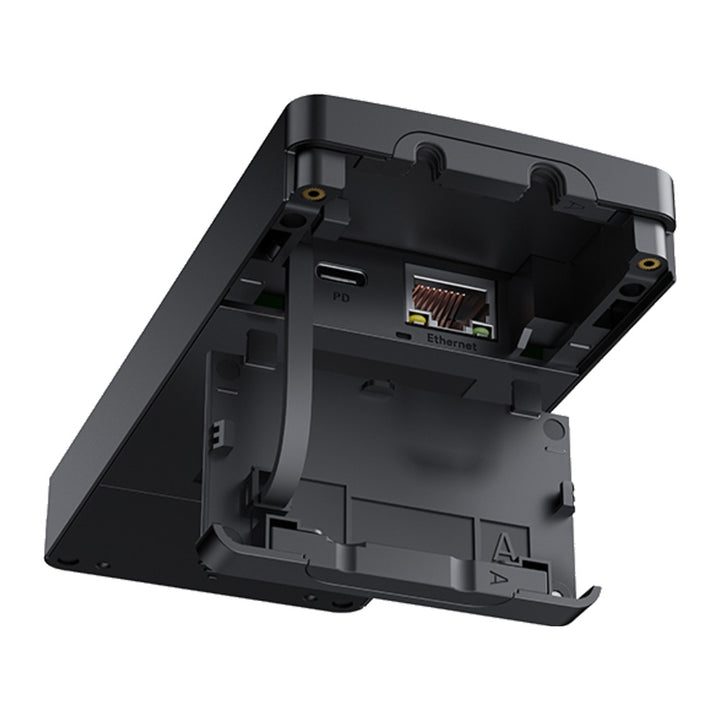


Yealink VCH51 Pro Content Sharing & BYOD Hub
PRODUCT DESCRIPTION
Yealink VCH51 Pro Content Sharing & BYOD Hub (1303229) - 2 Years Local Warranty
One USB-C Cable for Content Sharing, BYOD and Laptop Charging
The Yealink VCH51 Pro is a wired content sharing and BYOD hub for Yealink meeting room systems. Walk into the room, plug a single USB-C cable into your laptop and you are ready to present, join a call from your own device and keep your battery charged — a genuine one-cable meeting experience for busy Singapore meeting rooms and hybrid-work offices.
Smooth 4K/60fps Wired Presenting with Low Latency
Wireless sharing is convenient, but for detailed spreadsheets, CAD drawings and video content nothing beats a cable. The VCH51 Pro supports wired content sharing at up to 4K/60fps with low latency, so scrolling, cursor movement and video playback on the room display stay sharp and fluid.
Up to 65 W PD 2.0 Charging While You Present
The same USB-C cable that carries your presentation also delivers up to 65 W of USB Power Delivery 2.0 charging to your laptop (PD power adapter included), so back-to-back meetings never drain your battery.
True BYOD for Any Meeting Platform
In BYOD mode, the VCH51 Pro lets you run a meeting from your own laptop using the room's camera and audio equipment. Host on the platform your guests prefer — while keeping the room's native Microsoft Teams Rooms or Zoom Rooms experience for everyday use.
Built for Yealink MeetingBar, MeetingBoard Pro and MVC/ZVC S-Series Rooms
The VCH51 Pro is designed for Yealink's current-generation room systems, including MeetingBar A10/A25/A40/A50, MeetingBoard Pro series and MVC/ZVC S-Series kits. It is plug-and-play on Windows and macOS with no software or driver installation required.
Yealink VCH51 Pro Datasheet — Technical Specifications
General
| Model | Yealink VCH51 Pro (VCH51-PRO-PACKAGE) |
| Part Number | 1303229 |
| Product Type | Wired content sharing & BYOD hub for Yealink room systems |
| Warranty | 2 Years Local Warranty (Singapore) |
Ports & Connectivity
| Network | 1 x 1000 Mbps RJ45 port (IEEE 802.3af, full-duplex) |
| USB | 1 x USB 2.0 Type-C with DP video input |
| Power Port | 1 x PD power port |
Sharing
| Content Sharing | Wired presenting at up to 4K/60fps with low latency |
| BYOD | Run meetings from your laptop using the room's camera and audio |
| OS Support | Windows 7/8.1/10/11; macOS 10.6 or higher |
| Installation | Plug and play, no drivers required |
Power
| Laptop Charging | Up to 65 W via USB Power Delivery 2.0 (PD 2.0) |
| Power Adapter | PD power adapter included |
Design
| Dimensions (W x D x H) | 144 x 65 x 18 mm |
| Weight | 0.602 kg |
| Operating Temperature | 0 - 40°C |
| Operating Humidity | 10 - 95% |
Compatibility & Software Support
Yealink lists the following systems as compatible with the VCH51 Pro:
| MeetingBar (MTR on Android) | MeetingBar A10, A25, A40, A50 (MeetingBar A20/A30 are not supported — use the VCH51 Sharing Box instead) |
| MeetingBoard (MTR on Android) | MeetingBoard 65 Pro, 75 Pro, 86 Pro; MeetingBoard 65C/75C (EDLA). MeetingBoard 65/86 (non-Pro) are not supported |
| MeetingEye | MeetingEye 500 |
| MVC S-Series (MTR on Windows) | MVC S40, S80, S90, S98 (C5U kits); S50 support announced by Yealink as coming soon |
| ZVC S-Series (Zoom Rooms) | ZVC S40, S80, S90, S98 (C5U kits); S50 support announced by Yealink as coming soon |
| Laptop OS | Windows 7/8.1/10/11; macOS 10.6 or higher |
Firmware for the VCH51 Pro and its host room systems is published on the Yealink Support site. Keep the host system (MeetingBar/MeetingBoard/MVC/ZVC) on current firmware for the latest BYOD and sharing features.
Package Contents & VCH51 Pro Ordering Information
In the box (VCH51-PRO-PACKAGE):
- Yealink VCH51 Pro hub
- USB-C 3.2 Gen 1 cable, 1.8 m
- PD power adapter
- Cable cover kit with screwdriver and screws
- Velcro strips
- Quick Start Guide
Yealink wired sharing and BYOD family at SourceIT:
| Yealink VCH51 Pro Content Sharing & BYOD Hub (this product) | PN 1303229 — 4K/60fps sharing, BYOD, 65 W PD charging for current MeetingBar/MeetingBoard Pro/MVC/ZVC S-Series rooms |
| Yealink VCH51 Sharing Box | PN 1303106 — wired HDMI/USB-C sharing and BYOD for MeetingBar A20/A30 and MeetingEye 400/600 |
| Yealink MVC-BYOD-Extender | PN 1303113 — switches Yealink MVC Teams Rooms into BYOD mode over USB |
| Yealink WPP30 Wireless Presentation Pod | Wireless 4K presentation alternative for cable-free sharing |
Datasheet & Downloads
Frequently Asked Questions — Yealink VCH51 Pro
What does the Yealink VCH51 Pro do?
It is a wired content sharing and BYOD hub. One USB-C cable from your laptop gives you low-latency presenting at up to 4K/60fps on the room display, BYOD meetings using the room's camera and audio, and up to 65 W PD 2.0 laptop charging.
What is the difference between the VCH51 Pro, VCH51, MVC-BYOD-Extender and WPP30?
The VCH51 Pro (this product) is the current-generation one-cable USB-C hub with 4K/60fps sharing and 65 W charging for MeetingBar A10/A25/A40/A50, MeetingBoard Pro and MVC/ZVC S-Series. The VCH51 Sharing Box is the earlier wired sharing box (HDMI + USB-C, up to 4Kp15) for MeetingBar A20/A30 and MeetingEye 400/600. The MVC-BYOD-Extender is a USB adapter that switches Yealink MVC Teams Rooms into BYOD mode. The WPP30 is a wireless presentation pod for cable-free sharing.
Which Yealink systems is the VCH51 Pro compatible with?
MeetingBar A10/A25/A40/A50, MeetingBoard 65 Pro/75 Pro/86 Pro and 65C/75C (EDLA), MeetingEye 500, and MVC/ZVC S40/S80/S90/S98 (C5U) kits. MeetingBar A20/A30 are not supported — use the VCH51 Sharing Box for those rooms.
Does the VCH51 Pro charge my laptop?
Yes. Through the single USB-C cable it delivers up to 65 W of PD 2.0 charging to your laptop while you share content; the PD power adapter is included in the box.
Do I need to install software or drivers on my laptop?
No. The VCH51 Pro is plug and play on Windows 7/8.1/10/11 and macOS 10.6 or higher — just connect the included 1.8 m USB-C cable and start sharing.
Does the VCH51 Pro come with a local warranty in Singapore?
Yes. Every VCH51 Pro sold by SourceIT comes with 2 years local Singapore warranty and a GST invoice.


