

Samsung WM65R Flip 2 65" 4K Interactive Display
PRODUCT DESCRIPTION
Samsung WM65R 65" 4K Interactive Flip Chart (LH65WMRWBGCXXS) - Local Warranty
Flip 2: The Second-Generation Samsung Flip, Identified by the R
The WM65R is Samsung's Flip 2 — the second generation of the Samsung Flip interactive flip chart. Samsung codes the generation into the model letter: R is Flip 2, A is Flip 3, B is Flip Pro, and F is the current WMFX generation running Tizen 9.0. That letter decides which stand, wall mount and connectivity tray will fit, so it is worth knowing before you order accessories. This listing is the 65-inch Flip 2 on Tizen 5.0, part number LH65WMRWBGCXXS, supplied locally by SourceIT with Singapore warranty and a GST invoice on every unit.
A 65-Inch InGlass Canvas for Boardrooms and Training Rooms
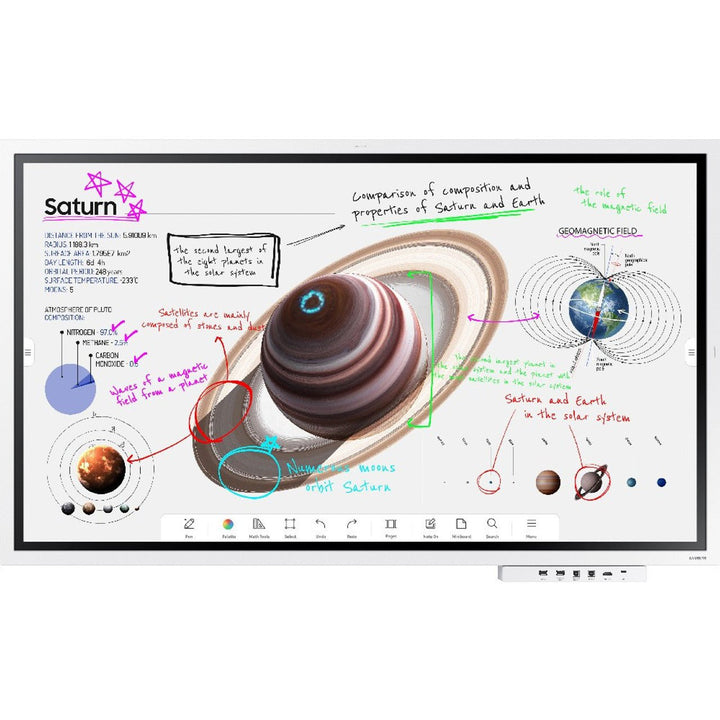
InGlass touch puts the sensing layer inside the glass rather than in a film over it, so the pen lands where you expect and the surface stays clean under daily use. The 65-inch 4K UHD panel gives a clear reading distance across a full boardroom table, and four people can write at once — enough for a design review or a workshop where several streams of thinking go up at the same time. Palm-swipe erasing means nobody looks for a duster mid-session. At 8ms response, ink keeps up with the hand rather than trailing it.
Tizen 5.0 On Board, So There Is No Room PC to Patch
The Flip 2 runs its whiteboard, annotation tools and file handling on the display itself under Tizen 5.0. There is no small-form-factor PC bolted behind the screen for IT to image, licence and patch, and no mismatched room build to support across a floor. Content comes in over HDMI, USB or the network, you annotate over the top without altering the source file, and the finished board goes out by email, network drive or USB at the close of the meeting. Fewer components in the room means fewer things that can fail before a client presentation.
Wall-Fixed in a Boardroom or Rolling Between Rooms
At 40.0kg on a 400 x 400mm VESA pattern, the WM65R takes a standard heavy-duty bracket for a permanent boardroom or lobby installation, or sits on Samsung's portable Flip stand where one display has to serve several rooms. In Singapore offices where meeting rooms are booked solid, a rolling board that moves to the team is often better value than four fixed screens. NFC pairing and wireless screen mirroring get a visiting presenter on screen in seconds, without cables being handed around the table.
Samsung WM65R Datasheet — Technical Specifications
General
| Product | Samsung Flip 2 WM65R 65" Interactive Digital Flip Chart |
| Part Number (SKU) | LH65WMRWBGCXXS |
| Generation | Flip 2 (R series) |
| Display Type | 65" 4K UHD interactive flip chart, InGlass touch |
| Operating Time | 16/7 |
| Platform | Tizen 5.0 |
| Local Warranty (Singapore) | Supplied by SourceIT with GST invoice |
Display
| Screen Size | 65" |
| Resolution | 3,840 x 2,160 (4K UHD) |
| Panel | New Edge, 60Hz |
| Brightness | 350 cd/m² (220 cd/m² with glass) |
| Contrast Ratio | 4,000:1 |
| Viewing Angle | 178° / 178° (H/V) |
| Response Time | 8ms |
| Touch Technology | InGlass |
| Simultaneous Writers | Up to 4 |
| Bezel Width | 26.2mm |
Smart Platform & Management
| Operating System | Tizen 5.0 |
| Built-in Tools | Digital whiteboard, annotation over imported content, palm-swipe eraser |
| Screen Mirroring | Yes |
| Device Pairing | NFC |
| Export & Share | Email, network drive, USB |
Connectivity
| HDMI In | 2 |
| USB | 1 |
| RJ45 (LAN) | Yes |
| Wi-Fi | Yes |
| Bluetooth | Yes |
| RS232 In | Yes |
| NFC | Yes |
| Audio Out | Stereo mini jack |
Physical & Environmental
| Dimensions (W x H x D) | 1522.4 x 897.6 x 62.9mm |
| Weight | 40.0kg |
| VESA Mount Pattern | 400 x 400mm |
| Operating Temperature | 0°C to 40°C |
| Operating Humidity | 10% to 80%, non-condensing |
Power
| Power Supply | AC 100-240V, 50/60Hz |
| Power Consumption (On) | 181.5W |
| Power Consumption (Sleep) | 0.5W |
Specifications are taken from Samsung's published product data for this model. Where Samsung does not publish a figure for this exact model it has been left out rather than estimated.
Compatibility & Installation
Mounting and orientation
The WM65R uses a 400 x 400mm VESA pattern and weighs 40.0kg, so specify a bracket rated comfortably above that weight at 400 x 400 and fix it into structural wall, not plasterboard alone. Samsung supplies and documents the Flip 2 as a landscape display, so plan the room around landscape use whether the board is wall-mounted or on the portable stand. Leave clear floor space in front for people to stand and write, and bring a mains outlet and a network point to the mount position during fit-out.
What it connects to
Two HDMI inputs take a laptop, a room video-conferencing codec or a media player. The USB port handles file import and export to a stick, RJ45 gives a wired network connection for saving straight to a network drive, and Wi-Fi and Bluetooth are built in. RS232 is there for control-system integration where the room runs on a Crestron, Extron or similar controller. Audio out on a stereo mini jack feeds a soundbar or ceiling speakers when a session includes video playback.
Network and content management
The Flip 2 runs Tizen 5.0 and works standalone — no external player and no room PC. Sessions are exported to email, a network drive or USB at the end of a meeting. NFC pairing and wireless screen mirroring put a laptop, tablet or phone on the board without running a cable to the table.
Matching Samsung accessories
- Samsung STN-WM55R portable stand (STN-WM55RXEN) — Samsung's rolling floor stand for the Flip 2 range.
- Samsung WMN-WM65R fixed wall mount (WMN-WM65RXEN) — the flush wall mount for the 65" Flip 2.
- Samsung Flip 2 connectivity tray (CY-TF65BRCXEN) — brings extra ports to the front edge of the WM55R and WM65R.
These accessories are specific to the R generation. Flip Pro (B) and the current WMFX (F) generation use different trays and brackets, so check the model letter before ordering.
Package Contents & Samsung Flip Range
In the box
- Samsung Flip 2 WM65R display unit
- Touch pen
- Power cable
- Quick setup guide
Package contents follow Samsung's product data for this model; items not listed by Samsung are not claimed here.
Samsung Flip range
| Model | Size |
| WM55R — Flip 2 | 55" |
| WM65R — Flip 2 (this listing) | 65" |
| WM55B — Flip Pro | 55" |
| WM65B — Flip Pro | 65" |
| WM75B — Flip Pro | 75" |
| WM85B — Flip Pro | 85" |
| WM75A — Flip 3 | 75" |
| WM85A — Flip 3 | 85" |
| WM55F — Flip (WMFX) | 55" |
| WM65F — Flip (WMFX) | 65" |
| WM75F — Flip (WMFX) | 75" |
| WM85F — Flip (WMFX) | 85" |
Datasheet & Downloads
- Samsung Singapore — Flip 2 Interactive Display WM65R (LH65WMRWBGCXXS)
- Samsung Singapore Support — WM65R manuals and firmware
SourceIT can email the current data sheet revision for the WM65R together with a quotation. If you need the mechanical drawing or a bracket installation guide for your fit-out, ask for it with your enquiry and we will include it.
Frequently Asked Questions — Samsung WM65R
What do the letters in the Samsung Flip model numbers mean?
They identify the generation. R is Flip 2, A is Flip 3, B is Flip Pro, and F is the current WMFX generation, which runs Tizen 9.0. So a WM65R is a 65-inch Flip 2, a WM75A is a 75-inch Flip 3, a WM75B is a 75-inch Flip Pro, and a WM65F is a 65-inch current-generation Flip. The letter also determines which stand, wall mount and connectivity tray fit, so quote the full part number when you order accessories.
Which generation is the WM65R, and what platform does it run?
The WM65R is Flip 2, the second generation of the Samsung Flip, running Tizen 5.0 on the display itself. Later generations move to newer Tizen builds — Flip 3 is Tizen 6.0 and Flip Pro is Tizen 6.5 — but the core writing experience carries across all of them.
Do I need a separate PC or media player?
No. The Flip 2 is an all-in-one display. Tizen 5.0 runs the whiteboard, the annotation tools and file import and export on board, so there is no small-form-factor PC to buy, image or patch. You only need mains power, plus a network connection if you want to save sessions to a network drive.
How many people can write on it at once?
Up to four people can write on the WM65R at the same time. On a 65-inch canvas that comfortably suits a project team or a training group working around one board.
Can I mount it in portrait?
Samsung supplies and documents the Flip 2 as a landscape display, so plan for landscape whether it is wall-mounted or on the portable stand. The VESA pattern is 400 x 400mm and the unit weighs 40.0kg, so specify a bracket rated well above that at 400 x 400.
How does the WM65R compare with the 55-inch WM55R?
Same Flip 2 product, two sizes. The WM55R measures 1297.4 x 768.2 x 59.9mm, weighs 28.2kg and draws 154W in use; the WM65R measures 1522.4 x 897.6 x 62.9mm, weighs 40.0kg and draws 181.5W. Resolution, InGlass touch and the Tizen 5.0 platform are identical, so choose on room size and viewing distance.
Is it rated for all-day use?
Yes. The WM65R is rated for 16/7 operation, which covers a full office or campus day with margin. If you need a display that stays on around the clock, look at Samsung's 24/7-rated signage range instead.
What warranty and invoice do I get from SourceIT?
Every WM65R sold by SourceIT comes with local Singapore warranty and a GST invoice on the unit. Support and any warranty claim are handled through a Singapore supplier rather than by shipping a display overseas.