Samsung WM75A Flip 3 75" Digital Flip Chart
PRODUCT DESCRIPTION
Samsung WM75A Flip 3 75" Digital Flip Chart (LH75WMAWLGCXXS) - Local Warranty
Flip 3: The A Generation, and What the Letter Tells You
The WM75A is a Samsung Flip 3. Samsung codes the generation into the model letter: R is Flip 2, A is Flip 3, B is Flip Pro, and F is the current WMFX generation running Tizen 9.0. This listing is the 75-inch Flip 3, part number LH75WMAWLGCXXS, running Tizen 6.0 with Samsung Workspace. Knowing the letter matters when you specify trays, stands and wall mounts, because Samsung's Flip accessories are generation-specific. Supplied locally by SourceIT with Singapore warranty and a GST invoice on every unit.
A 75-Inch Canvas That Reads From the Back of the Room
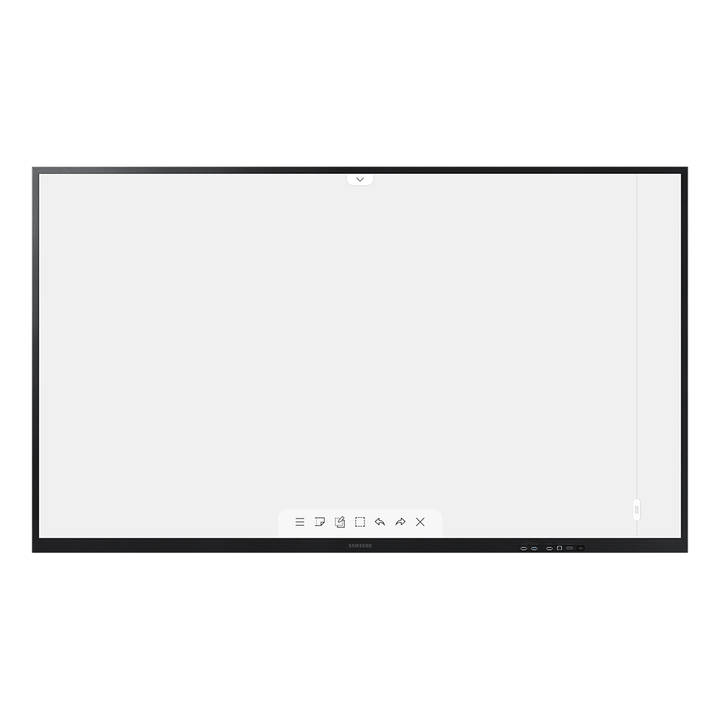
Seventy-five inches of 4K UHD makes handwriting and detail legible from the back of a boardroom or a seminar room, not just the first two rows. Infrared touch delivers 34ms drawing latency and 2,048 levels of stroke thickness, so pen weight varies naturally as you write and the ink stays under the tip. Palm rejection lets you rest a hand on the glass and erase with a swipe, exactly as on a whiteboard. For architectural drawings, process maps and financial models, the extra area is what keeps the detail readable to everyone at once.
Samsung Workspace: Microsoft 365 and Google Workspace on the Board
Tizen 6.0 on the WM75A includes Samsung Workspace, which opens Microsoft 365 and Google Workspace directly on the display. A chairperson can call up the live document, annotate over it in front of the room and save the marked-up version back without a laptop in the loop. Preloaded templates cover business, education and creative sessions, and finished boards export by email, network drive or USB. For hybrid teams in Singapore working across time zones, being able to leave a session as a shared file rather than a photograph of a whiteboard is the practical win.
An OPS Slot and a Full Port Set for Fitted-Out Rooms
The Flip 3 carries an OPS slot, so a Windows PC module can be dropped in where a room needs full desktop applications alongside the whiteboard — useful in classrooms tied to a campus SOE or in boardrooms running specialist software. Two HDMI inputs and a DisplayPort input take laptops and room codecs, an HDMI output feeds a second screen or a recorder, and four USB ports handle files and peripherals. Wired RJ45, Wi-Fi, Bluetooth and RS232 cover networking and control-system integration during a proper AV fit-out.
Samsung WM75A Datasheet — Technical Specifications
General
| Product | Samsung Flip 3 WM75A 75" Interactive Digital Flip Chart |
| Part Number (SKU) | LH75WMAWLGCXXS |
| GTIN | 8806090969838 |
| Generation | Flip 3 (A series) |
| Display Type | 75" 4K UHD interactive flip chart, infrared touch |
| Operating Time | 16/7 |
| Platform | Tizen 6.0 with Samsung Workspace |
| Local Warranty (Singapore) | Supplied by SourceIT with GST invoice |
Display
| Screen Size | 75" |
| Resolution | 3,840 x 2,160 (4K UHD) |
| Panel Type | VA |
| Brightness | 350 cd/m² (220 cd/m² with glass) |
| Contrast Ratio | 4,000:1 |
| Viewing Angle | 178° / 178° (H/V) |
| Response Time | 8ms |
| Refresh Rate | 60Hz |
| Touch Technology | Infrared (IR) |
| Touch Points | Up to 20 simultaneous touch points |
| Drawing Latency | 34ms |
| Pen Thickness Levels | 2,048 |
| Erasing | Palm rejection and palm-swipe erase |
Video & Audio
| Speakers | 10W x 2, built in |
| Audio Out | Stereo mini jack |
Smart Platform & Management
| Operating System | Tizen 6.0 |
| Productivity | Samsung Workspace, with Microsoft 365 and Google Workspace access |
| Screen Mirroring | Smart View, from Windows, Android and iOS devices |
| Built-in Tools | Digital whiteboard, annotation, highlighting, preloaded business, education and creative templates |
| Export & Share | Email, network drive, USB; PDF annotation and export |
| Security | Password-protected access and screen lock |
Connectivity
| HDMI In | 2 |
| HDMI Out | 1 |
| DisplayPort In | 1 |
| USB | 4 |
| RJ45 (LAN) | Yes |
| Wi-Fi | Yes |
| Bluetooth | Yes |
| RS232 | Yes |
| OPS Slot | Yes, for an optional PC module |
Physical & Environmental
| Dimensions (W x H x D) | 1721.0 x 1019.3 x 75.2mm |
| Weight | 58.3kg |
| Bezel Width | 18.9mm (top, left, right), 39.2mm (bottom) |
| VESA Mount Pattern | 400 x 400mm |
| Operating Temperature | 0°C to 40°C |
| Operating Humidity | 10% to 80%, non-condensing |
Power
| Power Supply | AC 100-240V, 50/60Hz |
| Power Consumption (On) | 275W |
| Power Consumption (Sleep) | 0.5W |
| Energy Saving | Eco mode |
Specifications are taken from Samsung's published product data for this model. Where Samsung does not publish a figure for this exact model it has been left out rather than estimated.
Compatibility & Installation
Mounting and orientation
The WM75A uses a 400 x 400mm VESA pattern and weighs 58.3kg, so specify a heavy-duty bracket rated well above that and fix into structural wall rather than plasterboard. Two installers are needed for the lift. Samsung supplies and documents the Flip 3 as a landscape display, so plan the room for landscape use whether the board is wall-mounted or on a floor stand. Allow clear floor space in front for a group to stand and write, and bring mains power and a network point to the mount position during fit-out.
What it connects to
Two HDMI inputs and a DisplayPort input take laptops, a room video-conferencing codec or a media player, while the HDMI output feeds a second display or a recording device in a lecture capture setup. Four USB ports handle file import, export and peripherals. RJ45 gives a wired network connection, Wi-Fi and Bluetooth are built in, and RS232 is available where the room runs on a Crestron, Extron or similar control system. The OPS slot takes an optional Windows PC module for rooms that need full desktop applications on the board.
Network and content management
Tizen 6.0 runs the whiteboard and Samsung Workspace on the display itself, with Microsoft 365 and Google Workspace accessible directly. Smart View screen mirroring works from Windows, Android and iOS devices, so a presenter shares without a cable. Sessions export to email, a network drive or USB, and password-protected access with screen lock keeps a shared room display from being opened by the next group.
Matching Samsung accessories
Flip accessories are generation-specific. The R-generation trays, stands and mounts listed against the Flip 2 do not fit the A-generation WM75A, and the B-generation tray (CY-TF65BBCXXS) is specified for the 55-inch and 65-inch Flip Pro rather than this model. For the WM75A, use a heavy-duty 400 x 400mm bracket rated above 58.3kg, or ask SourceIT for the current Samsung stand and mount options for the 75-inch Flip 3.
Package Contents & Samsung Flip Range
In the box
- Samsung Flip 3 WM75A display unit
- Touch pen
- Power cable
- Quick setup guide
Package contents follow Samsung's product data for this model; items not listed by Samsung are not claimed here.
Samsung Flip range
| Model | Size |
| WM55R — Flip 2 | 55" |
| WM65R — Flip 2 | 65" |
| WM55B — Flip Pro | 55" |
| WM65B — Flip Pro | 65" |
| WM75B — Flip Pro | 75" |
| WM85B — Flip Pro | 85" |
| WM75A — Flip 3 (this listing) | 75" |
| WM85A — Flip 3 | 85" |
| WM55F — Flip (WMFX) | 55" |
| WM65F — Flip (WMFX) | 65" |
| WM75F — Flip (WMFX) | 75" |
| WM85F — Flip (WMFX) | 85" |
Datasheet & Downloads
- Samsung Singapore — Flip 3 Interactive Display WM75A (LH75WMAWLGCXXS)
- Samsung Singapore Support — WM75A manuals and firmware
SourceIT can email the current data sheet revision for the WM75A together with a quotation. If you need the mechanical drawing for a bracket survey or the OPS module compatibility note, ask for it with your enquiry and we will include it.
Frequently Asked Questions — Samsung WM75A
What do the letters in the Samsung Flip model numbers mean?
They identify the generation. R is Flip 2, A is Flip 3, B is Flip Pro, and F is the current WMFX generation, which runs Tizen 9.0. So a WM75A is a 75-inch Flip 3, a WM75B is a 75-inch Flip Pro, a WM55R is a 55-inch Flip 2, and a WM75F is a 75-inch current-generation Flip. The letter also decides which tray, stand and mount fit, so quote the full part number when ordering accessories.
Which generation is the WM75A, and what platform does it run?
The WM75A is Flip 3, the A generation, running Tizen 6.0 with Samsung Workspace. That gives you Microsoft 365 and Google Workspace directly on the display, which the earlier Flip 2 on Tizen 5.0 does not offer.
Do I need a separate PC or media player?
No. The Flip 3 is an all-in-one display and runs the whiteboard, Samsung Workspace and file handling on board. An OPS slot is available if a particular room needs a full Windows desktop alongside the whiteboard, but it is an option rather than a requirement.
How many people can write on it at once?
The WM75A supports up to 20 simultaneous touch points, with 34ms drawing latency and 2,048 levels of stroke thickness. Palm rejection lets writers rest a hand on the glass without leaving marks.
Can I mount it in portrait, and what bracket do I need?
Samsung supplies and documents the Flip 3 as a landscape display, so plan for landscape. The VESA pattern is 400 x 400mm and the unit weighs 58.3kg, so specify a heavy-duty bracket rated well above that, fixed into structural wall. Two installers are needed for the lift.
How does the WM75A differ from the 85-inch WM85A?
Same Flip 3 product in two sizes. The WM85A gives an 85-inch canvas at 1942.8 x 1144.1 x 69.4mm and 74.5kg, on a 600 x 400mm VESA pattern and drawing 418W in use. The WM75A is 1721.0 x 1019.3 x 75.2mm and 58.3kg, on 400 x 400mm VESA, drawing 275W. Panel resolution, touch technology and the Tizen 6.0 platform are the same.
Is it rated for all-day use?
Yes. The WM75A is rated for 16/7 operation, which covers a full corporate or campus day with margin. For a display that must stay on around the clock, look at Samsung's 24/7-rated signage range instead.
What warranty and invoice do I get from SourceIT?
Every WM75A sold by SourceIT comes with local Singapore warranty and a GST invoice on the unit. Support and any warranty claim go through a Singapore supplier rather than an overseas RMA.