

Samsung Flip WM55F 55" 4K Interactive Display
PRODUCT DESCRIPTION
Samsung WM55F 55" Flip Interactive Display (LH55WMFWBGCXXS) - Local Warranty
A 55-Inch 4K Digital Flipchart for Huddle Rooms and Classrooms
The Samsung Flip WM55F puts a 3840 x 2160 UHD canvas at the front of the room, with a 4000:1 contrast ratio and 450 nits of brightness without glass so notes, diagrams and shared documents stay legible under normal office and classroom lighting. At 55 inches it suits huddle rooms, tutorial rooms and smaller meeting spaces where the group sits close to the board. The panel rotates between portrait and landscape, so a long document review and a wide side-by-side comparison can both use the same display without a second screen.
IR Touch with 2048 Pressure Levels and 26 ms Pen Response
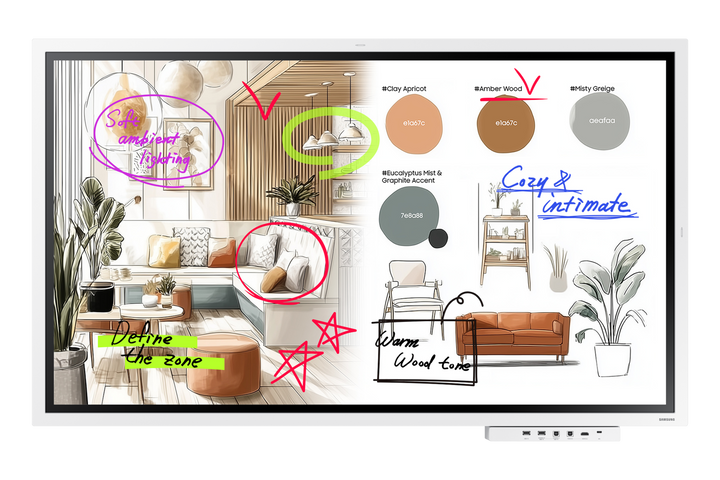
IR touch with 2048 levels of pressure sensitivity and a 26 ms pen response makes writing on the WM55F feel close to writing on paper, with line weight that follows how hard you press. Palm erase clears a mistake with the side of your hand instead of a menu selection, so corrections do not interrupt the flow of a session. The pen works straight out of the box with no pairing, charging or calibration, which matters in a shared meeting room booked by a different team every hour.
Enhanced Whiteboard with AI Writing Tool and Flip Home
Enhanced Whiteboard adds an AI writing tool that tidies rough input as you go, straightening hand-drawn shapes and cleaning up handwritten text so a working session still reads clearly when it is circulated afterwards. Flip Home gives your organisation a custom toolbar, putting the functions a room actually uses where people expect them rather than several menu levels down. For training rooms and classrooms that keeps the first few minutes of a session about the session, not about finding the right tool.
SMARTVIEW+ Sharing, AirPlay 2 and Tizen 9.0 with Knox
SMARTVIEW+ lets up to nine devices share to the WM55F wirelessly, and AirPlay 2 covers Apple users without extra software, so a room full of people can contribute without passing a cable around. Workspace opens a remote PC session directly on the display, so a presenter can reach their desktop without carrying a laptop. Tizen 9.0 runs on 8 GB of RAM and 64 GB of storage with Samsung Knox security, while a USB-C hub, HDMI Out, RJ45, Wi-Fi and Bluetooth cover wired and wireless connections.
Samsung WM55F Datasheet — Technical Specifications
General
| Product | Samsung Flip WM55F 55" Interactive Display |
| Part Number (SKU) | LH55WMFWBGCXXS |
| Display Type | Interactive flat panel display (Flip WMFX series) |
| Platform | Tizen 9.0 |
| Memory | 8 GB RAM |
| Internal Storage | 64 GB |
| Security | Samsung Knox |
| Local Warranty (Singapore) | Supplied by SourceIT with GST invoice |
Display
| Screen Size | 55" |
| Resolution | 3840 x 2160 (4K UHD) |
| Brightness | 450 nit (without glass) |
| Contrast Ratio | 4000:1 |
| Orientation | Rotatable portrait and landscape |
Touch & Writing
| Touch Technology | IR touch |
| Pressure Levels | 2048 |
| Pen Response Time | 26 ms |
| Palm Erase | Supported |
| Whiteboard | Enhanced Whiteboard with AI writing tool (shape and text cleanup) |
| Pen Setup | No pairing, charging or calibration required |
Smart Platform & Management
| Operating System | Tizen 9.0 |
| User Interface | Flip Home custom toolbar |
| Wireless Sharing | SMARTVIEW+ from up to 9 devices |
| Apple Sharing | AirPlay 2 |
| Remote PC Access | Workspace |
| Security | Samsung Knox |
Connectivity
| USB-C | USB-C hub |
| HDMI | HDMI Out |
| LAN | RJ45 Ethernet |
| Wi-Fi | Built-in |
| Bluetooth | Supported |
Physical & Environmental
| Orientation Support | Portrait and landscape (rotatable) |
Specifications are taken from Samsung's published product data for this model. Where Samsung does not publish a figure for this exact model it has been left out rather than estimated.
Compatibility & Installation
Mounting and orientation
The WM55F is one of the two rotatable sizes in the Flip WMFX generation: it can be mounted or set on a stand in landscape or turned to portrait, which suits a tall document, a checklist or a vertical agenda. The 75" and 85" models in the same generation are landscape only, so if portrait working matters to the room, specify the 55" or the 65". Confirm the VESA pattern and load rating against the Samsung installation guide for this exact model before ordering a mount or trolley.
What it connects to
A single USB-C hub connection handles a modern laptop, and HDMI Out feeds a second display or a capture device for a larger room. RJ45 gives a wired network drop for managed environments, while built-in Wi-Fi and Bluetooth cover rooms without structured cabling. Wirelessly, SMARTVIEW+ accepts up to nine devices and AirPlay 2 covers iPhone, iPad and Mac without installing anything. Workspace opens a remote PC session on the display itself for presenters who arrive without a laptop.
Network and content management
The WM55F runs Tizen 9.0 with Samsung Knox, so it fits the same Samsung display estate as the rest of your Tizen signage and meeting-room panels. Put it on a managed VLAN over RJ45 where your IT team wants control of updates and access, and use Wi-Fi where a drop is not available. Ask your SourceIT account manager which Samsung management tooling is licensed for this model before you plan a fleet rollout.
Accessory
The Samsung Connectivity Tray for Flip WM55F / WM65F (CY-TF65BFCXXS) fits this 55" model and the 65". It brings the input connections to the front edge of the display so guests can plug in without reaching behind the panel. The tray fits the WM55F and WM65F only — it does not fit the 75" or 85" Flip.
Package Contents & Samsung Flip Range
In the box
- Samsung Flip WM55F 55" interactive display
- Flip pen (no pairing, charging or calibration required)
Package contents follow Samsung's product data for this model; items not listed by Samsung are not claimed here.
Samsung Flip range
| Model | Size |
| WM55R | 55" |
| WM65R | 65" |
| WM55B | 55" |
| WM65B | 65" |
| WM75B | 75" |
| WM85B | 85" |
| WM75A | 75" |
| WM85A | 85" |
| WM55F (this listing) | 55" |
| WM65F | 65" |
| WM75F | 75" |
| WM85F | 85" |
Datasheet & Downloads
Samsung has not published a public Singapore data sheet page for the WM55F (LH55WMFWBGCXXS) that we can link to here, so no download link is given rather than pointing you at the wrong revision. SourceIT can email the current data sheet revision for this exact part number on request, together with a quotation.
Frequently Asked Questions — Samsung WM55F
What do the suffix letters mean — WMF, WAF and FX-P?
They are three different products that buyers mix up constantly. WMF (and the WMFX generation this model belongs to) is the Samsung Flip: a Tizen digital flipchart built around writing, with Enhanced Whiteboard, SMARTVIEW+ and Knox. WAF is the Samsung Interactive Display: an Android, EDLA-certified panel with licensed Google Play and Google Classroom, aimed at classrooms and meeting rooms that live in Google. FX-P is the WAF with a built-in 48 MP camera, far-field microphone array and dual 20 W speakers, so the room needs no separate video kit. This listing is the Tizen Flip.
Does the WM55F rotate to portrait?
Yes. The 55" and 65" Flip WMFX models rotate between portrait and landscape. The 75" and 85" are landscape only.
Do I need an external PC or media player?
No. Tizen 9.0 runs on the display with 8 GB of RAM and 64 GB of storage, so whiteboarding, wireless sharing and Workspace remote PC access all run on the panel itself. A room PC is optional, not required.
Does the pen need charging or pairing?
No. The Flip pen works straight away with no pairing, charging or calibration, and palm erase lets you clear a correction with the side of your hand.
How many people can share to it wirelessly?
SMARTVIEW+ accepts up to nine devices, and AirPlay 2 supports Apple devices without extra software.
Does the connectivity tray fit this model?
Yes. The CY-TF65BFCXXS connectivity tray fits the WM55F and the WM65F. It does not fit the 75" or 85" Flip.
How does it differ from the WM65F?
Only in size. The WM65F is the same Tizen 9.0 platform, the same 450 nit 4000:1 UHD panel, the same IR touch with 2048 pressure levels and the same 26 ms pen response, on a 65" screen. Choose the 65" when people sit further back.
What warranty and invoice do I get?
Every unit sold by SourceIT carries local Singapore warranty and comes with a GST invoice.