
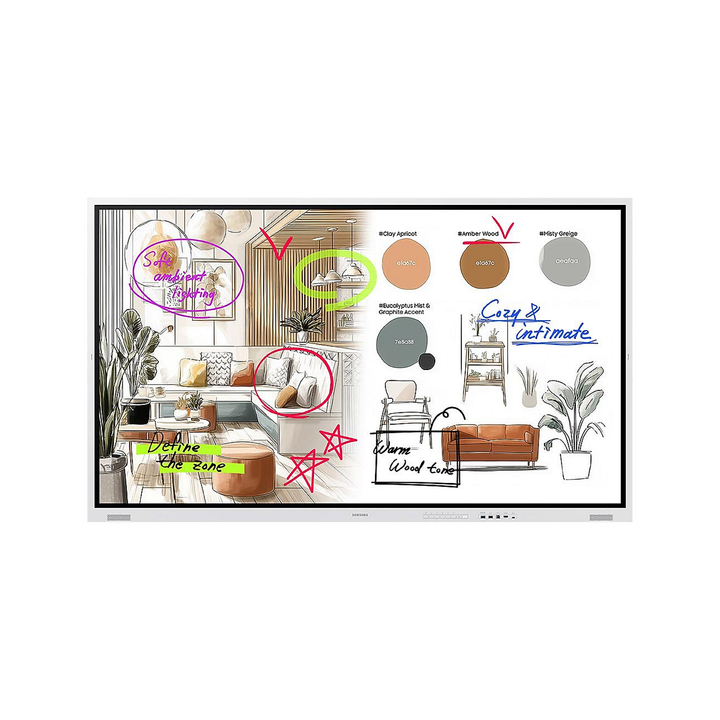


Samsung WM75F 75" The Flip 4K UHD Interactive Display
Prices in SGD, excluding 9% GST.
PRODUCT DESCRIPTION
Samsung WM75F 75" The Flip 4K UHD Interactive Display - 3 Years Local Warranty
Natural, Precise Writing for Meetings and Classrooms
The Samsung WM75F is the 75-inch model of The Flip (WMFX), Samsung's current interactive display range. IR touch with 26 ms writing latency and 2,048 pressure levels gives a pen-on-paper feel on a 4K UHD (3840 x 2160) VA panel, and the enhanced whiteboard lets teams sketch, annotate and save ideas without a PC attached.
Tizen 9.0 With SMARTVIEW+ and AirPlay 2
Tizen 9.0 runs the whiteboard, Flip Home toolbar, Annotation On and multitasking on the display itself, with 64 GB of flash storage. SMARTVIEW+ and AirPlay 2 bring laptop and phone screens onto the board wirelessly, while Samsung Knox security protects the device and its content.
Large-Room Size With a Front USB Port and OPS Option
At 75 inches the WM75F suits larger meeting rooms and classrooms. Two HDMI 2.0 inputs and front and rear USB ports are built in, and the 75-inch and 85-inch Flip models accept an OPS module (purchased separately) for a built-in PC.
Managed Like the Rest of Your Samsung Estate
Samsung VXT and SmartThings Pro (each sold separately) let IT teams monitor, update and manage Flip displays remotely across sites. Rated for 12/7 operation and supplied by SourceIT with 3 years local warranty and a GST invoice.
Samsung WM75F Datasheet — Technical Specifications
General
| Model | WM75F (The Flip, WMFX series) |
| Part Number | LH75WMFWBGCXXS |
| Screen Size | 75" class (74.5" diagonal) |
| Touch Technology | IR |
| Operation Time Support | 12/7 |
| Bezel Colour | Gray White |
| Local Warranty (Singapore) | 3 years local warranty |
Display
| Panel Type | VA |
| Resolution | 4K UHD (3840 x 2160) |
| Pixel Pitch (H x V) | 0.430 x 0.430 mm |
| Brightness (Typ.) | 450 cd/m² (without glass) |
| Contrast Ratio | 4,000:1 (without glass) |
| Viewing Angle (H/V) | 178° / 178° |
| Response Time | 8 ms (GTG) |
| Colour Gamut (NTSC) | 72% |
| Glass Haze | 2% (without glass) |
| H / V Scanning Frequency | 30–81 kHz / 48–75 Hz |
| Maximum Pixel Frequency | 148.5 MHz |
Smart Platform / SoC
| Operating System | Tizen 9.0 |
| Flash Memory | 64 GB |
| Writing | 26 ms latency, 2,048 pressure levels (Samsung figures) |
Connectivity
| HDMI In | 2 |
| HDMI / HDCP Version | HDMI 2.0 / HDCP 2.2 |
| USB | 2 (front 1, rear 1) |
| Video Out | Yes |
| Audio Out | Stereo mini jack |
| RS232 In | Yes |
| RJ45 (LAN) | Yes |
| Wi-Fi | Yes |
| Bluetooth | Yes |
Power
| Power Supply | AC 220–240 V, 50/60 Hz |
| Power Consumption (On Mode) | 385 W |
Physical & Environmental
| Set Dimensions (W x H x D) | 1735.4 x 1038.5 x 83.7 mm |
| Package Dimensions (W x H x D) | 1885 x 1171 x 210 mm |
| Set Weight | 53.6 kg |
| Package Weight | 64.5 kg |
| VESA Mount | 400 x 400 mm |
| Bezel Width | 23.5 mm |
| Frame Material | Non-glossy plastic |
| Operating Temperature | 0–40 °C |
| Humidity | 10–80% (non-condensing) |
Samsung Singapore publishes this model as LH75WMFWLGCXXS; SourceIT's part number for this listing is LH75WMFWBGCXXS. Specifications above are from Samsung Singapore's LH75WMFWLGCXXS page.
Compatibility & Installation
Mounting and Placement
VESA 400 x 400 mm mounting pattern. Samsung lists an optional wall mount for this model (model name not published on the Singapore page); the stand is sold separately.
Sources and Connectivity
HDMI 2.0 inputs: 2. USB: 2 (front 1, rear 1). Video out, RS232 and RJ45 for room control and networking, plus Wi-Fi and Bluetooth. Wireless screen sharing via SMARTVIEW+ and AirPlay 2.
OPS Slot
Samsung notes that the OPS module must be purchased separately and is available on the 75" and 85" models only.
Device and Content Management
Samsung VXT and SmartThings Pro (sold separately; feature availability may vary by region) for remote monitoring, firmware updates and content management.
Typical Use
Meeting rooms, huddle spaces, classrooms and training rooms that need a digital whiteboard with wireless screen sharing.
Package Contents & Samsung Flip Ordering Information
In the Box
Refer to Samsung's packing list for this model; Samsung Singapore does not publish an itemised in-box list on the product page.
Samsung Flip Interactive Display Range
| Model | Key feature |
| WM55F | The Flip (2025), 55", Tizen 9.0, IR touch |
| WM65F | The Flip (2025), 65", Tizen 9.0, IR touch |
| WM75F (this listing) | The Flip (2025), 75", Tizen 9.0, IR touch, OPS-ready |
| WM85F | The Flip (2025), 85", Tizen 9.0, IR touch, OPS-ready |
| WM55B | Flip Pro, 55" |
| WM65B | Flip Pro, 65" |
| WM75B | Flip Pro, 75", USB-C 65 W, Tizen 6.5 |
| WM85B | Flip Pro, 85" |
| WM75A | Flip 3, 75", IR touch, OPS slot |
| WM85A | Flip 3, 85", IR touch, OPS slot |
| WM55R | Flip 2, 55", InGlass touch |
| WM65R | Flip 2, 65", InGlass touch |
Datasheet & Downloads
| Samsung product page | Samsung Singapore — The Flip WMFX 75" (LH75WMFWLGCXXS) |
| Samsung support | Samsung Singapore support — LH75WMFWLGCXXS |
Frequently Asked Questions — Samsung WM75F
Does the WM75F need a PC?
No. Tizen 9.0 runs the whiteboard, annotation and screen-sharing features on the display. A PC can still be connected over HDMI.
Can laptops and phones share their screens wirelessly?
Yes. Samsung lists SMARTVIEW+ and AirPlay 2 for wireless screen sharing.
What is the operating-hours rating?
Samsung rates The Flip WMFX for 12/7 operation (12 hours a day, 7 days a week).
Is the brightness the same as older Flip models?
Samsung lists 450 cd/m² (typical, without glass) for The Flip WMFX, compared with 350 cd/m² for Flip 2 and Flip 3.
Can I add a built-in PC?
Yes. The 75-inch and 85-inch Flip WMFX models support an OPS module, purchased separately.
What warranty do I get?
3 years local warranty; supplied by SourceIT with a GST invoice.
Product Video
We Also Recommend


Samsung QM55C 55" 4K UHD Smart Signage Display


Samsung BE50F-H 50" 4K UHD Business TV


Samsung QB50C 50" 4K UHD Crystal Smart Signage Display


Samsung QM65C 65" 4K UHD Smart Signage Display

Samsung Flat 27" Height Adjustable (IPS, USB-C)