

Samsung Flip 2 Connectivity Tray for WM55R/WM65R
PRODUCT DESCRIPTION
Samsung Flip 2 Connectivity Tray for WM55R/WM65R (CY-TF65BRCXEN) - Local Warranty
Brings HDMI and USB to the Front of the Board
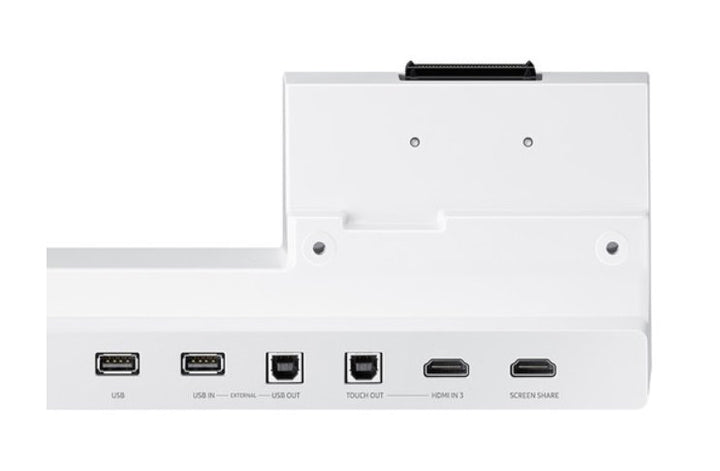
On a wall-mounted Flip 2 the rear ports are effectively out of service: nobody wants to reach behind a 65-inch board mid-meeting to find an HDMI socket. The CY-TF65BRC puts an HDMI input, an HDMI out with screen share, USB, a USB external in/out and touch out on the front face of the display, at waist height. A visiting consultant plugs a laptop in and presents in seconds, and the touch out means they can drive their own machine from the board's glass instead of hunching over a keyboard.
Cleaner Meeting Rooms, Fewer Trailing Cables
Because the tray docks onto the display itself, the cables people actually touch stop at the front of the board rather than running across the floor from a table box. In a boardroom, a client meeting suite or a training room, that is the difference between a tidy room and a trip hazard someone has to tape down before every session. The tray also gives the pens and eraser a home, which is the small thing that decides whether a Flip is still usable six months after handover. NFC is included for tap-based pairing.
Docks On and Off in Minutes, No Tools Drama
Samsung designs the tray around a dock connector, so it attaches to and detaches from the Flip 2 without a rebuild — useful if a board moves between a stand and a wall, or if one tray follows a mobile unit around a training centre. It measures 269.8 x 111.3 x 56.9 mm and weighs just 0.5 kg in a light grey finish that matches the Flip 2 family. One tray covers both the 55-inch WM55R and the 65-inch WM65R, so a mixed estate needs only one part number in the store cupboard.
Samsung CY-TF65BRC Datasheet — Technical Specifications
General
| Product | Samsung Flip 2 Connectivity Tray for WM55R / WM65R |
| Part Number (SKU) | CY-TF65BRCXEN |
| Product Type | Front-facing connectivity tray for an interactive display |
| Operating Time | Powered by the display through the dock connector |
| Platform | None — the display supplies the platform |
| Local Warranty (Singapore) | Supplied by SourceIT with GST invoice |
Compatibility
| Compatible Displays | Samsung Flip 2 WM55R (55") and WM65R (65") |
| Attachment | Dock connector — attaches and detaches without a rebuild |
| HDMI In | 1 |
| HDMI Out / Screen Share | 1 |
| USB | 1 |
| USB External In / Out | 1 |
| Touch Out | 1 |
| NFC | 1 |
Physical
| Dimensions | 269.8 x 111.3 x 56.9 mm (W x H x D) |
| Weight | 0.5 kg |
| Colour | Light grey |
Installation
The tray docks onto the Flip 2 using the display's dock connector and is supplied with an installation guide and screws. No wall work and no separate power supply are involved — it draws from the display. Because it attaches and detaches cleanly, one tray can follow a mobile board around a training centre, or move with a display that is later transferred from a stand to a wall mount.
What it pairs with
This tray fits the Samsung WM55R Flip 2 55" and the Samsung WM65R Flip 2 65". It pairs naturally with the Samsung STN-WM55R portable stand or the Samsung WMN-WM65R fixed wall mount. If your boards are the later WM55B or WM65B, order the CY-TF65BBC tray instead — the two are not interchangeable.
Specifications are taken from Samsung's published product data for this model. Where Samsung does not publish a figure for this exact model it has been left out rather than estimated.
Package Contents & Samsung Flip Accessory Range
In the box
- Installation Guide
- Screws
Package contents follow Samsung's product data for this model; items not listed by Samsung are not claimed here.
Samsung Flip accessory range
| Model | Size | Fits |
| STN-WM55R | 55" | Flip 2 WM55R — mobile stand |
| WMN-WM65R | 65" | Flip 2 WM65R — fixed wall mount |
| CY-TF65BRC (this listing) | 55" / 65" | Flip 2 WM55R and WM65R — connectivity tray |
| CY-TF65BBC | 55" / 65" | Flip WM55B and WM65B — connectivity tray |
Datasheet & Downloads
Samsung does not publish a dedicated Singapore product page for the CY-TF65BRCXEN tray, so the links above are to the displays it is designed for. SourceIT can email the current Flip 2 accessory data sheet revision with a quotation, and can quote the board, the tray and the stand or mount as one package.
Frequently Asked Questions — Samsung CY-TF65BRC
Which Flip models does this tray fit?
Samsung specifies the CY-TF65BRC for the Flip 2 WM55R and WM65R. If your boards are the later WM55B or WM65B, you need the CY-TF65BBC tray instead. The two are not interchangeable, so check the model on the back of the board before ordering.
What ports does it add?
One HDMI in, one HDMI out with screen share, one USB, one USB external in/out, one touch out and NFC — all on the front of the display where people can reach them.
What does the touch out port do?
It sends touch input from the Flip's glass back to a connected laptop, so a visitor can drive their own machine by touching the board instead of using a keyboard and trackpad at the table.
Does it need its own power supply?
No. It docks to the display and draws power through the dock connector, so there is no extra plug and no extra cable to route.
Is it worth adding to a wall-mounted board?
Especially so. Once a Flip 2 is flush against the wall, the rear ports are difficult to reach. The tray is what keeps guest laptops and USB drives usable without pulling the board off the mount.
Can I move the tray between boards?
Yes. It attaches and detaches through the dock connector, so a tray can follow a mobile board around a training centre or move with a display transferred from a stand to a wall mount.
How much space does it take?
It measures 269.8 x 111.3 x 56.9 mm and weighs 0.5 kg, so it projects a little under 60 mm from the face of the board — worth noting if the display sits inside a tight joinery recess.
What warranty and invoicing do I get?
Every CY-TF65BRC sold by SourceIT comes with local Singapore warranty and a GST invoice on every unit, which is what your finance and procurement teams need for claims and for local service.