
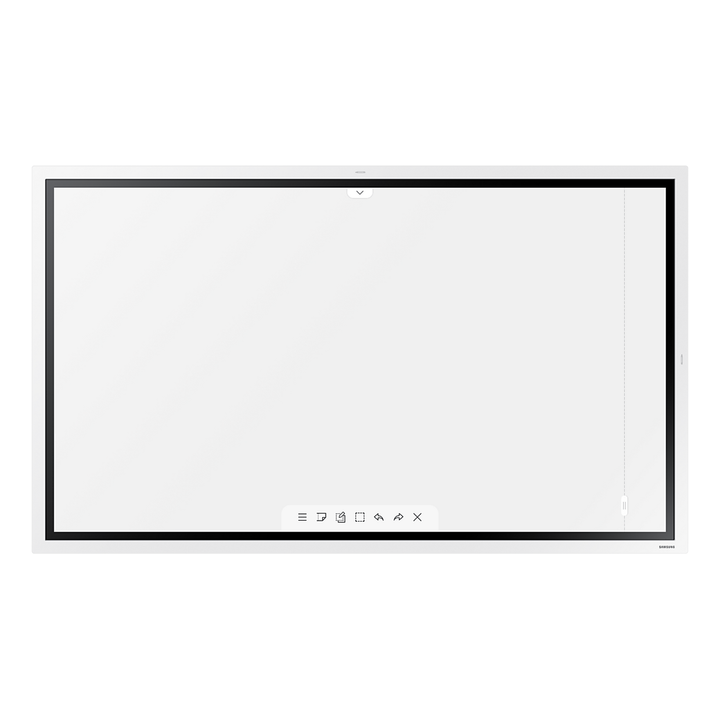

Samsung WM55R 55" Flip 2 4K UHD Interactive Display
Prices in SGD, excluding 9% GST.
PRODUCT DESCRIPTION
Samsung WM55R 55" Flip 2 4K UHD Interactive Display - 3 Years Local Warranty
Write on Screen Like a Paper Flipchart
The Samsung WM55R Flip 2 is a 55-inch 4K UHD interactive flipchart with Samsung's InGlass touch. Teams can write over any background, edit images and capture ideas without a PC attached.
Connect Laptops, Phones and Meeting Rooms
Two HDMI inputs, USB, RS232 and RJ45 cover wired sources and room control, while Wi-Fi, Bluetooth, screen mirroring and AirPlay 2 support bring laptop and phone content onto the board. Meeting notes can be shared with attendees at the end of a session.
Last-Batch Flip 2 at a Promotional Price
The WMR series is the earlier Flip 2 generation, now offered by SourceIT as a last-batch promotion. It runs Tizen 5.0 and is supplied with 3 years local warranty and a GST invoice.
Samsung WM55R Datasheet — Technical Specifications
General
| Model | WM55R (Flip 2, WMR series) |
| Part Number | LH55WMRWBGCXXS |
| Screen Size | 55" |
| Touch Technology | InGlass |
| Operating System | Tizen 5.0 |
| Local Warranty (Singapore) | 3 years local warranty |
Display
| Panel Type | New Edge, 60 Hz |
| Resolution | 3840 x 2160 (4K UHD) |
| Pixel Pitch (H x V) | 0.315 x 0.315 mm |
| Brightness (Typ.) | 350 cd/m² (220 cd/m² with glass) |
| Contrast Ratio | 4,000:1 |
| Viewing Angle (H/V) | 178° / 178° |
| Response Time | 8 ms |
| Colour Gamut | 72% |
| H / V Scanning Frequency | 30–81 kHz / 48–75 Hz |
| Maximum Pixel Frequency | 594 MHz |
Connectivity
| HDMI In | 2 |
| USB | 1 |
| Audio Out | Stereo mini jack |
| RS232 In | Yes |
| RJ45 (LAN) | Yes |
| Wi-Fi | Yes |
| Bluetooth | Yes |
| Connectivity Tray | Optional (CY-TF65BRC, sold separately) |
Power
| Power Supply | AC 100–240 V, 50/60 Hz |
| Power Consumption (On Mode) | 154 W |
| Power Consumption (Sleep Mode) | 0.5 W |
Physical & Environmental
| Set Dimensions (W x H x D) | 1297.4 x 768.2 x 59.9 mm |
| Package Dimensions (W x H x D) | 1464 x 915 x 190 mm |
| Set Weight | 28.2 kg |
| Package Weight | 35.2 kg |
| VESA Mount | 400 x 400 mm |
| Bezel Width | 26.2 mm |
| Frame Material | Plastic |
| Operating Temperature | 0–40 °C |
| Humidity | 10–80% (non-condensing) |
Specifications are from Samsung India's page for the same 55-inch Flip 2 model (LH55WMRWBGCXXL), as Samsung Singapore no longer lists the 55-inch WMR.
Compatibility & Installation
Mounting and Placement
VESA 400 x 400 mm. Samsung lists the STN-WM55R stand and the WMN-4277SE wall mount as optional accessories for the 55-inch Flip 2.
Sources and Connectivity
2 x HDMI in, 1 x USB, audio out, RS232 and RJ45, plus Wi-Fi and Bluetooth. The optional CY-TF65BRC connectivity tray adds an HDMI input and a USB port within reach of the presenter.
Typical Use
Meeting rooms, huddle spaces and classrooms that need a digital flipchart with wired and wireless screen sharing.
Package Contents & Samsung Flip Ordering Information
In the Box
Refer to Samsung's packing list for this model; Samsung does not publish an itemised in-box list on the product page.
Optional Samsung Accessories
| Connectivity tray | CY-TF65BRC |
| Portable stand | STN-WM55R |
| Wall mount | WMN-4277SE |
Samsung Flip Interactive Display Range
| Model | Key feature |
| WM55F | The Flip (2025), 55", Tizen 9.0, IR touch |
| WM65F | The Flip (2025), 65", Tizen 9.0, IR touch |
| WM75F | The Flip (2025), 75", Tizen 9.0, IR touch, OPS-ready |
| WM85F | The Flip (2025), 85", Tizen 9.0, IR touch, OPS-ready |
| WM55B | Flip Pro, 55" |
| WM65B | Flip Pro, 65" |
| WM75B | Flip Pro, 75", USB-C 65 W, Tizen 6.5 |
| WM85B | Flip Pro, 85" |
| WM75A | Flip 3, 75", IR touch, OPS slot |
| WM85A | Flip 3, 85", IR touch, OPS slot |
| WM55R (this listing) | Flip 2, 55", InGlass touch |
| WM65R | Flip 2, 65", InGlass touch |
Datasheet & Downloads
| Samsung product page | Samsung India — Flip 2.0 WM55R (LH55WMRWBGCXXL) |
| User manual | Flip 2 (WMR) User Manual (PDF, English) |
Frequently Asked Questions — Samsung WM55R
Does the WM55R need a PC?
No. The Flip 2 whiteboard runs on Tizen 5.0 on the display; a PC can be connected over HDMI if needed.
What touch technology does it use?
Samsung InGlass touch.
Is this the current Flip model?
No. Flip 2 (WMR) is an earlier generation offered as a last-batch promotion. The current range is The Flip WMFX (WM55F, WM65F, WM75F, WM85F).
Which accessories are available?
The CY-TF65BRC connectivity tray, plus the stand or wall mount listed under Package Contents.
What warranty do I get?
3 years local warranty; supplied by SourceIT with a GST invoice.
Product Video
We Also Recommend


Samsung QM55C 55" 4K UHD Smart Signage Display


Samsung BE50F-H 50" 4K UHD Business TV


Samsung QB50C 50" 4K UHD Crystal Smart Signage Display


Samsung QM65C 65" 4K UHD Smart Signage Display

Samsung Flat 27" Height Adjustable (IPS, USB-C)