Samsung WMN-WM65R Fixed Wall Mount for 65" Flip 2
PRODUCT DESCRIPTION
Samsung WMN-WM65R Fixed Wall Mount for 65" Flip 2 (WMN-WM65RXEN) - Local Warranty
No-Gap Mounting That Makes the Flip 2 Look Built In
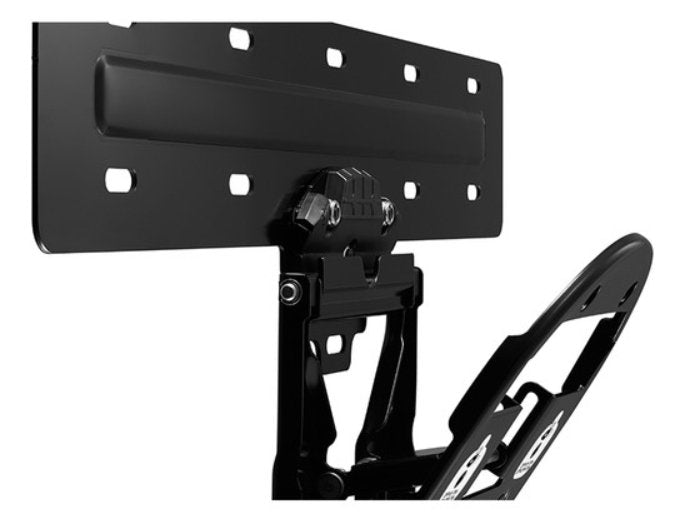
Samsung designs the WMN-WM65R with no-gap spacing, so the 65-inch Flip 2 sits tight against the wall rather than standing proud on a generic bracket. At 15.9 mm deep the mount all but disappears behind the display. In a boardroom with panelled joinery, a client-facing meeting room or a school hall, that flush finish is the difference between a screen that looks specified and one that looks retrofitted. It is the mount to choose when the Flip 2 has a permanent home and the room's appearance matters as much as its function.
An Extra Bracket Because People Push on a Flip
An interactive display is not a television: people press into it to write, drag and erase, all day. Samsung specifies this mount with an extra bracket for strong fixation precisely for that load, which is why a generic flat-panel bracket is the wrong economy here. The mount itself weighs only 1.75 kg and measures 520 x 280.3 mm, so the fixing load lands on a small area of wall — confirm your substrate with the contractor before installation, especially on drywall partitions, which are common in Singapore office fit-outs.
Samsung's Own 400 x 400 VESA Fit, With Guide and Screws
The WMN-WM65R matches the Flip 2's 400 x 400 mm VESA pattern and ships with an installation guide and screws, so a facilities team or an AV contractor can mount the board without sourcing hardware separately. The light grey finish matches the Flip 2 family. Because it is a fixed mount, it holds one orientation and one height: decide the mounting height with the people who will use the board, because writing comfort on a 65-inch interactive display is very sensitive to where the bottom edge of the screen lands.
Samsung WMN-WM65R Datasheet — Technical Specifications
General
| Product | Samsung WMN-WM65R Fixed Wall Mount for 65" Flip 2 |
| Part Number (SKU) | WMN-WM65RXEN |
| Product Type | Fixed, flush wall mount for an interactive display |
| Operating Time | Passive accessory — no power required |
| Platform | None — the display supplies the platform |
| Local Warranty (Singapore) | Supplied by SourceIT with GST invoice |
Compatibility
| Compatible Display | Samsung Flip 2 WM65R (65") |
| VESA Pattern | 400 x 400 mm |
| Rotation | Not available — fixed orientation |
| Fixation | Extra bracket supplied for strong fixation |
Physical
| Dimensions | 520 x 280.3 x 15.9 mm (W x H x D) |
| Weight | 1.75 kg |
| Colour | Light grey |
| Wall Spacing | No-gap spacing — the display sits flush to the wall |
Mounting and installation
The mount fixes to the wall and then to the Flip 2's 400 x 400 mm VESA pattern, with an installation guide and screws supplied. Because this is a fixed mount, orientation and height are set at installation and cannot be changed afterwards without re-drilling — agree the bottom-edge height with the people who will write on the board before the contractor arrives. Confirm the wall substrate too: an interactive display takes repeated pressure from users, so drywall partitions may need noggins or a backing plate behind the fixing points.
What it pairs with
The WMN-WM65R is made for the Samsung WM65R Flip 2 65". Add the Samsung Flip 2 Connectivity Tray for WM55R/WM65R for front-facing HDMI and USB, which is especially worth having on a wall-mounted board where the rear ports are hard to reach. If you would rather keep the display mobile, the Samsung STN-WM55R portable stand is the 55-inch alternative.
Specifications are taken from Samsung's published product data for this model. Where Samsung does not publish a figure for this exact model it has been left out rather than estimated.
Package Contents & Samsung Flip Accessory Range
In the box
- Installation Guide
- Screws
Package contents follow Samsung's product data for this model; items not listed by Samsung are not claimed here.
Samsung Flip accessory range
| Model | Size | Fits |
| STN-WM55R | 55" | Flip 2 WM55R — mobile stand |
| WMN-WM65R (this listing) | 65" | Flip 2 WM65R — fixed wall mount |
| CY-TF65BRC | 55" / 65" | Flip 2 WM55R and WM65R — connectivity tray |
| CY-TF65BBC | 55" / 65" | Flip WM55B and WM65B — connectivity tray |
Datasheet & Downloads
Samsung does not publish a dedicated Singapore product page for the WMN-WM65RXEN mount, so the link above is to the display it is designed for. SourceIT can email the current Flip 2 accessory data sheet revision with a quotation, and can quote the board, the mount and the connectivity tray as one line.
Frequently Asked Questions — Samsung WMN-WM65R
Which Flip does this mount fit?
Samsung specifies the WMN-WM65R for the 65-inch Flip 2 (WM65R), using a 400 x 400 mm VESA pattern. For a 55-inch Flip 2 that needs to stay mobile, the STN-WM55R portable stand is the matching accessory.
Can I tilt or rotate the display on it?
No. Samsung lists rotation as not available on this mount. It is a fixed, flush mount, so orientation and height are decided at installation.
How far does the display sit from the wall?
The mount is 15.9 mm deep and is specified with no-gap spacing, so the Flip 2 finishes close to flush with the wall for a built-in appearance.
Why not use a generic flat-panel bracket?
An interactive display takes repeated pressure from people writing and dragging on it, not just the static weight of a screen. Samsung supplies this mount with an extra bracket for strong fixation, which is designed for that load.
What height should the board be mounted at?
Agree it with the people who will use the board before installation. Writing comfort on a 65-inch interactive display is very sensitive to where the bottom edge lands, and a fixed mount cannot be adjusted afterwards without re-drilling.
Will it fix to a drywall partition?
The mount's fixing points are concentrated over a 520 x 280 mm area, so on drywall partitions your contractor may need noggins or a backing plate behind the fixings. Confirm the substrate before installation day.
Do I still need the connectivity tray?
They are separate accessories, and the tray is worth more on a wall-mounted board than on a stand, because the Flip's rear ports become hard to reach once it is flush to the wall. The CY-TF65BRC brings HDMI and USB to the front.
What warranty and invoicing do I get?
Every WMN-WM65R sold by SourceIT comes with local Singapore warranty and a GST invoice on every unit, which is what your finance and procurement teams need for claims and for local service.