
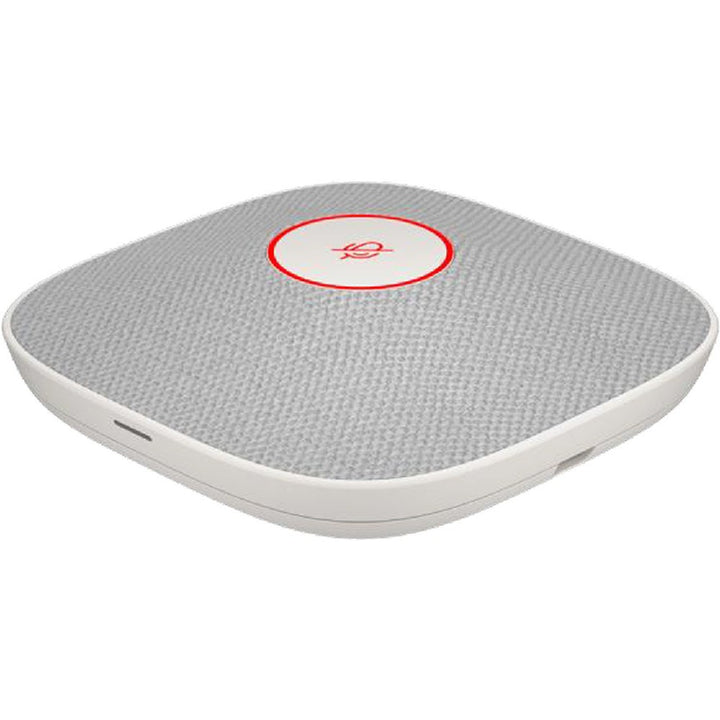

Poly Studio A2 White Table Microphone
Email sales@sourceit.com.sg or use Request for Quotation below and our team will confirm the latest price, availability and lead time.
PRODUCT DESCRIPTION
Poly Studio A2 White Table Microphone with Mounting Plate and I/O Cables (B22X4AA) - Local Warranty
Poly Studio A2 White Table Microphone — Four Cardioid Elements and 4.3 m Pickup
The Poly Studio A2 Table Microphone in white (B22X4AA) extends voice pickup across the meeting table on Poly Studio G62, X-Series and V-Series systems. Four uni-directional cardioid elements cover a 1.8 m radius, rising to a 4.3 m radius with Poly NoiseBlockAI switched on. Up to eight microphones daisy-chain over the A2B audio bus through the Studio A2 Audio Bridge, so a long Singapore boardroom table gets even coverage rather than one hot seat at the front.
Four Cardioid Elements with Auto-Switching
Each microphone carries four uni-directional cardioid elements. Poly NoiseBlockAI v2 raises speech intelligibility with microphone auto-switching, so the element facing the person speaking carries the call while the others stay out of the way. Sensitivity is −35 dB (V/Pa) at 1 kHz with a signal-to-noise ratio better than 68 dBA.
1.8 m Standard, 4.3 m with NoiseBlockAI
HP specifies a pickup radius of up to 1.8 m with NoiseBlockAI off and up to 4.3 m with it on — a material difference when you are deciding how many microphones a table needs. Plan the microphone count around the mode you intend to run.
White Finish, Magnetic Mount, 60% Recycled Plastic
The low-profile white unit measures 92 x 92 x 24 mm and weighs 120 g, mounting to the table on a magnetic plate with adhesive backing and a cable-management design that keeps the run tidy. A capacitive touch mute button and integrated LED status indicators sit on the top face. HP states the microphone contains at least 60% recycled plastic content and ships in paper-based packaging — useful when the tender has a sustainability line item.
Poly Studio A2 Table Microphone Datasheet — Technical Specifications
General
| Product | HP Poly Studio A2 White Table Microphone w/ Mounting Plate I/O cables |
| Part number | B22X4AA (retail order code B22X4AA#AC3) |
| Manufacturer | Poly (HP) |
| Type | Expansion table microphone for the Poly Studio A2 room audio system |
| Colour | White |
| Management | Poly Lens (via the host video system) |
| Warranty | Local Warranty (Singapore) |
Audio
| Microphone elements | Four uni-directional cardioid microphone elements |
| Pickup range | Up to 1.8 m radius with Poly NoiseBlockAI off; up to 4.3 m radius with Poly NoiseBlockAI on |
| Sensitivity | −35 dB (V/Pa) at 1 kHz |
| Signal-to-noise ratio | > 68 dBA |
| Noise reduction | Poly NoiseBlockAI v2, with increased speech intelligibility through microphone auto-switching |
| Controls and indicators | Capacitive touch mute button; integrated LED status indicators |
Connectivity and power
| Ports | 3-pin JST output; 4-pin JST input (A2B audio bus) |
| Power | 2 W per microphone, bus-powered from the Studio A2 Audio Bridge |
| Daisy-chain | Up to 8 Studio A2 table microphones |
Design and environment
| Dimensions | 92 x 92 x 24 mm |
| Weight | 120 g |
| Mounting | Magnetic mounting plate with adhesive backing; cable-management design for tabletop installation |
| Operating environment | 0–40 °C (32–104 °F), 15–80% humidity |
| Sustainability | Contains at least 60% recycled plastic content; paper-based packaging |
| Manufacturer warranty | HP standard one-year limited warranty |
| Package dimensions | 168 x 140 x 67 mm |
HP does not publish a frequency response figure for this microphone, and does not describe it as a beamforming array — it specifies four uni-directional cardioid elements with auto-switching. Acoustic Fence is documented by HP as a feature of the host video systems, not of this microphone. None of those three claims is made here.
Compatibility & Software Support
The Studio A2 Table Microphone connects over the A2B audio bus using JST and Phoenix connectors, and is powered from the Poly Studio A2 Audio Bridge at 2 W per microphone. Up to eight microphones daisy-chain across four independent chains on one bridge. The one exception is the Poly Studio V12, which HP documents as connecting a single A2 microphone directly, without an Audio Bridge.
Compatible Poly video systems and maximum Studio A2 table microphones
| Poly Studio G62 | Up to 8 Studio A2 table microphones |
| Poly Studio X72 and Poly Studio V72 | Up to 4 Studio A2 table microphones |
| Poly Studio X52 and Poly Studio V52 | Up to 4 Studio A2 table microphones |
| Poly Studio X32 | Up to 2 Studio A2 table microphones |
| Poly Studio V12 | 1 Studio A2 table microphone, connected directly — no Audio Bridge required |
HP states the Studio A2 range is not backward compatible with the Poly Studio X70, X50 or X30 or with the G7500. For expansion microphones on those systems, use the Poly Table Expansion Microphone for Studio X Series or the Poly IP Table Microphone Array for G7500 instead.
Audio processing: HP confirms Poly NoiseBlockAI for this microphone — switching it on raises the specified pickup radius from 1.8 m to 4.3 m. HP does not describe the A2 microphone as a beamforming array (it specifies four uni-directional cardioid elements with auto-switching), and Acoustic Fence is documented as a feature of the host video systems rather than of this microphone, so neither claim is made here.
Certification: HP does not state Microsoft Teams or Zoom certification for this accessory. Platform certification attaches to the host video system — the Studio G62, X-Series or V-Series bar the microphone is connected to.
Management: the A2 audio chain is configured and monitored through Poly Lens alongside the host video system.
Package Contents & Studio A2 Ordering Information
In the box:
- HP Poly Studio A2 Table Microphone (White)
- Mounting plate
- JST to Phoenix input cable (6 m)
- JST to Phoenix daisy-chain output cable (2 m)
- JST to JST daisy-chain cable (1.8 m)
- Quick start guide, safety guide and warranty card
An A2 Audio Bridge (B22X2AA) is required for every system except the Poly Studio V12, which connects a single microphone directly.
Poly Studio A2 range — ordering information
| Studio A2 Audio Bridge w/ CAT6A, Mic Extension Cable and Mounting Plate | B22X2AA |
| Studio A2 Audio Bridge — TAA variant | B22X3AA |
| Studio A2 White Table Microphone w/ Mounting Plate and I/O cables | B22X4AA |
| Studio A2 White Table Microphone — TAA variant | B22X5AA |
| Studio A2 Black Table Microphone w/ Mounting Plate and I/O cables | B22X6AA |
| Studio A2 Black Table Microphone — TAA variant | B22X7AA |
Datasheet & Downloads
- HP Poly Studio A2 — product page (HP Singapore)
- HP Poly Studio A2 — product page (global)
- HP-hosted PDF — HP Poly Studio A2 Administrator Guide
- HP product-specifications page — Studio A2 White Table Microphone (B22X4AA)
- HP official spec sheet PDF — Studio A2 White Table Microphone (B22X4AA)
Note for Singapore buyers: HP's /sg-en/ site hosts the Studio A2 product page linked above, but not the accessory product-detail catalogue — those /sg-en/ URLs return 404. The Ireland locale page linked here serves the identical global specification table.
Frequently Asked Questions — Poly Studio A2 Table Microphone
What is the difference between the white and black Studio A2 table microphones?
They are electrically and mechanically identical — four uni-directional cardioid elements, the same 1.8 m / 4.3 m pickup, the same 92 x 92 x 24 mm body and the same cabling. Only the finish differs. Choose white (B22X4AA) for light-toned tables and bright interiors, or black (B22X6AA) for darker boardroom furniture.
How far will one microphone pick up?
HP specifies up to a 1.8 m radius with Poly NoiseBlockAI off, and up to a 4.3 m radius with NoiseBlockAI on. Size the microphone count for the mode you will actually run.
How many can I use in one room?
That depends on the host system: Studio G62 up to 8; Studio X72 and V72 up to 4; Studio X52 and V52 up to 4; Studio X32 up to 2; and Studio V12 exactly 1.
Do I need the Studio A2 Audio Bridge as well?
Yes for every supported system except the Studio V12, which HP documents as connecting a single A2 microphone directly. For everything else, order the Studio A2 Audio Bridge (B22X2AA).
Will it work with my Studio X70, X50, X30 or G7500?
No. HP states the Studio A2 range is not backward compatible with those systems. Use the Poly Table Expansion Microphone for Studio X Series or the Poly IP Table Microphone Array for G7500 instead.
Is it PoE powered?
No. The microphone draws 2 W over the A2B bus from the Studio A2 Audio Bridge, using JST and Phoenix connectors. PoE applies to the Audio Bridge, not to the microphones.
Is it certified for Microsoft Teams or Zoom?
HP does not state platform certification for the A2 accessories. Certification attaches to the host video system — the Studio G62, X-Series or V-Series bar the microphone is connected to.
Does this come with local warranty in Singapore?
Yes. Every Poly Studio A2 Table Microphone sold by SourceIT comes with local Singapore warranty and a GST invoice.


