
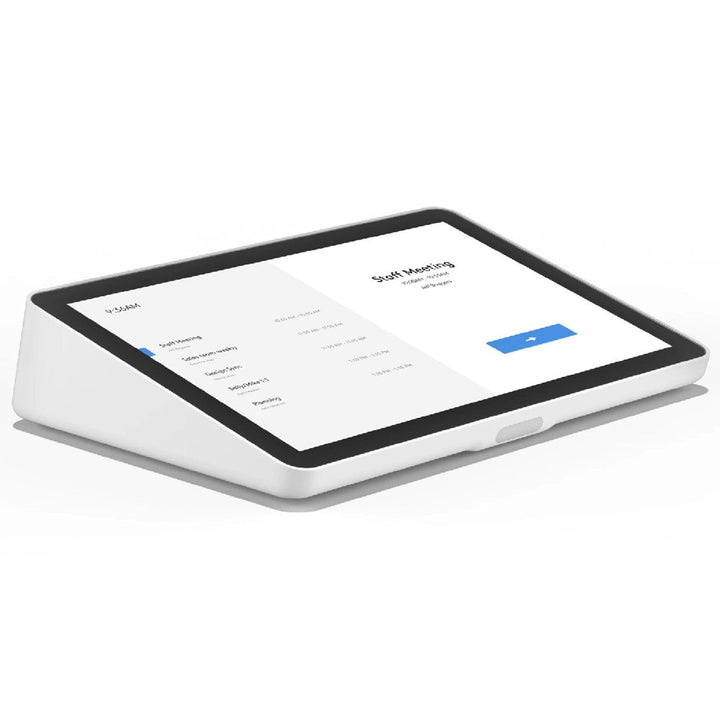


Logitech Tap IP Meeting Room Touch Controller White
Email sales@sourceit.com.sg or use Request for Quotation below and our team will confirm the latest price, availability and lead time.
PRODUCT DESCRIPTION
Logitech Tap IP Network Connected Meeting Room Touch Controller White (952-000088) - 2 Years Local Warranty
Logitech Tap IP — Network-Connected Touch Controller for Teams Rooms and Zoom Rooms
Logitech Tap IP (952-000088, White) is a PoE meeting room touch controller that pairs over the network with a Logitech CollabOS appliance. It is certified for Microsoft Teams Rooms on Android, Zoom Rooms Appliances, Zoom Rooms for Windows and Mac, and Google Meet on Android — one controller standard across a mixed-platform estate. Because the pairing is network-based rather than USB, there is no cable run to plan between the table and the compute device.
Single-Cable PoE Installation Up to 100 Metres
One Cat5e cable carries both power and data. Tap IP is an IEEE 802.3af Type 1, Class 3 device drawing under 15.4 W in normal operation, and Logitech supports a run of up to 100 m from the powered switch port or PoE injector to the controller. For Singapore offices retrofitting rooms without pulling new AV trunking, that usually means the existing structured cabling is enough.
10.1-Inch IPS Touchscreen with 400 Nits and 10-Point Multi-Touch
The 10.1-inch IPS panel runs at 1280 x 800 with 400 nits of brightness, a 1000:1 contrast ratio and an 85° viewing angle in every direction. Capacitive 10-point multi-touch and an oleophobic anti-fingerprint coating keep it responsive and clean under heavy daily use, and the fixed 14° tilt is set for a seated eye line.
Built for Fleet Deployment and Remote Management
Tap IP runs Logitech CollabOS and reports into Logitech Sync for remote monitoring, firmware updates, provisioning and room analytics. An integrated motion sensor wakes the room, internal cable retention and a thumbscrew-secured bottom cover keep installs tidy and tamper-resistant, and the 100 x 100 mm VESA pattern accepts the Logitech table, riser and wall mounts.
Logitech Tap IP Datasheet — Technical Specifications
General
| Product | Logitech Tap IP Network-Connected Meeting Room Touch Controller |
| Part Number | 952-000088 |
| Colour | White |
| Product Type | PoE network touch controller for CollabOS appliance room systems |
| Operating Platform | Logitech CollabOS |
| Device Management | Logitech Sync |
| Sustainability | Certified carbon neutral; FSC-certified paper packaging |
| Warranty | 2 Years Local Warranty (Singapore) |
Display
| Screen Size | 10.1 in (256.54 mm) diagonal |
| Resolution | 1280 x 800 |
| Panel | IPS LCD with LED backlight |
| Touch Technology | Capacitive, 10-point multi-touch |
| Brightness | 400 nits |
| Contrast Ratio | 1000:1 |
| Viewing Angle | 85° (up / down / left / right) |
| Display Tilt Angle | 14° (fixed) |
| Coating | Oleophobic anti-fingerprint |
Connectivity
| Ethernet | 10/100 Mbps (RJ45) |
| Power over Ethernet | IEEE 802.3af, Type 1, Class 3 device |
| Wi-Fi | 802.11a/b/g/n/ac |
| Bluetooth | 5.0 |
| Cable Specification | Cat5e UTP AWG24 or better |
| Maximum Cable Run | 100 m (328 ft) from the powered RJ45 port or PoE injector to Tap IP |
Pairing & Compute
| Pairs With | Logitech CollabOS appliances — Rally Bar, Rally Bar Mini, Rally Bar Huddle, Rally Board 65 or RoomMate |
| Also Supported | Zoom Room PCs over the network |
| Connection Model | Network-paired; no USB or direct cable link to the compute device |
Design & Power
| Dimensions (H x W x D) | 56.1 x 246.2 x 171.3 mm (2.21 x 9.69 x 6.74 in) |
| Weight | 1.0 kg (2.2 lb) |
| Power | Power over Ethernet only (802.3af). A PoE switch port or PoE injector is required; there is no AC adapter option. |
| Power Consumption | Less than 15.4 W in normal operation; budget 15.4 W per port |
| Motion Sensor | Integrated |
| Speaker | Integrated |
| Cable Management | Internal cable retention and strain relief; bottom cover secured by thumbscrew |
| Controls | Factory restore pinhole and device reset button |
| Mounting | 100 x 100 mm VESA FDMI (MIS-D); no mount included in the box |
Compatibility & Software Support
Platform certifications. Tap IP is certified for Microsoft Teams Rooms on Android, Zoom Rooms Appliances, Zoom Rooms for Windows, Zoom Rooms for Mac, and Google Meet on Android. Tencent Meeting Rooms is certified on the China SKU. Support for RingCentral Rooms, GoTo Rooms and Pexip has been discontinued.
Appliances it pairs with. Tap IP pairs with Rally Bar, Rally Bar Mini, Rally Bar Huddle, Rally Board 65 and RoomMate. Tap IP joins the same network as the appliance and is paired from the appliance's setup screen — there is no USB run between them.
Software and management. Tap IP runs Logitech CollabOS and is monitored, updated and provisioned through Logitech Sync. Room platform administration also flows through the Microsoft Teams admin center or Zoom Device Management depending on the platform deployed.
Package Contents & Logitech Tap Family Ordering Information
In the box
- Logitech Tap IP touch controller (White)
- VESA mounting screws (4)
- Microfiber cloth
- Documentation
Not included: PoE injector, Ethernet cable, and any table, riser or wall mount.
Logitech Tap family — ordering information
| Logitech Tap IP — White | 952-000088 (this listing) |
| Logitech Tap IP — Graphite | 952-000085 — Tap IP Graphite |
| Logitech Tap (USB, with Cat5e Kit) | 939-001950 — Logitech Tap |
| Logitech Tap Scheduler — Graphite | 952-000091 — Tap Scheduler Graphite |
| Logitech Tap Scheduler — White | 952-000094 — Tap Scheduler White |
| RoomMate + Tap IP room bundle | 991-000401 — RoomMate + Tap IP Bundle |
Mounts and power accessories
| Tap Table Mount | 939-001811 — preserves the 14° screen angle, swivels 180° (available at SourceIT) |
| Tap Riser Mount | 939-001814 — raises the screen to a 30° angle, swivels 180° |
| Tap Wall Mount | 939-001817 — plate-and-cleat design, adds virtually no thickness (available at SourceIT) |
| Tap PC Mount | 939-001825 — steel mount for small-form-factor room PCs |
| VESA | 100 x 100 mm VESA FDMI |
| PoE Injector | 952-000074 — Logitech PoE Injector with Plug Set |
Regional note: 952-000085 (Graphite) and 952-000088 (White) are the Americas, EMEA and Asia Pacific SKUs — the same part numbers apply in Singapore. Only China (952-000086 / 952-000089) and Japan (952-000087 / 952-000090) diverge.
Datasheet & Downloads
Frequently Asked Questions — Logitech Tap IP
What is the difference between the Graphite and White Tap IP?
The two SKUs are functionally identical — the difference is the enclosure colour. Graphite is 952-000085 and White is 952-000088. The Graphite plastics contain 56% certified post-consumer recycled material.
Do I still need a room PC with Tap IP?
No. Tap IP is designed for appliance-mode rooms. It pairs over the network with a Logitech CollabOS device — Rally Bar, Rally Bar Mini, Rally Bar Huddle, Rally Board 65 or RoomMate. If your room has a USB camera and a Windows room PC instead, the USB-connected Logitech Tap is the correct controller.
Is a PoE injector or Ethernet cable included?
No. Tap IP is powered only over PoE and the box contains the controller, four VESA screws, a microfiber cloth and documentation. You will need a PoE-enabled switch port or a PoE injector such as the Logitech PoE Injector with Plug Set (952-000074), plus a Cat5e UTP AWG24 or better cable. Budget 15.4 W per port (802.3af Type 1, Class 3).
How far can Tap IP sit from the switch?
Up to 100 m (328 ft) of Cat5e UTP AWG24 or better cabling between the powered RJ45 port or PoE injector and the Tap IP. This is one of the main practical advantages over the USB-connected Tap, which is limited to a 40 m total Cat5e run.
Does Tap IP come with a table stand or wall mount?
No mount ships in the box. Tap IP uses the 100 x 100 mm VESA FDMI pattern and shares the Tap mount range: Table Mount 939-001811, Riser Mount 939-001814 and Wall Mount 939-001817. The Table Mount and Wall Mount are also available at SourceIT.
Is a Microsoft Teams Rooms or Zoom Rooms licence included?
No. Tap IP is hardware only; the room platform licence is purchased separately. If you are building a room from scratch, the RoomMate + Tap IP bundle (991-000401) pairs the controller with a compute appliance, though a camera and a licence are still required.
Does the Logitech Tap IP come with local warranty in Singapore?
Yes. Every Logitech Tap IP sold by SourceIT comes with 2 years local Singapore warranty and a GST invoice.


