
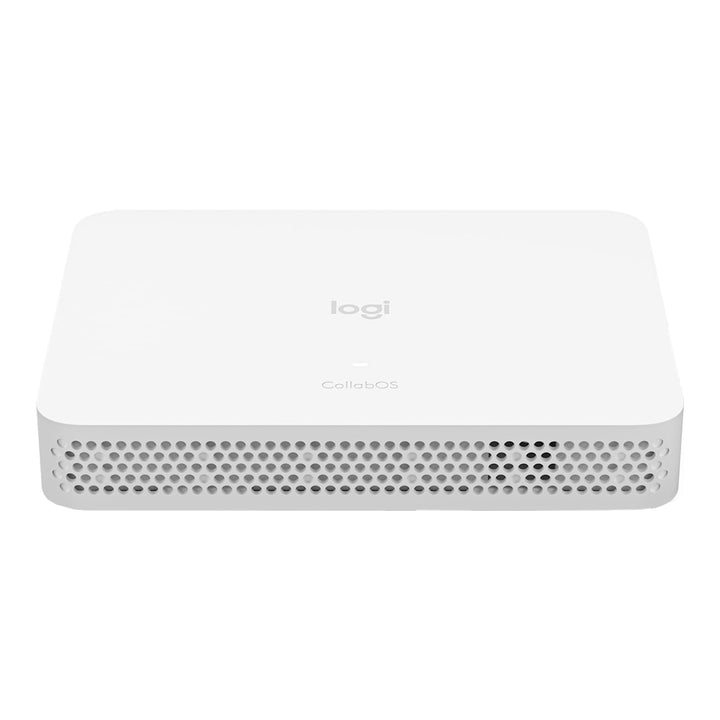


Logitech RoomMate Multi Platform Video Conferencing
Email sales@sourceit.com.sg or use Request for Quotation below and our team will confirm the latest price, availability and lead time.
PRODUCT DESCRIPTION
Logitech RoomMate Multi-Platform Video Conferencing Compute Appliance (950-000085) - 2 Years Local Warranty
Logitech RoomMate — Compute Appliance for Microsoft Teams Rooms and Zoom Rooms
Logitech RoomMate (950-000085) is a purpose-built computing appliance that runs Logitech CollabOS and converts a certified USB Logitech room camera into a native appliance-mode room system. It is certified for Microsoft Teams Rooms on Android and Zoom Rooms Appliances, which means the meeting room no longer needs a Windows room PC, its Windows updates, its antivirus agent or its domain join.
Bring Existing MeetUp, Rally and Rally Plus Rooms Up To Date
Logitech certifies RoomMate with MeetUp, Rally Camera, Rally System and Rally Plus System. For organisations across Singapore that invested in Logitech cameras during the first wave of hybrid working, RoomMate is the low-disruption path to an appliance-based Teams Rooms or Zoom Rooms deployment: keep the camera and the cabling, replace only the compute.
Drive Up To Three Displays with HDMI Content Sharing
Two HDMI 1.4 outputs support one, two or three displays at up to 1080p, with the third display requiring an additional dongle. An HDMI 1.4 input handles wired content sharing, three USB 2.0 Type-A ports connect the camera and peripherals, and Gigabit Ethernet, 802.11ac Wi-Fi and Bluetooth Low Energy for the bundled remote round out the connectivity.
Enterprise Management, Encryption and a Small Footprint
At 34.5 x 161 x 211 mm and 857 g, RoomMate sits under a table or behind a display on the included VESA plate. Full disk AES-128 encryption, PKI-based data encryption and IPv4/IPv6 support meet enterprise security review, and Logitech Sync delivers remote monitoring, firmware updates and provisioning across the estate. Plastic parts contain 33% certified post-consumer recycled content.
Logitech RoomMate Datasheet — Technical Specifications
General
| Product | Logitech RoomMate purpose-built computing appliance |
| Part Number | 950-000085 |
| Function | Runs Logitech CollabOS and turns supported USB Logitech room cameras into appliance-mode room systems — no room PC required |
| Minimum Firmware | Logitech CollabOS 1.4 or higher |
| Device Management | Logitech Sync |
| Security | Full disk encryption AES-128; symmetric key and PKI data encryption; IPv4 / IPv6 |
| Room Platform Licence | Not included — a Microsoft Teams Rooms or Zoom Rooms licence is purchased separately |
| Warranty | 2 Years Local Warranty (Singapore) |
Connectivity
| HDMI Out | 2 x HDMI 1.4, up to 1080p |
| Displays Supported | One, two or three displays (a third display requires an additional dongle) |
| HDMI In | 1 x HDMI 1.4 |
| USB | 3 x Type-A, USB 2.0 |
| Ethernet | 10/100/1000 Mbps (RJ45) |
| Power over Ethernet | Not supported — RoomMate uses a dedicated 19 V power supply |
| Wi-Fi | 802.11a/b/g/n/ac |
| Bluetooth | Bluetooth Low Energy (for the bundled remote control) |
Design & Power
| Dimensions (H x W x D) | 34.5 x 161 x 211 mm (1.36 x 6.34 x 8.31 in) |
| Weight | 857 g (1.14 lb) |
| Power Supply | Auto-sensing 100–240 V input, 19 V / 4.74 A output |
| Power Supply Size | 127 x 51 x 30 mm; 1 m AC cable, 1.5 m DC cable |
| Recycled Content | 33% certified post-consumer recycled plastic in plastic parts (by weight, excluding cables, PWA and packaging) |
| Mounting | VESA mounting plate included; optional Logitech Compute Mount 952-000097 |
Compatibility & Software Support
Certified platforms. RoomMate is certified for Microsoft Teams Rooms on Android and Zoom Rooms Appliances. Google Meet is not certified on RoomMate.
Certified cameras. Logitech lists MeetUp, Rally Camera, Rally System and Rally Plus System. The Logitech MeetUp is the most common pairing for small and medium Singapore meeting rooms. Scribe and Swytch also appear in Logitech's RoomMate compatibility tables.
Touch controllers. RoomMate works with both Logitech Tap IP (network paired, PoE) and the USB-connected Logitech Tap.
Verified audio partners. Biamp, Extron, Nureva, Q-SYS/QSC and Shure.
Multi-camera behaviour. On Microsoft Teams Rooms on Android, multiple cameras may be connected but only one is used at a time; simultaneous multi-camera is not supported, and neither are multiple audio devices. On Zoom Rooms, simultaneous multi-camera is supported from CollabOS 1.14, but not when a USB-connected Tap is in use.
Package Contents & RoomMate Ordering Information
In the box
- Logitech RoomMate appliance
- Power supply and AC cable
- VESA mounting plate / bracket
- Remote control
- User documentation
RoomMate ordering information
| Logitech RoomMate | 950-000085 (this listing) |
| RoomMate + Tap IP + Compute Mount bundle | 991-000401 — RoomMate + Tap IP Bundle |
| Logitech Compute Mount | 952-000097 — PC Mount for RoomMate and NUC |
| Logitech Tap IP — Graphite | 952-000085 — Tap IP Graphite |
| Logitech Tap IP — White | 952-000088 — Tap IP White |
| Extended warranty (Logitech) | 994-000139 (1 year) / 994-000170 (3 years) |
Regional note: Logitech publishes RoomMate under several regional SKUs for the same hardware — 950-000081 (Americas), 950-000084 (EU) and 950-000085 (UK). The difference is the regional plug and market SKU, not the device. Please quote 950-000085 when ordering against this listing.
Datasheet & Downloads
Frequently Asked Questions — Logitech RoomMate
What does RoomMate actually do?
RoomMate is a compute appliance running Logitech CollabOS. It replaces the Windows room PC: plug a certified USB Logitech camera into it, add a touch controller, and the room becomes a native Microsoft Teams Rooms on Android or Zoom Rooms Appliance system. It is the way to modernise rooms that already have a MeetUp, Rally or Rally Plus without replacing the camera.
Which cameras are certified with RoomMate?
Logitech lists MeetUp, Rally Camera, Rally System and Rally Plus System as certified. If you are buying a camera and compute together for a new room, an all-in-one bar such as Rally Bar or Rally Bar Mini already contains its own CollabOS compute and does not need a RoomMate.
Do I need a Microsoft Teams Rooms or Zoom Rooms licence as well?
Yes. Logitech states explicitly that the room solution software licence is not included with RoomMate. The Teams Rooms or Zoom Rooms licence is purchased separately per room.
Which touch controller should I pair with it?
Either. Tap IP pairs over the network and is powered by PoE, which usually gives the cleanest install. The USB-connected Logitech Tap also works, but note that on Zoom Rooms a USB-connected Tap disables simultaneous multi-camera support.
How many displays can RoomMate drive?
One, two or three. Two HDMI 1.4 outputs at up to 1080p are built in, and a third display requires an additional dongle. There is also one HDMI 1.4 input for wired content sharing.
Is it PoE powered, and how do I mount it?
No — RoomMate uses a dedicated 19 V / 4.74 A power supply, which is included. A VESA mounting plate is in the box, and the Logitech Compute Mount (952-000097) is available for a tidy under-table or behind-display installation; it also fits 75x75 and 100x100 VESA small-form-factor PCs and Intel NUC.
Does the Logitech RoomMate come with local warranty in Singapore?
Yes. Every Logitech RoomMate sold by SourceIT comes with 2 years local Singapore warranty and a GST invoice.
We Also Recommend


Logitech MeetUp + RoomMate Video Conference Bundle


Logitech Meetup 4K ConferenceCam Ultra HD Video Bar


Logitech Expansion Mic for MeetUp


