
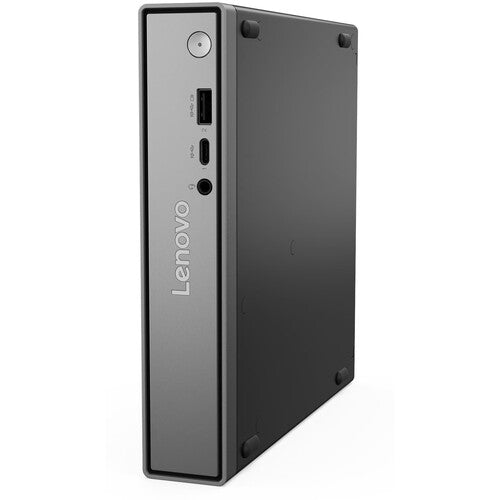


Lenovo ThinkCentre Neo 50Q TINY G5 C5 /8GB /256GB SSD
PRODUCT DESCRIPTION
Lenovo ThinkCentre neo 50q Gen 5, Core 5 210H / 8 GB / 256 GB (13B9004FSG) - 3 Years Onsite, Singapore Local Warranty
A One-Litre Desktop That Disappears Behind the Monitor
179 x 183 x 36.5 mm and about 1.2 kg: an Intel Core 5 210H in a chassis that VESA-mounts behind a screen or sits in a drawer. Full desktop ports, gigabit Ethernet and the manageability an IT department actually needs, without a tower taking up the footwell.
What You Are Actually Getting, Not Just What the Range Offers
Lenovo publishes the processor, memory, storage, wireless card and warranty term as options for this machine type rather than as facts about any one part number. So this page carries a separate This Configuration table from the distributor's build sheet for 13B9004FSG: 8 GB DDR5-5600 SODIMM, 256 GB PCIe 4.0 x4 with Opal 2.0 and Windows 11 Pro, English. Everything we could not substantiate is marked as not stated rather than filled in.
Built to Be Managed, Not Just Bought
Gigabit Ethernet with optional 2.5 GbE on some configurations. Discrete TPM 2.0 with TCG and FIPS 140-2 certification, a Kensington slot, and Lenovo's own management tooling. On a fleet of any size the manageability is worth more than the specification sheet suggests.
Three Years Onsite on This Build
The build sheet for this part number records 3-year onsite cover. Lenovo's own book for this machine type publishes no 3-year base term, so this is a configured upgrade supplied with the unit — which is worth understanding rather than assuming. Onsite means an engineer comes to the machine rather than you carrying it somewhere, which on a desktop somebody uses every day is the half of the warranty that actually gets used. The full detail, including what Lenovo publishes as the base term, is set out below.
Lenovo ThinkCentre neo 50q Gen 5 Datasheet — Technical Specifications
General
| Product | Lenovo ThinkCentre neo 50q Gen 5 |
| Part Number | 13B9004FSG |
| Machine Type | 13B9 |
| Form Factor | Tiny (1L) |
| Line | neo — Lenovo's value tier. See the comparison below |
| Warranty | 3-year onsite service on this build |
| Local Warranty (Singapore) | Included with every SourceIT purchase, with GST invoice |
This Configuration — From the Distributor Build Sheet for 13B9004FSG
| Processor | Intel Core 5 210H — 8 cores (4 performance and 4 efficient), 12 threads, up to 4.8 GHz, 12 MB cache |
| Memory Fitted | 8 GB DDR5-5600 SODIMM |
| Storage Fitted | 256 GB PCIe 4.0 x4 with Opal 2.0 |
| Wireless | Realtek Wi-Fi 7 RTL8922AE with Bluetooth 5.4 |
| Operating System | Windows 11 Pro, English |
| Warranty on This Build | 3-year onsite service, per the distributor build sheet. See the warranty note below for what Lenovo publishes as the base term |
| Bundled With This Build | USB keyboard and mouse |
Chassis and Platform — From Lenovo PSREF
| Form Factor | Tiny (1L) |
| Processor Options for This Machine Type | Lenovo's own wording is "Intel U-series, 13th Generation Intel Core i3 Processor or Intel H Series Core 5 / 7 Processor (Series 2)". The two parts we stock are the Core 5 210H (8 cores, 4 performance and 4 efficient, 12 threads, up to 4.8 GHz, 12 MB) and the Core 7 240H (10 cores, 6 performance and 4 efficient, 16 threads, up to 5.2 GHz, 24 MB), both with Intel Graphics |
| Memory | Two DDR5 SODIMM slots, dual-channel, up to 64 GB at DDR5-5600. Lenovo footnotes that memory may run at DDR5-5200 depending on the processor's memory support |
| Storage | Three M.2 slots (one for wireless, two for SSD), M.2 2280, PCIe NVMe 4.0 x4. No 2.5-inch or 3.5-inch bays |
| Discrete Graphics | None. Lenovo lists no discrete graphics option for this machine type |
| Ports | Front: 1 x USB-C 10 Gbps with 5 V at 3 A charging; 1 x USB-A 10 Gbps Always On; 3.5 mm combo. Rear: 2 x USB-A 2.0 (one Smart Power On); 2 x USB-A 10 Gbps; HDMI 2.1 TMDS; DisplayPort 1.4b; gigabit RJ-45; power connector |
| Networking | Gigabit Ethernet on a Realtek RTL8111K, optionally 2.5 Gigabit on a Realtek RTL8125BGS — the only machine in this group offering 2.5 GbE. Wireless runs from Intel Wi-Fi 6 AX203 up to Realtek Wi-Fi 7 RTL8922AE, Bluetooth 5.2 to 5.4 |
| Power Supply Options | External adapters at 65 W or 90 W (89%) and 135 W (89% or 90%), autosensing. Lenovo publishes efficiency percentages rather than an 80 PLUS tier |
| Dimensions and Weight | 179 x 182.9 x 34.5 mm without feet; approximately 1.13 kg |
| Security | Discrete TPM 2.0, TCG certified and FIPS 140-2 certified. Kensington Security Slot, 3 x 7 mm. Chassis intrusion switch hardware ready. No smart-card reader and no fingerprint reader |
| Operating System Options | Windows 11 Pro, Home or Home Single Language; Ubuntu Linux; IGEL Linux; or no preload |
| Base Warranty Options | Lenovo publishes 1-year courier or carry-in and 1-year limited onsite only. There is no 3-year base term for this machine type |
| Lenovo's AI PC Category | Not published. This machine type predates the field and Lenovo assigns it no AI PC designation |
Compatibility & Fit
Why this page separates "the chassis" from "this unit"
Lenovo publishes its specification book per machine type, not per part number. That book is authoritative about what cannot vary — the ports, the number of memory and drive slots, the dimensions, the security slot. But it lists the processor, memory, storage, wireless card, power supply, discrete graphics, operating system and warranty term as options, because Lenovo builds the same machine many different ways. The per-part-number pages that would settle which options a given SKU carries render only inside a browser.
So rather than presenting the option list as though it described this unit, this page shows you both: the chassis table is Lenovo's, and the This Configuration table is the distributor's own build sheet for this exact part number. Anything neither source states is marked as not stated. If one item decides your purchase, ask us and we will confirm it in writing before you order.
A desktop running mobile-class silicon, and why that is worth knowing
Lenovo's processor list for this machine type is U-series and H-series parts — the silicon families designed for laptops rather than the S-series parts that normally go in a desktop. That is a deliberate design choice, not a fault: it is how the machine stays quiet, cool and cheap to run, and an H-series part with ten cores is a genuinely capable office processor.
What follows from it is worth knowing before you standardise on it. Mobile silicon runs to a lower sustained power envelope than a desktop part of the same core count, so on long, heavy, all-core work — large builds, video encoding, big datasets — a desktop-silicon machine like the M70s or M90q in the ordering table will pull ahead. For office applications, browsers, video calls and line-of-business software, you will not notice. Tell us what the machines actually run and we will say honestly which side of that line you are on.
M-series or neo? The difference is real, and it is not just price
Lenovo sells both lines into the same size classes, which makes them easy to confuse on a quotation. Comparing the two specification books side by side, these are the consistent differences:
- Manageability. The M-series carries an Intel I219-LM Ethernet controller and offers vPro; the neo machines use Realtek controllers. If you manage a fleet out-of-band, that is the difference that matters
- Expansion. In the 8.2-litre chassis, the M70s takes four DIMM slots and 128 GB against the neo 50s's two slots and 64 GB, and offers an NVIDIA graphics option the neo does not
- Warranty. The M-series books publish a 3-year limited onsite base warranty option. The neo books do not publish any 3-year base term at all — only 1-year options. Where a neo machine in our range carries three years, it is a configured upgrade rather than Lenovo's base term, and we say so on the page
None of that makes neo the wrong choice — for a fleet of standard office desktops it is often exactly right, and cheaper. It makes it a choice worth making deliberately. Tell us how the machines will be managed and we will tell you which line fits.
About the three-year warranty, precisely — this one needs explaining
Lenovo's PSREF book for this machine type publishes no 3-year base warranty at all. The base options it lists are 1-year courier or carry-in and 1-year limited onsite. That is the neo line's pattern across every book we have checked, and it differs from the M-series, whose books do publish a 3-year onsite option.
The 3-year onsite cover on this part number is recorded on the distributor's build sheet, which makes it a configured Lenovo warranty upgrade supplied with the unit rather than the manufacturer's standard term. It is genuinely worth having — three years instead of one, and onsite rather than carry-in — and we would rather explain what it is than let it look like something it isn't. Every unit SourceIT sells also carries local Singapore warranty support and a GST invoice.
Package Contents & ThinkCentre Ordering Information
In the box, per Lenovo PSREF:
- Lenovo ThinkCentre neo 50q Gen 5 desktop, built to the configuration above
- USB keyboard and mouse
- Power adapter
- Quick start guide and safety documentation
Lenovo does not publish a carton contents list per part number for the ThinkCentre range. The build sheet for this unit is reflected above. A monitor, and a VESA or stand mounting kit, are separate items — ask us and we will quote the whole desk rather than the box.
Lenovo ThinkCentre Ordering Information
| 13DH000CSG | Lenovo ThinkCentre neo 30s Gen 5 SFF — i5-13420H / 16GB / 512GB — 8.2L SFF, 13th Gen mobile silicon |
| 13DH000ESG | Lenovo ThinkCentre neo 30s Gen 5 SFF — i7-13620H / 16GB / 512GB — 8.2L SFF, 13th Gen mobile silicon |
| 12TD0020SG | Lenovo ThinkCentre M70q Gen 5 Tiny — i5-14400T / 8GB / 512GB — 1L Tiny, vPro, Intel NIC |
| 12TD0021SG | Lenovo ThinkCentre M70q Gen 5 Tiny — i7-14700T / 16GB / 512GB — 1L Tiny, vPro, Intel NIC |
| 12TH003FSG | Lenovo ThinkCentre M90q Gen 5 Tiny — i7-14700 / 16GB / 512GB — 1L Tiny with a PCIe slot |
| 13B9004FSG (this listing) | Lenovo ThinkCentre neo 50q Gen 5 Tiny — Core 5 210H / 8GB / 256GB — 1L Tiny, Wi-Fi 7 |
| 13B9004CSG | Lenovo ThinkCentre neo 50q Gen 5 Tiny — Core 5 210H / 16GB / 512GB — 1L Tiny, Wi-Fi 7 |
| 13B9004ESG | Lenovo ThinkCentre neo 50q Gen 5 Tiny — Core 7 240H / 8GB / 256GB — 1L Tiny, Wi-Fi 7 |
| 13B9004DSG | Lenovo ThinkCentre neo 50q Gen 5 Tiny — Core 7 240H / 16GB / 512GB — 1L Tiny, Wi-Fi 7 |
| 12YK002FSG | Lenovo ThinkCentre M70s Gen 6 SFF — Ultra 5 225 / 8GB / 512GB — 8.2L SFF, 128GB max, 4 DIMM slots |
| 12YK002HSG | Lenovo ThinkCentre M70s Gen 6 SFF — Ultra 7 265 / 16GB / 512GB — 8.2L SFF, 128GB max, 4 DIMM slots |
| 13A40040SG | Lenovo ThinkCentre M70q Gen 6 Tiny — Ultra 5 225T / 16GB / 512GB — 1L Tiny, Thunderbolt 4 option |
| 13A40044SG | Lenovo ThinkCentre M70q Gen 6 Tiny — Ultra 7 265T / 32GB / 512GB — 1L Tiny, Thunderbolt 4 option |
| 12YU001FSG | Lenovo ThinkCentre M90s Gen 6 SFF — Ultra 7 265 / 16GB / 512GB — 8.2L SFF, 5 drives, PCIe 5.0 |
| 13DM003HSG | Lenovo ThinkCentre neo 50s Gen 6 SFF — Ultra 5 225 / 16GB / 512GB — 8.2L SFF, one DIMM slot free |
| 13DM003JSG | Lenovo ThinkCentre neo 50s Gen 6 SFF — Ultra 7 265 / 16GB / 512GB — 8.2L SFF, one DIMM slot free |
| 13HR002RSG | Lenovo ThinkCentre neo 50q Gen 6 Tiny — Ultra 5 226V / 16GB / 512GB — Copilot+ PC. Memory soldered, not upgradable |
| 13HR002SSG | Lenovo ThinkCentre neo 50q Gen 6 Tiny — Ultra 7 256V / 16GB / 512GB — Copilot+ PC. Memory soldered, not upgradable |
| 13BG001JSG | Lenovo ThinkCentre neo Ultra Gen 2 — Ultra 5 / 16GB / 512GB / RTX 5060 — 3.6L with a discrete RTX 5060 |
| 13BG001KSG | Lenovo ThinkCentre neo Ultra Gen 2 — Ultra 7 / 32GB / 512GB / RTX 5060 — 3.6L with a discrete RTX 5060 |
| 13BG001LSG | Lenovo ThinkCentre neo Ultra Gen 2 — Ultra 9 / 32GB / 1TB / RTX 5060 — 3.6L with a discrete RTX 5060 |
| 13BG001MSG | Lenovo ThinkCentre neo Ultra Gen 2 — Ultra 9 / 64GB / 1TB / RTX 5060 — 3.6L, 64GB — the published ceiling |
Datasheet & Downloads
PSREF is Lenovo's own Product Specifications Reference. It publishes per machine type rather than per part number, so this SKU does not appear inside the PDF itself — the PDF is the authority on the chassis, the ports and the option menu, and the distributor build sheet is the authority on which options this unit carries. Both are reflected above.
Frequently Asked Questions — Lenovo ThinkCentre neo 50q Gen 5
Is the memory upgradable, and is a slot free?
Yes. Lenovo publishes two DDR5 SODIMM slots to 64 GB for this machine type with no soldered memory. What is not published — by Lenovo or on the build sheet — is whether the 8 GB in this unit occupies one slot or both. That is the difference between a cheap upgrade later and replacing what you already own, and it is the most-asked question we get. Ask us and we will confirm the module configuration for your order.
Can I add a graphics card?
Lenovo publishes no discrete graphics option for this machine type, and in a 1-litre Tiny there is no room for one. If you need discrete graphics in a small chassis, the neo Ultra Gen 2 in the ordering table takes an RTX 5060 in 3.6 litres.
What warranty does it come with?
3-year onsite service, per the distributor build sheet for this part number. Worth being precise: Lenovo's own book for this machine type publishes no 3-year base term at all — only 1-year options. So this is a configured upgrade supplied with the unit, not the manufacturer's standard warranty. Onsite means an engineer attends the machine rather than you shipping it. Every unit SourceIT sells also carries local Singapore warranty support and a GST invoice, and we will confirm the exact term and start date in writing before you order.
Is this a Copilot+ PC?
No, and Lenovo does not claim it is. This machine type predates the designation — its specification book carries no AI PC Category field and publishes no NPU figure at all. If Copilot+ certification is a requirement, the neo 50q Gen 6 in the ordering table is the only ThinkCentre here that meets it.
What is the difference between the M-series and the neo machines?
Three things, consistently. The M-series carries an Intel I219-LM Ethernet controller and offers vPro, where the neo machines use Realtek controllers — that is the one that matters if you manage machines out-of-band. In the 8.2-litre chassis the M70s takes four DIMM slots and 128 GB against the neo 50s's two and 64 GB. And the M-series books publish a 3-year onsite base warranty option where the neo books publish only 1-year terms. This machine is a neo. Neither line is the right answer for everyone — tell us how the fleet is managed and we will say which fits.
What lock fits it?
A Kensington lock in a 3 x 7 mm slot. Lenovo publishes the slot dimensions as 3 x 7 mm. We stock Lenovo's cable locks; ask us and we will match the lock to the machines you actually have, which matters in a mixed fleet where the laptops take the smaller Nano slot and the desktops do not.
Can you help me choose between these?
Yes, and it is worth two minutes of your time. The machines in the ordering table above look similar and are not: some take 128 GB and some 16 GB soldered, some have an Intel NIC and vPro and some do not, some carry a 3-year onsite term and some carry one year. Tell us what the machines will run, how long you intend to keep them and how they will be managed, and we will tell you which one fits — including when the cheaper one is the right answer.


