


Yealink MCoreKit-C5U-MS Native Microsoft Teams Rooms System Base Kit
PRODUCT DESCRIPTION
Yealink MCoreKit-C5U-MS Native Microsoft Teams Rooms System Base Kit (MCoreKit-C5U-MS) - 2 Years Local Warranty
Native Microsoft Teams Rooms Base Kit for Custom Meeting Rooms
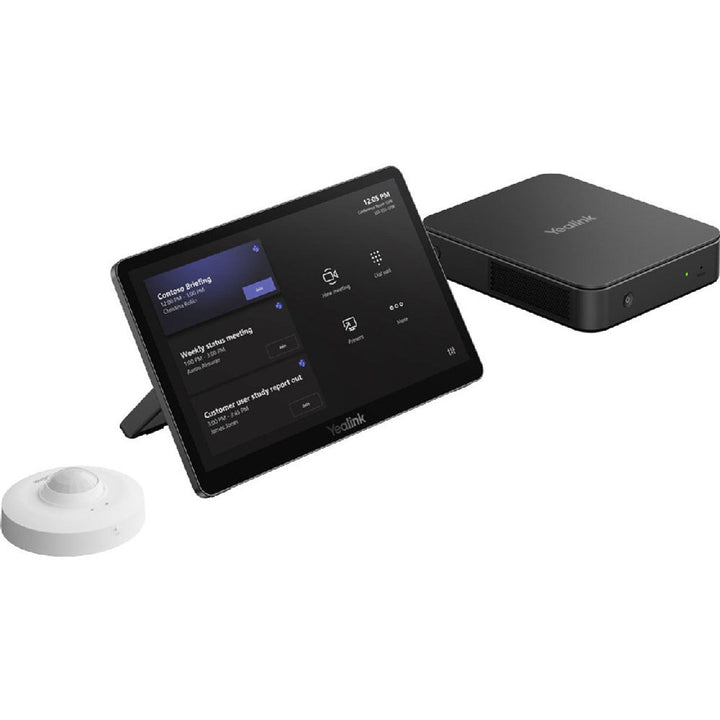
The Yealink MCoreKit-C5U-MS is the compute-and-control foundation for building a custom Microsoft Teams Rooms on Windows deployment. The kit bundles three components — the MCore 4 Gen-4 mini-PC, the MTouch Plus Gen-3 touch panel and the Yealink RoomSensor — so integrators and IT teams in Singapore can add their choice of Yealink UVC camera and room audio to complete a Teams room precisely scaled to the space, from focus rooms to boardrooms.
MCore 4 Mini-PC with Intel Core Ultra 5 AI Compute
At the heart of the kit, the MCore 4 pairs the Intel Core Ultra 5 125H processor with 16 GB (2 x 8 GB) DDR5 memory and a 256 GB SSD, running Windows 11 IoT Enterprise x64 with the license included and the Microsoft Teams Rooms app plus Yealink RoomConnect preloaded. The Intel Core Ultra platform's integrated NPU delivers strong performance for AI-driven workloads, and the system supports Microsoft Copilot integration and Windows Autopilot for streamlined IT rollout. Enterprise-grade security comes from TPM 2.0, Kernel DMA protection, a security slot and AV-LAN/Internet network separation.
Triple-Display Video with 4K HDMI Input
The MCore 4 drives up to three displays through 1 x HDMI-Out 2.1 and 2 x HDMI-Out 2.0 ports with CEC and EDID support via the built-in EDID module, and accepts a 4K-resolution auxiliary stream through its HDMI-In port. Four USB 3.0 Type-A ports connect Yealink UVC cameras, microphones and speakers, while a Gigabit Ethernet port and a dedicated AV-network LAN port keep meeting traffic cleanly separated.
MTouch Plus Console and RoomSensor Automation
The 11.6-inch MTouch Plus touch panel connects to the MCore 4's dedicated MTouch RJ-45 port over a single Cat5e network cable (7.5 m cable supplied) using a simple IP connection — no extra accessories required. It offers one-touch join and call control, wired HDMI/USB-C content sharing with PD power for the sharing device, and wireless sharing with the optional WPP30 presentation pod. The Bluetooth (BLE) RoomSensor detects occupancy across a 120-degree field to wake the room automatically and reports real-time temperature and humidity.
Built for Singapore Hybrid Workplaces
For Singapore offices standardising on Microsoft Teams, the MCoreKit-C5U-MS provides a consistent, native Teams Rooms on Windows experience across every meeting space. SourceIT supplies the kit locally with 2 years Singapore warranty and a GST invoice, and can pair it with Yealink UVC cameras, VCM microphones and MSpeaker audio to suit each room.
Yealink MCoreKit-C5U Datasheet — Technical Specifications
General
| Part Number | MCoreKit-C5U-MS (SourceIT SKU: MCoreKit-C5-MS; Yealink global order code 1206709) |
| Product Type | Microsoft Teams Rooms on Windows base kit (compute + touch console + sensor) |
| Kit Contents | MCore 4 Gen-4 mini-PC, MTouch Plus Gen-3 touch panel, RoomSensor |
| Operating System | Windows 11 IoT Enterprise x64 (license included) |
| Preloaded Software | Microsoft Teams Rooms app, Yealink RoomConnect |
| Warranty | 2 Years Local Warranty (Singapore) |
MCore 4 — Compute & Security
| Processor | Intel Core Ultra 5 125H (integrated NPU for AI workloads) |
| Memory | 16 GB (2 x 8 GB) DDR5 |
| Storage | 256 GB SSD |
| Security | TPM 2.0, Kernel DMA, security slot; AV-LAN and Internet separation |
MCore 4 — Video
| HDMI Output | 1 x HDMI-Out 2.1 + 2 x HDMI-Out 2.0 (3 x HDMI video output with CEC and EDID support) |
| HDMI Input | 1 x HDMI-In, 4K-resolution auxiliary stream input |
MCore 4 — Connectivity
| USB | 4 x USB 3.0 Type-A |
| Network | 1 x 10/100/1000 Gigabit Ethernet, 1 x LAN port for AV network |
| Touch Console Port | 1 x MTouch port (RJ-45) |
| Wi-Fi | IEEE 802.11 a/b/g/n/ac/ax (Wi-Fi 6) |
| Bluetooth | Bluetooth 5.2 |
| Other | 1 x 3.5 mm headphone port, 1 x reset port, 1 x power supply port (19V/4.7A adapter) |
MTouch Plus — Touch Console
| Display | 11.6-inch narrow-bezel IPS, 1920 x 1080 |
| Connection | Single Cat5e network cable to MCore 4 MTouch port (IP connection; 7.5 m cable supplied) |
| Content Sharing | Wired HDMI/USB-C video input; wireless sharing with optional WPP30; PD power supply to the sharing device |
| Adjustability | Screen-to-desktop angle 30°–70°; support frame adjustable 50°–180° |
| Mounting | Desktop placement, desktop fixed, or wall-mounted |
RoomSensor
| Detection Angle | 120°, adjustable ±20° |
| Protocol | Bluetooth (BLE) |
| Environmental Metrics | Real-time temperature and humidity reporting |
| Operating Conditions | 0–40 °C, 10–95% humidity |
Compatibility & Software Support
The MCoreKit-C5U-MS ships as a native Microsoft Teams Rooms on Windows system: Windows 11 IoT Enterprise x64 (license included) with the Microsoft Teams Rooms app and Yealink RoomConnect preloaded. A display, a wired network and a Microsoft Teams Rooms account/license are required to deploy (not included). Windows Autopilot is supported for IT provisioning, and Microsoft Copilot integration is supported on the Intel Core Ultra platform.
| Platform | Microsoft Teams Rooms on Windows (native) |
| Operating System | Windows 11 IoT Enterprise x64, license included |
| Device Management | Yealink Device Management Platform / Yealink Management Cloud Service — remote management, monitoring, configuration, updates and diagnostics; Yealink RoomConnect on-device |
| Peripherals | 4 x USB 3.0 ports for Yealink UVC cameras, VCM microphones and MSpeaker audio; WPP30 wireless presentation pod supported via MTouch Plus |
Looking for the Zoom platform instead? The same hardware bundle is available preloaded for Zoom as the Yealink MCoreKit-C5U-ZR.
Package Contents & MCoreKit Ordering Information
- MCore 4 Gen-4 mini-PC package (with 19V/4.7A power adapter and cabling, incl. 1.8 m HDMI cable)
- MTouch Plus Gen-3 touch panel package (with 7.5 m Cat5e cable and 1.2 m USB-C cable)
- RoomSensor package
Display, camera, room audio and Microsoft Teams Rooms license are not included — SourceIT can bundle Yealink UVC cameras and audio to complete the room.
| Yealink MCoreKit-C5U-MS | This kit — native Microsoft Teams Rooms base kit (Yealink order code 1206709) |
| Yealink MCoreKit-C5U-ZR | Same MCore 4 + MTouch Plus + RoomSensor bundle, preloaded for Zoom Rooms (Yealink order code 1206710) |
| Yealink MCore Pro (MS) | Previous-generation 11th Gen Intel Core i5 mini-PC for Microsoft Teams Rooms (PC only) |
| Yealink MCore Pro i7-01 (MS) | Intel Core i7 mini-PC option for Microsoft Teams Rooms (PC only) |
| Yealink MVC S40-C5-000 | Full native Teams Rooms kit with SmartVision 40 camera for small-to-medium rooms |
| Yealink MVC S60-C5-000 | Full native Teams Rooms kit with SmartVision 60 camera for small-to-medium rooms |
Datasheet & Downloads
Frequently Asked Questions — Yealink MCoreKit-C5U-MS
What is the difference between the MCoreKit-C5U-MS and the MCoreKit-C5U-ZR?
The hardware is identical — MCore 4 mini-PC, MTouch Plus touch panel and RoomSensor. The MS version ships with the Microsoft Teams Rooms app preloaded, while the MCoreKit-C5U-ZR ships preloaded for Zoom Rooms.
How does the MCoreKit-C5U compare with the Yealink MCore Pro?
The MCore Pro and MCore Pro i7-01 are previous-generation mini-PCs sold on their own. The MCoreKit-C5U upgrades to the Gen-4 MCore 4 with an Intel Core Ultra 5 125H (with NPU), 16 GB DDR5 and a 256 GB SSD, and bundles the MTouch Plus touch console and RoomSensor in one part number.
Does this kit include a camera, microphone or display?
No. It is a base kit — compute, touch control and occupancy sensor only. Add your choice of Yealink UVC camera, microphones, speakers and displays. If you prefer a complete pre-configured bundle with camera and audio, see the MVC S40-C5-000 or MVC S60-C5-000 full Teams Rooms kits.
How many displays can the MCore 4 drive?
Up to three: one HDMI 2.1 output plus two HDMI 2.0 outputs, all with CEC and EDID support. A separate HDMI-In port also accepts a 4K auxiliary content stream.
What do I need to get the room running?
Per Yealink's quick start guide you need a display, a wired network connection and a Microsoft Teams Rooms account/license, plus a USB camera and room audio. The MTouch Plus connects to the MCore 4 with the supplied 7.5 m Cat5e cable, so only one cable run is needed to the table.
Does the MCoreKit-C5U-MS come with a local warranty in Singapore?
Yes. Every MCoreKit-C5U-MS sold by SourceIT comes with 2 years local Singapore warranty and a GST invoice.


