
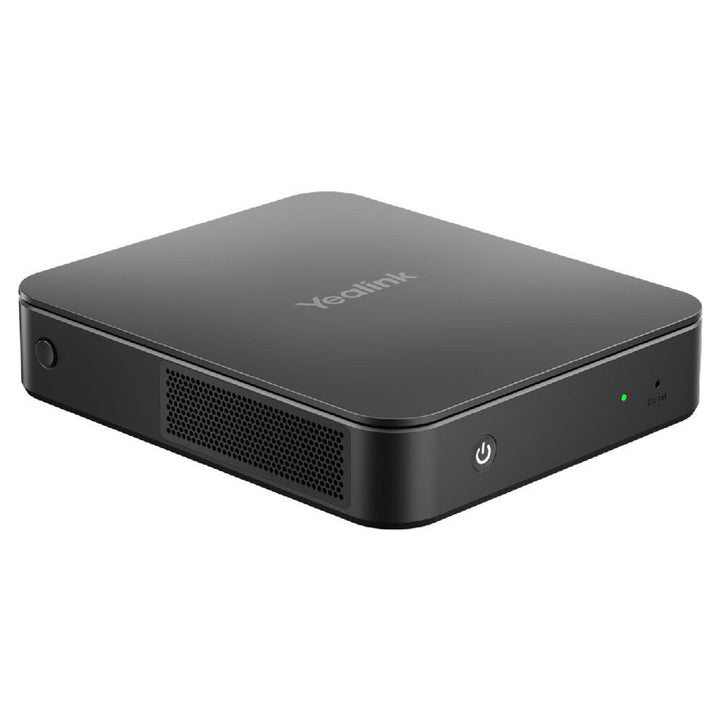

Yealink MCore Pro-i701 for Microsoft Teams Room
Email sales@sourceit.com.sg or use Request for Quotation below and our team will confirm the latest price, availability and lead time.
PRODUCT DESCRIPTION
Yealink MCore Pro-i701-MS Mini-PC for Microsoft Teams Rooms (1306018) - 2 Years Local Warranty
Yealink MCore Pro i701 — High-Performance Compute for Microsoft Teams Rooms
The Yealink MCore Pro-i701-MS is the high-performance version of Yealink's conference room mini-PC, preloaded with Windows 11 IoT Enterprise and the Microsoft Teams Rooms application. Stepping up to an Intel Core i7 quad-core processor with 16 GB of memory and a 256 GB SSD, it delivers the headroom demanding Teams Rooms need — multi-camera setups, advanced AV processing and triple-display layouts — with performance to spare for future MTR features.
Triple-Display Output and One-Cable Console Connection
Three HDMI outputs — one HDMI 2.1 supporting 5K 21:9 plus two HDMI 2.0 — drive up to three screens simultaneously, with CEC automatic screen wake. The dedicated MTouch port (RJ-45) connects a Yealink MTouch console over a single Cat5e cable, keeping the meeting table clean, and four USB 3.0 ports handle cameras and audio devices.
Enterprise Security in a Compact Chassis
TPM 2.0, UEFI Secure Boot and Kernel DMA protection satisfy enterprise IT policy, with a physical security lock slot on the compact 168 × 197 × 39 mm chassis. Wi-Fi 6-class wireless (802.11ax) and Bluetooth 5.2 are built in, and the included mount bracket tucks the unit neatly behind the room display.
Ideal For
The MCore Pro-i701-MS is ideally suited to large or complex Microsoft Teams Rooms in Singapore — boardrooms with multiple UVC cameras, ceiling audio and multi-screen front-of-room displays — where the standard i5 model may run out of headroom.
Yealink MCore Pro-i701 Datasheet — Technical Specifications
| Model | Yealink MCore Pro-i701-MS |
| Part Number | 1306018 |
| Product Type | High-performance mini-PC for Microsoft Teams Rooms |
| Preload | Windows 11 IoT Enterprise x64 + Microsoft Teams Rooms app |
| Warranty | 2 Years Local Warranty (Singapore) |
| Processor | Intel Core i7 quad-core |
| Memory | 16 GB |
| Storage | 256 GB SSD |
| Security | TPM 2.0; UEFI Secure Boot; Kernel DMA; built-in security lock slot |
| Video Output | 1 × HDMI 2.1 (supports 5K 21:9) + 2 × HDMI 2.0 — up to 3 displays, CEC auto wake |
| USB | 4 × USB 3.0 Type-A |
| Ethernet | 1 × 10/100/1000M Gigabit port |
| Console Port | 1 × MTouch port (RJ-45), single-cable console connection |
| Wireless | Wi-Fi IEEE 802.11a/b/g/n/ac/ax; Bluetooth 5.2 |
| Power Supply | 19V / 4.74A, 90.06 W |
| Dimensions | 168 × 197 × 39 mm (≈1.2 L) |
| Weight | 0.69 kg |
Compatibility & Software Support
The MCore Pro-i701-MS ships with Windows 11 IoT Enterprise and the Microsoft Teams Rooms application, pairing with Yealink MTouch consoles (via the dedicated RJ-45 MTouch port), UVC cameras and Yealink room audio over USB 3.0. It is the compute platform used in Yealink's higher-end MVC Teams Rooms kits, and the Zoom Rooms equivalent is the MCore Pro-i701-ZR. Remote provisioning, monitoring and updates are supported through centralised device management.
Package Contents & MCore Pro Ordering Information
1 × MCore Pro i701 mini-PC, 1 × power supply, 1 × mount bracket, HDMI cables, 1 × Quick Start Guide.
| MCore Pro-i701-MS | 1306018 — i7 / 16 GB / 256 GB, Teams Rooms (this model) |
| MCore Pro-i701-ZR | i7 / 16 GB / 256 GB — Zoom Rooms |
| MCore Pro-MS | i5 / 8 GB / 128 GB — Microsoft Teams Rooms |
| MCore Pro-ZR | i5 / 8 GB / 128 GB — Zoom Rooms |
| MCoreKit-C5U-MS | Base kit with MTouch console — Teams Rooms |
Datasheet & Downloads
Frequently Asked Questions — Yealink MCore Pro-i701-MS
What is the difference between the i701 and the standard MCore Pro?
The i701 upgrades the CPU to an Intel Core i7 quad-core with 16 GB memory and a 256 GB SSD, versus i5 / 8 GB / 128 GB on the standard MCore Pro-MS. Chassis, ports and security features are shared across the family.
When do I need the i7 version?
Choose the i701 for large boardrooms with multiple cameras, intensive AV processing, triple-display layouts, or where you want extra headroom for future Teams Rooms features.
Is there a Zoom Rooms version?
Yes — the MCore Pro-i701-ZR is the same hardware configured for Zoom Rooms.
How many displays can it drive?
Up to three simultaneously: one HDMI 2.1 output (supporting 5K 21:9 ultrawide) and two HDMI 2.0 outputs, with CEC automatic screen wake.
How does the MTouch console connect?
Through the dedicated MTouch RJ-45 port over a single Cat5e cable — no separate power outlet needed at the meeting table.
Does the MCore Pro-i701-MS come with local warranty in Singapore?
Yes. Every MCore Pro-i701-MS sold by SourceIT comes with 2 years local Singapore warranty and a GST invoice.
We Also Recommend


Microsoft 365 E5 Annual Subscription (12 Months)


Microsoft 365 E3 Annual Subscription (12 Months)
Microsoft 365 F3 Annual Subscription (12 Months)
Microsoft 365 Business Premium Annual Subscription (12 Months)


Microsoft 365 Business Standard Annual Subscription (12 Months)