
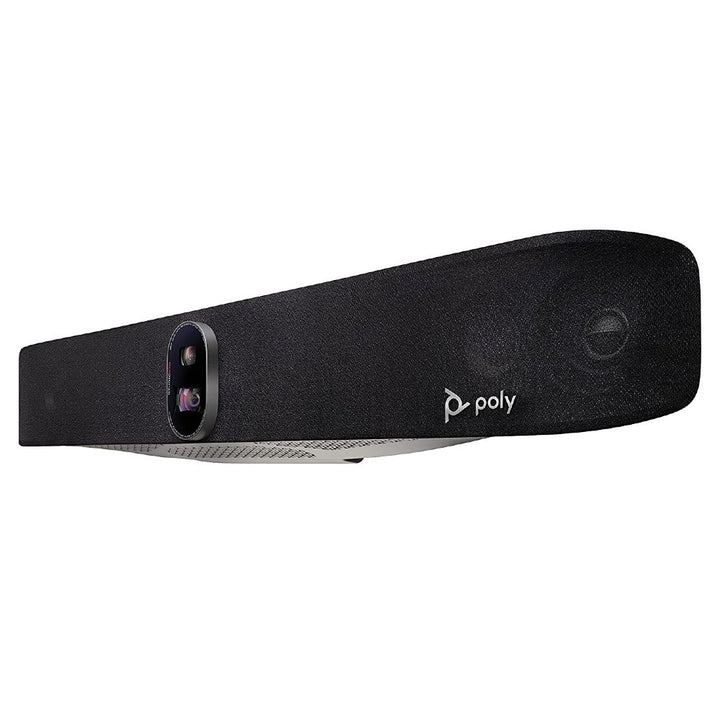


Poly Studio X70 Video Bar for Large Conference Rooms
Email sales@sourceit.com.sg or use Request for Quotation below and our team will confirm the latest price, availability and lead time.
PRODUCT DESCRIPTION
Poly Studio X70 Video Bar for Large Conference Rooms (7200-87290-102 / 83Z51AA) - Local Warranty
Poly Studio X70 Dual-Camera 4K Video Bar for Large Conference Rooms
The Poly Studio X70 is Poly’s premium all-in-one video bar for large conference rooms, pairing two 20 MP 4K camera sensors with a two-way stereo audio system and built-in compute. HP recommends it for rooms up to roughly 30 ft x 20 ft (9.1 m x 6.1 m), with camera and microphone coverage rated to 7.62 m (25 ft). It is Certified for Microsoft Teams, Certified for Zoom and certified to work with Google Meet, and it runs those apps natively — no separate room PC required.
Dual 20 MP 4K Cameras with Poly DirectorAI Framing
The Studio X70 carries two 20 MP sensors behind two lenses: a 120° horizontal wide lens that sees the whole room and a 70° narrow lens for detail. Poly DirectorAI smart camera technology uses both together for people framing, group framing, speaker framing and a DirectorAI perimeter, and adds 7.3x digital zoom. Capture is 2160p 4K UHD (3840 x 2160) at 5–30 fps, with an integrated lens cover.
Two-Way Stereo Audio Built for Big Rooms
A two-way stereo speaker system — 2 x 20 W RMS mid speakers plus 2 x 15 W RMS aluminium cone tweeters in an acoustic chamber design with bass ports — fills a large room without strain, at 83 dB and 89 dB sensitivity respectively and up to 22 kHz audio bandwidth. Four microphones (two MEMS plus two second-order) in a next-generation beamforming array pick up voices to 7.62 m, with Poly NoiseBlockAI and Poly Acoustic Fence suppressing keyboard clatter and corridor noise.
Simple to Deploy and Manage in Singapore
Two 10/100/1G Ethernet ports with IPv4 and IPv6, 2 x HDMI-out 1.4 for displays, 1 x HDMI-in 1.4 for audio, USB Type-C and two USB Type-A ports at 5 Gbps, plus Wi-Fi 802.11a/b/g/n/ac (MIMO) and Bluetooth 5.0 on standard builds. A wall mount kit is in the box, and Poly Lens cloud management lets your IT team monitor, provision and update every room from one console. Supplied by SourceIT with local Singapore warranty and a GST invoice.
Poly Studio X70 Datasheet — Technical Specifications
General
| Model | Poly Studio X70 |
| Part Number / SKU | 7200-87290-102 / 83Z51AA |
| Product type | All-in-one video bar with built-in compute (no separate room PC required) |
| Configuration | Standard build — wireless radio and power cord included |
| Recommended room size | Up to 30 ft x 20 ft (approx. 9.1 m x 6.1 m) |
| Manufacturer | Poly (HP) |
| Warranty | Local Warranty (Singapore) |
Camera
| Camera system | Dual camera, 2 x 20 MP 4K sensors |
| Capture resolution | 2160p, 4K UHD (3840 x 2160) |
| Frame rate | 5–30 fps (up to 4K resolution at 15 fps in call) |
| Zoom | 7.3x digital zoom (HP does not specify any optical zoom for this model) |
| Field of view — wide lens | 120° horizontal (HFOV) / 140° diagonal (DFOV) |
| Field of view — narrow lens | 70° horizontal (HFOV) / 78° diagonal (DFOV) |
| Smart framing | Poly DirectorAI — people framing, group framing, speaker framing, DirectorAI perimeter |
| Camera coverage range | Up to 7.62 m (25 ft) |
| Lens cover | Integrated |
Audio
| Speaker design | Two-way stereo with aluminium cone tweeters and advanced bass ports, in an acoustic chamber design |
| Speaker output | 2 x 20 W RMS (mid speakers); 2 x 15 W RMS (tweeters) |
| Speaker sensitivity | 83 dB (1 W / 1 m) mid speakers; 89 dB (1 W / 1 m) tweeters |
| Audio bandwidth | Up to 22 kHz (Polycom Siren 22 technology) |
| Microphones | 4 total — 2 x MEMS microphones plus 2 x second-order microphones |
| Microphone array | Next-generation beamforming microphone array |
| Microphone pickup range | Up to 7.62 m (25 ft) |
| Audio processing | Poly NoiseBlockAI and Poly Acoustic Fence |
| Expansion microphone | Poly Table Expansion Microphone (875M6AA) supported, sold separately |
Connectivity
| HDMI out | 2 x HDMI-out 1.4 (video) |
| HDMI in | 1 x HDMI-in 1.4 (audio) |
| USB | 1 x USB Type-C (5 Gbps signalling rate); 2 x USB Type-A (5 Gbps signalling rate) |
| Ethernet | 2 x RJ-45; 10/100/1G |
| Analogue audio | 1 x audio-in; 1 x audio-out |
| Network | IPv4; IPv6 |
| Wi-Fi | 802.11a/b/g/n/ac (MIMO), multi-channel concurrency |
| Bluetooth | Bluetooth 5.0 |
| Power over Ethernet | HP does not list PoE power for the Studio X70; the bar is powered from its external AC adapter |
Design & Power
| Dimensions (W x H x D) | 840.18 x 135.38 x 117.33 mm (33.1 x 5.3 x 4.6 in) |
| Weight | 3,200 g (3.2 kg / 7.05 lb) |
| Power supply | External, auto-sensing |
| Power consumption | 37 VA @ 120 V 60 Hz; 37 VA @ 230 V 50/60 Hz |
| Mounting | Wall mount kit included; optional VESA mount (875L2AA) and table stand (875L3AA) |
| Device management | Poly Lens cloud-based device management |
Compatibility & Software Support
Certified collaboration platforms. HP lists the Poly Studio X70 as Certified for Microsoft Teams, Certified for Zoom, and Certified to work with Google Meet. Built-in cloud video apps run directly on the bar.
Built-in compute. The Studio X70 carries its own compute, so a Microsoft Teams Rooms or Zoom Rooms experience runs natively on the device — there is no separate room PC or compute appliance to buy, license, patch or rack. That is the single biggest deployment difference between an appliance-class Studio X bar and a USB/BYOD bar such as the Poly Studio V52.
Networking and connectivity. Two RJ-45 Ethernet ports (10/100/1G) with IPv4 and IPv6 support, 1 x USB Type-C and 2 x USB Type-A at 5 Gbps, 2 x HDMI-out 1.4 for displays and 1 x HDMI-in 1.4 for audio, plus analogue audio-in and audio-out for integration with room AV.
Wireless. Standard builds include Wi-Fi 802.11a/b/g/n/ac (MIMO) with multi-channel concurrency and Bluetooth 5.0. The “No Radio” builds sold for secure and restricted-wireless environments are supplied without the wireless radio — they are genuinely different hardware builds, not a software setting.
Poly Lens management. HP supports remote management, monitoring, provisioning and firmware updates of the Studio X70 through Poly Lens cloud-based device management software — useful for Singapore IT teams running several rooms across one or more sites.
Touch control. The Studio X70 is driven from a Poly touch controller. The TC8 and TC10 are both PoE-powered over a single Ethernet cable.
Package Contents & Studio X70 Ordering Information
What’s in the Box
- Poly Studio X70 video bar
- AC power adapter
- 2 x HDMI cable
- Ethernet cable
- Wall mount kit
Poly Studio X70 Ordering Information
| Studio X70 video bar (standalone) (this listing) | 7200-87290-102 / 83Z51AA |
| Studio X70 with TC8 touch controller kit | 7200-87300-102 / 83Z52AA |
| Studio X70 with TC10 touch controller kit | 7200-88155-102 / 8L531AA |
| Studio X70 All-In-One — no power cord (GSA/TAA build) | 842X3AA |
| Studio X70 All-In-One — no radio / no power cord (TAA build) | 842X5AA |
| Studio X70 All-In-One with TC8 — no radio / no power cord (TAA build) | 842Y5AA |
| Studio X70 All-In-One — no radio / no power cord | 89L73AA |
Touch Controllers
| Poly TC8 Touch Controller (8-inch, PoE) | 2200-30760-001 / 875J0AA |
| Poly TC10 Touch Controller (10.1-inch, PoE) | 875K5AA |
| Poly GC8 Touch Controller | 2200-30780-001 / 875J6AA |
Mounts, Microphones and Accessories
| Poly Studio X70 VESA Mount | 2215-87249-001 / 875L2AA |
| Poly Studio X70 Table Stand | 2215-86538-100 / 875L3AA |
| Poly Studio E70/X70 Polarized Filter | 875K9AA |
| Poly Table Expansion Microphone (Studio X series) | 2200-87840-001 / 875M6AA |
| Poly Studio X50/X70/USB Power Supply (without power cord) | 1465-49603-001 / 875M7AA |
Datasheet & Downloads
HP Poly Studio X70 product page (HP Singapore) — official overview, framing modes and certifications.
HP product specifications — Poly Studio X70 (83Z51AA) — HP's own specification sheet: camera, ports, wireless, dimensions and box contents.
Note: HP publishes one Studio X70 specification set that covers the standard, TAA and No-Radio builds; the differences between those builds are in what ships in the carton (wireless radio, power cord), not in the camera or audio engine.
Frequently Asked Questions — Poly Studio X70
Which Poly Studio X70 configuration is this, and how do the variants differ?
This is the standard Studio X70 video bar on its own, with the wireless radio and power cord included and no touch controller in the box. Across the range, the standalone bar and the TC8/TC10 kits differ only by the controller in the box; the TAA and “No Radio / No Power Cord” part numbers are genuinely different factory builds for government, secure-facility and restricted-wireless procurement, not just different packaging. The camera, audio engine and compute are the same Studio X70 in every case. The full list of part numbers is in the ordering table above.
Do I need a touch controller with this listing?
This listing is the video bar without a controller. Most large rooms pair it with a Poly TC8 (8-inch) or a Poly TC10 (10.1-inch). SourceIT also sells the X70 pre-bundled with a TC8 or a TC10.
What size room is the Poly Studio X70 designed for?
HP recommends the Studio X70 for large rooms up to approximately 30 ft x 20 ft (about 9.1 m x 6.1 m), with camera and microphone coverage rated to 7.62 m (25 ft). In Singapore terms that covers a large boardroom, a training room or a town-hall space. For medium rooms, the Poly Studio X52 or Studio X50 is the better fit.
Does the Studio X70 have optical zoom?
No. HP specifies 7.3x digital zoom on the Studio X70 — there is no optical zoom on this model. What the X70 gives you instead is two 20 MP 4K sensors, a 120° wide lens and a 70° narrow lens working together, so DirectorAI can pull a tight, high-resolution framing of a speaker without a moving lens. If your room genuinely needs mechanical optical reach, look at the Poly Studio E60, which has a 12x optical MPTZ lens.
Do I need a separate room PC, compute appliance or licence?
No room PC or compute appliance is required — the Studio X70 has built-in compute and runs Microsoft Teams Rooms, Zoom Rooms and other supported cloud video apps natively. You will still need the relevant platform licence from Microsoft, Zoom or Google for the room account itself. If you would rather drive the room from a laptop or an existing room PC, the Poly Studio V52 USB video bar is the USB-connected alternative.
How is it powered, and can I add expansion microphones?
The Studio X70 is powered from its external auto-sensing AC adapter (37 VA at 120 V or 230 V); HP does not list PoE power for the bar itself, although the TC8 and TC10 controllers are PoE-powered. For long or awkwardly shaped rooms you can add the Poly Table Expansion Microphone (875M6AA). Mounting options are the VESA mount (875L2AA) and the table stand (875L3AA); a wall mount kit is already in the box.
Is local Singapore warranty included?
Yes. Every Poly Studio X70 sold by SourceIT comes with local Singapore warranty and a GST invoice.


