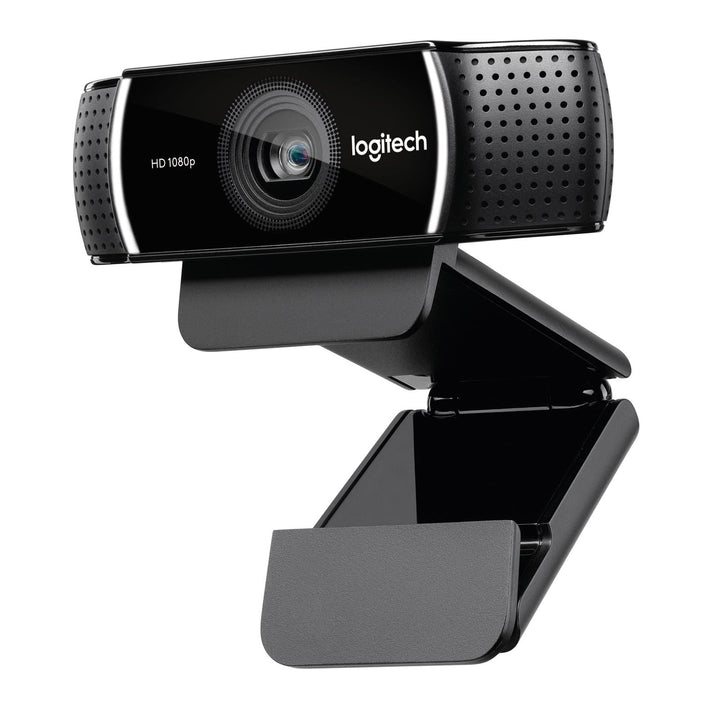

Logitech C922 Full HD Webcam
PRODUCT DESCRIPTION
Logitech C922 Pro Stream Webcam — 960-001090 - 2 Years Local Warranty
Full HD 1080p30 and Smooth 720p at 60 Frames Per Second
The Logitech C922 Pro Stream Webcam is built for streaming, recording and any use where motion matters. It is the only webcam in the Logitech C-Series that offers a 720p at 60 fps mode alongside Full HD 1080p at 30 fps, and that doubled frame rate is what makes hand movement, whiteboard work and live demonstrations look fluid instead of stuttery.
20-Step Autofocus and a Full HD Glass Lens
A Full HD glass lens paired with 20-step autofocus keeps the subject sharp through a wide range of distances, which is useful when you hold a product up to the camera or move between a keyboard and a whiteboard. Automatic low-light correction compensates for the dim, mixed lighting of a home studio or a meeting room after dark.
Dual Stereo Microphones and a 78° Field of View
Two built-in omni-directional microphones capture stereo audio, and the 78° diagonal field of view frames a single presenter cleanly. Logitech Capture software adds recording, scene switching and streaming controls on Windows and macOS, and Logi Tune handles image adjustment and firmware.
Plug-and-Play USB with Tripod Mounting
The C922 connects over USB-A with no drivers required and is recognised by Teams, Zoom, Google Meet, Webex, OBS, Streamlabs and anything else that speaks UVC 1.1. The adjustable universal clip grips a monitor or laptop, and the camera also takes a standard tripod mount for studio and training-room setups.
Logitech C922 Datasheet — Technical Specifications
Specifications below come from Logitech's official C922 Pro Stream technical specification and support pages.
General
| Product name | Logitech C922 Pro Stream Webcam |
| Part number | 960-001090 |
| Regulatory model number | V-U0028 |
| Category | Full HD streaming and recording webcam |
| Warranty | 2 Years Local Warranty (Singapore) |
Camera
| Maximum resolution | Full HD 1080p at 30 fps |
| High frame rate mode | HD 720p at 60 fps |
| Additional mode | HD 720p at 30 fps |
| Lens | Full HD glass lens |
| Focus type | Autofocus, 20-step |
| Field of view (diagonal) | 78° |
| Field of view (horizontal / vertical) | 70.42° / 43.3° |
| Light correction | Automatic low-light correction |
| Privacy shutter | Not included on this model |
Audio
| Microphones | 2 built-in omni-directional microphones, stereo |
Connectivity
| Connection | USB-A, plug-and-play |
| USB version | USB 2.0 |
| Cable length | 1.5 m (5 ft) |
| Standards | UVC 1.1 compliant |
Design & Power
| Dimensions | 29 mm (H) x 95 mm (L) x 24 mm (D) |
| Weight | 162 g |
| Mounting | Adjustable universal clip for monitors and laptops; tripod mounting supported |
| Power | USB bus-powered |
Compatibility & Software Support
Operating system support
- Windows 7, Windows 8, Windows 10 and later
- macOS 10.9 or later
- ChromeOS
Platform compatibility
The C922 is a UVC 1.1 camera and works without drivers in Microsoft Teams, Zoom, Google Meet, Cisco Webex, Skype, OBS Studio, Streamlabs and any other UVC-compliant application. Logitech does not publish a Teams, Zoom or Google Meet certification for the C922 — it is a streaming and consumer product — so we do not claim one. Where certification is a procurement requirement, quote the C920e.
Logitech software
- Logitech Capture — recording, multi-source scenes, text overlays and streaming controls.
- Logi Tune — the C922 Pro Stream is on Logitech's supported-device list for image adjustment and firmware updates.
- Logitech Sync — not supported. The C922 cannot be centrally managed.
Package Contents & Logitech C-Series Ordering Information
In the box
- Logitech C922 Pro Stream webcam with attached 1.5 m USB-A cable
- User documentation
Logitech does not publish an itemised package-contents list for the C922 Pro Stream. Retail packs have historically varied by region and promotion — if a tripod or software bundle is critical to your order, confirm with the SourceIT sales team before purchase.
Logitech C-Series ordering information
| Model / Variant | Part Number |
| Logitech C505e HD Business Webcam — 720p, 60° FOV | 960-001372 |
| Logitech C920 HD Pro Webcam — 1080p retail | 960-000770 |
| Logitech C920e Business Webcam — 1080p, Sync-managed | 960-001360 |
| Logitech C922 Pro Stream Webcam — 1080p30 / 720p60 (this listing) | 960-001090 |
| Logitech C925e Business Webcam — integrated privacy shutter | 960-001075 |
| Logitech C930e Business Webcam — 90° FOV, 4x zoom | 960-000976 |
All six C-Series models above connect over USB-A. None of the C-Series is USB-C.
Stepping up from the C-Series
| Model / Variant | Part Number |
| Logitech Brio 305 Full HD Business Webcam | 960-001472 |
| Logitech Brio 505 Full HD 1080p HDR Business Webcam | 960-001461 |
| Logitech Brio 4K Ultra HD Webcam with HDR (APAC pack) | 960-001723 |
| Logitech MX Brio 705 for Business | 960-001531 |
Ask the SourceIT sales team for current pricing, stock and volume quotations on any model listed here.
Datasheet & Downloads
All documents below are hosted by Logitech. Links open in a new tab.
- C922 Pro Stream Technical Specifications — Logitech Support — full official specification table
- C922 Pro Stream Webcam — Logitech Support & Downloads — software, firmware and manuals
- C922 Pro Stream Setup Guide (PDF)
- Logitech Webcams Portfolio Comparison (PDF) — side-by-side comparison of the full Logitech webcam range
Frequently Asked Questions — Logitech C922
What is the difference between the C922 and the C920?
The key difference is frame rate. The C920 maxes out at 1080p30; the C922 adds a 720p at 60 fps mode for smooth motion, and uses a 20-step autofocus. Both are 78° field of view, both USB-A, and neither has a privacy shutter or Logitech Sync support. Choose the C922 if you stream, record demos or capture movement; choose the C920 for standard video calls.
Can the C922 shoot 1080p at 60 fps?
No. The 60 fps mode is at 720p. Full HD 1080p is capped at 30 fps. If you need 1080p60, the MX Brio does 1080p at 60 fps and also captures 4K at 30 fps.
Does the C922 have a privacy shutter?
No. Logitech's specification table lists Privacy Shutter as No for the C922. The C925e has an integrated sliding shutter and the C930e includes an attachable one.
Is it suitable for a corporate deployment?
It works perfectly well on a corporate desk, but it is not the model IT departments should standardise on. It has no Logitech Sync manageability and no platform certification. For a managed fleet, quote the C920e, C925e or C930e.
What room or desk size does it suit?
A single presenter at a desk or in a small studio. The 78° diagonal field of view frames one person with a little room either side. It is not intended as a meeting-room camera.
Do I need a licence, dock or separate PC?
No. It is a USB-A peripheral for an existing Windows, macOS or ChromeOS computer. Logitech Capture and Logi Tune are both free downloads.
Does the Logitech C922 come with a Singapore warranty and GST invoice?
Yes. Every Logitech C922 sold by SourceIT comes with 2 years local Singapore warranty and a GST invoice.