
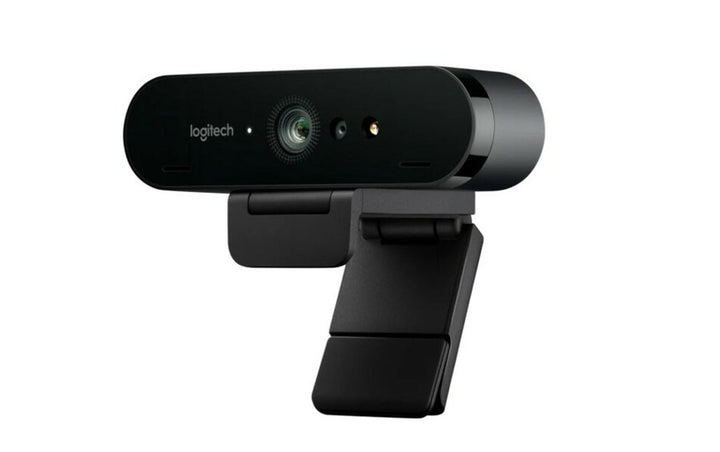


Logitech BRIO 4K Ultra HD Webcam With HDR
Prices in SGD, excluding 9% GST.
PRODUCT DESCRIPTION
Logitech Brio 4K Ultra HD Webcam with HDR — 960-001105 - 2 Years Local Warranty
4K Ultra HD Video with HDR for Professional Video Calls
The Logitech Brio 4K is Logitech's flagship personal webcam, built around a 13-megapixel sensor and a glass autofocus lens that captures 4K Ultra HD at 30 fps, Full HD 1080p at up to 60 fps and HD 720p at up to 90 fps. RightLight 3 with HDR balances exposure frame by frame, so a colleague sitting against a bright Singapore office window or under mixed fluorescent and daylight still reads clearly on the far end rather than silhouetting. For executives, marketing teams and anyone whose face is the product on a client call, it is a visible step up from the 1080p webcams built into most laptops.
Adjustable Field of View and 5x Digital Zoom
Brio 4K gives you three diagonal fields of view — 90°, 78° and 65° — switchable in the free Logi Tune app. Use 90° when two or three people share one desk or a small huddle corner, and drop to 65° for a tight head-and-shoulders framing that crops out an untidy background. A 5x digital zoom lets you push in further, and once zoomed you can pan and tilt within the sensor to centre yourself without physically moving the camera. Note that the zoom and the pan/tilt are digital and software-driven; Brio 4K has no motorised mechanism and no optical zoom.
Windows Hello Facial Sign-In and Certified for Teams, Zoom and Google Meet
An infrared sensor sits alongside the optical sensor, so Brio 4K supports Windows Hello facial recognition — useful for organisations that have moved to passwordless or multi-factor sign-in on Windows fleets. Logitech certifies the camera for Microsoft Teams, Zoom and Google Meet, and lists it under Works With Chromebook. Outside those platforms it behaves as a standard UVC camera, so Webex, Skype, GoTo and in-house applications all see it without drivers.
Deployable and Manageable Across a Singapore Office Fleet
Because Brio 4K is supported in Logitech Sync, IT teams can monitor deployed cameras, push firmware and check device health centrally instead of chasing individual desks. Logi Tune lets each user fine-tune framing and image settings locally. The camera clips to a monitor or laptop lid with the detachable universal mount, or screws onto any tripod via the 1/4"-20 thread for demo rooms, product photography and training recordings. The current pack ships with a minimum 38% post-consumer recycled plastic and a low-carbon aluminium housing.
Logitech Brio 4K Datasheet — Technical Specifications
All specifications below are taken from Logitech's official Brio 4K datasheet, Logitech spec hub and the logitech.com Singapore product page.
General
| Product name | Logitech Brio 4K Ultra HD Webcam (sold as "Brio" in North America, "Brio 4K" elsewhere) |
| Part number | 960-001105 |
| Regional pack | America (Logitech's Americas part number) |
| Component model number | V-U0040 |
| Category | Ultra HD 4K personal / desktop webcam |
Camera
| Image sensor | 13 MP (13-megapixel) |
| Lens | Glass lens with autofocus |
| Maximum resolution | 4K Ultra HD 2160p at 30 fps (up to 4096 x 2160) |
| Full HD | 1080p at 30 or 60 fps (up to 1920 x 1080) |
| HD | 720p at 30, 60 or 90 fps |
| Additional capture modes | 4K DCI, 4K UHD, 1440p |
| Zoom | 5x digital zoom (Logitech states digital zoom only — there is no optical zoom on this model) |
| Field of view (diagonal) | 90°, adjustable to 78° or 65° via Logi Tune |
| Field of view (horizontal) | 82.1°, adjustable to 70.42° |
| Field of view (vertical) | 52.2°, adjustable to 43.3° |
| Pan and tilt | Software pan and tilt within the sensor, available when the image is zoomed in. Not motorised. |
| Light correction | RightLight 3 with HDR |
| Privacy shutter | Attachable privacy shutter, flips up and down over the lens |
Audio
| Microphones | 2 built-in omni-directional microphones |
| Noise cancelling | Yes — noise-cancelling dual omni-directional mics |
| Pickup range | Up to 1.2 m |
Connectivity
| Connection | USB plug-and-play |
| USB versions supported | USB 2.0, USB 3.0, USB 3.1 or USB Type-C. USB 3.0 is required for 4K capture; USB 2.0 supports up to Full HD. |
| Cable | USB-A to USB-C, 1.5 m on the current pack revision (earlier packs shipped a 2.2 m cable) |
| Facial recognition | Optical and infrared sensors — supports Windows Hello and Microsoft DirectShow |
| Standards | Works with any UVC-compliant video conferencing application |
Design & Power
| Webcam dimensions | 27 mm (H) x 102 mm (W) x 26.5 mm (D) |
| Webcam weight | 65 g |
| Mounting clip dimensions | 23.8 mm (H) x 36.3 mm (W) x 62.7 mm (D) |
| Mounting clip weight | 69.2 g |
| Mounting | Detachable universal clip for monitors, LCD displays and laptops; 1/4"-20 tripod thread |
| Power | USB bus-powered — no separate power adapter required |
| Sustainability | Current pack uses a minimum 38% post-consumer recycled plastic, low-carbon aluminium housing and FSC-certified paper packaging |
| Warranty | 2 Years Local Warranty (Singapore) |
Compatibility & Software Support
Operating system support
- Windows 8 or later (Windows 8.1 or later for resolutions above 1080p)
- macOS 10.10 or later (Logitech's spec hub lists macOS 10.8 or later)
- ChromeOS version 29.0.1547.70, Platform 4319.79.0 or later
Platform certifications
Logitech certifies the Brio 4K for Microsoft Teams, Zoom and Google Meet, and lists it under Works With Chromebook. It also supports Windows Hello facial sign-in via its infrared sensor. Beyond those certifications it operates as a standard UVC camera, so it works with Cisco Webex, BlueJeans, GoTo Meeting, Skype and any other UVC-compliant application.
Logitech software
- Logi Tune — adjust field of view, brightness, colour and image settings, and apply firmware updates. Brio is on Logitech's supported-device list for Logi Tune.
- Logitech Sync — IT teams can monitor Brio fleets, push firmware and check device health from one console, which is the usual reason Singapore IT departments standardise on Brio rather than a consumer webcam.
System requirements
- An available USB-A port (USB 3.0 for 4K capture)
- 2.4 GHz Intel Core 2 Duo or better
- 2 GB RAM or more for 1080p streaming
Package Contents & Brio Series Ordering Information
In the box
- Logitech Brio 4K webcam
- Detachable universal mounting clip with adapter
- Attachable privacy shutter
- USB-A to USB-C cable (1.5 m on the current pack revision)
- User documentation
Brio 4K regional part numbers
| Model / Variant | Part Number |
| Logitech Brio 4K — Americas pack (this listing) | 960-001105 |
| Logitech Brio 4K — Latin America & Asia Pacific pack | 960-001723 |
Logitech's own Brio datasheet lists these as regional part numbers for a single product (component model V-U0040): America 960-001105, Europe 960-001746, Latin America & Asia Pacific 960-001723, Africa / Middle East / Central Asia 960-001724, China 960-001725, India 960-001755, Japan C1000eRR. The camera, specifications and in-box contents are identical across all of them — the difference is the regional pack. 960-001723 is the Asia Pacific part number and is the one printed on Logitech's Singapore product page.
Other Logitech webcams stocked by SourceIT
| Model / Variant | Part Number |
| Logitech Brio 100 Full HD Webcam — Graphite | 960-001587 |
| Logitech Brio 100 Full HD Webcam — Off White | 960-001618 |
| Logitech Brio 100 Full HD Webcam — Rose | 960-001624 |
| Logitech Brio 300 Full HD USB-C Webcam — Graphite | 960-001437 |
| Logitech Brio 300 Full HD USB-C Webcam — Off White | 960-001443 |
| Logitech Brio 300 Full HD USB-C Webcam — Rose | 960-001449 |
| Logitech Brio 305 Full HD Business Webcam | 960-001472 |
| Logitech Brio 505 Full HD 1080p HDR Business Webcam | 960-001461 |
| Logitech MX Brio 4K Webcam — Graphite | 960-001548 |
| Logitech MX Brio 705 for Business | 960-001531 |
Prices, stock and lead times for any of the above are available from the SourceIT sales team.
Datasheet & Downloads
All documents below are hosted by Logitech. Links open in a new tab.
- Logitech Brio 4K Datasheet (PDF) — official Logitech datasheet, includes the full regional part-number table
- Logitech Webcams Portfolio Comparison (PDF) — compares Brio 4K against the Brio 100/300/500 series and MX Brio 705
- Brio / Brio 4K Specifications — Logitech Spec Hub — field-of-view, USB and mounting specifications
- Logitech Brio Support Hub — firmware, Logi Tune guides and troubleshooting
- Logitech Brio 4K Product Page (Singapore) — en-SG product page carrying part number 960-001723
Frequently Asked Questions — Logitech Brio 4K
What is the difference between part numbers 960-001105 and 960-001723?
None functionally. Logitech's Brio datasheet lists them as regional part numbers for the same camera (component model V-U0040): 960-001105 is the Americas pack and 960-001723 is the Latin America and Asia Pacific pack, which is the part number printed on Logitech's Singapore product page. Specifications, in-box contents and features are identical. If your procurement system requires the APAC part number, order 960-001723; if a global contract quotes the Americas number, order 960-001105. Talk to us if you are unsure which your buyer expects.
Does the Brio 4K have optical zoom or a motorised camera?
No. Logitech specifies 5x digital zoom only, and the pan and tilt are software adjustments within the sensor that become available once you zoom in. There is no optical zoom and no motor. If you need genuine motorised pan-tilt-zoom for a meeting room, look at Logitech's room systems such as Rally Bar or Rally Camera rather than a personal webcam.
Which room or desk size does the Brio 4K suit?
It is a personal and small-huddle camera. At the 65° or 78° field of view it frames one person at a desk; at 90° it comfortably covers two or three people sharing a desk or a small corner. For a proper meeting room with a table and a display, you want an all-in-one video bar rather than a webcam.
How does the Brio 4K compare with the MX Brio and the Brio 505?
The MX Brio is Logitech's newer 4K model with a larger-pixel Sony STARVIS sensor, a USB-C connection, an integrated privacy shutter and Show Mode — but Logitech states MX Brio does not support Windows Hello, so if facial sign-in matters, Brio 4K remains the model to buy. The Brio 505 is a 1080p business camera with RightSight auto-framing and a lower price; it is the volume choice for standard desks, while Brio 4K is for people who need 4K capture or Windows Hello.
Do I need to install anything to use it?
No. Brio 4K is UVC plug-and-play and will work the moment you plug it in. Logi Tune is optional and free, but you do need it to change the field of view, adjust image settings or update firmware. For fleet management, Logitech Sync is the IT-side tool.
Do I need USB 3.0, and can I use USB-C?
USB 3.0 is required to capture at 4K. On USB 2.0 the camera still works but tops out at Full HD. The supplied cable is USB-A to USB-C; connecting to a USB-C-only laptop needs a USB-C adapter or hub, which is worth budgeting for on newer machines.
Does the Logitech Brio 4K come with a Singapore warranty and GST invoice?
Yes. Every Logitech Brio 4K sold by SourceIT comes with 2 years local Singapore warranty and a GST invoice.
We Also Recommend


Jabra Evolve2 75 MS Stereo Wireless BT with Stand USB-C


Jabra Evolve2 75 MS Stereo Wireless BT with Stand USB-A


Jabra Evolve2 75 MS Stereo ANC Wireless BT Headset USB-C