
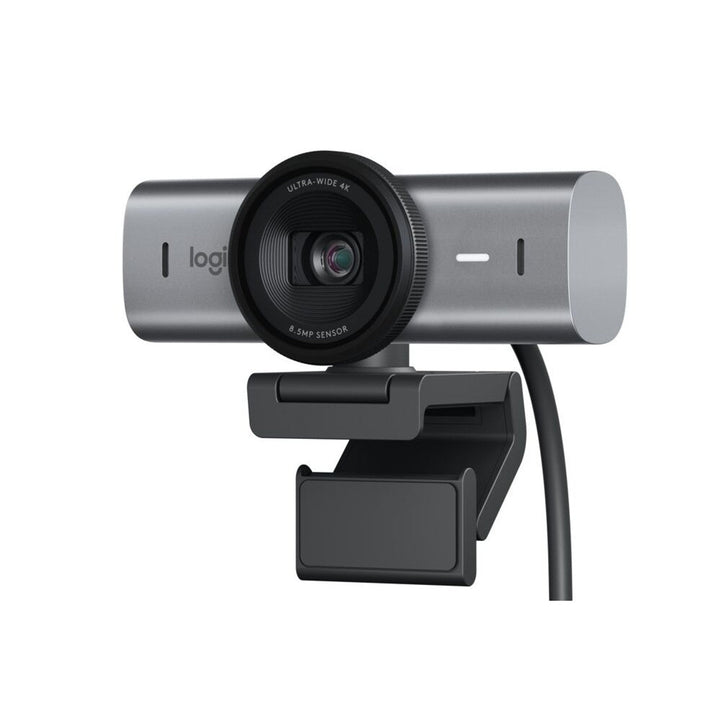


Logitech MX Brio 705 4K Ultra HD Business Webcam
Prices in SGD, excluding 9% GST.
PRODUCT DESCRIPTION
Logitech MX Brio 705 for Business 4K Ultra HD Webcam — 960-001531 - 2 Years Local Warranty
Clearance Promotion Model Strictly While Stock Last Only
Certified 4K Business Webcam for Microsoft Teams, Zoom and Google Meet
The Logitech MX Brio 705 for Business is the enterprise version of Logitech's most advanced desktop webcam, and the model to quote when procurement asks for a certified device. Logitech certifies it for Microsoft Teams, Zoom and Google Meet, and lists it under Works With Chromebook. An 8.5 MP Sony STARVIS sensor captures 4K Ultra HD at 30 fps, Full HD 1080p at up to 60 fps and HD 720p at up to 60 fps through a glass lens with closed-loop, face-based autofocus.
RightLight 5 with HDR and RightSight Auto-Framing
RightLight 5 with HDR and face-based image enhancement keeps faces correctly exposed against bright windows and mixed office lighting, and Logitech states it represents skin tones more accurately. RightSight auto-framing detects users and keeps them centred as they speak and move — enabled through the free Logi Tune app. Three selectable diagonal fields of view (65°, 78° and 90°) plus 4x digital zoom cover everything from a tight head-and-shoulders crop to two or three people sharing a desk.
Centrally Managed Across a Fleet with Logitech Sync
This is the practical reason IT departments specify the 705 rather than the consumer MX Brio. Logitech lists MX Brio 705 for Business as a Sync-managed device, so a Singapore IT team can monitor every deployed camera, verify device health, confirm settings and push firmware across the company from a single console — no desk visits, no manual version tracking.
Show Mode, Integrated Privacy Shutter and 82% Recycled Plastic
Tilt the camera down and Show Mode shares whatever is on the desk — a sketch, a document, a hardware sample — straight into the call. A privacy shutter is built into the body and closes with a dial. Dual beamforming, noise-reducing microphones pick up clearly to 1.2 m. The housing uses a minimum 82% post-consumer recycled plastic and low-carbon aluminium made with renewable energy, in FSC-certified paper packaging — useful evidence for corporate sustainability reporting.
Logitech MX Brio 705 for Business Datasheet — Technical Specifications
Specifications below come from Logitech's official MX Brio 705 for Business datasheet, Logitech spec hub and the logitech.com Singapore business product page.
General
| Product name | Logitech MX Brio 705 for Business |
| Part number | 960-001531 (Asia Pacific) |
| Regional part numbers | Americas 960-001529 · EMEA 960-001530 · Asia Pacific 960-001531 · China 960-001532 · Japan MXBRIO705GR. All are the same camera; 960-001531 is the part number on this listing. |
| Colour | Graphite (the only colour Logitech offers for the 705) |
| Category | 4K Ultra HD USB-C business webcam, certified and centrally manageable |
| Warranty | 2 Years Local Warranty (Singapore) |
Camera
| Sensor | 8.5 MP Sony STARVIS |
| Maximum resolution | 4K Ultra HD at 30 fps (up to 3840 x 2160) |
| Full HD | 1080p at 30 or 60 fps (up to 1920 x 1080) |
| HD | 720p at 30 or 60 fps |
| Lens | Glass |
| Focus | Closed-loop autofocus with face-based technology |
| Field of view (diagonal) | 65° / 78° / 90°, selectable |
| Zoom | 4x digital zoom (there is no optical zoom) |
| Light correction | RightLight 5 with HDR and face-based image enhancement |
| RightSight auto-framing | Yes — automatically detects and centres the camera on users as they speak and move. Requires Logi Tune; not available on ARM processors. |
| Show Mode | Yes — accelerometer-based tilt to share physical items on the desk during a call |
| Privacy shutter | Integrated, engaged by a privacy-shutter dial in a contrasting colour |
Audio
| Microphones | 2 dual beamforming, noise-reducing built-in microphones |
| Pickup range | Up to 1.2 m (4 ft) |
Connectivity
| Connection | USB-C plug-and-play |
| Cable | Detachable USB-C 3.0 cable, 1.5 m (4.92 ft) |
| Requirement | An available USB-C port on the host computer |
Design & Sustainability
| Dimensions (with mount clip) | 61.6 mm (H) x 98.0 mm (W) x 52.2 mm (D) |
| Dimensions (camera body) | 43.6 mm (H) x 98 mm (W) x 36.2 mm (D) |
| Weight | Webcam 174 g plus mount clip 40 g; camera body 137 g |
| Mounting | Universal mount clip with removable mount adapter for laptops, LCD displays and monitors; 360° pan; 1/4"-20 tripod thread |
| Post-consumer recycled plastic | Minimum 82% |
| Housing | Low-carbon aluminium produced with renewable energy |
| Packaging | FSC-certified paper |
Compatibility & Software Support
Operating system support
- Windows 10 or later
- macOS 10.15 or later
- ChromeOS
Platform certifications
Logitech certifies MX Brio 705 for Business for Microsoft Teams, Zoom and Google Meet, and lists it under Works With Chromebook. This is the certification set that makes it the right model to quote when a tender or corporate standard requires a certified device. Beyond those platforms it operates as a standard UVC camera, so Cisco Webex, Skype, GoTo Meeting and in-house applications all recognise it without drivers.
Logitech software
- Logi Tune — free app for Windows and macOS; adjusts colour, brightness, digital zoom and field of view, and is required to enable RightSight auto-framing.
- Logitech Sync — supported. MX Brio 705 for Business is listed by Logitech as a Sync-managed webcam, so IT can monitor and manage company-wide deployments, check device health and push firmware from one platform.
A note on the consumer MX Brio
Logitech also sells a consumer MX Brio (960-001548 Graphite and 960-001561 Pale Grey). Those part numbers are not certified for Teams, Zoom or Google Meet, are not manageable in Logitech Sync, and do not offer RightSight auto-framing. If your requirement is a managed or certified fleet, 960-001531 is the part number to order.
Package Contents & MX Brio Series Ordering Information
In the box
- Logitech MX Brio 705 for Business webcam
- Universal mount clip with removable mount adapter
- Detachable USB-C 3.0 cable (1.5 m)
- User documentation
MX Brio series ordering information
| Model / Variant | Part Number |
| Logitech MX Brio 4K Webcam — Graphite | 960-001548 |
| Logitech MX Brio 4K Webcam — Pale Grey | 960-001561 |
| Logitech MX Brio 705 for Business — Graphite (this listing) | 960-001531 |
MX Brio is offered in Graphite and Pale Grey. MX Brio 705 for Business is offered in Graphite only.
Regional part numbers for MX Brio 705 for Business: Americas 960-001529, EMEA 960-001530, Asia Pacific 960-001531, China 960-001532, Japan MXBRIO705GR. These are the same camera in different regional packs — 960-001531 is the correct part number for Singapore.
Alternative Logitech business webcams
| Model / Variant | Part Number |
| Logitech Brio 4K Ultra HD Webcam with HDR (APAC pack) — supports Windows Hello | 960-001723 |
| Logitech Brio 505 Full HD 1080p HDR Business Webcam | 960-001461 |
| Logitech Brio 305 Full HD Business Webcam | 960-001472 |
| Logitech C920e Full HD Business Webcam — Teams and Zoom certified | 960-001360 |
Datasheet & Downloads
All documents below are hosted by Logitech. Links open in a new tab.
- Logitech MX Brio 705 for Business Datasheet (PDF) — official Logitech datasheet, includes the regional part-number table
- Logitech Webcams Portfolio Comparison (PDF) — compares MX Brio 705 against the Brio 105/305/505 series
- MX Brio 705 for Business Specifications — Logitech Spec Hub
- Difference Between MX Brio 705 for Business and Brio / Brio 4K — Logitech Spec Hub
- Logitech MX Brio 705 for Business Product Page (Singapore)
- Devices Manageable with Logitech Sync — Logitech Spec Hub — confirms MX Brio 705 for Business as a Sync-managed webcam
Frequently Asked Questions — Logitech MX Brio 705 for Business
What is the difference between MX Brio 705 for Business and the standard MX Brio?
The 705 is the enterprise model. Logitech certifies it for Microsoft Teams, Zoom and Google Meet and lists it under Works With Chromebook; it is managed centrally through Logitech Sync; it adds RightSight auto-framing; and it has RightLight 5 with HDR. The consumer MX Brio has none of those, but is offered in Pale Grey as well as Graphite. For a corporate rollout or any tender that names certification, order 960-001531.
Which room or desk size does it suit?
It is a personal and small-huddle camera. At 90° it takes in two or three people sharing a desk or a small corner; at 78° or 65° it frames a single person tightly, and RightSight will keep whoever is speaking centred. For a meeting room with a table and a wall display, an all-in-one video bar with speakers and beamforming microphones is the correct product.
How does it compare with the Logitech Brio 4K and the Brio 505?
The Brio 4K is the older 4K model; its key advantage is Windows Hello facial sign-in, which the MX Brio family does not offer. MX Brio 705 has the newer 8.5 MP STARVIS sensor, RightLight 5 with HDR, RightSight auto-framing, Show Mode and a USB-C connection. The Brio 505 is the 1080p business option for volume desk rollouts.
Do I need a room PC, licence or compute appliance?
No. MX Brio 705 for Business is a USB-C peripheral for an existing Windows, macOS or ChromeOS computer. There is no licence to buy: Logi Tune and Logitech Sync are both free Logitech applications. You do need a USB-C port — the supplied cable is USB-C 3.0 — so factor in a hub or adapter for older machines.
Can our IT team manage these centrally?
Yes. Logitech lists MX Brio 705 for Business as a Sync-managed webcam. From the Sync console your IT team can monitor deployed cameras, check device health, confirm configuration and push firmware across the fleet without visiting individual desks.
Does the Logitech MX Brio 705 for Business come with a Singapore warranty and GST invoice?
Yes. Every Logitech MX Brio 705 for Business sold by SourceIT comes with 2 years local Singapore warranty and a GST invoice.
We Also Recommend


Logitech MX Keys Mini Wireless Keyboard For Business Graphite


Logitech MX Keys Mini Wireless Keyboard For Business Off-White


Logitech H540 USB Stereo Wired USB-A Headset


Logitech Ergo M575 Wireless Trackball Mouse For Business Off-White


Logitech Signature M650 M Size Wireless Mouse for Business Off-White