
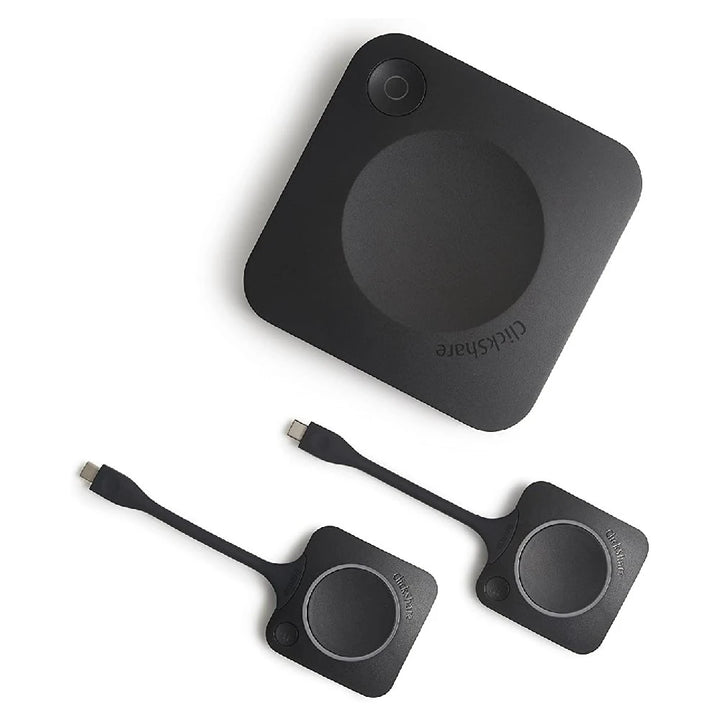


Barco ClickShare CX-30 Gen-2 Wireless Conferencing System with 2 Buttons
Prices in SGD, excluding 9% GST.
PRODUCT DESCRIPTION
Barco ClickShare CX-30 Gen-2 Wireless Conferencing System with 2 ClickShare Buttons, 4K, BYOM (R9861613NAB2) - 1 Year Warranty, up to 5 Years with SmartCare Registration
Wireless Conferencing for Medium-Sized Meeting Rooms
The Barco ClickShare CX-30 Gen-2 turns medium-sized meeting rooms into a bring-your-own-meeting space: connect wirelessly from your laptop and the room's USB camera, microphone and speakerphone become available to Microsoft Teams, Zoom or whichever platform you already use. This bundle (article R9861613NAB2) includes two ClickShare Buttons.
One Click to Share and Conference
Plug in the USB-C ClickShare Button or open the ClickShare App to share content at up to 4K UHD (3840 x 2160) and start your call with the room's peripherals. AirPlay, Google Cast and Miracast are supported natively for guests. Two sources can be shown side by side, with touch-back and local view.
Gen-2 Connectivity
Gen-2 units add USB 3.0 on all USB ports, 4K output over USB-C DisplayPort 1.2 as well as HDMI 1.4b, and USB-C Power Delivery, with 1 Gbps Ethernet and dual-band Wi-Fi for secure network integration.
Need help choosing? Email sales@sourceit.com.sg with your room size, conferencing platform and quantity and we will recommend the right ClickShare setup.
Barco R9861613NAB2 Datasheet — Technical Specifications
General
| Product Name | Barco ClickShare CX-30 Gen-2 with 2 Buttons (NA version) |
| Part Number | R9861613NAB2 |
| Product Family | ClickShare Conference |
| ClickShare Buttons Included | 2 (4th-generation USB-C) |
| Warranty | 1 year standard; 5 years coverage upon registering the unit with Barco SmartCare |
Video, Audio & Sharing
| Video Output | 4K UHD (3840 x 2160) @ 30 Hz via HDMI 1.4b or USB-C DisplayPort 1.2 |
| Audio Output | USB, HDMI |
| Max. Sources on Screen | 2 |
| Native Protocols | AirPlay, Google Cast, Miracast |
| Wireless Conferencing | Via ClickShare App or Button, using USB room peripherals |
| Touch Screen & Interactivity | Yes |
| Local View | Yes |
Connectivity
| Ports | 1 x Ethernet LAN 1 Gbps; USB-C 3.0 and USB-A 3.0 (Gen-2) |
| Wireless | IEEE 802.11 a/g/n/ac and IEEE 802.15.1 |
| Frequency Bands | 2.4 GHz and 5 GHz (DFS channels in select countries) |
| Reach | Max. 30 m (100 ft) |
| Network Connection | LAN & Wi-Fi |
Client Operating Systems
| Supported | Windows 10+, macOS 11+, Android 11+, iOS 14+ |
Power & Physical
| Power Supply | Standard 110/220 V AC plug or USB-C (Gen-2) |
| Dimensions (H x W x D) | 34 x 135 x 135 mm |
| Weight | 900 g |
| Power Consumption | Operational 5–10 W, 24 W max |
| Noise Level | Max. 25 dBA @ 0–30 °C; max. 30 dBA @ 30–40 °C |
| Operating Temperature | 0 °C to +40 °C (max. 35 °C at 3000 m) |
| Storage Temperature | -20 °C to +60 °C |
| Humidity | 0–85% operating, 0–90% storage, non-condensing |
| Anti-theft | Kensington lock |
| Certifications | FCC / CE |
Compatibility & Software Support
Conferencing: works with the conferencing software on the presenter's laptop (for example Microsoft Teams or Zoom) — the ClickShare App or Button connects the laptop to the USB camera, microphone and speakers attached to the base unit.
Sharing: ClickShare App on Windows 10+, macOS 11+, Android 11+ and iOS 14+; native AirPlay, Google Cast and Miracast. Barco lists the CX series as compatible with the ClickShare Button Gen 4 / 4.1 (Gen 4.1 needs firmware 2.12.0.12 or later on Gen-2 units). Gen-2 units (article numbers R98616xx) add USB 3.0 on all USB ports, DisplayPort over USB-C and USB-C Power Delivery; functions are otherwise the same as Gen-1, per Barco.
Package Contents & ClickShare Range Ordering Information
In the Box
Two ClickShare Buttons included (per the article description). Barco does not publish a full box-contents list. USB camera, microphone and speakerphone are not included.
Barco ClickShare Room Systems
| Model | Part Number | Type |
| C-5 Gen-2 | R9861605NA | Wireless presentation |
| C-10 Gen-2 (1 Button) | R9861611NAB1 | Wireless presentation |
| C-10 Gen-2 (2 Buttons) | R9861611NAB2 | Wireless presentation |
| CX-20 Gen-2 | R9861612NAB1 | Wireless conferencing (BYOM) |
| CX-30 Gen-2 (this listing) | R9861613NAB2 | Wireless conferencing (BYOM) |
| CX-50 Gen-2 | R9861622NAB2 | Wireless conferencing (BYOM) |
| Bar Core | R9861632USB1 | All-in-one video bar |
| Bar Pro | R9861633USB2 | All-in-one video bar |
| Hub Core | R9861711CNB1 | Teams Rooms system |
| Hub Pro | R9861710CNB2 | Teams Rooms system |
| Control Panel | R9861720US | Hub touch console |
Datasheet & Downloads
| Barco spec sheet | ClickShare CX-30 Gen-2 Spec Sheet (PDF) |
| Barco product page | CX-30 Gen-2 on barco.com |
| SmartCare warranty registration | How to register your ClickShare base unit |
Need a PDF sent directly? Email sales@sourceit.com.sg quoting R9861613NAB2.
Frequently Asked Questions — Barco R9861613NAB2
Does it include a camera or microphone?
No. The CX-30 connects your laptop wirelessly to the USB camera, microphone and speakerphone already in the room. For an all-in-one option with built-in camera and audio, see the ClickShare Bar Core / Bar Pro.
Which conferencing platforms does it support?
Any platform running on the presenter's laptop, such as Microsoft Teams or Zoom — it is a bring-your-own-meeting system.
How many Buttons are included?
2. Extra Gen 4 USB-C Buttons (R9861600D01C) or the two-Button + tray pack (R9861600P01C) can be added.
How many sources can be on screen?
2.
What warranty do I get?
Barco: 1 year standard; 5 years coverage upon registering the unit with Barco SmartCare.
Product Video
We Also Recommend


Barco ClickShare Hub Core Microsoft Teams Rooms System with 1 Button


Barco ClickShare Hub Pro Microsoft Teams Rooms System with 2 Buttons


Barco ClickShare 2-in-1 Tray for Gen 5 Buttons


Barco ClickShare Button Gen 5 for ClickShare Hub


Barco ClickShare Button Pack: 2 x Gen 4 USB-C Buttons + Tray