
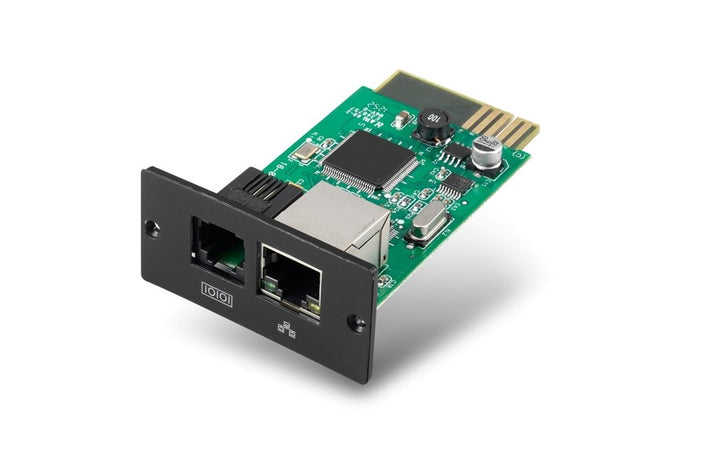
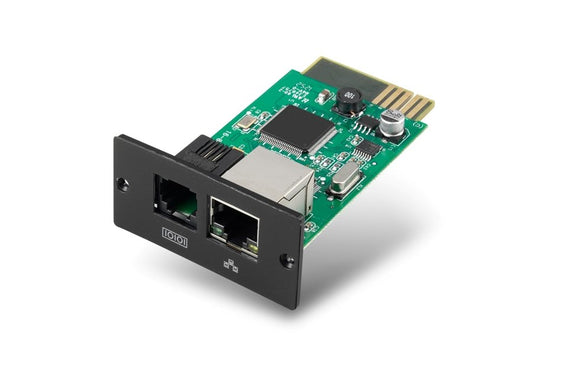
APC Easy UPS On-Line SRV SNMP Card
PRODUCT DESCRIPTION
APC Easy UPS On-Line SRV SNMP Card (APV9601) - Local Warranty
SNMP Network Monitoring for APC Easy UPS On-Line SRV
The APC Easy UPS On-Line SRV SNMP Card (APV9601) slots into the Intelligent Card Slot of an Easy UPS On-Line SRV and puts the UPS on your network. Input and output voltage, battery condition and load level become readable over SNMP v1, v2c or v3, so a UPS in a comms cabinet on another floor stops being a device somebody has to walk to.
The Right Card for an Easy UPS — Not a Smart-UPS Card
This is the part of the APC accessory range that catches people out. Easy UPS On-Line SRV uses an Intelligent Card Slot and takes the APV9601. Smart-UPS SMT, SMC, SMX and SRT use a SmartSlot and take the AP9640 or AP9641 Network Management Card 3. The two are not interchangeable, and Easy UPS SMV takes a third card again, the APV9602. Buy against your actual UPS model, and if you are not certain, send us the serial number.
Unattended Shutdown for Singapore Server Rooms
A network-managed UPS is what turns a power event into a controlled shutdown instead of a hard stop. With the APV9601 fitted, SchneiderUPS Network Shutdown can bring hosts down cleanly when the battery reaches a set threshold — worth having in an SME server room or comms cabinet where nobody is on site when a storm takes the grid down.
Buy the APV9601 in Singapore with GST Invoice
SourceIT supplies the APV9601 from Singapore stock with a GST invoice and local warranty support. Schneider has moved this range to the AP9544 card for new deployments, so if you are designing a monitoring scheme from scratch rather than adding a card to an installed Easy UPS On-Line SRV, ask us which is the better buy — sales@sourceit.com.sg.
APC APV9601 Datasheet — Technical Specifications
General
| Part Number (SKU) | APV9601 |
| Brand | APC by Schneider Electric |
| Schneider product name | APC Easy UPS On-Line SRV Network Management Card, with direct SNMP connection |
| Product type | SNMP network management card for APC Easy UPS On-Line SRV |
| Document reference | Easy UPS On-Line SRV SNMP Card User Guide, EN 990-91198A |
| Published firmware | v2.0.3 |
| Lifecycle | Schneider lists APV9601 as discontinued (31 Aug 2023), with end of standard service 31 Aug 2024. The current-generation Schneider card for Easy UPS On-Line 1-phase is AP9544. |
| Local support | Local Warranty (Singapore) |
Function & Connectivity
| Network interface | RJ-45, auto-sensing 10/100 Mbps Fast Ethernet |
| Status indicators | Status LED, 100M link LED (green), 10M link LED (yellow) |
| SNMP versions | SNMP v1, v2c and v3 |
| Transport protocols | TCP/IP and UDP |
| IP addressing | DHCP supported; a static address is assigned using the APC Easy UPS On-Line UPS Monitoring Software (SFAPV9601) |
| Configuration method | Via the APC Easy UPS On-Line UPS Monitoring Software running on a PC |
| Unattended shutdown | Supports SchneiderUPS Network Shutdown |
| Security | SNMP v3 is Schneider's recommended setting. The card ships with default password 12345678 and does not force a change — change it during commissioning. |
| Sensor port | Physically present, but Schneider's user guide states the temperature and smoke sensor accessory is not available for the SRV and SRVS series |
| Fits | APC Easy UPS On-Line SRV series, in the UPS Intelligent Card Slot |
Physical & Environmental
| Dimensions | 47 mm (W) × 25 mm (H) × 80 mm (D) |
| Weight | 0.11 kg (card); 0.3 kg packaged |
| Package dimensions | 168 mm × 42 mm × 132 mm |
| Rack mountable | No — the card installs inside the UPS |
| Operating temperature | 0 °C to 40 °C |
| Operating relative humidity | 0–95 % relative humidity, non-condensing |
| Certifications | CE |
Schneider publishes no warranty term for the APV9601 in any document we were able to verify, and its own regional product pages render no warranty field, so no duration is claimed above. SourceIT supplies the card with local Singapore warranty support and a GST invoice — email sales@sourceit.com.sg for the current term in writing before you order.
Compatibility & Fitment
Which UPS models the APV9601 fits
Schneider's user guide states the card “can be installed in any compatible device that has an Intelligent Card Slot, including: Easy UPS On-Line: SRV series UPS”. In practice that means the APC Easy UPS On-Line SRV range and nothing else.
| Easy UPS On-Line SRV model | Capacity |
| APC Easy UPS On-Line SRV1KI | 1000 VA tower |
| APC Easy UPS On-Line SRV2KI | 2000 VA tower |
| APC Easy UPS On-Line SRV3KI | 3000 VA tower |
| APC Easy UPS On-Line SRV1KRI | 1000 VA rackmount 2U |
| APC Easy UPS On-Line SRV2KRI | 2000 VA rackmount 2U |
| APC Easy UPS On-Line SRV3KRI | 3000 VA rackmount 2U |
| APC Easy UPS On-Line SRVPM1KIL | 1000 VA extended runtime |
| APC Easy UPS On-Line SRVPM2KIL | 2000 VA extended runtime |
| APC Easy UPS On-Line SRVPM3KIL | 3000 VA extended runtime |
| APC Easy UPS On-Line SRV6KI | 6000 VA tower |
| APC Easy UPS On-Line SRV10KI | 10000 VA tower |
Every model above carries an Intelligent Card Slot in its Schneider product name. Schneider does not publish a per-SKU compatibility matrix for the APV9601, so if you are fitting a card to an older or a non-SRV unit, email sales@sourceit.com.sg with the UPS serial number and we will confirm before shipping.
What it does not fit — read this before ordering
Three genuine mix-ups are worth stating plainly:
- Smart-UPS (SMT, SMC, SMX, SRT) is not supported. Those units use a SmartSlot and take the AP9640 / AP9641 Network Management Card 3. Schneider's APV9601 documentation makes no mention of any Smart-UPS model.
- Easy UPS SMV and Easy UPS LI take the APV9602, not this card. Reseller copy claiming the APV9601 “suits SMV and SRV” is wrong.
- The SRVS series takes the APVS9601, a separate part number with its own user guide.
Environmental monitoring
The card has a sensor port, but Schneider's user guide states in terms that the temperature and smoke sensor accessory is not available for the SRV and SRVS series. If you need rack temperature and humidity monitoring alongside an Easy UPS On-Line, plan a separate sensor path rather than expecting it from this card.
Network and management support
The card presents SNMP v1, v2c and v3 over a 10/100 Mbps RJ-45 port, supports DHCP, and is configured from the APC Easy UPS On-Line UPS Monitoring Software (SFAPV9601) rather than a browser — Schneider's user guide documents no web interface, HTTPS, SSH or email alerting for this card, so we do not advertise them. Unattended shutdown is via SchneiderUPS Network Shutdown. PowerChute Network Shutdown and EcoStruxure IT support are not documented for the APV9601 and are not claimed here.
Security note worth acting on: the card ships with default password 12345678 and does not force a change at first login. Change it and move to SNMP v3 during commissioning.
Package Contents & Easy UPS On-Line SRV Ordering Information
In the box
- 1 × APV9601 SNMP card
- 1 × user manual
- 1 × utility CD
Which UPS to pair it with
| Easy UPS On-Line SRV tower | Capacity, outlets and cartridge |
| APC Easy UPS On-Line SRV1KI | 1000 VA / 800 W · 3 × C13 · APCRBCV203 |
| APC Easy UPS On-Line SRV2KI | 2000 VA / 1600 W · 4 × C13 · APCRBCV204 |
| APC Easy UPS On-Line SRV3KI | 3000 VA / 2400 W · 6 × C13 + 1 × C19 · APCRBCV205 |
| Easy UPS On-Line SRV rackmount 2U | Capacity, outlets and cartridge |
| APC Easy UPS On-Line SRV1KRI | 1000 VA / 800 W · 3 × C13 · APCRBCV200 |
| APC Easy UPS On-Line SRV2KRI | 2000 VA / 1600 W · 4 × C13 · APCRBCV201 |
| APC Easy UPS On-Line SRV3KRI | 3000 VA / 2400 W · 6 × C13 + 1 × C19 · APCRBCV202 |
Datasheet & Downloads
Official Schneider Electric product page for the APC APV9601 — Singapore regional page. Schneider publishes the product datasheet, user guide and environmental disclosure from the document list on that page.
Schneider serves its APC datasheet PDFs from a redirecting download host that regularly returns the wrong model's document, so we do not publish direct PDF links that we cannot verify resolve to the right part number. Email sales@sourceit.com.sg with the model you need and we will send the correct current-revision datasheet and user manual, along with a GST-invoiced quotation.
Every specification on this page was taken from Schneider Electric's own product page and its published product datasheet or user manual for this exact part number. Where Schneider's own sources disagreed, or published nothing, the field has been left out rather than estimated.
Frequently Asked Questions — APC APV9601
Which UPS models does the APV9601 fit?
The APC Easy UPS On-Line SRV series, in the UPS Intelligent Card Slot. Schneider's user guide scopes it to “Easy UPS On-Line: SRV series UPS” and does not publish a per-SKU list, so if you are fitting an older unit, send us the serial number first.
Will it work in a Smart-UPS SMT, SMC, SMX or SRT?
No. Smart-UPS models use a SmartSlot and take the AP9640 or AP9641 Network Management Card 3. Schneider's APV9601 documentation makes no mention of any Smart-UPS model. This is the single most common ordering mistake on this part — if your UPS is a Smart-UPS, you want an AP964x card instead.
Does it give me rack temperature and humidity monitoring?
No, not on an SRV. The card has a sensor port, but Schneider's user guide states directly that the temperature and smoke sensor accessory is not available for the SRV and SRVS series — and SRV is the only range this card fits. If you need environmental monitoring in the same cabinet, plan a separate sensor path and talk to us about it.
Can I manage it from a web browser?
Schneider's user guide for the APV9601 documents configuration through the APC Easy UPS On-Line UPS Monitoring Software (SFAPV9601) on a PC, and describes no web interface, HTTPS, SSH or email alerting. We therefore do not advertise those. What is documented is SNMP v1, v2c and v3 over a 10/100 Mbps RJ-45 port, DHCP addressing, and unattended shutdown through SchneiderUPS Network Shutdown.
Is it secure out of the box?
Not until you configure it. The card ships with default password 12345678 and does not force a change at first login. Change the password and switch to SNMP v3 during commissioning — Schneider's own guidance recommends exactly this. Treat the card as a managed network device and put it on your management VLAN.
Schneider lists this card as discontinued — should I still buy it?
It depends on why you need it. Schneider marks APV9601 as discontinued from 31 Aug 2023 with end of standard service from 31 Aug 2024, and names AP9544 (Network Management Card 3 for Easy UPS On-Line 1-Phase) as the current-generation replacement. If you are adding a card to an existing Easy UPS On-Line SRV, the APV9601 is the card that unit was designed around and SourceIT holds stock. If you are specifying a new deployment, ask us about AP9544 first — email sales@sourceit.com.sg.
Is the APV9601 covered by warranty in Singapore?
Every APC APV9601 sold by SourceIT comes with local Singapore warranty and a GST invoice. Schneider does not publish a warranty duration for this card in any document we were able to verify, and its own product pages render no warranty field, so we do not state a number here rather than quote one we cannot stand behind. Email sales@sourceit.com.sg and we will confirm the current term in writing before you order.


